
1.製品オーバーview
The SCULPFUN RA Pro Max is a versatile 4-in-1 multi-function rotary module designed for laser engraving machines. It combines a chuck rotary and a roller, offering adaptability for engraving a wide range of objects including rings, spherical items, cylindrical objects, and irregular shapes. Its durable metal structure and 180° adjustable angle provide stability and flexibility for various engraving tasks.
ビデオ1: 終了view of the SCULPFUN RA Pro Max Rotary Chuck features and capabilities.
2. 主な特徴
- Durable Metal Structure: Constructed from anodized aluminum alloy and high-strength brass for corrosion resistance, stability, and long-term reliability.
- Easy and Convenient Setup: Features a shared motor for roller and chuck, quick disassembly, and plug-and-play connectivity via adapter cables to the Y-axis stepper motor interface.
- 180°調整可能な角度: Allows free adjustment for processing large objects, with an angle line for easy viewing and flexible positioning.
- Multi-function Rotary Module: Includes 3 sets of jaw attachments (stepped, L-shaped, hexagonal) and a dual wheel extension bracket for engraving irregular shapes like wine glasses, baseballs, and handled mugs.
- 幅広い互換性: Compatible with LightBurn and LaserGRBL software, and SCULPFUN S6/S6 Pro/S9/S10/S30 series/S30 Ultra series/SF-A9 laser engravers. Includes a measuring tape and mini level for precise object placement.
3. パッケージ内容
以下にリストされているすべてのアイテムがパッケージに含まれていることを確認してください。

画像1: 詳細 view of all components included in the SCULPFUN RA Pro Max package.
- SCULPFUN RA Pro Max Rotating Module Body
- L-shaped Jaws (3 sets)
- Stepped Jaws (3 sets)
- Hexagonal Jaws (3 sets)
- テールストック
- Dual Wheel Bracket
- モーター接続ケーブル
- Motor Adapter Cable
- Machine Risers (4 pieces)
- M5 Nuts, Screws
- M2, M2.5, M3 Allen Keys
- M3ネジ
- メジャーテープ
- ミニレベル
- ユーザーズマニュアル
4. 安全情報
Always wear appropriate safety goggles when operating the laser engraver. Ensure the work area is well-ventilated. Keep hands and loose clothing away from moving parts. Do not leave the machine unattended during operation. Refer to your laser engraver's manual for additional safety guidelines.
5. セットアップとインストール
This section provides detailed instructions for setting up your SCULPFUN RA Pro Max Laser Rotary Roller with your laser engraver.
Video 2: Comprehensive installation guide for the SCULPFUN RA Chuck Rotary Roller with SF-A9 and S9 laser engravers, covering chuck and roller modes, angle adjustment, and software settings.
5.1. Attaching the Rotary Module
- Place the rotary module on a stable surface beneath your laser engraver.
- Ensure the module is positioned centrally within the engraving area.
5.2. レーザー彫刻機への接続
- Locate the Y-axis stepper motor interface on your laser engraver.
- Connect the provided adapter cable to the Y-axis interface.
- Connect the rotary module's motor cable to the adapter cable.
5.3. Adjusting for Different Objects
The RA Pro Max offers multiple configurations for various object shapes:
- Chuck Mode (Jaws): Use the L-shaped, stepped, or hexagonal jaws to securely hold irregular, spherical, or ring-shaped objects. The jaws can be installed in forward or reverse positions to accommodate different object sizes.
- ローラーモード: For cylindrical objects like pens or tumblers, remove the jaws and install the roller. Adjust the roller's position using the two adjustable gears for objects with diameters between 5-198mm.
- 180°調整可能な角度: The chuck can be tilted up to 180 degrees to engrave objects at various angles, useful for items with handles or unique geometries. Use the angle markings on the side for precise adjustment.
- Dual Wheel Bracket: For extra-long cylindrical objects, attach the dual wheel bracket to provide additional support and stability during engraving.

Image 2: The RA Pro Max configured for different object types, including chuck and roller modes.

Image 3: Demonstration of the 180° adjustable angle feature for versatile engraving.
6. 操作手順
This section outlines how to operate the SCULPFUN RA Pro Max with common laser engraving software.
6.1. Software Setup (LightBurn)
- Open LightBurn software.
- へ移動 Laser Tools > Rotary Setup.
- 選択 チャック or ローラー 設定によって異なります。
- 有効にする ロータリー.
- セット 回転軸 to Y Axis.
- Measure the object's diameter and circumference using the provided measuring tape.
- Input the correct mm per rotation value. This value depends on your specific laser engraver model and the rotary module. Refer to your laser engraver's documentation or SCULPFUN support for precise values.
- 入力してください 対象物の直径 そして 周.
- クリック OK.
- へ移動 Edit > Machine Settings.
- Confirm or adjust the Y Direction pin invert ($3) setting to ensure correct rotation direction. For some SCULPFUN models (e.g., SF-A9), this might need to be set to 'True' for chuck mode and 'False' for roller mode, or vice-versa. Test rotation to verify.
- クリック 書く to save settings to the machine.
- Place your object securely in the rotary module.
- Use the mini level to ensure the object is level.
- Adjust the laser focus as needed for the object's surface.
- Frame your design to check alignment before starting the engraving process.
6.2. Software Setup (LaserGRBL)
- Open LaserGRBL software.
- Connect to your laser engraver via the correct COM port.
- へ移動 Grbl > Grbl Configuration.
- 調整する Y-axis travel resolution ($101) based on your rotary module and object. This value is crucial for accurate engraving. Calculate it by dividing the steps per rotation of your engraver's Y-axis motor by the circumference of your object. For example, if your engraver's Y-axis is 13000 steps/mm and your object's circumference is 192mm, the resolution would be 13000/192 ≈ 67.7 steps/mm.
- クリック 書く 設定を保存します。
- Import your image and set engraving parameters (speed, power, etc.).
- Ensure the laser mode is set to M4 - Dynamic Power for optimal results with rotary engraving.
- Place your object securely in the rotary module.
- Use the mini level to ensure the object is level.
- Adjust the laser focus as needed for the object's surface.
- Run a test frame to check alignment before starting the engraving process.
7. メンテナンス
Regular maintenance ensures optimal performance and longevity of your rotary module.
- クリーニング: Periodically clean the rotary module, especially the jaws and rollers, to remove dust, debris, and engraving residue. Use a soft, dry cloth. Avoid abrasive cleaners.
- 潤滑: Lightly lubricate moving parts (e.g., roller bearings, chuck mechanism) with a suitable lubricant as needed to ensure smooth operation.
- 検査: Regularly inspect all components for wear, damage, or loose connections. Tighten any loose screws. Replace worn parts promptly.
- ストレージ: When not in use, store the rotary module in a clean, dry place away from direct sunlight and extreme temperatures.
8。 トラブルシューティング
問題が発生した場合は、次の一般的な問題と解決策を参照してください。
- ロータリーが動かない:
- すべてのケーブル接続をチェックして、しっかりと接続されていることを確認します。
- Verify that the rotary function is enabled in your engraving software (LightBurn/LaserGRBL).
- Ensure the Y-axis stepper motor interface on your engraver is functioning correctly.
- Incorrect engraving size/distortion:
- Double-check the 'mm per rotation' or Y-axis travel resolution settings in your software. Ensure the object diameter and circumference are accurately measured and entered.
- Verify that the object is securely held and not slipping during engraving.
- Object not level:
- Use the provided mini level to ensure the object is perfectly horizontal or at the desired angle. Adjust the rotary module or object supports as needed.
- Jaws/Roller not holding securely:
- Ensure the correct jaw type is selected for the object's shape.
- Tighten the jaws sufficiently without over-tightening and damaging the object.
- For roller mode, ensure the object is centered and the rollers are adjusted to the correct width.
9. 仕様
| 仕様 | 価値 |
|---|---|
| 製品寸法 | 11.81 x 3.94 x 5.51インチ |
| 商品型番 | SCULPFUN RA Pro Max |
| アイテム重量 | 3.92ポンド |
| メーカー | スカルファン |
| Chuck Jaw Range (L-shaped) | 最小47mm、最大116mm |
| Chuck Jaw Range (Stepped) | 最小10mm、最大109mm |
| Chuck Jaw Range (Hexagonal) | 最小10mm、最大102mm |
| Rotary Roller Diameter Range | 最小5mm、最大198mm |
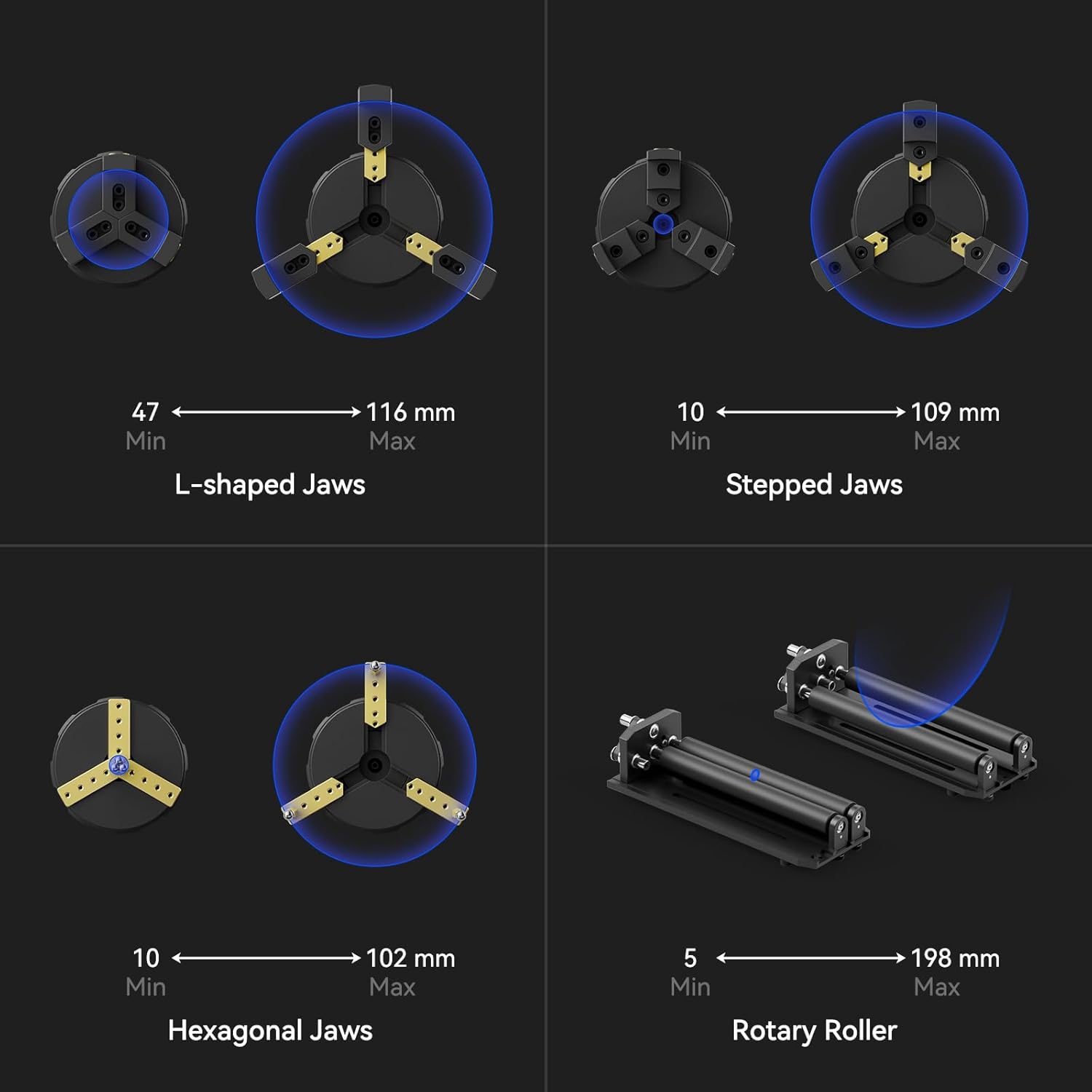
Image 4: Minimum and maximum dimensions for various jaw types and the rotary roller.
10. 保証とサポート
The SCULPFUN RA Pro Max Laser Rotary Roller comes with a standard manufacturer's warranty. For specific warranty details, technical support, or service inquiries, please contact SCULPFUN customer service directly. You can typically find contact information on the official SCULPFUN webサイトまたは購入プラットフォームを通じて購入できます。