
Mediacom Azimut 4
Mediacom SmartPad 4 4G Azimut 4 Tablet User Manual
Model: Azimut 4
1. はじめに
This manual provides essential information for the safe and efficient use of your Mediacom SmartPad 4 4G Azimut 4 tablet. Please read this manual thoroughly before operating the device and retain it for future reference.
2. 安全情報
- バッテリーの安全性: Do not attempt to replace the internal battery. Do not expose the device to extreme temperatures or direct sunlight.
- 耐水性: このデバイスは防水ではありません。液体に濡らさないでください。
- 充電: デバイスに付属のオリジナルの充電器とケーブルのみを使用してください。
- 聴覚保護: 聴覚障害を防ぐため、大音量で長時間聴くことは避けてください。
- 廃棄: 本製品およびバッテリーは、地域の規制に従って廃棄してください。家庭ごみと一緒に廃棄しないでください。
3. パッケージ内容
パッケージにすべてのアイテムが揃っていることを確認します。
- Mediacom SmartPad 4 4G Azimut 4 Tablet
- USB-C充電ケーブル
- 電源アダプター
- クイックスタートガイド(付属している場合)
- SIMイジェクターツール(付属している場合)
4. デバイスのレイアウト
タブレットの物理的なコンポーネントについて理解しておきましょう。
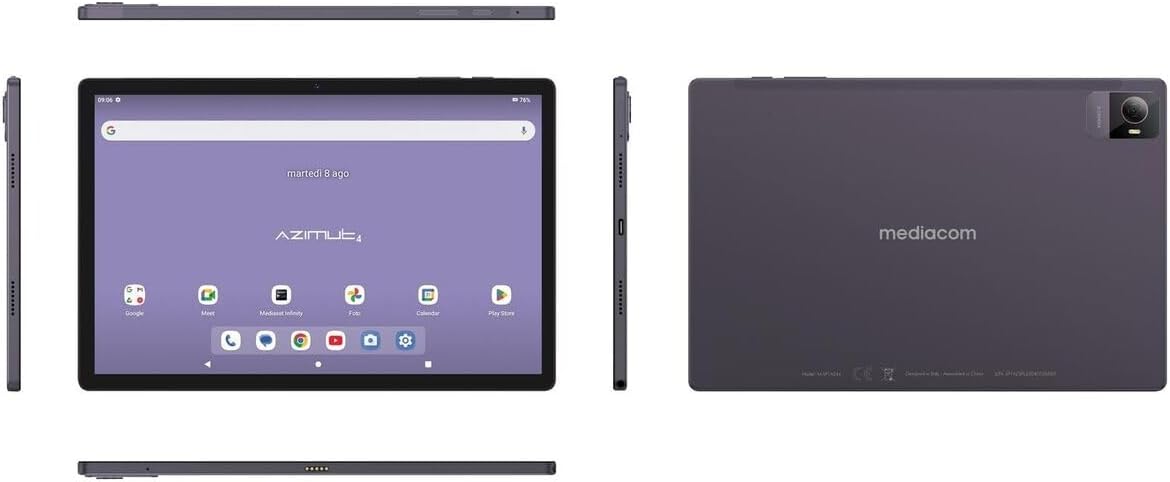
画像4.1: 複数 views of the Mediacom SmartPad 4 4G Azimut 4 tablet, illustrating the front display, rear camera, and various side ports and buttons. This includes the power button, volume rocker, USB-C port, headphone jack, and SIM/microSD card slot.
- フロントカメラ: Located at the top center of the display when held in landscape orientation.
- 画面: 10.51インチのIPSスクリーン。
- 電源ボタン: Typically located on the side, used to turn the device on/off or wake/sleep the screen.
- 音量ボタン: 電源ボタンの近くにあり、オーディオの音量を調整するために使用します。
- USB-Cポート: 充電やデータ転送に。
- ヘッドフォンジャック: 標準の3.5mmオーディオ出力。
- SIM/microSDカードスロット: Combined slot for Nano-SIM and microSD cards.
- リアカメラ: Located on the back of the tablet, typically with a flash.
- 講演者: Four speakers for immersive audio.
5. セットアップ
5.1デバイスの充電
Before first use, fully charge your tablet. Connect the USB-C cable to the tablet's USB-C port and the power adapter. Plug the adapter into a wall outlet. The battery indicator on the screen will show charging status.
5.2 SIMカードとMicroSDカードの挿入
- Locate the SIM/microSD card slot on the side of the tablet.
- 付属の SIM イジェクタ ツールを使用してトレイを開きます。
- Carefully place your Nano-SIM card and/or microSD card into the designated slots on the tray. Ensure correct orientation.
- カチッと音がするまでトレイをゆっくりとスロットに戻します。
5.3 初回電源投入とセットアップ
- Press and hold the Power button until the Mediacom logo appears.
- 画面の指示に従って言語を選択し、Wi-Fi ネットワークに接続し、Google アカウントを設定し、その他の初期設定を構成します。
6. 操作手順
6.1 基本的なナビゲーション
The Mediacom SmartPad 4 4G Azimut 4 uses a multi-touch capacitive touchscreen. Common gestures include:
- タップ: 項目を選択したり、アプリを開いたりします。
- タップ&ホールド: コンテキスト メニューにアクセスしたり、アイコンを移動したりします。
- スワイプ: ページまたはリストをスクロールします。
- ピンチ: 画像を拡大または縮小するには web ページ。
6.2 Wi-Fiへの接続
- へ移動 設定 > ネットワークとインターネット > Wi-Fi.
- Wi-Fiの切り替え On.
- リストから希望のネットワークを選択し、プロンプトが表示されたらパスワードを入力します。
6.3 Connecting to 4G Cellular Network
If a Nano-SIM card is inserted and activated, your tablet will automatically connect to the 4G network. Ensure mobile data is enabled in 設定 > ネットワークとインターネット > モバイルネットワーク.
6.4 カメラの使用
Open the Camera app from your home screen or app drawer. You can switch between the 8 MP front camera and the 13 MP rear camera. Tap the shutter button to take photos or record videos.
6.5 ストレージの管理
Your tablet has 64 GB of internal storage. You can expand this by up to 128 GB using a microSD card. To view ストレージ使用量については、 設定 > ストレージ.
6.6 Bluetooth接続
Bluetooth デバイスを接続するには:
- へ移動 設定 > 接続されたデバイス > ブルートゥース.
- Bluetoothを切り替える On.
- 利用可能なデバイスのリストからデバイスを選択し、ペアリングの手順に従います。
7. メンテナンス
7.1デバイスのクリーニング
タブレットの画面と本体を拭く際は、柔らかく糸くずの出ない布をご使用ください。刺激の強い化学薬品や研磨剤の使用は避けてください。
7.2バッテリーケア
- バッテリーを頻繁に完全に放電することは避けてください。
- タブレットを完全に充電した後は、長時間充電したままにしないでください。
- 長期間使用しない場合は、タブレットを涼しく乾燥した場所に保管してください。
7.3ソフトウェアアップデート
最適なパフォーマンスとセキュリティを確保するために、定期的にソフトウェアのアップデートを確認してください。 設定 > システム > システムアップデート.
8。 トラブルシューティング
- デバイスの電源が入らない: バッテリーが充電されていることを確認してください。充電器を接続してもう一度お試しください。
- 画面が反応しない: Try restarting the device by holding the Power button for about 10-15 seconds.
- Wi-Fi接続の問題: タブレットとWi-Fiルーターを再起動してください。範囲内にいること、正しいパスワードを入力していることを確認してください。
- アプリがクラッシュする: 問題のあるアプリのキャッシュをクリアしてください(設定 > アプリ > [アプリ名] > ストレージとキャッシュ > キャッシュをクリア)。問題が解決しない場合は、アプリを再インストールしてみてください。
- パフォーマンスが遅い: Close unused apps, clear cache, or consider performing a factory reset (backup your data first).
9. 仕様
| 特徴 | 仕様 |
|---|---|
| モデル名 | Azimut 4 |
| オペレーティング·システム | アンドロイド13 |
| 画面 | 10.51" IPS, 1920 x 1200 pixels, Multi-touch 5 points |
| プロセッサ | Spreadtrum Tiger T606 (8-core, 1.6 GHz) |
| ラム | 4ギガバイト |
| 内部ストレージ | 64ギガバイト |
| 拡張可能なストレージ | 最大128GBのmicroSD |
| リアカメラ | 13メガピクセル(フラッシュ付き) |
| フロントカメラ | 8メガピクセル |
| セルラーテクノロジー | 4G (GSM, WCDMA, FDD-LTE) |
| 携帯電話バンド | W-CDMA 900/2100, GSM 850/900/1800/1900, LTE B1/B20/B3/B7 |
| ワイヤレス接続 | Wi-Fi(802.11n)、Bluetooth 5.0 |
| ポート | 1 x Nano-SIM/microSD combo, 1 x Headphone (3.5mm), 1 x USB-C |
| バッテリー | 6000mAhリチウムポリマー |
| 特集 | 4G Cellular Technology, Ergonomic and Contemporary Design |
10. 保証とサポート
For warranty information and technical support, please refer to the warranty card included in your product packaging or visit the official Mediacom webサイトでご確認ください。保証請求に備えて購入証明書を保管してください。
11. 規制遵守
This device complies with relevant regulatory standards. For detailed compliance information, please refer to the product packaging or the official Mediacom webサイト。