
1. はじめに
This manual provides comprehensive instructions for the Blackmagic Design Pyxis 6K Cinema Camera, L-Mount. It covers essential information regarding setup, operation, maintenance, and troubleshooting to ensure optimal performance and longevity of your camera. Please read this manual thoroughly before using the camera.
2. 安全情報
- カメラを水や過度の湿気にさらさないでください。
- Avoid operating the camera in extreme temperatures.
- Use only Blackmagic Design approved accessories and power supplies.
- カメラを分解したり改造したりしないでください。修理は必ず資格を持った専門家にご依頼ください。
- カメラを強い磁場から遠ざけてください。
3. パッケージ内容
パッケージにすべてのアイテムが揃っていることを確認します。
- Blackmagic Design Pyxis 6K Cinema Camera (L-Mount)
- 電源
- ユーザーマニュアル(このドキュメント)
- DaVinci Resolve Studio activation key
4.カメラオーバーview
The Blackmagic Design Pyxis 6K Cinema Camera features a 36x24mm full-frame 6K sensor, offering exceptional image quality and flexibility for cinematic content creation. It supports various recording formats including Blackmagic RAW and H.264 proxies, with resolutions up to 6048 x 4032.

図4.1: 前面 view of the Blackmagic Design Pyxis 6K Cinema Camera with an L-Mount lens attached. This image highlights the camera's robust body, the lens mount, and the integrated top handle.
Key features include a built-in 4-inch HDR 1500 nit LCD screen for clear monitoring, and support for open gate 3:2, full height 6:5 anamorphic, and Super 35 recording modes. The camera records full resolution up to 36 frames per second (fps) or 120 fps in windowed mode.

図4.2:背面 view of the Blackmagic Design Pyxis 6K Cinema Camera, showcasing the 4-inch HDR LCD touchscreen display, control buttons, and the attached lithium-ion battery pack. The screen displays recording settings and menu options.
The camera utilizes CFexpress for flash memory storage and offers HDMI connectivity for external monitoring. Audio is supported in AAC, MP3, and PCM formats.
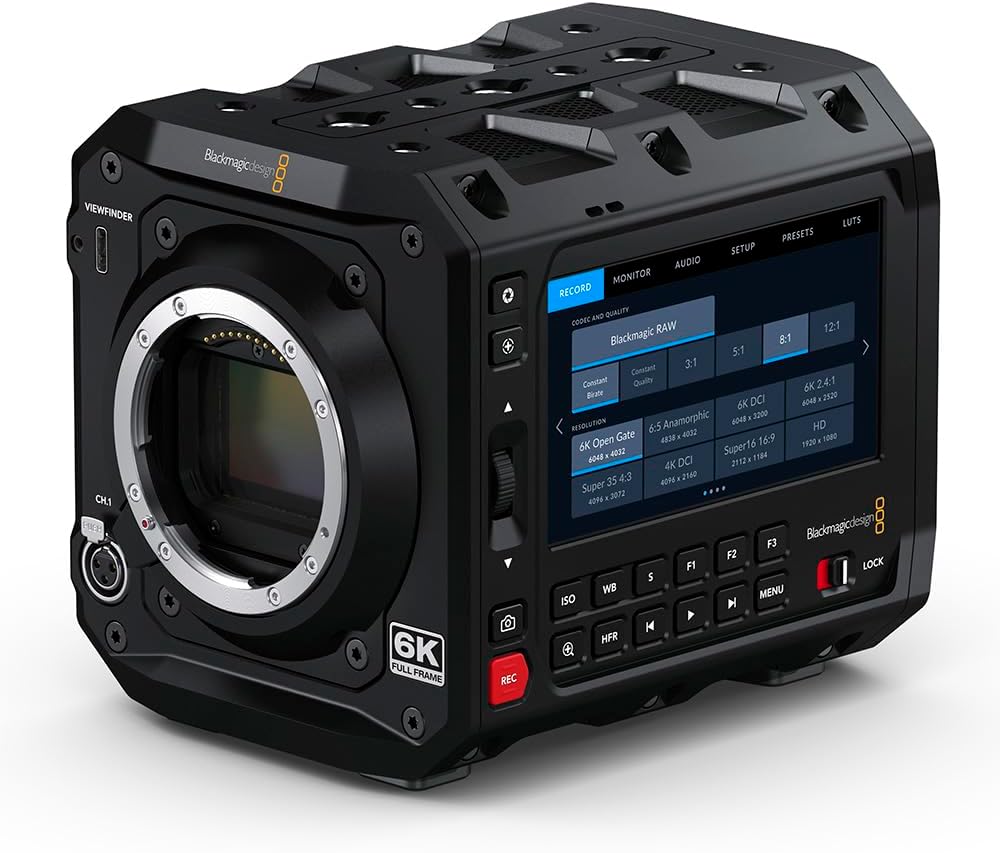
図4.3: 前面 view of the Blackmagic Design Pyxis 6K Cinema Camera without a lens, clearly showing the L-Mount for lens attachment and the '6K FULL FRAME' designation. This view highlights the camera's robust construction and lens interface.
5. セットアップ
5.1. バッテリーの取り付け
- カメラの電源がオフになっていることを確認してください。
- カメラの背面にある電池ボックスを見つけます。
- Insert a compatible lithium-ion battery pack, ensuring it clicks securely into place.
5.2. Lens Attachment (L-Mount)
- Remove the body cap from the camera and the rear cap from your L-Mount lens.
- レンズの白いインデックスマークをカメラのレンズマウントの白いインデックスマークに合わせます。
- Insert the lens into the mount and rotate it clockwise until it locks into position.
5.3. Media Card Insertion
- Locate the CFexpress card slot.
- Insert a CFexpress card with the label facing the correct direction until it clicks into place.
- 取り外すには、カードを軽く押して取り出します。
5.4.電源のオン/オフ
- 電源をオンにするには、電源スイッチを「ON」の位置にスライドします。
- 電源を切るには、電源スイッチを「OFF」の位置にスライドします。
5.5. 初期設定
Upon first power-on, you may be prompted to set the language, date, and time. Follow the on-screen instructions using the touchscreen LCD.
6. カメラの操作
6.1. メニューナビゲーション
The 4-inch HDR LCD screen is a touchscreen interface. Tap icons and swipe to navigate through menus and adjust settings. Physical buttons are also available for quick access to common functions like ISO, White Balance, and Frame Rate.
6.2。 録音
- 録音フォーマット: The camera supports Blackmagic RAW for maximum quality and H.264 proxies for efficient workflow. Select your desired format in the 'Record' menu.
- 解像度とフレームレート: Adjust resolution (e.g., 6K Open Gate, 6K DCI, Super 35) and frame rate (up to 36 fps at full resolution, 120 fps windowed) via the 'Record' or 'Project' settings.
- 記録の開始/停止: Press the dedicated 'REC' button on the camera body to start and stop recording.
6.3.オーディオ設定
Access audio input levels, monitoring options, and format settings (AAC, MP3, PCM) through the 'Audio' menu. Ensure external microphones are properly connected to the camera's audio inputs.
6.4. Monitoring and Connectivity
Use the built-in LCD for on-camera monitoring. For external displays, connect an HDMI cable from the camera's HDMI output to your monitor. Adjust display settings in the 'Monitor' menu.
7. メンテナンス
7.1. 清掃
- カメラ本体を清掃する際は、柔らかく乾いた布を使用してください。
- LCD 画面の場合は、専用の画面クリーニング液とマイクロファイバークロスを使用してください。
- Keep the lens mount free of dust and debris. Use a blower brush for sensor cleaning if necessary, or consult a professional.
7.2. ストレージ
When not in use, store the camera in a cool, dry place, preferably in a padded camera bag or case to protect it from physical damage and environmental factors.
7.3. ファームウェアのアップデート
定期的にBlackmagic Designをチェックしてください website for firmware updates. Updates can improve performance, add features, and resolve issues. Follow the instructions provided with the firmware update carefully.
8。 トラブルシューティング
- カメラの電源が入らない: Ensure the battery is fully charged and correctly inserted, or the external power supply is connected.
- LCD に画像が表示されない: Check lens attachment, ensure the lens cap is removed, and verify monitor settings.
- 録音の問題: Confirm a compatible CFexpress card is inserted and has sufficient free space. Check recording format and resolution settings.
- オーディオの問題: Verify microphone connection, audio input levels, and selected audio format.
- For persistent issues, perform a factory reset (refer to the 'Settings' menu) or contact Blackmagic Design support.
9. 仕様
| 特徴 | 仕様 |
|---|---|
| 製品寸法 | 5.91 x 4.72 x 4.33インチ |
| アイテム重量 | 4.62ポンド |
| 商品型番 | CINECAMCPYXA60LFL |
| フォトセンサー技術 | シーモス |
| ビデオキャプチャ解像度 | 6K (6048 x 4032), 1080p, 720p |
| 最大絞り | 2ミリメートル(レンズに依存) |
| フラッシュメモリタイプ | CFエクスプレス |
| ビデオキャプチャフォーマット | Blackmagic RAW, CinemaDNG, ProRes, DNxHR |
| サポートされているオーディオ形式 | AAC、MP3、PCM |
| 画面サイズ | 4 Inches (HDR 1500 nit LCD) |
| 接続技術 | HDMI |
| 色 | 黒 |
| メーカー | ブラックマジックデザイン |
10. 保証とサポート
10.1. 保証情報
Blackmagic Design products typically come with a limited manufacturer's warranty. Please refer to the warranty card included with your product or visit the official Blackmagic Design webお住まいの地域に固有の詳細な保証条件については、こちらのサイトをご覧ください。
10.2. テクニカルサポート
For technical assistance, product registration, or to download the latest software and drivers, please visit the official Blackmagic Design support page. You can find comprehensive FAQs, knowledge base articles, and contact information for customer support.
Official Blackmagic Design Store: Blackmagic Design on Amazon