
1.はじめにおよび安全情報
This manual provides essential instructions for the installation, operation, and maintenance of your GAMEMAX GX-850 80 Plus Gold Fully Modular Power Supply. Please read this manual thoroughly before installation and retain it for future reference.
1.1重要な安全上の警告
- 感電の危険: 電源には高電圧が内蔵されているtage components. Do not open the power supply unit. There are no user-serviceable parts inside. Opening the unit will void the warranty.
- 適切な接地: Ensure your computer system is properly grounded to prevent electrical hazards.
- 電源を切る: Always disconnect the AC power cord from the wall outlet before installing, removing, or servicing the power supply or any other computer components.
- 換気: 電源装置の周囲に十分な換気を確保してください。通気口を塞がないでください。
- 湿度と温度: Do not operate the power supply in high humidity or high-temperature environments. Keep it away from water and heat sources.
- 専門家による設置: インストール手順が不明な場合は、資格のある技術者に支援を求めてください。
2. パッケージ内容
Verify that all items are present in your GAMEMAX GX-850 package:
- GAMEMAX GX-850 80 Plus Gold Fully Modular Power Supply
- Modular Cable Set (including ATX 24-pin, CPU 8-pin, PCIe 6+2-pin, SATA, Peripheral 4-pin cables)
- AC電源コード
- 取り付けネジ
- ユーザーマニュアル(このドキュメント)
3.製品オーバーview
The GAMEMAX GX-850 is an 850-watt 80 Plus Gold certified fully modular power supply designed for desktop computers. It features an LLC and DC-DC circuit design for high efficiency and stable power delivery, along with an ultra-quiet FDB (Fluid Dynamic Bearing) fan for optimal cooling and low noise.
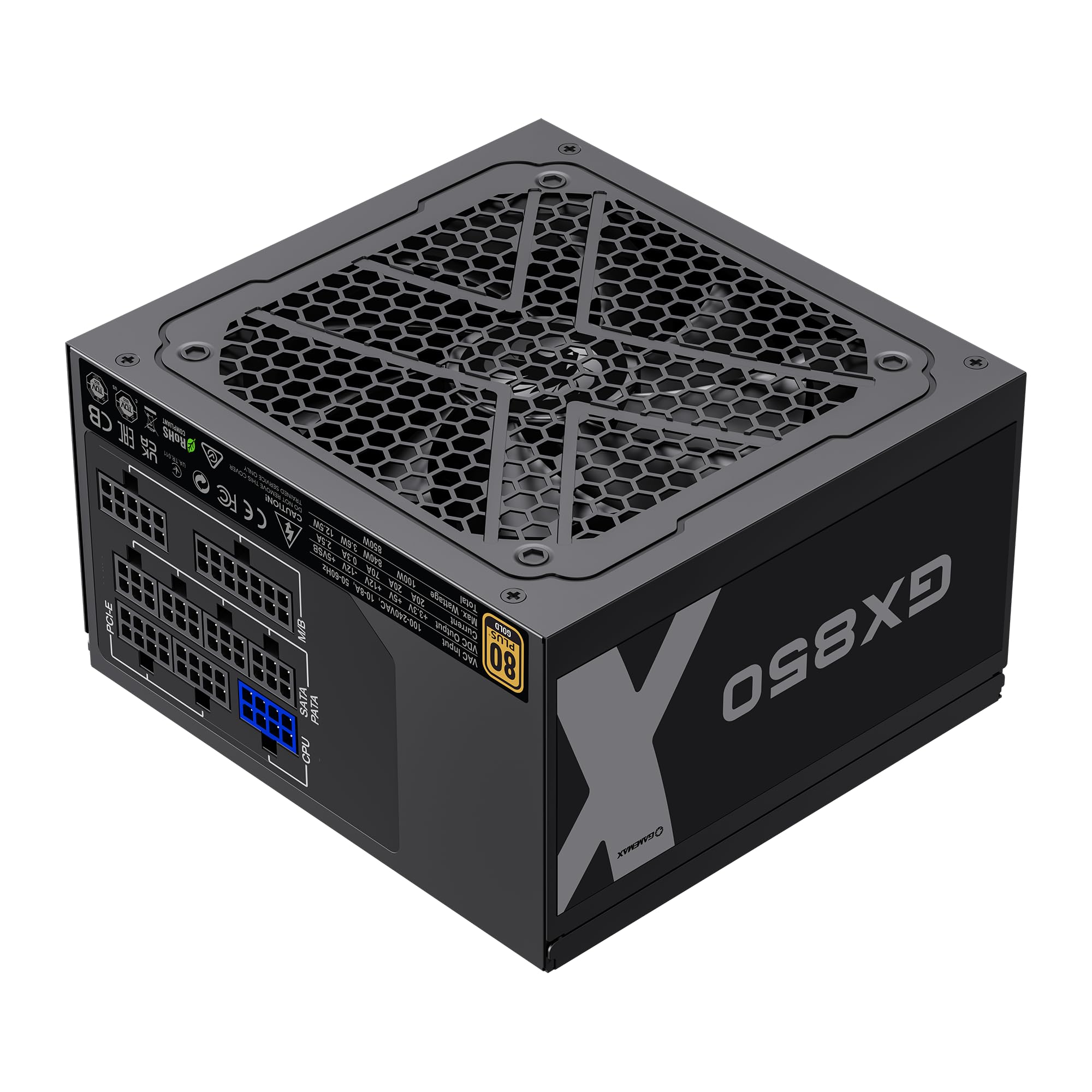
Image: The GAMEMAX GX-850 80 Plus Gold Fully Modular Power Supply, showcasinブラック仕上げとモジュラーデザインが特徴です。
3.1 主な特徴
- 80 Plusゴールド認証: 高い電力効率を保証し、発熱と運用コストを削減します。
- LLC+DC-DC Circuit: Advanced circuit design for stable voltage output and improved efficiency.
- 完全モジュール設計: Allows for custom cable management, reducing clutter and improving airflow.
- FDB Fan: Ultra-quiet temperature-controlled Fluid Dynamic Bearing fan for silent operation and extended lifespan.
- 105℃ Mainstream Capacitor: High-quality capacitors ensure long life and smooth power output.
- 包括的な保護: Features SIX levels of protection: Over Temperature Protection (OTP), Over Current Protection (OCP), Short Circuit Protection (SCP), Over Voltage Protection(OVP)、Under Voltage Protection (UVP), and Over Power Protection (OPP).
4. セットアップとインストール
Follow these steps to properly install your GAMEMAX GX-850 power supply into your computer system.
4.1 インストール手順
- システムを準備する: コンピュータの電源が完全にオフになっており、壁のコンセントからプラグが抜かれていることを確認してください。コンピュータのケースを開けてください。
- 古い PSU を削除します (該当する場合)。 古い電源装置からすべてのケーブルを外し、ケースから取り外します。
- 新しいPSUを取り付けます。 Carefully place the GAMEMAX GX-850 into the power supply bay of your computer case. Secure it with the provided mounting screws. Ensure the fan is facing the correct direction for optimal airflow (typically facing down if your case has a bottom vent, or up if it's a top-mounted PSU).
- モジュラーケーブルを接続します。 Identify the necessary cables for your components. Connect the modular cables to the corresponding ports on the power supply first, then route them to your components.
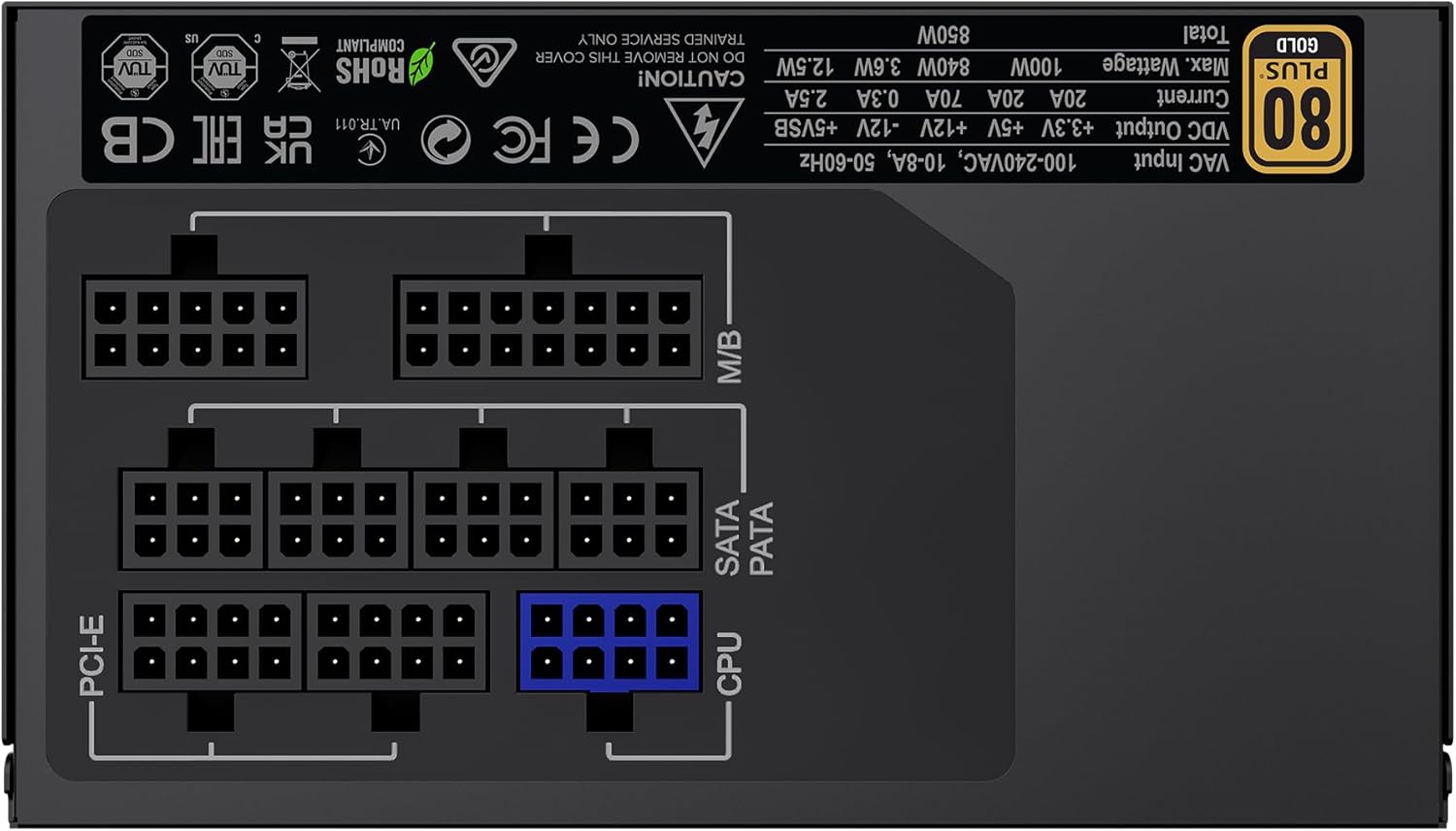
画像: 背面 view of the GAMEMAX GX-850 showing the fully modular cable connection ports for PCI-e, M/B (Motherboard), SATA/PATA, and CPU cables.
- Motherboard (M/B): 24 ピン ATX ケーブルをマザーボードに接続します。
- CPU: Connect the 8-pin (or 4+4-pin) CPU power cable to the CPU power connector on your motherboard.
- Graphics Cards (PCI-e): Connect the 6+2-pin PCIe power cables to your graphics card(s). Use separate cables for each connector if your GPU requires multiple.
- Storage Devices (SATA): SATA 電源ケーブルを SSD、HDD、光学ドライブに接続します。
- Peripherals (PATA/Molex): Connect peripheral power cables to any other devices requiring them (e.g., fan controllers, older drives).
- ケーブル管理 ケーブルをきちんと配線して、空気の流れと美観を改善します。
- ケースを閉じてAC電源を接続します。 Close your computer case. Connect the AC power cord to the power supply and then to a grounded wall outlet.
5. 操作手順
インストールが成功したら、次の手順に従ってシステムを操作します。
- 電源スイッチ: 電源装置の背面にある電源スイッチが「ON」(I) の位置になっていることを確認します。
- システム電源オン: Press the power button on your computer case to turn on the system.
- System Power Off: To turn off your system, use the operating system's shutdown procedure. For a hard shutdown, hold the case power button for several seconds. For complete power disconnection, switch the PSU's power switch to 'OFF' (O) and unplug the AC cord.
6. メンテナンス
定期的なメンテナンスを行うことで、電源装置の寿命が長くなり、最適なパフォーマンスが確保されます。
- ダストクリーニング: Periodically clean the power supply's fan and ventilation grilles using compressed air to prevent dust buildup, which can impede cooling. Ensure the system is powered off and unplugged before cleaning.
- ケーブルチェック: Occasionally check all modular cable connections to ensure they are securely seated.
- 環境条件: コンピューターを清潔で乾燥した、換気の良い環境に保ちます。
7。 トラブルシューティング
電源に問題が発生した場合は、次の一般的なトラブルシューティング手順を参照してください。
- 電源なし:
- Ensure the AC power cord is securely plugged into both the wall outlet and the power supply.
- PSU 背面の電源スイッチが「ON」(I) の位置にあることを確認します。
- Verify that the 24-pin ATX and 8-pin CPU power cables are correctly and firmly connected to the motherboard.
- 別のデバイスを使用して壁のコンセントをテストし、電力が供給されていることを確認します。
- システムの不安定性/ランダムなシャットダウン:
- Ensure all modular cables are fully seated at both the PSU and component ends.
- Check for proper ventilation and ensure the PSU fan is spinning. Overheating can cause shutdowns.
- If you have recently added new components, ensure your 850W power supply is sufficient for the total system wattage.
- ファンが回転しない:
- The GX-850 features a temperature-controlled fan. It may not spin at low loads or temperatures. This is normal operation.
- If the fan does not spin under load and the PSU feels hot, ensure there are no obstructions and consider contacting support.
If problems persist after performing these steps, contact GAMEMAX customer support or your retailer for further assistance.
8. 仕様
Detailed technical specifications for the GAMEMAX GX-850 80 Plus Gold Power Supply:
| 特徴 | 仕様 |
|---|---|
| モデル名 | GX-850 Modular |
| ブランド | ゲームマックス |
| 出力ワットtage | 850ワット |
| フォームファクター | ATTX |
| 効率認証 | 80プラスゴールド |
| 電源設計 | フルモジュラー |
| 冷却方法 | エア(FDBファン) |
| ファン数 | 1 |
| 最小入力ボリュームtage | 115ボルト |
| 最大入力ボリュームtage | 240ボルト(AC) |
| 上限温度定格 | 105 Degrees Celsius (Capacitors) |
| 対応デバイス | デスクトップコンピュータ |
| コネクタの種類 | ATX, PCI-e, SATA |
9. 保証とサポート
GAMEMAX products are manufactured to high-quality standards. For warranty information, please refer to the warranty card included with your product or visit the official GAMEMAX webサイトをご覧ください。保証条件は地域や販売店によって異なる場合があります。
For technical support or further inquiries, please contact GAMEMAX customer service through their official webサイトまたは販売店から提供された連絡先情報を参照してください。