
NICEHCK NX7 MK4
NICEHCK NX7 MK4 In-Ear Monitor User Manual
Model: NX7 MK4
1.製品オーバーview
The NICEHCK NX7 MK4 is a high-fidelity in-ear monitor designed for musicians, audiophiles, and gamers, offering a rich and detailed audio experience. It features a sophisticated driver configuration and customizable sound profiles.

Image: The NICEHCK NX7 MK4 In-Ear Monitors, showcasinデザインとフォームファクター。
主な機能は次のとおりです。
- Classic Seven Driver Units: Equipped with new beryllium-plated dual dynamic drivers and 4 Balanced Armature (BA) drivers for rich low-mid frequencies and exquisite treble, complemented by a 7-layer Piezoelectric (PZT) driver for gorgeous Ultra High Frequencies (UHF).
- プレミアム素材: Constructed from stabilized wood, resin, aluminum alloy, and PC, providing a warm and rich sound while ensuring durability and an elegant appearance.
- 人間工学に基づいたデザイン: Lightweight and ergonomically shaped for comfortable, extended wear. The soft, tangle-free cable enhances daily usability.
- 幅広い互換性: Features interchangeable cables with 3.5mm single-ended or 4.4mm balanced options, making them versatile for various audio setups.
- カスタマイズ可能なサウンド: Includes replaceable tuning filters (gold, red, black) to adjust the sound profile to balanced, mid/treble-focused, or bass-heavy preferences.

Image: Diagram illustrating the four different materials used in the construction of the NX7 MK4: stabilized wood, environmental resin, aluminum alloy, and environmental PC.

Image: Comparison chart highlighting improvements of the 4th Generation NX7 MK4 over the 3rd Generation NX7 MK3, including mixed materials, easier drive, and higher sound quality.
2. パッケージ内容
パッケージを注意深くチェックし、すべてのアイテムが揃っていて良好な状態であることを確認してください。
- NICEHCK NX7 MK4 In-Ear Monitors (1 pair)
- High-fidelity OCC and silver-plated mixed cable (1 unit)
- Replaceable Tuning Filters (Gold, Red, Black - 1 set each)
- シリコン製イヤーチップ(各種サイズ)
- 収納ケース(1個)

Image: The NX7 MK4 In-Ear Monitors displayed with their packaging and the included interchangeable tuning filters.

Image: Close-up of the upscale OCC and silver-plated mixed cable that comes standard with the NX7 MK4, highlighting its braided design.
3. セットアップ
3.1 ケーブルの接続
- Identify the left (L) and right (R) earpieces. The cable connectors are typically marked.
- Align the 2-pin connector on the cable with the corresponding receptacle on the earpiece. Ensure the pins are correctly oriented.
- Gently push the connector into the earpiece until it clicks securely into place. Do not force it.
- もう一方のイヤピースでも繰り返します。
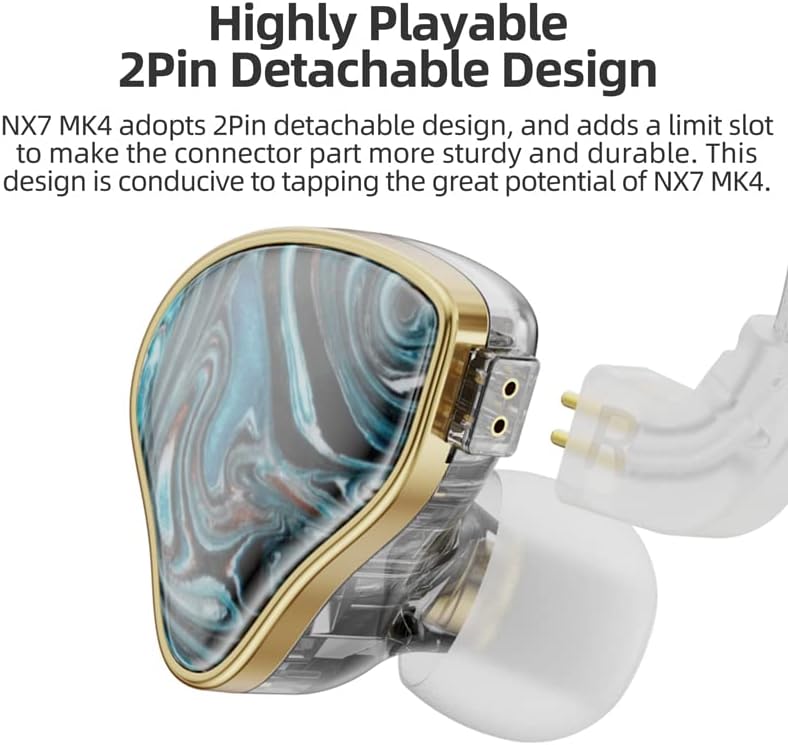
画像: 詳細 view of the NX7 MK4's 2-pin detachable design, showing how the cable connects to the earpiece for secure and durable attachment.
3.2 イヤーチップの選び方
Selecting the correct ear tip size is crucial for optimal sound quality and comfort. Experiment with the included silicone ear tips to find the best fit. A good seal ensures proper bass response and passive noise isolation.
3.3 Inserting the In-Ear Monitors
- Gently insert the earpiece into your ear canal.
- Adjust the earpiece until it feels secure and comfortable, forming a good seal.
- Route the cable over your ear for a more secure fit and to reduce microphonics (cable noise).
4. 操作手順
4.1 基本的な使用法
Once the cable is connected and the ear tips are properly seated, plug the 3.5mm or 4.4mm connector into your audio source (e.g., smartphone, digital audio player, computer, gaming console). Adjust the volume on your audio source to a comfortable listening level before placing the IEMs in your ears.

Image: The NX7 MK4 In-Ear Monitors connected to a portable music player, demonstrating typical usage.
4.2 互換性
The NX7 MK4 is compatible with a wide range of devices that feature a 3.5mm or 4.4mm audio jack. This includes:
- 携帯電話
- タブレット
- デスクトップコンピュータ
- ノートパソコン
- ゲーム機
- テレビ
- スマートスピーカー
- Digital Audio Players (DAPs)
5. Tuning Filters
The NICEHCK NX7 MK4 comes with three sets of replaceable tuning filters, allowing you to customize the sound signature to your preference. Each filter subtly alters the frequency response:
- Gold Filter: バランスの取れたサウンドプロを提供file, offering a neutral and natural listening experience. Sensitivity: 112dB/mW.
- 赤フィルター: Enhances mid and high frequencies, providing a brighter and more detailed sound. Sensitivity: 113dB/mW.
- ブラックフィルター: Boosts bass frequencies, delivering a more impactful and warm sound. Sensitivity: 110dB/mW.
5.1 Changing Filters
- Gently unscrew the currently installed filter from the nozzle of the earpiece.
- Select your desired filter (gold, red, or black).
- Carefully screw the new filter onto the nozzle until it is finger-tight. Do not overtighten.
- Ensure the filter is securely attached before use.
Image: The NX7 MK4 In-Ear Monitors displayed with their packaging and the included interchangeable tuning filters (gold, red, black).
6. メンテナンス
6.1 Cleaning the Ear Tips and Nozzles
- 定期的にイヤーチップを外して、柔らかくて清潔な布で拭いてください。amp 布で拭いてください。完全に乾いてから再度取り付けてください。
- Use a small, soft brush or a cotton swab to gently clean any earwax or debris from the earpiece nozzles. Ensure no moisture enters the earpiece.
6.2 ケーブルのケア
- Avoid sharp bends or kinks in the cable, as this can damage the internal wires.
- 保管時はケーブルを緩く巻いてください。
- Do not pull the cable directly to disconnect; always grasp the plug.
6.3 ストレージ
When not in use, store your NX7 MK4 IEMs in the provided storage case to protect them from dust, moisture, and physical damage.
7。 トラブルシューティング
| 問題 | 考えられる原因 | 解決 |
|---|---|---|
| No sound or sound from only one side. |
|
|
| Poor sound quality (lack of bass, tinny sound). |
|
|
| フィット感が不快です。 |
|
|
8. 仕様

画像: 分解図 view diagram of the NX7 MK4's classic seven-driver unit configuration, detailing the 4BA, Beryllium-plated Dual Dynamic, and 7-layer PZT drivers.
| 特徴 | 詳細 |
|---|---|
| 製品名 | NICEHCK NX7 MK4 In-Ear Monitors |
| モデル | NX7 MK4 |
| ドライバー構成 | 4 Balanced Armature (BA) + 2 Beryllium-plated Dynamic + 1 Seven-layer Piezoelectric (PZT) |
| インピーダンス | 39Ω |
| Sensitivity (Gold Filter) | 112dB/mW |
| Sensitivity (Red Filter) | 113dB/mW |
| Sensitivity (Black Filter) | 110dB/mW |
| 周波数応答 | 20-28kHz |
| プラグオプション | 3.5mmまたは4.4mm |
| ケーブル長さ | 1.2m±5cm |
| ケーブル材質 | High-purity silver-plated copper wire and monocrystalline copper wire mixed cable |
| 騒音制御 | パッシブノイズキャンセリング |
| 重さ | 318 g (product) |
| 寸法(梱包) | 17.02 x 12.7 x 5.59 cm |
9. 保証とサポート
9.1 保証情報
NICEHCK products are typically covered by a manufacturer's warranty against defects in materials and workmanship. Please refer to your purchase documentation or the seller's policy for specific warranty terms and duration. Extended warranty options may be available through third-party providers.
- Standard Return Policy: 30 days for refund/replacement.
- Extended Warranty Options: Available for 12 or 24 months against failures and defects.
9.2 カスタマーサポート
For technical assistance, troubleshooting, or warranty claims, please contact NICEHCK customer support. You can reach them via email:
メールアドレス: support@nicehck.com
Additional support and information can be found on the official NICEHCK webサイトまたはソーシャル メディア チャネルを通じて行われます。

Image: Information on NICEHCK's global support and service, including the support email address and social media icons.
関連文書 - NX7 MK4
 |
NICEHCK Tears Earphone Upgrade Cable User Guide User guide and product introduction for the NICEHCK Tears upgrade cable, featuring 18.6AWG monocrystalline copper and gold-plated connectors for enhanced audio performance. |
 |
Classic Flat Headphones 10th Anniversary Edition User Manual User manual and specifications for the NICEHCK Classic Flat Headphones 10th Anniversary Edition. Includes usage instructions, maintenance tips, and technical parameters. |
 |
NICEHCK OriG in TWS Bluetooth Earbuds User Manual User manual for the NICEHCK OriG in TWS Bluetooth Earbuds, covering specifications, pairing, touch controls, charging, and troubleshooting. |
 |
ARISYN YUN XIU: PZT Hybrid IEM User Manual & Specifications This user manual provides detailed specifications, usage instructions, and maintenance guidelines for the ARISYN YUN XIU In-Ear Monitor (IEM), featuring PZT Hybrid and 10mm DLC Diaphragm Dynamic Drivers. |
 |
ARISYN HUO SHU In-Ear Monitors: User Manual & Specifications User manual for the ARISYN HUO SHU In-Ear Monitors, detailing specifications, usage instructions, and maintenance guidelines for these LCP Composite Diaphragm Dynamic Driver headphones. |
 |
Headphone Upgrade Cable Product Manual - Installation, Specifications, and Warranty Comprehensive product manual for the Headphone Upgrade Cable, detailing package contents, technical specifications, step-by-step installation instructions, usage precautions, and warranty information. |
Ask a question about this manual
Ask about setup, troubleshooting, compatibility, parts, safety, or missing instructions. Manuals+ will review the question and use this page’s manual context to help answer it.