
1. はじめに
Welcome to the user manual for your new Hisense 55U72NQ 55-inch Mini-LED 4K Smart TV. This television is designed to deliver an exceptional viewing experience with its advanced Mini-LED PRO display, 4K resolution, and 144Hz refresh rate. Featuring the intuitive VIDAA U7 Smart TV platform, built-in Alexa, and comprehensive connectivity options, your Hisense TV offers seamless entertainment and smart home integration. This manual provides essential information for setting up, operating, maintaining, and troubleshooting your television to ensure optimal performance and longevity.

図1.1: 前面 view of the Hisense 55U72NQ 55-inch Mini-LED 4K Smart TV.
2. 安全情報
テレビをご使用になる前に、安全に関するすべての説明と操作手順をよくお読みください。これらの手順は、今後の参考のために保管してください。
- 電源: Connect the TV only to the power supply indicated on the rating label. Ensure the power cord is not walked on or pinched.
- 換気: Do not block any ventilation openings. Maintain adequate space around the TV for proper airflow.
- 水と湿気: テレビを雨や湿気にさらさないでください。花瓶など、液体の入った物をテレビの上に置かないでください。
- クリーニング: 清掃する前に、テレビのプラグを壁のコンセントから抜いてください。柔らかく乾いた布を使用してください。液体洗剤やエアゾール洗剤は使用しないでください。
- 取り付け: When mounting the TV on a wall, follow the instructions provided with the wall mount kit. Ensure the wall mount is suitable for the weight of the TV.
- 稲妻: 雷雨の際や長期間放置される場合の保護を強化するために、テレビを壁のコンセントから抜き、アンテナまたはケーブル システムを外してください。
- サービス: この製品を自分で修理しようとしないでください。 すべてのサービスを資格のあるサービス担当者に依頼してください。
3. セットアップ
3.1 開梱とパッケージの内容
テレビとすべての付属品をパッケージから慎重に取り出します。すべての部品が揃っていて、損傷がないことを確認してください。
パッケージには以下が含まれている必要があります。
- Hisense 55U72NQ Television
- 電源ケーブル
- リモートコントロール
- ユーザーマニュアル
- クイックスタートガイド
- リモコン用電池(別売りの場合があります)
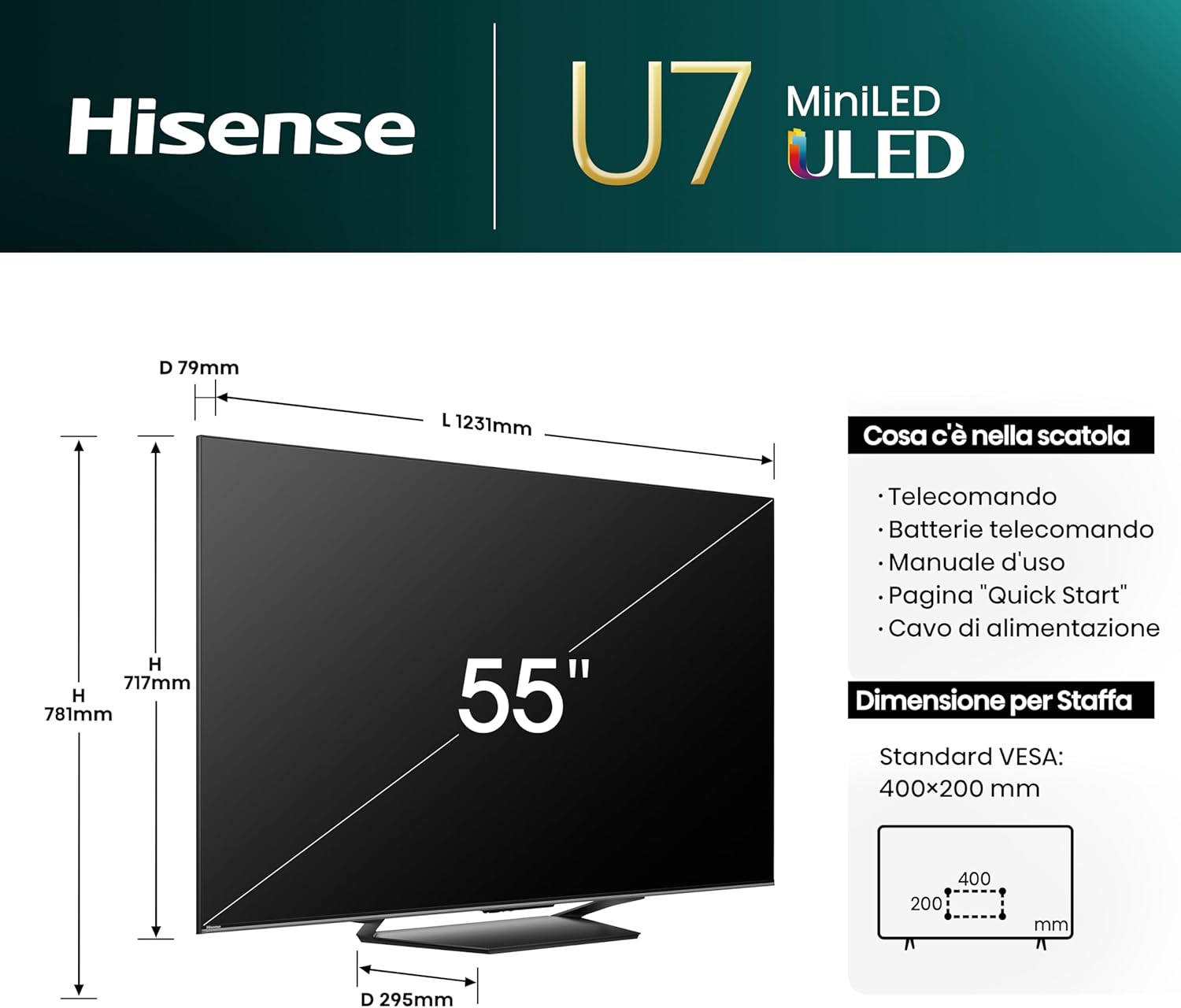
Figure 3.1: Product dimensions and included accessories. Note the VESA standard for wall mounting is 400x200 mm.
3.2 Assembling the Stand / Wall Mounting
You can either use the included stand or a compatible VESA wall mount (sold separately).
- スタンドアセンブリ: Attach the stand base to the TV using the provided screws, ensuring it is securely fastened. Place the TV on a stable, level surface.
- 壁掛け: If wall mounting, remove the stand (if pre-attached). Refer to your wall mount kit's instructions for proper installation. The TV's dimensions are approximately 123.1 cm (width) x 71.7 cm (height) x 7.9 cm (depth) without stand, and it weighs 15.4 kg.

図3.2: 背面と側面 views of the Hisense 55U72NQ TV, showing mounting points and profile.
3.3 外部機器の接続
Your Hisense TV offers a variety of ports for connecting external devices.
- HDMI: Connect Blu-ray players, game consoles, or set-top boxes to the HDMI 2.1 ports. This model features multiple HDMI 2.1 ports, including one with eARC for enhanced audio return channel functionality.
- USB: メディアを再生するには、USB フラッシュ ドライブを接続します。
- アンテナ(ANT): Connect your terrestrial or satellite antenna cable for DVB-T2/S2 reception.
- デジタルオーディオ出力: サウンドバーまたはオーディオ レシーバーに接続して、サウンドを強化します。
- イーサネット: 安定した有線インターネット接続を実現します。
- ヘッドホン: プライベートリスニング用。

図3.3:詳細 view of the Hisense 55U72NQ TV's back panel, showing various input and output ports.
3.4 Initial Power On and First-Time Setup Wizard
After connecting all necessary cables, plug the TV into a power outlet and press the power button on the remote control or TV. The TV will guide you through the initial setup process, including language selection, network connection (Wi-Fi or Ethernet), channel scanning, and smart TV account setup.

Figure 3.4: Illustration of various connectivity options, including Wi-Fi, Bluetooth, HDMI, and Apple AirPlay 2.
4. Hisenseテレビの操作
4.1 リモコンの使用
The included remote control provides full functionality for your TV. It features dedicated buttons for popular streaming services and voice control capabilities.
- 電源ボタン: テレビの電源をオンまたはオフにします。
- ナビゲーションパッド(OKボタン): メニューを移動したり選択を確定したりするために使用します。
- 音量/チャンネルボタン: 音量を調整し、チャンネルを変更します。
- ワンタッチアクセス: Quick access buttons for services like Netflix, YouTube, Prime Video, and Disney+.
- 音声コントロール: Activate Alexa Built-in or VIDAA Voice by pressing the microphone button.
- ソーラー充電: The remote control can be recharged via solar power or a Type-C USB connection.
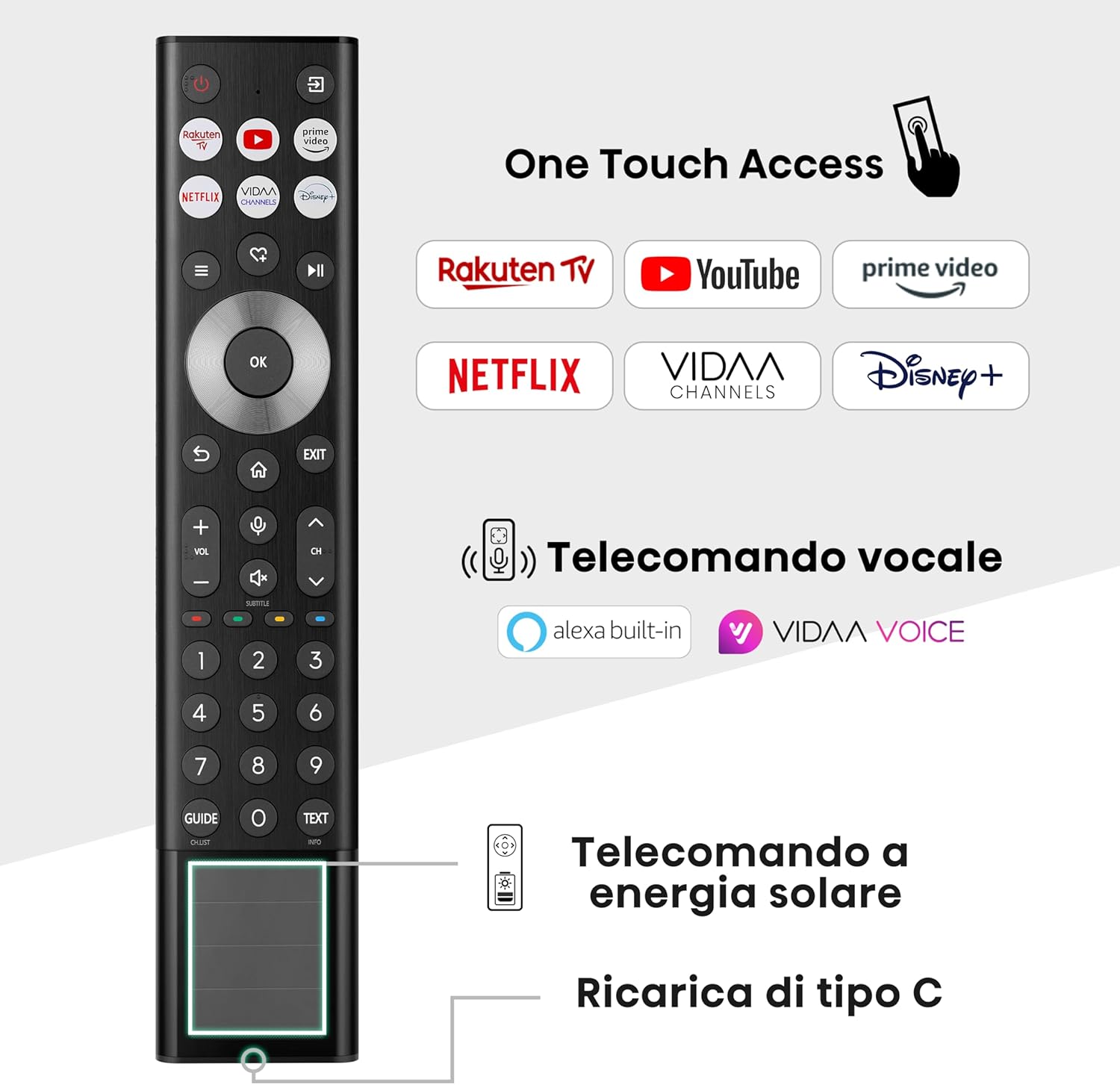
Figure 4.1: The Hisense TV remote control, highlighting one-touch access buttons, voice control, and solar charging capability.
4.2 Navigating the VIDAA U7 Smart TV Interface
The VIDAA U7 operating system provides a user-friendly interface for accessing apps, live TV, and connected devices. Use the navigation buttons on your remote to browse content and settings.

Figure 4.2: The intuitive VIDAA Smart TV home screen, showing various streaming applications and content recommendations.

図4.3:以上view of VIDAA Smart TV features, including voice remote, screen sharing, one-touch access, and universal search.
4.3画像設定
Your Hisense 55U72NQ TV features advanced picture technologies for stunning visuals.
- Mini-LED PRO with Full Array Local Dimming: This technology provides precise backlight control for deep blacks and bright highlights, with up to 1500 nits peak brightness.
- QLEDディスプレイ: Quantum Dot technology delivers a wider color gamut and more vibrant colors.
- HDR 互換性: Supports Dolby Vision IQ, HDR10+ Adaptive, HLG, and HDR10 for enhanced contrast and color in compatible content.
- こんにちは-View Engine PRO: Hisense's intelligent processor optimizes picture quality in real-time.
- IMAX エンハンスド: Experience IMAX's signature picture and sound quality at home with certified content.
- 映画製作者モード: ポストプロセス効果を無効にすることで、ディレクターのオリジナルのビジョンを保存します。

Figure 4.4: Illustration of Mini-LED Pro technology with Full Array Local Dimming, showing precise light control.

Figure 4.5: Visual representation of the TV's comprehensive HDR compatibility, including HDR10+, Dolby Vision IQ, and HDR10.

図4.6: ハイView Engine PRO, Hisense's advanced processor for AI-based visual mastery.

Figure 4.7: Description of the IMAX Enhanced feature, bringing cinematic quality to your home.

Figure 4.8: Explanation of Filmmaker Mode, ensuring content is viewed as intended by the creators.
4.4 サウンド設定
Enjoy immersive audio with your Hisense TV.
- 統合サブウーファー: Provides deep, rich bass for a more impactful audio experience.
- ドルビーアトモス: あなたの周囲に広がる多次元サウンドをお届けします。
- EZPlay: Allows for easy control of Hisense soundbars directly from your TV interface.

Figure 4.9: Visual demonstrating the integrated subwoofer for deep, immersive bass.

Figure 4.10: EZPlay feature for seamless control of Hisense soundbars.
4.5 ゲーム機能
Optimized for gaming, the 55U72NQ offers a smooth and responsive experience.
- 144Hz ゲームモード PRO: Provides an ultra-smooth gaming experience with a high refresh rate.
- AMD FreeSync プレミアムプロ: 画面のティアリングやスタッタリングをなくし、スムーズなゲームプレイを実現します。
- ゲームバー: A dedicated on-screen menu for quick access to gaming-related settings and information.
- 低入力遅延: Ensures minimal delay between your input and on-screen action.

Figure 4.11: Visual comparison demonstrating the smoothness of 144Hz Game Mode PRO with VRR.

Figure 4.12: AMD FreeSync Premium Pro for tear-free and low-latency gaming.

Figure 4.13: The Game Bar interface for optimizing gameplay settings.
4.6 音声制御
Control your TV hands-free with integrated voice assistants.
- アレクサ内蔵: 音声コマンドを使用して、コンテンツの検索、スマートホームデバイスの制御などを行うことができます。
- VIDAA Voice: Hisense's native voice assistant for TV functions.

Figure 4.14: Illustration of hands-free voice control for the Hisense TV.
4.7 特殊モード
- AIスポーツモード: スポーツ コンテンツに合わせて画像とサウンドの設定を最適化し、鮮明さと動きを向上させます。

Figure 4.15: AI Sports Mode for clear and fluid images during fast-paced sports scenes.
5. メンテナンス
適切なメンテナンスを行うことで、Hisense テレビの寿命が長くなり、最適なパフォーマンスが確保されます。
- 画面の掃除: 柔らかく糸くずの出ない布で画面を優しく拭いてください。頑固な汚れには、軽くamp布に水または専用のスクリーンクリーナーを含ませます(スクリーンに直接スプレーしないでください)。
- テレビ本体の掃除: テレビのフレームとスタンドを拭くときは、柔らかく乾いた布を使用してください。
- 換気: Ensure the ventilation openings on the back of the TV are not blocked by dust or objects. Regularly clean any dust accumulation.
- 電源コード: Periodically check the power cord for any damage. If damaged, replace it immediately with an approved cord.
6。 トラブルシューティング
This section addresses common issues you might encounter with your Hisense TV.
| 問題 | 考えられる原因 | 解決 |
|---|---|---|
| 電源なし | 電源コードが外れているため、コンセントから電力が供給されません。 | 電源コードの接続を確認し、別のデバイスでコンセントをテストします。 |
| 映像はないが、音声はある | 間違った入力ソースが選択されました。外部デバイスの問題です。 | Press the 'Input' button on the remote to select correct source; check external device connection. |
| 音はないが、映像は表示される | Volume muted or too low; audio cable disconnected. | 音量のミュートを解除するかレベルを上げ、オーディオ ケーブルの接続を確認します。 |
| リモコンが動作しない | Batteries low or inserted incorrectly; obstruction. | Replace batteries; ensure line of sight to TV's IR sensor; recharge solar remote. |
| Wi-Fiに接続できません | パスワードが間違っている、ルーターに問題がある、テレビがルーターから離れすぎている。 | パスワードを確認し、ルーターを再起動し、テレビを近づけるか、イーサネットを使用します。 |
7. 仕様
Detailed technical specifications for the Hisense 55U72NQ TV.
| 特徴 | 詳細 |
|---|---|
| モデル番号 | 55U72NQ |
| 画面サイズ | 55インチ(140 cm) |
| ディスプレイ技術 | ミニLED、QLED |
| 解決 | 4K(3840x2160) |
| リフレッシュレート | 144Hz |
| HDR サポート | Dolby Vision IQ, HDR10+ Adaptive, HLG, HDR10 |
| スマートTVプラットフォーム | ライフ U7 |
| 音声アシスタント | Alexa内蔵、VIDAA音声 |
| 接続性 | Bluetooth, Ethernet, HDMI (2.1), USB, Wi-Fi, AirPlay 2 |
| オーディオ機能 | Integrated Subwoofer, Dolby Atmos |
| ゲーム機能 | 144Hz Game Mode PRO, AMD FreeSync Premium Pro, Game Bar |
| 寸法(幅×高さ×奥行き) | 123.1 x 71.7 x 7.9 cm(スタンドなし) |
| 重さ | 15.4キロ |
| エネルギー効率クラス | E |

Figure 7.1: Comparison table highlighting key features of the U7 series (including 55U72NQ) versus the U8 series.
8. 保証とサポート
Hisense products are designed for reliability and performance. In the unlikely event that you encounter an issue, please refer to the following information.
- 保証情報: For details regarding your product's warranty, including coverage period and terms, please refer to the warranty card included in your product packaging or visit the official Hisense webあなたの地域のサイト。
- 返品と返金: If you wish to return a product within 30 days of receipt because you have changed your mind, please consult the return policy of your retailer. If you have received a defective or damaged product, please refer to the retailer's help page for defective/damaged products.
- テクニカルサポート: For technical assistance, troubleshooting beyond this manual, or service requests, please contact Hisense customer support. Contact details can typically be found on the Hisense official webサイトまたは製品のクイック スタート ガイドをご覧ください。