1. はじめに
Welcome to the user manual for your new SENTRY BT Pro Sq Headset with Active Noise Canceling. This manual provides essential information on setting up, operating, maintaining, and troubleshooting your headset to ensure optimal performance and longevity. Please read this manual thoroughly before using the product.
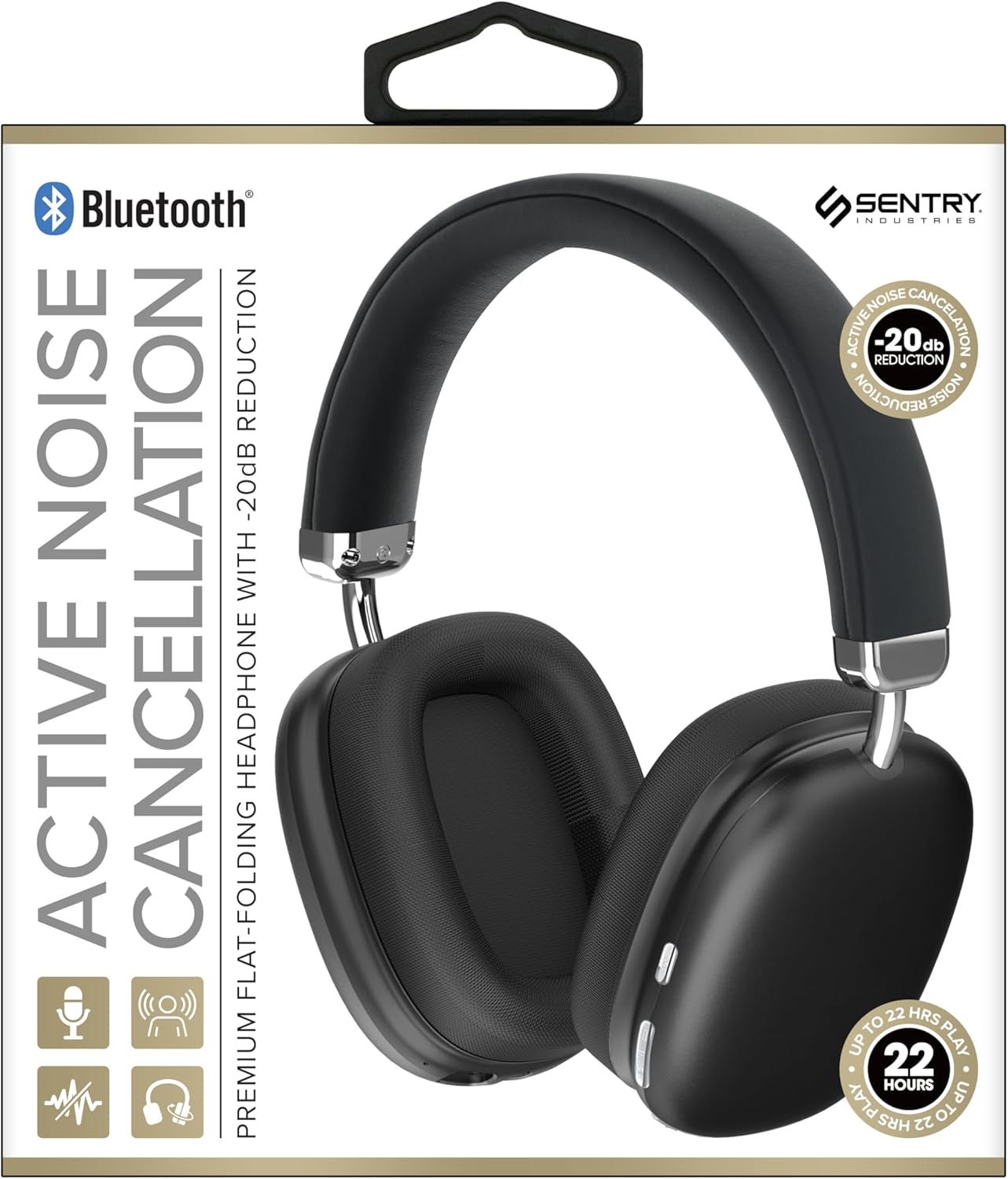
This image displays the SENTRY BT Pro Sq Headset in black, highlighting its over-ear design, adjustable headband, and the control buttons located on the earcups. The packaging indicates features such as Bluetooth connectivity, Active Noise Cancellation with -20dB reduction, and up to 22 hours of play time.
2. 重要な安全情報
安全かつ適切な操作を確保するために、次のガイドラインに従ってください。
- ヘッドセットを極端な温度、湿度、腐食性物質にさらさないでください。
- ヘッドセットを落としたり、強い衝撃を与えたりしないでください。
- ヘッドセットをご自身で分解したり修理したりしないでください。保証が無効になります。
- ヘッドセットは柔らかく乾いた布で拭いてください。液体クリーナーは使用しないでください。
- 大きな音量で長時間聴くと聴覚障害を引き起こす可能性があります。安全な音量に調整してください。
- Do not use the headset in situations where inability to hear ambient sounds could be dangerous (e.g., driving, cycling, walking in traffic).
3. パッケージ内容
パッケージに以下の項目が含まれているか確認してください。
- SENTRY BT Pro Sq Headset
- USB充電ケーブル
- ユーザーマニュアル
4.製品オーバーview
The SENTRY BT Pro Sq Headset features an over-ear design with soft ear pads for comfort and noise isolation. It includes an adjustable folding headband for portability. Key components include:
- イヤーカップ: House the audio drivers and provide passive noise isolation.
- ヘッドバンド: Adjustable for a comfortable fit, designed to fold for compact storage.
- コントロールボタン: Located on the earcups for power, volume, track control, and Active Noise Cancellation (ANC).
- マイクロフォン: ハンズフリー通話用に内蔵されています。
- 充電ポート: USB充電ケーブルを接続します。
Refer to the product image in the Introduction section for visual identification of these components.
5. セットアップ
5.1 ヘッドセットの充電
- USB 充電ケーブルの小さい方の端をヘッドセットの充電ポートに接続します。
- USB 充電ケーブルの大きい方の端を USB 電源アダプタ (別売) またはコンピュータの USB ポートに接続します。
- The LED indicator on the headset will illuminate to show charging status. It will change color or turn off when fully charged.
- フル充電には通常約2〜3時間かかります。
5.2 Bluetoothデバイスとのペアリング
Before using the headset wirelessly, you must pair it with your Bluetooth-enabled device (smartphone, laptop, tablet, smart speaker, gaming console).
- ヘッドセットが完全に充電されていることを確認してください。
- With the headset powered off, press and hold the Power button for approximately 5-7 seconds until the LED indicator flashes rapidly, indicating pairing mode.
- Bluetooth デバイスで Bluetooth を有効にし、新しいデバイスを検索します。
- Select "SENTRY BT Pro Sq" (or similar name) from the list of available devices.
- Once paired, the LED indicator on the headset will stop flashing and may turn solid blue or off, depending on the model.
- ヘッドセットは、電源を入れると、最後にペアリングしたデバイスに自動的に再接続しようとします。
6. 操作手順
6.1 電源オン/オフ
- 電源オン: Press and hold the Power button for 2-3 seconds. The LED indicator will light up.
- 電源を切る: Press and hold the Power button for 3-4 seconds. The LED indicator will turn off.
6.2 アクティブノイズキャンセレーション(ANC)
The headset features Active Noise Cancellation to reduce ambient noise.
- ANCをアクティブにします。 Locate the ANC button (if separate) or press the designated control. The ANC indicator light will turn on.
- ANCを非アクティブ化: ANCボタンをもう一度押すと、ANCインジケーターライトが消灯します。
6.3 Media Control (Touch Control)
Control your audio playback directly from the headset:
- 再生/一時停止: 多機能ボタンを1回タップします。
- ボリュームアップ: 音量を上げるボタンをタップします。
- ボリュームダウン: 音量ダウンボタンをタップします。
- 次のトラック: Double tap the multi-function button.
- 前のトラック: Triple tap the multi-function button.
6.4 通話管理
Manage phone calls with the built-in microphone:
- 通話に応答: Single tap the multi-function button when a call comes in.
- 通話終了: 通話中に多機能ボタンを 1 回タップします。
- 通話を拒否: 電話がかかってきたら、多機能ボタンを2秒間押し続けます。
7. メンテナンスとケア
- クリーニング: Wipe the headset with a soft, dry, lint-free cloth. Do not use abrasive cleaners, alcohol, or chemical solvents.
- ストレージ: When not in use, store the headset in a cool, dry place, away from direct sunlight and extreme temperatures. Utilize the folding headband feature for compact storage.
- バッテリーのケア: To preserve battery life, charge the headset regularly, even if not used for extended periods. Avoid fully discharging the battery frequently.
- 水を避ける: The headset is not waterproof. Keep it away from water and moisture.
8。 トラブルシューティング
ヘッドセットで問題が発生した場合は、次の一般的な問題と解決策を参照してください。
| 問題 | 考えられる解決策 |
|---|---|
| ヘッドセットの電源が入りません。 | Ensure the headset is fully charged. Connect to a power source and allow it to charge for at least 30 minutes before attempting to power on again. |
| Bluetooth デバイスとペアリングできません。 | Ensure the headset is in pairing mode (LED flashing rapidly). Make sure Bluetooth is enabled on your device and it is within range (10 meters). Try restarting both the headset and your device. |
| ヘッドセットから音が出ません。 | Check the volume level on both the headset and your connected device. Ensure the headset is properly paired and connected. Try playing audio from a different application or device. |
| Active Noise Cancellation (ANC) is not effective. | Ensure ANC is activated. Make sure the earcups are properly sealed around your ears. ANC is most effective against low-frequency, constant noise. |
| マイクが機能しません。 | Ensure the headset is connected and selected as the input device on your computer or smartphone. Check privacy settings on your device that might restrict microphone access. |
9. 仕様
| 特徴 | 詳細 |
|---|---|
| モデル名 | HPXBTA1000 |
| 接続技術 | ワイヤレス(Bluetooth) |
| 騒音制御 | アクティブノイズキャンセリング |
| 耳の位置 | オーバーイヤー |
| フォームファクター | オーバーイヤー |
| コントロールタイプ | メディアコントロール、タッチ |
| 周波数範囲 | 20Hz~20,000Hz |
| オーディオドライバータイプ | ダイナミックドライバ |
| 対応デバイス | Smartphones, Laptops, Tablets, Smart Speakers, Gaming Consoles |
| 色 | 黒 |
| アイテム重量 | 1.2ポンド |
| 欧州連合 | 080068501503 |
| メーカー | 歩哨 |
10. 保証とサポート
SENTRY products are designed and manufactured to the highest quality standards. For information regarding warranty coverage, technical support, or service inquiries, please refer to the warranty card included with your product or visit the official SENTRY webサイトでご確認ください。保証請求のために購入証明書を保管してください。