
1. はじめに
This manual provides detailed instructions for the installation, operation, and maintenance of your DB Drive SPRO2500.4 4-Channel Class AB Ampライファイア。正しく使用し、ユニットや車両のオーディオシステムの損傷を防ぐため、取り付けまたは操作を行う前にこのマニュアルをよくお読みください。このマニュアルは、今後の参考のために保管してください。
2. 安全情報
設置および操作中は、常に次の安全上の注意事項を守ってください。
- 電気作業を始める前に、車両のバッテリーのマイナス端子を外してください。
- 挟まれたり、切断されたり、ショートしたりしないように、すべての配線が適切に配線され、固定されていることを確認してください。
- このマニュアルに指定されているように、電源およびアース接続には適切なゲージの配線を使用してください。
- インストール amp過熱を防ぐために、換気が十分にできる場所に装置を設置してください。
- の取り付けは避けてください。 amp直射日光、高温、湿気、ほこりの多い場所に置かないでください。
- 開封したり変更したりしないでください。 ampすべての修理は資格を持った担当者にお任せください。
- Wear eye protection when working with tools and electrical components.
3. セットアップとインストール
3.1 開梱
慎重に取り外します amp装置を梱包から取り出し、損傷がないか確認してください。損傷が見つかった場合は、直ちに販売店にご連絡ください。
3.2取り付け位置
Choose a mounting location that is dry, well-ventilated, and protected from physical damage. Ensure sufficient space around the amp空気循環のための換気装置。 amp適切なハードウェアを使用して、固体表面にしっかりと固定します。
3.3配線接続
Proper wiring is crucial for optimal performance and safety. Refer to the diagram below for terminal identification.

画像: Rear panel of the DB Drive SPRO2500.4 amplifier showing power, ground, remote, fuse, and speaker output terminals.
- 電源(BATT+): Connect a 4-gauge power cable directly from the positive (+) terminal of the vehicle's battery. Install an in-line fuse holder (not supplied) within 18 inches (45 cm) of the battery.
- グラウンド (GND): Connect a 4-gauge ground cable from the amplifier's GND terminal to a clean, unpainted metal surface of the vehicle's chassis. Ensure a solid electrical connection.
- リモート(REM): ヘッドユニットのリモート出力から18ゲージのリモート電源オンワイヤーを amp充電器のREM端子。この配線は ampヘッドユニットで電源のオン/オフを切り替えます。
- スピーカー出力(CH1-CH4): Connect your speakers to the appropriate output terminals. The SPRO2500.4 supports 4-channel stereo operation or 2-channel bridged operation. Refer to the specifications for minimum impedance requirements.
- ヒューズ: の amplifier is equipped with internal fuses. Do not attempt to replace them.
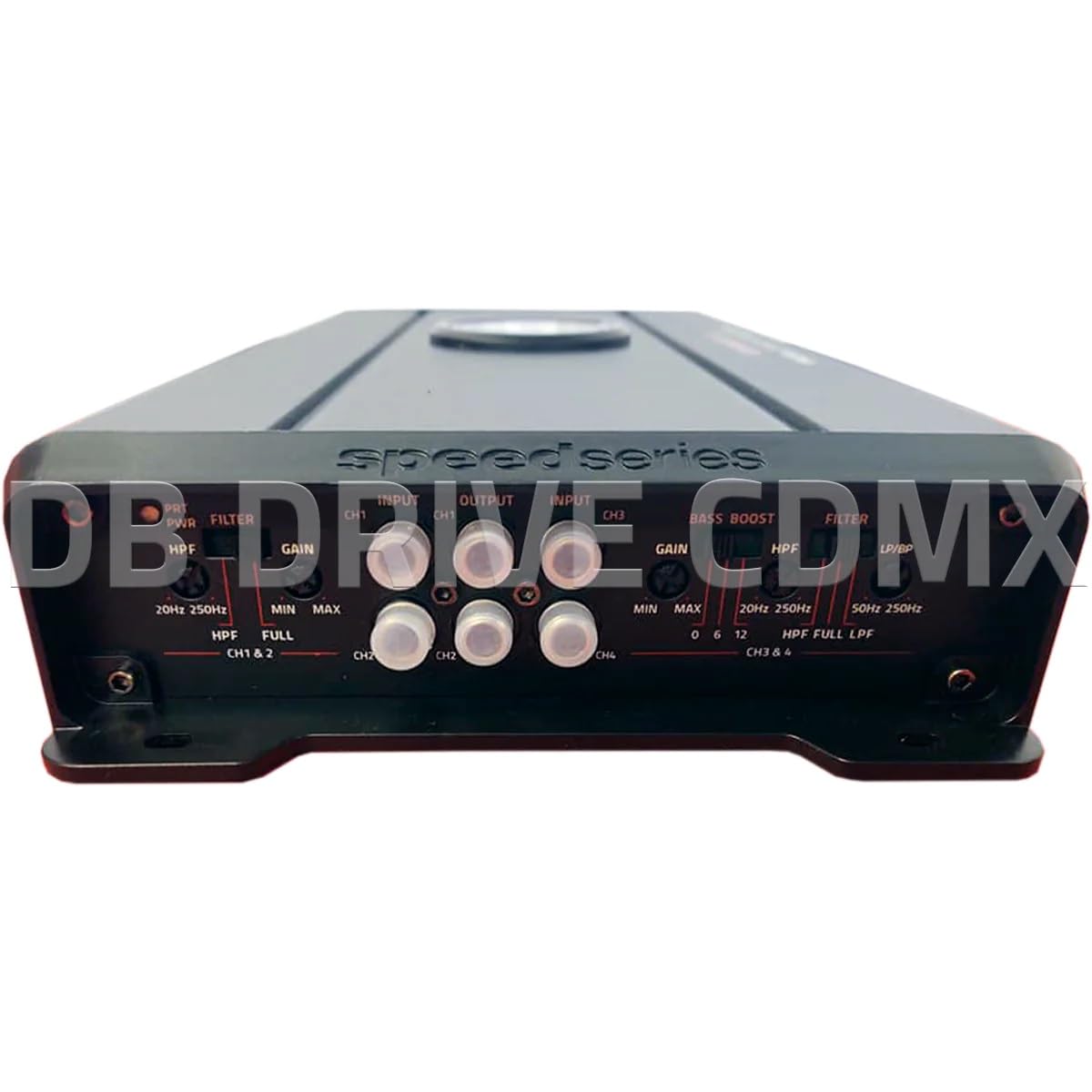
画像: Front panel of the DB Drive SPRO2500.4 amplifier showing input, gain, filter, and bass boost controls.
3.4 コントロールパネルの設定
The front panel features controls for fine-tuning the amplifier's audio output:
- Input (CH1/CH2, CH3/CH4): ヘッドユニットのプリアンプからRCAケーブルを接続します。amp これらの入力に出力します。
- Gain (CH1&2, CH3&4): の入力感度を調整します。 ampヘッドユニットの出力レベルに合わせて、リファイアを調整します。ゲインを最小から始めて、歪みなく希望の音量になるまで徐々に上げてください。
- Filter (HPF/FULL/LPF): Selects the crossover mode for the respective channels.
- HPF (ハイパスフィルター): Allows frequencies above the set point to pass, blocking lower frequencies. Useful for full-range speakers.
- LPF (ローパスフィルター): Allows frequencies below the set point to pass, blocking higher frequencies. Useful for subwoofers.
- 満杯: Allows all frequencies to pass without filtering.
- HPF/LPF Frequency Controls: Adjusts the cutoff frequency for the selected HPF or LPF.
- 低音ブースト: Provides an adjustable bass enhancement at a specific frequency. Use sparingly to avoid distortion.
4. 操作手順
Once all connections are made and verified, you can power on your audio system. The amplifier will turn on automatically with your head unit via the remote wire.
- 初期パワーアップ: ヘッドユニットの電源を入れます。 amp充電器の電源インジケーターが点灯します。
- オーディオ調整: Start with the head unit volume low. Gradually increase the volume and adjust the amplifier's gain controls until the desired sound level is reached without audible distortion.
- Crossover Tuning: Adjust the HPF and LPF settings according to your speaker types and desired sound characteristics. For full-range speakers, use HPF to remove low bass. For subwoofers, use LPF.
- 低音ブースト: If desired, slowly increase the bass boost control to enhance low frequencies. Overuse can lead to distortion and potential speaker damage.
5. メンテナンス
The DB Drive SPRO2500.4 amp長期的なパフォーマンスを確保するために、lifier には最小限のメンテナンスが必要です。
- クリーニング: 定期的に拭き取ってください amp本体の外側は柔らかく乾いた布で拭いてください。刺激の強い化学薬品や研磨剤入りの洗剤は使用しないでください。
- 換気: 確実に amp冷却フィンには埃やゴミが付着していないため、適切な放熱が維持されます。
- 接続チェック: Occasionally check all wiring connections for tightness and corrosion. Loose connections can cause performance issues or damage.
6。 トラブルシューティング
問題が発生した場合 amp問題がある場合は、次の一般的な問題と解決策を参照してください。
| 問題 | 考えられる原因 | 解決 |
|---|---|---|
| 電源なし / Amp電源が入らない | ヒューズが切れている、電源/アース/リモート ワイヤが緩んでいる、リモート ターンオン信号に障害がある。 | Check in-line fuse near battery. Verify all power, ground, and remote connections are secure. Test remote wire for 12V when head unit is on. |
| 音が出ない | RCA cables disconnected, speaker wires disconnected or shorted, gain set too low, head unit volume too low. | Check RCA input connections. Verify speaker wiring for proper polarity and no shorts. Increase gain and head unit volume. |
| 歪んだ音 | Gain set too high, improper crossover settings, damaged speakers, poor ground connection. | Reduce gain. Adjust HPF/LPF settings. Inspect speakers for damage. Ensure ground connection is solid. |
| Ampライファイア過熱 | 換気が不十分、インピーダンスが低すぎる、高出力が長時間続く。 | 周囲に十分な空気の流れを確保してください amplifier. Verify speaker impedance meets specifications. Reduce volume or allow amp冷却するためのリファイアー。 |
If these steps do not resolve the issue, contact DB Drive customer support or a qualified car audio technician.
7. 仕様
The following table details the technical specifications for the DB Drive SPRO2500.4 amplifier:

画像: Detailed specifications sheet for the DB Drive SPRO2500.4 amplifier。
| 特徴 | 仕様 |
|---|---|
| Amplifierクラス | クラスA/B |
| チャンネル | 4チャンネル |
| Output Power (RMS @ 14.4VDC, 2Ω) | 4 x 500W |
| Output Power (RMS @ 14.4VDC, 4Ω) | 4 x 250W |
| Output Power (RMS @ 14.4VDC Bridged) | 2 x 1000W |
| 電源入力Voltage | 12.0VDC〜14.8VDC |
| THD (100Hz @ 1Ω) | 0.04% |
| Frequency Response (3dB) | 20Hz - 250Hz |
| Damping Factor (1KHz @ 4Ω) | 100 |
| S/N Ratio (as weighted @ 1 Volt) | 99デシベル |
| 入力感度 | .20mV - 5.0V RMS |
| 最小負荷インピーダンス | 2Ω |
| 入力 | RCAのプリ |
| クロスオーバーフィルターのスロープ | 12デシベル |
| Crossover Filter Range in Mono | 24デシベル |
| Channel 1-2 HPF Range | 20Hz - 250Hz |
| Channel 3-4 HPF Range | 20Hz - 250Hz |
| Channel 3-4 LPF/BPF Range | 50Hz - 250Hz |
| Selectable Bass Boost CH 1-2 or 3-4 | 0 - 6dB - 12dB |
8. 保証とサポート
DB Drive products are designed and manufactured to the highest quality standards. For specific warranty information, please refer to the warranty card included with your product or contact your authorized DB Drive dealer.
カスタマーサポート:
For technical assistance or support, please contact:
DB Research L.L.P
302ハンモア工業団地
Harlingen, TX 78550 USA
電話: 877-787-0101
Local: 956-421-4513