
1. はじめに
This manual provides comprehensive instructions for the installation, operation, and maintenance of your Lloyd's Smart Full HD 1080P Video Intercom System. This system is designed to provide secure access control for your home or office, allowing you to monitor, communicate with, and grant access to visitors remotely.
Please read this manual thoroughly before using the product to ensure proper function and safety. Keep this manual for future reference.
2. 安全情報
製品の損傷やご自身または他の人への傷害を防ぐために、以下の安全上の注意事項を守ってください。
- 設置またはメンテナンスを行う前に、すべての電源が切断されていることを確認してください。
- 電気配線に精通していない場合は、資格のある電気技師が設置を行う必要があります。
- 製品を極端な温度、湿度、直射日光にさらさないでください。
- 付属の電源アダプターと付属品のみを使用してください。
- 製品を水やその他の液体から遠ざけてください。
- ご自身でユニットを分解したり修理したりしないでください。サポートが必要な場合は、カスタマーサポートにお問い合わせください。
3. パッケージ内容
パッケージにすべてのアイテムが揃っていることを確認します。
- 1 x Monitor (7'' Color LCD Touchscreen)
- 1 x Outdoor Unit (Doorbell with Camera and Keypad)
- ユーザーガイド x 1
- 1 xハウジング
- 1 x Rain Cover Bracket
- 1 x Recessed Box
- 1 x AC / DCアダプター
- 1 x取付金具
- Wall Plugs and Mounting Screws
- 3 xコネクタ
- 1 x Allen Screwdriver
- 接続ケーブル4本

図3.1:以上view of the Lloyd's Smart Video Intercom System components and packaging.
4.製品オーバーview
4.1. Monitor (Indoor Unit)
- 画面: 7-inch color LCD touchscreen with 1020 x 600 px resolution.
- 調整可能な設定: Brightness, contrast, and volume.
- 機能: Hands-free intercom, call transfer (requires additional monitor), date, time, and weather display.
- ストレージ: Integrated memory for up to 30 photos, supports up to 128 GB memory card (not included).
- 接続性: 2.4 GHz Wi-Fi for stable connection in large areas.
4.2. Outdoor Unit (Doorbell)
- カメラ: 2MP Full HD (1920x1080) resolution.
- ナイトビジョン: Yes, with LED numeric panel.
- View角度: 120度。
- モーション検出: Detection distance of less than or equal to 3 meters.
- オーディオ: 2-way audio with adjustable microphone and speaker volume.
- アクセス制御: Works with a 12 VDC electric lock (not included), supports 4-6 digit password entry.
- Tamper Button: Sends alerts to your smartphone and triggers an alarm if the outdoor unit is forced.
- 耐久性: IP65 rating for indoor or outdoor use.
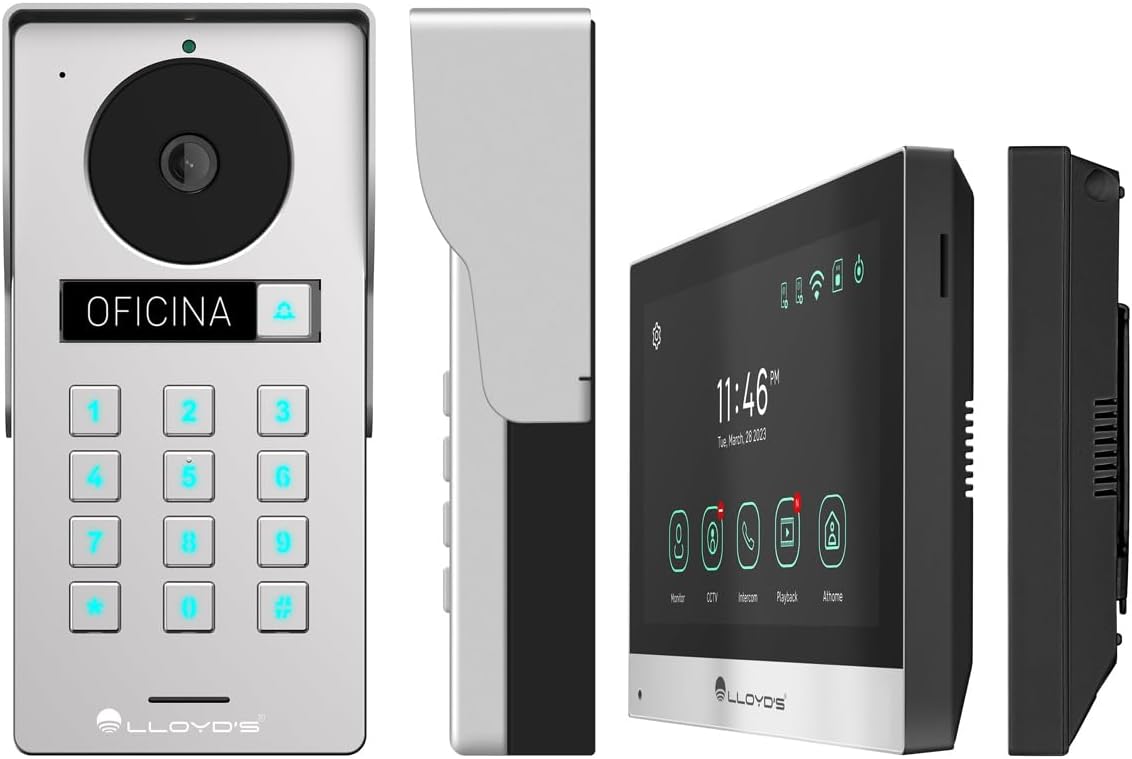
図4.1:詳細 views of the outdoor unit and monitor.

Figure 4.2: Key features of the Lloyd's Smart Video Intercom System.
5. セットアップとインストール
5.1. 配線と取り付け
The system requires a wired connection between the monitor and the outdoor unit. The maximum operating distance is 50 meters using a 4-wire cable (0.5 mm² not included). Follow the wiring diagram provided in the quick start guide for correct connections.
- 室外機の取り付け: 入り口近くの適切な場所を選択し、カメラがクリアに見えるようにしてください。 view and easy access to the keypad. Use the provided mounting bracket, wall plugs, and screws. The unit is IP65 rated for outdoor use.
- モニターの取り付け: Install the monitor indoors at a convenient height for viewing and interaction. Use the mounting bracket and screws.
- 電源接続: Connect the AC/DC adapter to the monitor and a power outlet.
- Electric Lock Connection (Optional): If using an electric lock (12 VDC, not included), connect it to the outdoor unit as per the wiring diagram.
5.2. アプリとWi-Fi接続
To utilize smart features, download the Lloyd's smart home application on your smartphone (compatible with Android 5.0+ and iOS 11+).
- Power on the monitor and outdoor unit.
- On the monitor, navigate to the Wi-Fi settings and connect to your 2.4 GHz Wi-Fi network.
- Open the Lloyd's app on your smartphone and create an account or log in.
- Follow the in-app instructions to add your new video intercom system. This typically involves scanning a QR code displayed on the monitor or manually entering device details.
- 接続すると通知が届き、アプリ経由でシステムをリモート制御できるようになります。
6. 操作手順
6.1. Answering Calls and Communication
- When a visitor presses the doorbell button, the monitor will ring, and you will receive a notification on your smartphone.
- On the monitor, tap the "Answer" icon to establish two-way audio and video communication.
- On your smartphone, open the app and tap the incoming call notification to answer.
- The intercom communication time is 60 seconds.

Figure 6.1: Communicate with visitors from anywhere using the app or monitor.

Figure 6.2: Receive instant notifications on your smartphone and monitor.
6.2. Door Opening
- アプリから: During a call, tap the "Unlock" icon in the app to open the connected electric lock.
- From the Monitor: During a call, tap the "Unlock" icon on the monitor's touchscreen.
- From the Outdoor Unit: Visitors can enter a pre-set 4-6 digit password on the numeric keypad to open the door.
6.3. 動きの検知と録画
- The system automatically captures photos and videos when motion is detected within 3 meters of the outdoor unit or when someone rings the doorbell.
- You will receive real-time alerts on your smartphone via the app when motion is detected.
- Review recorded events and snapshots through the app or on the monitor.
- The monitoring time for motion detection is 30 seconds.

Figure 6.3: Receive motion detection alerts directly on your smartphone app.

Figure 6.4: Automatic photo and video capture for events.
6.4. システム拡張
The system supports expansion for enhanced security and convenience:
- Up to 2 additional Outdoor Units (Doorbell)
- Up to 3 additional Monitors
- Up to 2 additional Cameras
- Up to 2 additional Sensors
(Additional units and sensors are not included and must be purchased separately.)
You can also integrate the system with other Lloyd's smart home products to create customized routines and share device access with family members.
7. メンテナンス
- クリーニング: モニター画面と室外機の清掃には、柔らかく乾いた布をご使用ください。研磨剤入りの洗剤や溶剤は使用しないでください。
- ソフトウェアアップデート: Periodically check the Lloyd's app for firmware updates to ensure optimal performance and security.
- ストレージ管理: If using a memory card, regularly back up important recordings and delete old fileスペースを解放します。
8。 トラブルシューティング
| 問題 | 考えられる原因 | 解決 |
|---|---|---|
| No image or sound from outdoor unit. | Loose wiring, power issue, unit malfunction. | Check all cable connections. Ensure power adapter is properly connected. Restart the system. |
| Wi-Fi 接続が不安定または切断されています。 | Wi-Fi 信号が弱い、パスワードが間違っている、ルーターに問題がある。 | Ensure the monitor is within Wi-Fi range. Re-enter Wi-Fi password. Restart your router. |
| Cannot open door via app/monitor. | Electric lock not connected, lock malfunction, wiring issue. | Verify electric lock connection and functionality. Check wiring between outdoor unit and lock. |
| モーション検出アラートはありません。 | モーション検出が無効、感度が正しくない、アプリの通知設定。 | Enable motion detection in app settings. Adjust sensitivity. Check smartphone notification permissions for the app. |
| ビデオ品質が低い。 | Dirty camera lens, poor lighting, network bandwidth. | カメラのレンズをきれいにしてください。十分な照明を確保してください。インターネットの速度を確認してください。 |
9. 仕様
| 特徴 | 詳細 |
|---|---|
| モデル番号 | LC-1373 |
| モニターディスプレイ | 7インチカラーLCDタッチスクリーン |
| モニター解像度 | 1020 x 600ピクセル |
| Outdoor Unit Camera Resolution | 2MP Full HD (1920x1080) |
| View角度 | 120度 |
| 暗視範囲 | 最大10メートル |
| 動体検知範囲 | ≤3メートル |
| ワイヤレス接続 | 2.4GHz Wi-Fi |
| ストレージ | Integrated (30 photos), supports up to 128 GB MicroSD (not included) |
| 電源 | 12 VDC (via AC/DC adapter) |
| 消費電力(スタンバイ) | 4W |
| 消費電力(動作時) | 10W |
| 動作距離(有線) | Up to 50m (with 0.5 mm² 4-wire cable) |
| Ingress Protection (Outdoor Unit) | IP65 |
| Monitor Dimensions (H x W x D) | 12.4 cm x 18 cm x 2.1 cm |
| 室外機寸法(高さ×幅×奥行き) | 18 cm x 8.7 cm x 3.2 cm |
| 対応デバイス | Android 5.0以上、iOS 11以上 |

Figure 9.1: Dimensions of the Monitor and Outdoor Unit.
10. 保証とサポート
For warranty information, please refer to the warranty card included with your product or visit the official Lloyd's website. If you encounter any issues or require technical assistance, please contact Lloyd's customer support.
カスタマーサポート: Refer to the contact information provided on the product packaging or the official Lloyd's webサイト。
オンラインリソース: 訪問 Lloyd's Official Store on Amazon 追加の製品情報とサポートについては、こちらをご覧ください。
11. 公式製品ビデオ
No official seller videos were provided for this product in the available data.