
1. はじめに
The OWON HDS25 is a compact, multi-functional handheld device integrating a 2-channel oscilloscope and a 20,000-count multimeter. Designed for portability and versatility, it features a 3.5-inch LCD display, USB Type-C connectivity for charging and data transfer, and supports SCPI commands for remote control. This manual provides essential information for the safe and effective operation, maintenance, and troubleshooting of your HDS25 device.
2.製品オーバーview
2.1 主な特徴
- 3-in-1 機能: Combines a 2-channel oscilloscope and a 20,000-count True RMS multimeter.
- オシロスコープ: 25MHz帯域幅、250MSa/sリアルタイムample rate, 8K record length.
- マルチメーター: AC/DCボリュームを測定tage、AC/DC 電流、抵抗、静電容量、ダイオード、導通など。
- 画面: 3.5インチの高解像度液晶を搭載。
- 接続性: USB Type-C for charging and PC communication, supports SCPI commands.
- 移植性: Compact design with approximately 4 hours of continuous battery operation.
2.2 デバイスコンポーネント
The following image illustrates the main components of the OWON HDS25 device:
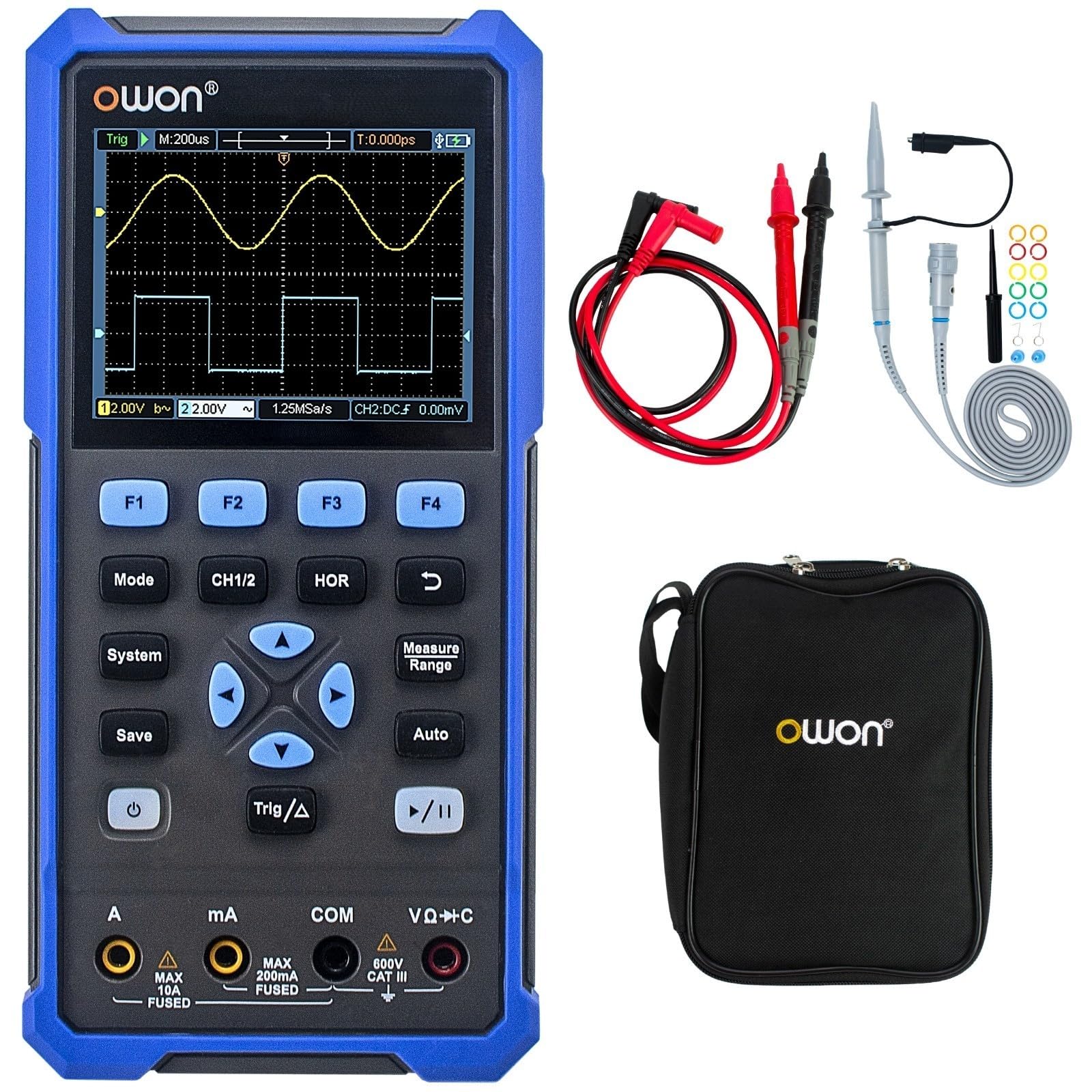
The device features a central 3.5-inch LCD screen for waveform display and measurement readings. Below the screen are function buttons (F1-F4), mode selection buttons (Mode, CH1/2, HOR, System, Save, Auto, Trig/Δ, Power, Play/Pause), and a directional pad for navigation. At the bottom, there are input jacks for current (A, mA), common ground (COM), and voltage/resistance/capacitance (VΩ+C) measurements.

2.3付属のアクセサリ
- USB Type-Cケーブル
- オシロスコーププローブ (2)
- プローブ調整ツール
- マルチメーターのテストリード
- 保護バッグ

3. セットアップ
3.1デバイスの充電
Before initial use, fully charge the device using the provided USB Type-C cable and a compatible power adapter (not included). The charging indicator on the device will show the charging status.
3.2 プローブとリードの接続
- オシロスコーププローブ: Connect the BNC connector of the oscilloscope probes to the CH1 and CH2 input ports on the top of the device. Ensure a secure connection.
- マルチメーターのテストリード: For multimeter functions, insert the red test lead into the VΩ+C jack and the black test lead into the COM jack. For current measurements, use the A or mA jacks as appropriate.
3.3 電源のオン/オフ
を押し続けます 力 button (usually marked with a circle and vertical line symbol) to turn the device on or off.
4. 操作手順
4.1一般的なナビゲーション
- 使用 モード button to switch between Oscilloscope and Multimeter modes.
- The directional pad (up, down, left, right) is used to navigate menus and adjust parameters.
- ボタン F1 に F4 correspond to on-screen menu options.
- の システム button accesses system settings.
- の 保存 button allows saving waveforms or measurement data.
4.2 オシロスコープモード
In Oscilloscope mode, the device displays real-time waveforms. Use the following controls:
- CH1/2: Selects the active channel or displays both.
- HOR (Horizontal): Adjusts the time base (horizontal scale) of the waveform.
- 垂直スケール: Use the directional pad (up/down) to adjust the voltage scale for the selected channel.
- Trig/Δ (Trigger): Configures trigger settings (edge, level, mode) to stabilize the waveform display.
- 自動: Automatically adjusts vertical, horizontal, and trigger settings for a stable waveform display.
- 再生/一時停止: Freezes or resumes the waveform acquisition.
4.3 マルチメーターモード
In Multimeter mode, the device functions as a digital multimeter. Use the directional pad to select the desired measurement function (Voltage, Current, Resistance, etc.). Ensure the test leads are connected to the correct input jacks for the selected measurement type.
- 巻tage 測定値 (V): Connect leads in parallel with the circuit.
- Current Measurement (A/mA): Connect leads in series with the circuit. Ensure correct jack selection (A or mA) based on expected current.
- 抵抗測定(Ω): Connect leads across the component when power is off.
- 導通/ダイオード: For checking circuit continuity or diode function.
- 静電容量測定(F): Connect leads across the capacitor when power is off.
5. メンテナンス
5.1 クリーニング
デバイスの外側を柔らかくて乾いた布で拭いてください。amp cloth. Do not use abrasive cleaners or solvents. Ensure the device is powered off and disconnected from all power sources and measurement circuits before cleaning.
5.2バッテリーケア
バッテリーの寿命を延ばすには、バッテリーを頻繁に完全に放電させないでください。特に長期間保管する場合は、定期的に充電してください。デバイスは涼しく乾燥した場所に保管してください。
5.3 ストレージ
When not in use, store the HDS25 in its protective bag in a clean, dry environment away from direct sunlight, extreme temperatures, and high humidity.
6。 トラブルシューティング
OWON HDS25 で問題が発生した場合は、次の一般的な問題と解決策を参照してください。
| 問題 | 考えられる原因 | 解決 |
|---|---|---|
| デバイスの電源が入りません。 | 電池残量が少ないか、電源ボタンに不具合があります。 | デバイスを30分以上充電してください。それでも反応しない場合は、サポートにお問い合わせください。 |
| オシロスコープモードでは波形が表示されません。 | Incorrect probe connection, wrong vertical/horizontal scale, or trigger settings. | プローブがしっかりと接続されていることを確認してください。 オート button. Adjust vertical (voltage) and horizontal (time) scales. Check trigger level. |
| マルチメーターの読み取り値が不正確またはゼロです。 | Incorrect lead connection, wrong measurement function selected, or open circuit. | Verify test leads are in the correct jacks for the selected function. Ensure proper connection to the circuit. Check for open circuits. |
| デバイスがフリーズしたり、応答しなくなったりします。 | ソフトウェアの不具合。 | Perform a soft reset by holding the power button until the device turns off, then restart. If the issue persists, contact support. |
7. 仕様
| 特徴 | 仕様 |
|---|---|
| モデル | HDS25 |
| 帯域幅 | 25 MHz |
| チャンネル | 2 |
| Sampルレート | 250MSa/秒 |
| レコード長 | 8K |
| マルチメーターカウント | 20,000 |
| 画面 | 3.5インチ液晶 |
| 接続性 | USB Type-C (charging & data) |
| バッテリー寿命 | 約4時間 |
| 認定資格 | CE、RoHS、UL |
| 含まれるもの | USB cable, probes, probe adjustment tool, multimeter leads, bag |
8. 保証とサポート
8.1 保証情報
The OWON HDS25 comes with a 3年間のメーカー保証 本体と 1年間保証 for included accessories. Please retain your proof of purchase for warranty claims.
8.2 カスタマーサポート
For technical assistance, troubleshooting, or warranty inquiries, please contact OWON customer support. You can also find the latest user manual and support resources on the official OWON web地点 (owon.co.jp) or on the product page where you purchased the device.