
VanSmaGo BL-HJ07
Astronaut Galaxy Projector User Manual
Brand: VanSmaGo | Model: BL-HJ07
製品終了view
The VanSmaGo Astronaut Galaxy Projector is a versatile device designed to transform any room into a captivating celestial experience. It features 13 distinct projection scenarios, an 8-color LED night light, and adjustable focus for clear, high-definition imagery. Its quiet operation and auto-off timer make it ideal for creating a serene environment for relaxation or sleep.
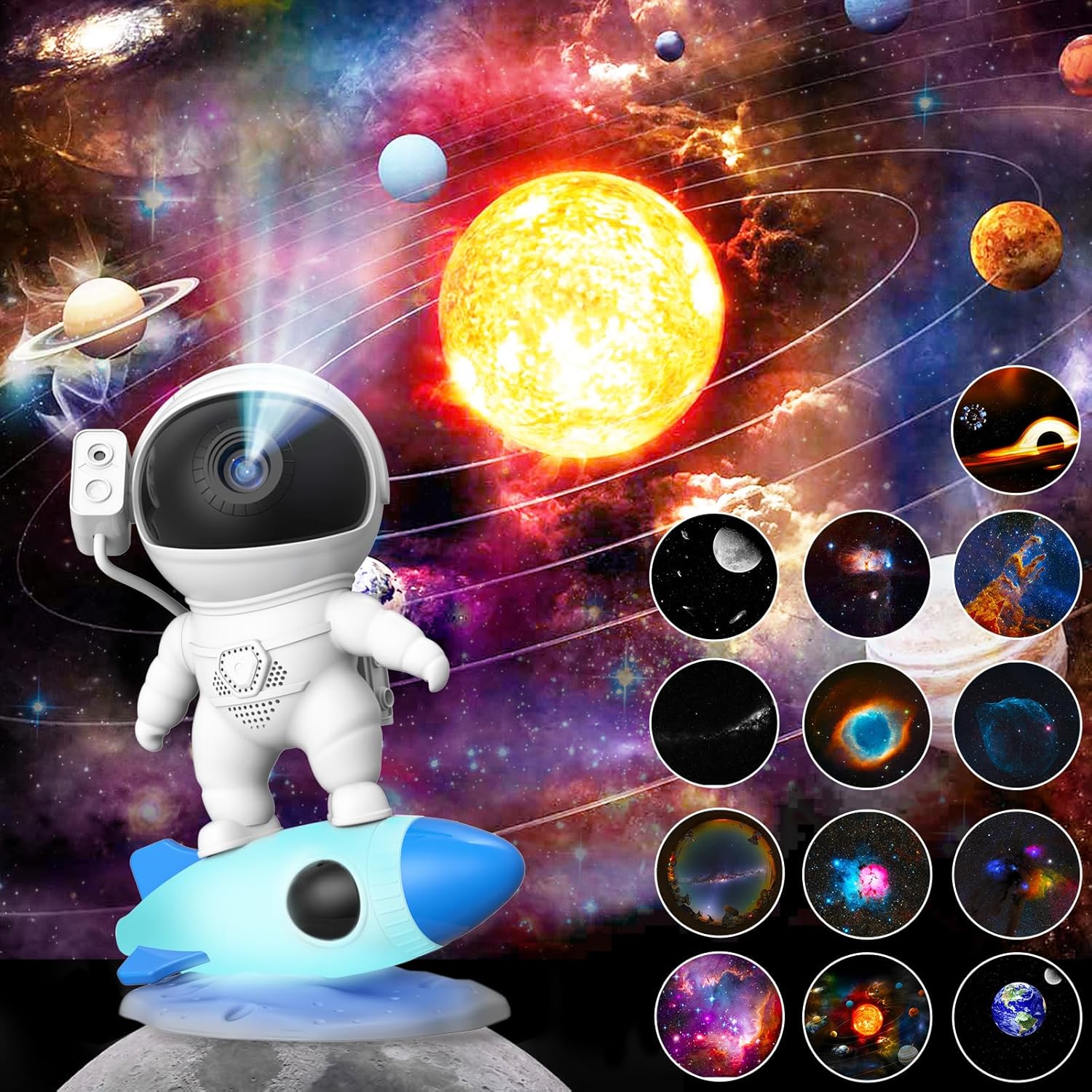
Image: The Astronaut Galaxy Projector showcasing its ability to project a realistic starry sky and nebula, with various film disc options visible.
安全情報
Please read all safety instructions before using the projector. Keep the device away from water and high humidity. Do not attempt to disassemble or repair the unit yourself. Use only the provided Type-C cable for power. Ensure proper ventilation during operation. This product is not a toy and should be used under adult supervision for children.
パッケージ内容
開梱時にすべてのアイテムが揃っていて良好な状態であることを確認します。
- 1 x Astronaut Galaxy Projector
- 13 x Film Discs (one disc is pre-inserted)
- タイプC USBケーブル x 1
- ユーザーマニュアル x 1

Image: Contents of the package including the projector, film discs, and cable.
製品の特徴
- 13-in-1 Planetarium Projections: Explore a variety of celestial scenes including the Solar System, Earth, Moon, The Milky Way, Galaxy, Small Magellanic, The Flame Nebula, The Trifid Nebula, Starry Sky Palette, Sharpless 308, The Helix Nebula, Pillars Of Creation, and Black Hole.
- HD Projection & Adjustable Focus: Achieve clear and sharp images by rotating the top focusing head. Supports projection distances up to 16.4 feet and covers an area of 754 square feet.
- 360° Rotatable Angle: Project images onto ceilings, walls, or floors with ease.
- Super Quiet Operation & Auto-Off Timer: Enjoy a peaceful environment with silent operation. The built-in timer function allows for automatic shutdown, promoting a restful sleep. Note that the projected image rotation is intentionally slow to simulate real starry sky movement.
- 8色LEDナイトライト: The rocket base features an integrated night light with 8 changeable colors, adding an ambient glow.

Image: Visual representation of the 12 included film discs, each depicting a unique celestial body or phenomenon.

Image: Illustration demonstrating the adjustable focus mechanism on the projector's head.

Image: The projector's rocket base displaying its 8 different LED night light colors.
セットアップガイド
- 開梱: プロジェクターとすべての付属品をパッケージから慎重に取り出します。
- 電源接続: Connect the provided Type-C USB cable to the projector's USB-C Port (5) and plug the other end into a compatible USB power adapter (not included) or a USB port on a computer.
- 配置: Place the projector on a stable, flat surface. For optimal projection, ensure the room is dark.
- Initial Film Disc: Verify that a film disc is already inserted into the projector. If not, or if you wish to change it, refer to the "Changing Film Discs" section.

Image: Labeled diagram of the projector's controls and ports for easy setup.
操作手順
Power On/Off and Projection
を押す 電源オン/オフボタン (1) to turn the projector on or off. The projector will begin displaying the inserted film disc.
フォーカスの調整
To achieve the clearest image, rotate the top focusing head of the astronaut's helmet. Adjust until the projected image is sharp on your desired surface.
Image: Illustration demonstrating the adjustable focus mechanism on the projector's head.
Changing Film Discs
The projector comes with 13 unique film discs. To change the projection scene:
- Gently pull out the currently inserted film disc from the slot.
- Select your desired new film disc. Ensure the disc is clean and free of dust or fingerprints.
- Insert the new film disc into the slot, making sure it is oriented correctly (usually with the image facing the projector lens).

Image: Visual guide for inserting and removing film discs.
Adjusting Rotation Speed
を押す Rotation Speed Button (2) to cycle through different rotation speeds for the projected image. The rotation is designed to be slow to simulate realistic celestial movement.
オートオフタイマーの設定
To set a timer for automatic shutdown, press the Timer Setting Button (3). The projector will turn off after the set duration. To cancel the timer, press the Timer Cancel Button (4).
常夜灯の使用
を押す ナイトライトボタン (6) located on the rocket base to activate the 8-color LED night light. Press repeatedly to cycle through the available colors.
ビデオデモンストレーション
Video: A demonstration of the Astronaut Galaxy Projector's features, including film disc installation, projection, and night light functions.
メンテナンス
- レンズの掃除: プロジェクターレンズを拭く際は、光学レンズ専用の柔らかく糸くずの出ない布をご使用ください。研磨剤入りのクリーナーや溶剤は使用しないでください。
- Cleaning Film Discs: Handle film discs by their edges to avoid fingerprints. If necessary, gently wipe them with a soft, dry cloth. Store discs in their protective cases when not in use.
- 一般的な清掃: Wipe the exterior of the projector with a soft, dry cloth. Do not immerse the device in water or any other liquid.
- ストレージ: 長期間使用しない場合は、プロジェクターを直射日光や極端な温度を避け、涼しく乾燥した場所に保管してください。
トラブルシューティングガイド
| 問題 | 考えられる原因 | 解決 |
|---|---|---|
| プロジェクターがオンになりません。 | 電源が接続されていないか、ケーブルに障害があります。 | Ensure the Type-C cable is securely connected to both the projector and a working power source. Try a different USB port or power adapter. |
| Projected image is blurry. | Focus not adjusted; dirty lens or film disc. | Rotate the top focusing head to adjust clarity. Clean the projector lens and film disc with a soft, lint-free cloth. |
| 画像は投影されません。 | Film disc not inserted or incorrectly inserted. | Ensure a film disc is properly inserted into the slot. Refer to "Changing Film Discs" section. |
| 夜間照明が機能しません。 | Night Light Button not pressed or power issue. | Press the Night Light Button (6). Check power connection. |
| Image rotation is too slow. | これは設計によるものです。 | The rotation speed is intentionally slow to simulate realistic celestial movement. This is not a malfunction. |
技術仕様
| 特徴 | 詳細 |
|---|---|
| ブランド | ヴァンスマゴ |
| モデル番号 | BL-HJ07 |
| 製品寸法 | 5.1 x 6.4 x 9インチ |
| アイテム重量 | 1ポンド |
| 材料 | アクリロニトリルブタジエンスチレン(ABS) |
| 光源の種類 | 導かれた |
| 巻tage | 5ボルト |
| ワットtage | 500ミリワット |
| 接続技術 | USB(タイプC) |
| 予測シナリオ | 13 (Film Discs Included) |
| 夜間照明の色 | 8 |
| 投影距離 | 最大16.4フィート(5メートル) |
| 投影面積 | Up to 754 sq ft (70 sq meters) |
| 制御方法 | プッシュボタン |
| メーカー推奨年齢 | 12ヶ月~3歳 |

Image: Dimensions of the Astronaut Galaxy Projector.
保証とカスタマーサポート
VanSmaGo products are manufactured with quality and reliability in mind. For specific warranty details, please refer to the warranty card included with your purchase or contact our customer support.
カスタマーサポート
If you encounter any issues or have questions regarding your Astronaut Galaxy Projector, please do not hesitate to contact us through the Amazon platform. Our support team is available to assist you.
For more information about VanSmaGo products, visit the official VanSmaGo Store on Amazon.