
ROMOSS PAC20 White
ROMOSS PAC20 ポータブル充電器 ユーザーマニュアル
Model: PAC20 White | Brand: ROMOSS
1. はじめに
Thank you for choosing the ROMOSS Touch Button PAC20 Portable Charger. This high-capacity 20000mAh power bank features PD 22.5W fast charging, built-in Lightning and USB-C cables, and multiple output/input ports for versatile charging. This manual provides essential information for safe and efficient use of your device.
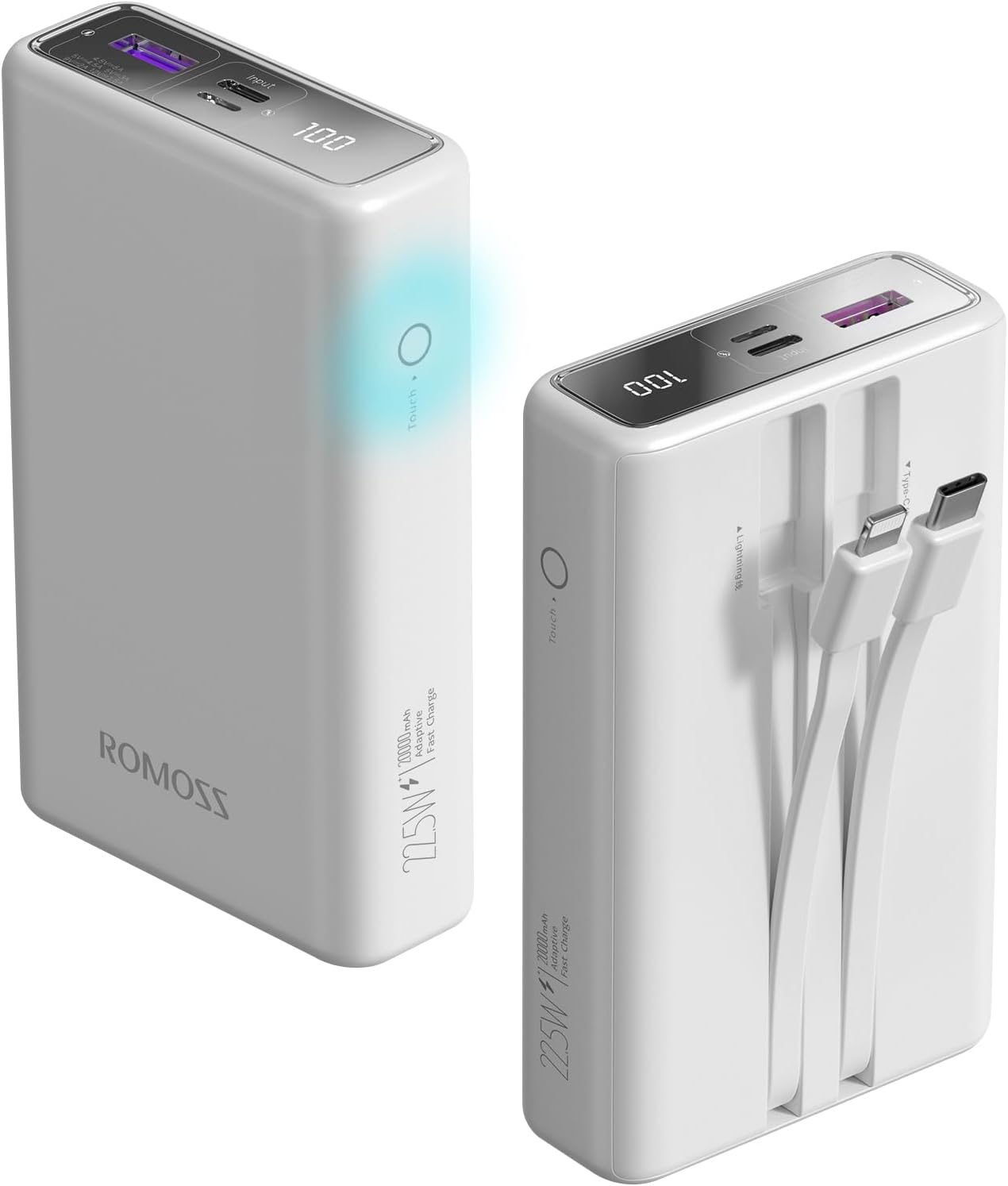
Image: The ROMOSS PAC20 Portable Charger, showcasing its sleek design, LED display, and touch button.
2. 安全情報
Please read and follow these safety instructions carefully to prevent injury or damage to your device:
- パワーバンクを極端な温度(60°C/140°F以上または0°C/32°F以下)、直射日光、火気にさらさないでください。
- デバイスを落としたり、衝撃を与えたり、分解したりしないでください。
- 水、湿気、腐食性物質から遠ざけてください。
- デバイスが破損、膨張、または漏れている場合は使用しないでください。
- 認定された充電ケーブルとアダプターのみを使用してください。
- お子様の手の届かない場所に保管してください。
- デバイスは地域の規制に従って責任を持って廃棄してください。
- This power bank is compliant with IATA standards for air travel, making it a suitable companion for flights.

Image: The ROMOSS PAC20 Portable Charger is designed to be travel-friendly and is allowed on flights, adhering to international aviation standards.
3. パッケージ内容
パッケージに以下の項目が含まれているか確認してください。
- 1 x ROMOSS PAC20 Portable Charger
- USB充電ケーブル1本(パワーバンクの充電用)
- ユーザーマニュアル (本書) x 1

Image: The ROMOSS PAC20 Portable Charger shown alongside its retail packaging and included user manual.
4.製品オーバーview
Familiarize yourself with the various components and features of your PAC20 portable charger:
- 内蔵ケーブル: Integrated Lightning and USB-C cables for direct device charging.
- USB-A 出力ポート: Additional port for charging devices using your own USB-A cable.
- Type-C入力ポート: パワーバンクの充電用。
- Lightning入力ポート: パワーバンクの充電用。
- LEDデジタルディスプレイ: バッテリー残量を正確に表示しますtag(0-100%)。
- タッチボタン: Activates the LED display to check battery status.

Image: The ROMOSS PAC20 highlighting its convenient built-in USB-C and Lightning fast-charge cables.

画像: 詳細な view of the ROMOSS PAC20, illustrating its Lightning output, Type-C output, USB-A output, Type-C input, and Lightning input ports.

Image: Close-up of the ROMOSS PAC20 showing the location of the touch-sensitive on-off button for checking power status.
5. セットアップ
Before first use, it is recommended to fully charge your ROMOSS PAC20 portable charger. This ensures optimal battery performance and accuracy of the LED display.
- Connect the provided USB charging cable to the Type-C or Lightning input port on the power bank.
- Connect the other end of the USB cable to a compatible USB wall charger (not included).
- The LED display will show the charging progress. The power bank is fully charged when the display shows "100".
6. 操作手順
6.1 パワーバンクの充電
To recharge your PAC20 power bank:
- Use the Type-C input port for fast recharging (up to 20W).
- Alternatively, use the Lightning input port.
- A full charge takes approximately 6 hours with an 18W fast charger.

Image: A graph illustrating the faster recharge time of the ROMOSS PAC20 when using an 18W fast charger compared to standard charging.
6.2 デバイスの充電
The PAC20 offers multiple ways to charge your devices:
- 内蔵ケーブルの使用: Simply pull out the integrated Lightning or USB-C cable and connect it directly to your compatible device.
- USB-A出力の使用: デバイスの充電ケーブルをパワーバンクの USB-A 出力ポートに接続します。
- The power bank supports up to 22.5W fast charging for compatible devices.
- The built-in Lightning cable supports PD 20W fast charging, capable of charging an iPhone 14 from 0% to 60% in approximately 30 minutes.

Image: A comparison showing the fast charging capability of the ROMOSS PAC20's PD 20W Lightning cable, charging an iPhone 14 significantly faster than an ordinary 10W cable.
6.3 同時充電
You can charge up to three devices simultaneously using a combination of the built-in cables and the USB-A output port.

Image: The ROMOSS PAC20 demonstrating its ability to charge three devices concurrently, sharing power efficiently.
6.4 バッテリー残量の確認
バッテリー残量を確認するにはtage, simply touch the on-off button located on the side of the power bank. The LED digital display will illuminate, showing the precise percentag0 から 100 までの値です。
7. メンテナンス
Proper care will extend the lifespan of your ROMOSS PAC20 portable charger:
- クリーニング: 柔らかく乾いた布でデバイスを拭いてください。刺激の強い化学薬品や研磨剤入りの洗剤は使用しないでください。
- ストレージ: Store in a cool, dry place away from direct sunlight and extreme temperatures. If storing for a long period, charge the power bank to about 50-70% capacity.
- バッテリーの状態: The high-quality lithium polymer battery is designed to maintain 85% health after 750 discharge cycles, ensuring long-term reliability.

Image: An illustration highlighting the trusted quality of the batteries used in ROMOSS power banks, designed for long-term performance.
8。 トラブルシューティング
If you encounter issues with your PAC20, refer to the following common problems and solutions:
- パワーバンクが充電されない:
- Ensure the charging cable is securely connected to both the power bank's input port and the wall adapter.
- Verify that the wall adapter is functioning correctly and providing sufficient power (e.g., 5V/2A or 9V/2A for fast charging).
- 別の充電ケーブルまたは壁のアダプターを試してください。
- パワーバンクからデバイスが充電されない:
- パワーバンクに十分な充電があることを確認します(LED ディスプレイを確認してください)。
- Verify that the built-in cable or your external cable is securely connected to both the power bank and your device.
- 別の出力ポートまたはケーブルを試してください。
- 一部のデバイスでは特定の充電プロトコルが必要な場合がありますので、互換性を確認してください。
- 遅い充電:
- Ensure both the power bank and the device support fast charging protocols (PD, QC).
- 高品質で急速充電に対応したケーブルを使用してください。
- 複数のデバイスを同時に充電すると、個々の充電速度が低下する可能性があります。
- LEDディスプレイが動作しない:
- Gently touch the on-off button to activate the display.
- パワーバンクの電池が完全に消耗している場合は、充電されるまでディスプレイが点灯しないことがあります。
9. 仕様
| 特徴 | 仕様 |
|---|---|
| モデル番号 | PAC20 White |
| バッテリー容量 | 20000mAh |
| バッテリーセルの構成 | リチウムポリマー |
| 製品寸法 | 11.9 x 7.2 x 3.2 cm |
| アイテム重量 | 355グラム |
| 入力ポート | Type-C、Lightning |
| 出力ポート | Built-in Type-C, Built-in Lightning, USB-A |
| 最大出力 | 22.5W |
| 最大入力電力 | 20W(タイプC) |
| 推奨用途 | Tablets, Phones (iPhone, Galaxy, Google etc.) |
| メーカー | ロモス |
| 原産国 | 中国 |
| 初回利用可能日 | 10年2024月XNUMX日 |
10. 保証とサポート
ROMOSS provides a worry-free 12-month guarantee for the PAC20 Portable Charger from the date of purchase. This warranty covers manufacturing defects and issues arising from normal use.
For any problems, questions, or support needs, please contact our friendly customer service team. We are available 7 days a week, 24 hours a day, and aim to resolve your inquiries within 24 hours.
連絡先:
- Please refer to the contact details provided on your purchase platform or the official ROMOSS webサイト。
Ask a question about this manual
Ask about setup, troubleshooting, compatibility, parts, safety, or missing instructions. Manuals+ will review the question and use this page’s manual context to help answer it.