
1. はじめに
This manual provides detailed instructions for the proper use and maintenance of your Flysocks PF270 Golf Rangefinder. Please read this manual thoroughly before operating the device to ensure optimal performance and longevity.
1.1 製品終了view
The Flysocks PF270 is a high-precision laser rangefinder designed for golf, hunting, and other outdoor activities. It features slope compensation, flagpole lock with vibration, 7X magnification, and a magnetic strip for convenient attachment.

Image 1.1: Flysocks PF270 Golf Rangefinder and Carrying Case
The image displays the Flysocks PF270 Golf Rangefinder, a compact black and green device, alongside its protective black carrying case. The rangefinder features two optical lenses and a prominent 'SLOPE' switch.
1.2 パッケージ内容
パッケージにすべてのアイテムが含まれていることを確認します。
- Flysocks PF270 Laser Golf Rangefinder x1
- Portable Soft Case x1
- Charging Cable (USB-A to USB-C) x1
- Mountaineering Buckle x1
- マイクロファイバークロス×1
- ユーザーマニュアル x1

画像1.2: パッケージ内容
This image shows all items included in the Flysocks PF270 package: the rangefinder itself, its retail box, a portable soft case, a USB charging cable, a mountaineering buckle, a microfiber cleaning cloth, and the user manual.
2. 安全情報
怪我やデバイスの損傷を防ぐために、次の安全上の注意事項を守ってください。
- レーザーの安全性: This device uses an invisible Class 1 laser. Do not stare directly into the laser beam or point it at others.
- 目の保護: レーザーが直接目に当たらないようにしてください。
- 子供たち: デバイスを子供の手の届かない場所に保管してください。
- 温度: デバイスを極端な温度や直射日光に長時間さらさないでください。
- 水への露出: The device is IP54 weatherproof, meaning it is resistant to splashes and dust. It is not designed for submersion or heavy rain.
- 分解: Do not attempt to disassemble or modify the rangefinder. This will void the warranty and may cause damage.
3 製品の特徴
The Flysocks PF270 Golf Rangefinder incorporates several advanced features for precise measurements:
- 測定範囲: 5-1200 yards (approximately 4.5-1097 meters).
- 正確さ: ±0.3 yards at 300 yards.
- 倍率: 7X for clear view遠くのターゲットを狙う。
- 傾斜補償: Calculates adjusted distance based on elevation changes. Features a physical ON/OFF switch for tournament legality.
- 振動式旗竿ロック: Provides a short vibration when the flag is successfully targeted, distinguishing it from background objects.
- 連続スキャンモード: Allows for scanning multiple targets quickly.
- 磁気ストライプ: ゴルフカートや金属面に簡単に取り付けられるマグネットが内蔵されています。
- 充電式バッテリー: Built-in 1000mAh Lithium-Ion battery.
- 複数の測定モード: Includes distance, height, angle, and speed.
- 単位切り替え: Easily switch between Yards, Meters, and Feet.
- Fast Readout: Measurements displayed in as little as 0.1 seconds.
- Ergonomic and Anti-Slip Design: 安全で快適なグリップを実現します。
- IP54耐候性: ほこりや水しぶきに強い。

図3.1: 主な特徴view
This image highlights the main features of the laser rangefinder through icons: 1200 Yards range, Slope Measurement, Flag Lock Vibration, 7X Magnification, Magnetic Stripe, LCD Display, Rechargeable, and 8 Modes.

Image 3.2: Detailed Feature Set
画像ショーasing the rangefinder's capabilities: 1200 Yard range, Slope Switch, 8 Modes, 7X Magnifications, Magnetic Stripe, and Rechargeable functionality, presented with corresponding icons.
4. セットアップ
4.1 バッテリーの初期充電
Before first use, fully charge the rangefinder's built-in battery.
- デバイスの側面にある USB-C 充電ポートを見つけます。
- Connect the provided USB-A to USB-C charging cable to the rangefinder and a compatible USB power source (e.g., computer USB port, wall adapter).
- The battery indicator on the display will show charging progress. A full charge typically takes 2-3 hours.
- 完全に充電されたら、ケーブルを外します。

Image 4.1: Charging the Rangefinder
The image shows the Flysocks PF270 rangefinder with a USB-C cable plugged into its charging port. The internal display indicates battery charge levels (5%, 20%, 40%) and charging status (In Charging, Fully Charged, Power Status).
4.2 電源オン/オフ
- To power on, press the Power/Measurement button (usually located on top).
- The device will automatically power off after 30 seconds of inactivity to conserve battery. Press any button to wake it up.
4.3 接眼レンズの調整
接眼レンズを回転させて、ディスプレイとターゲットが鮮明に表示されるまで焦点を調整します。

Image 4.2: Adjustable Eyepiece and Unit Switching
This image illustrates the 7X magnification, the adjustable eyepiece for clear optics, and the ability to switch measurement units between Yards, Meters, and Feet on the rangefinder.
5. 操作手順
5.1 測定モード
The rangefinder offers various measurement modes. Press the 'Mode' button to cycle through them.
- 距離測定: Standard mode for measuring linear distance to a target.
- 水平モード: 水平距離を測定します。
- 速度測定: 移動する物体の速度を測定します。
- 高さ測定: Calculates the height of an object.

Image 5.1: Distance, Horizontal, and Speed Measurement
This image displays three different views through the rangefinder's eyepiece, illustrating Distance Measurement (up to 1200Yd), Horizontal Mode (activated by short pressing the Mode Button), and Speed Measurement (activated by short pressing the Mode Button to enter Speed Mode).

Image 5.2: Continuous Scan, Height Modes, and Auto-Off
The image shows the Continuous Scan Mode (press and hold Mode Button to target multiple objects), Two Modes for Height (Auto Height & Two Point Height), and the Energy-Saving LCD Auto-Off feature (30s inactivity, press any button to wake).
5.2 スロープ補正
The slope compensation feature adjusts the measured distance based on the incline or decline to the target, providing a more accurate 'play as' distance for golf.
- To activate or deactivate slope compensation, use the physical 'SLOPE' switch located on the side of the rangefinder.
- When the slope function is active, the adjusted distance will be displayed along with the linear distance and angle.
- For tournament play, ensure the slope function is switched OFF to comply with regulations.

Image 5.3: Slope Compensation Mode
This image provides diagrams demonstrating how the rangefinder measures both linear and ballistic (slope-adjusted) distances for uphill and downhill shots, with corresponding display readouts.

Image 5.4: Tournament Legal Slope Switch
A diagram illustrating the physical Slope ON/OFF button on the rangefinder, emphasizing its importance for complying with golf tournament rules regarding slope-adjusted measurements.
5.3 振動式旗竿ロック
This feature helps to accurately target the flagpole by providing a tactile confirmation.
- Aim the crosshairs at the flagpole.
- Press and hold the Power/Measurement button.
- Slowly sweep the rangefinder across the flagpole.
- Once the flagpole is detected and locked, the device will vibrate briefly, and the distance will be displayed.
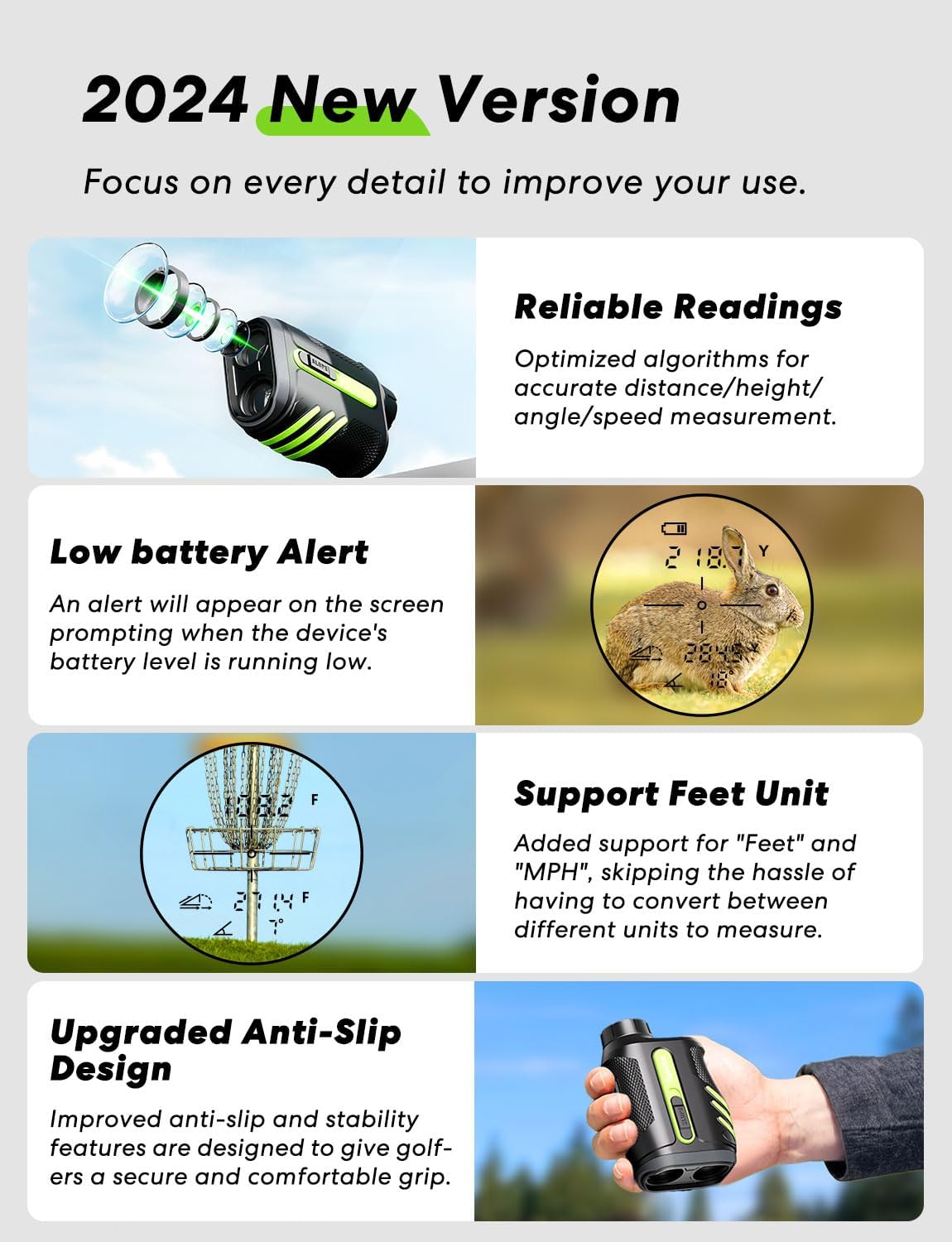
Image 5.5: Flagpole Lock with Vibration in Use
A man is shown looking through the Flysocks PF270 rangefinder, with an overlay demonstrating the flagpole lock feature. The display shows a target locked onto a flag, accompanied by vibration indicators, confirming the target is within 250 yards.

Image 5.6: Lock with Vibration Indicators
この画像は2つの views through the rangefinder's display, illustrating the 'Flagpole Lock' (up to 250 yards) and 'Flag Lock' (up to 350 yards) features, both indicated by vibration symbols, confirming accurate target acquisition.
5.4 単位切り替え
To change the measurement unit (Yards, Meters, Feet), press and hold the 'Mode' button for approximately 3 seconds until the unit changes on the display.
6. 充電とバッテリー
The Flysocks PF270 is equipped with a built-in 1000mAh Lithium-Ion battery.
- 充電時間: フル充電には約2〜3時間かかります。
- バッテリー寿命: Provides power for approximately 40,000 uses per full charge.
- 自動オフ: The device automatically powers off after 30 seconds of inactivity to conserve battery.
- 低バッテリー警告: An alert will appear on the screen when the battery level is low.

Image 6.1: Low Battery Alert and Feet Unit Support
This image shows the rangefinder's display indicating a low battery alert and demonstrating support for 'Feet' as a measurement unit, useful for activities like disc golf.
7. メンテナンス
Proper care ensures the longevity and performance of your rangefinder.
- レンズのクリーニング: Use the provided microfiber cloth to gently clean the lenses. Do not use abrasive materials or harsh chemicals.
- クリーニングボディ: デバイスの本体を柔らかくて乾いた布で拭いてください。amp 布。
- ストレージ: Store the rangefinder in its protective soft case when not in use. Keep it in a cool, dry place away from direct sunlight and extreme temperatures.
- 耐水性: The device is IP54 weatherproof, offering protection against dust and splashing water. Avoid exposing it to heavy rain or submerging it in water.

Image 7.1: IP54 Weatherproof and Performance
This image emphasizes the rangefinder's IP54 weatherproof rating, its fast and reliable readings (optimized algorithms for distance, height, angle, speed), and the low battery alert feature with 30s auto-off.
8。 トラブルシューティング
一般的な問題とその解決策については、このセクションを参照してください。
| 問題 | 考えられる原因 | 解決 |
|---|---|---|
| デバイスの電源が入りません。 | バッテリー残量が少なくなりました。 | Charge the battery fully (refer to Section 4.1). |
| 不正確な測定値。 | レンズが汚れている、ターゲットが小さすぎるか反射している、環境の干渉(霧、大雨)。 | Clean lenses with microfiber cloth; ensure stable aim; avoid use in adverse weather conditions. |
| Cannot lock on target (e.g., flagpole). | Target is too far; unstable hand; background interference. | Ensure target is within range; use a steady hand or brace; sweep slowly across the target. |
| ディスプレイが暗かったり、不鮮明です。 | Eyepiece not focused; low battery. | Adjust the eyepiece (refer to Section 4.3); charge the battery. |
| USB-C charging not working with C-to-C cable. | Device requires USB-A to USB-C cable. | Use the provided USB-A to USB-C charging cable. |
9. 仕様
| 特徴 | 仕様 |
|---|---|
| モデル番号 | PF270 |
| 測定範囲 | 5 - 1200ヤード |
| 正確さ | ±0.3 Yards (at 300 yards) |
| 倍率 | 7X |
| 測定速度 | 0.1秒 |
| 電池のタイプ | 1000mAhリチウムイオンポリマー内蔵 |
| 充電ポート | USB-C |
| 充電時間 | 2~3時間 |
| オートオフ | 30秒 |
| 寸法(長さ×幅×高さ) | 11.1 x 7.29 x 4.5 cm(4.37 x 2.87 x 1.77インチ) |
| 重さ | 212 g (7.5 オンス) |
| 材料 | プラスチック |
| 色 | ブラック+グリーン |
| 耐水性 | IP54耐候性 |
10. 保証と顧客サポート
Flysocks is committed to providing high-quality products and excellent customer service.
10.1 保証情報
Your Flysocks PF270 Golf Rangefinder is covered by a 2-year maintenance warranty for quality-related issues from the date of purchase. Please retain your proof of purchase for warranty claims. This warranty does not cover damage caused by misuse, accidents, unauthorized modifications, or normal wear and tear.

Image 10.1: 2-Year Unconditional Warranty
An icon depicting a wrench, symbolizing the provision of a 2-year unconditional warranty for the product.
10.2 カスタマーサポート
ご質問、ご不明な点、技術的なサポートがございましたら、カスタマー サービス チームまでお問い合わせください。
- オンラインカスタマーサービス: 24/7からご利用いただけます。
- テクニカルサポート: 製品には生涯にわたるテクニカル サポートが提供されます。
Please refer to the contact information provided on the Flysocks official website or your purchase platform for the most current support channels.

Image 10.2: 24/7 Technical Support
An icon featuring a headset, indicating the availability of 7*24 hours technical support for users.