
1. はじめに
Thank you for choosing the RIGOL DS1102Z-E Digital Oscilloscope. This manual provides essential information for the safe and efficient use of your device. Please read it thoroughly before operation and keep it for future reference.
The DS1102Z-E is a high-performance digital oscilloscope designed for various applications including research and development, education, maintenance, and industrial testing. It features a 100 MHz bandwidth, 1 GSa/s sample rate, and a 24 Mpts memory depth, enabling precise analysis of complex waveforms.
2.製品オーバーview
The RIGOL DS1102Z-E is a versatile measurement instrument integrating a frequency counter and supporting protocol decoding for RS232/UART, I2C, and SPI. It also includes FFT analysis and automatic measurement functions to enhance testing efficiency.
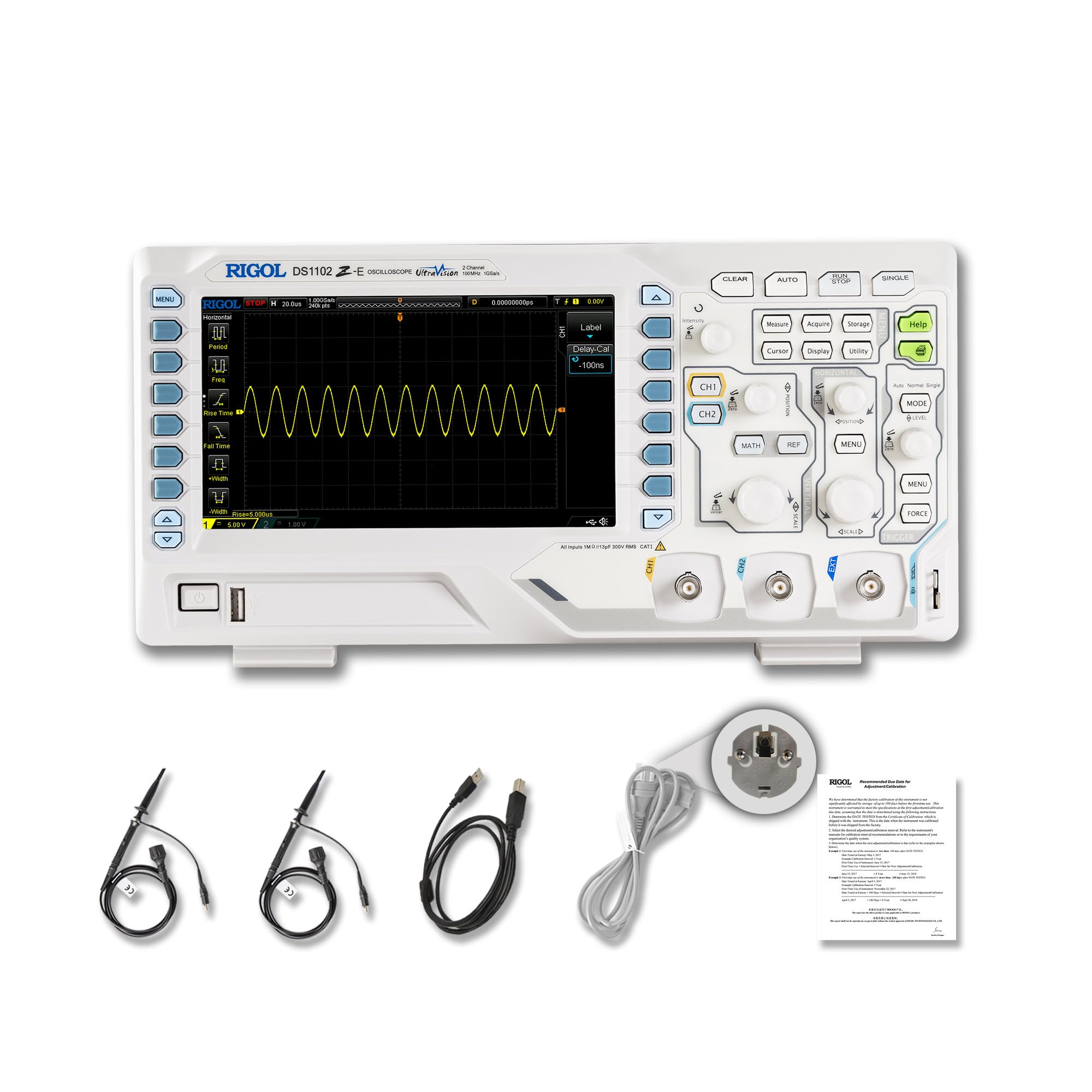
図2.1: 前面 view of the RIGOL DS1102Z-E Digital Oscilloscope.
2.1 主な特徴
- 100 MHz Bandwidth, 1 GSa/s Sampルレート: Captures signals with high precision.
- 24 Mpts Memory Depth: Allows for extended signal capture and detailed waveform analysis.
- Multi-function Measurement Device: Includes frequency counter, protocol decoding (RS232/UART, I2C, SPI), FFT analysis, and automatic measurement functions.
- 波形の記録と再生: Records signal variations and replays them for fault identification.
- 高解像度ディスプレイ: 7-inch TFT screen with 256-level grayscale, offering a phosphor-like display effect for clear waveform details.
- Remote Control & Secondary Development Support: Equipped with USB and LAN ports for PC remote control, compatible with SCPI commands, LabVIEW, Visual Basic, and Visual C++.
2.2 箱の中身

Figure 2.2: Contents included with the DS1102Z-E Oscilloscope.
- 1x Main Unit (DS1102Z-E Digital Oscilloscope)
- 2x Passive Probes (150MHz)
- 1x Power Cable (EU plug)
- 1x USB A-B Cable
- 保証カード x 1
- 校正証明書1枚
- 1x Declaration of Conformity
3. セットアップ
Follow these steps to set up your RIGOL DS1102Z-E oscilloscope:
- 開梱: すべての部品をパッケージから慎重に取り出し、デバイスに損傷がないか点検してください。
- 電源接続: Connect the provided power cable to the oscilloscope's power input and then to a suitable AC power outlet.
- プローブ接続: Connect the passive probes to the BNC input connectors (CH1, CH2) on the front panel. Ensure a secure connection.
- 接地: Always ensure the oscilloscope is properly grounded through the power cable.
- USB/LAN接続(オプション): If you plan to use remote control or secondary development, connect the USB cable to a PC or the LAN cable to your network.

図3.1:以上view of the oscilloscope's physical dimensions and ports.
4. 操作手順
This section covers the basic operation of your oscilloscope.
4.1 電源のオン/オフ
- 電源オン: Press the power button located on the front panel. The device will perform a self-test and display the main interface.
- 電源を切る: デバイスがシャットダウンするまで電源ボタンを押し続けます。
4.2 基本波形表示
After powering on, connect a signal to one of the input channels (e.g., CH1). Adjust the vertical scale (Volts/Div) and horizontal scale (Time/Div) knobs to display the waveform clearly. Use the オート button for automatic setup of the waveform display.

図4.1:例ample of a waveform displayed on the oscilloscope screen.
4.3高度な機能
- 測定機能: を押す 測定 button to access automatic measurements like frequency, period, peak-to-peak voltageなど
- トリガーシステム: Use the trigger controls to stabilize repetitive waveforms. Adjust the trigger level and mode (Edge, Pulse, Video, Slope, etc.) as needed.
- 波形記録: The oscilloscope allows recording and replaying waveforms. Access this feature through the menu to capture transient events.
- プロトコルデコード: For serial bus analysis (RS232/UART, I2C, SPI), configure the decoding settings via the menu.
- FFT分析: Perform Fast Fourier Transform (FFT) to analyze the frequency components of your signal.

Figure 4.2: Complex waveform analysis with measurement data.

Figure 4.3: Multiple waveforms displayed simultaneously for comparison.
5. メンテナンス
適切なメンテナンスを行うことで、オシロスコープの寿命と精度が確保されます。
- クリーニング: オシロスコープの外側は、柔らかく乾いた布で拭いてください。頑固な汚れには、軽く湿らせた布で拭いてください。amp 中性洗剤を含ませた布で拭いてください。研磨剤入りの洗剤や溶剤の使用は避けてください。
- スクリーンのお手入れ: Clean the display screen with a soft, lint-free cloth. Do not use excessive force or harsh chemicals.
- ストレージ: オシロスコープを使用しないときは、直射日光、極端な温度、過度のほこりを避け、清潔で乾燥した環境に保管してください。
- プローブのお手入れ: Handle probes carefully. Avoid bending or stressing the probe tips. Store them properly to prevent damage.
- 較正: For optimal performance, periodic calibration by qualified personnel is recommended. Refer to the official RIGOL website for calibration services.
6。 トラブルシューティング
このセクションでは、発生する可能性のある一般的な問題に対する解決策を示します。
| 問題 | 考えられる原因 | 解決 |
|---|---|---|
| 電源を入れても電源が入らない。 | Power cable not connected, power outlet faulty, or power button issue. | Check power cable connection. Test the power outlet. Ensure the power button is fully pressed. |
| 波形が表示されません。 | No signal input, probe not connected correctly, vertical/horizontal scale incorrect, or trigger not set. | Verify signal source. Check probe connections. Adjust Volts/Div and Time/Div. Press オート or adjust trigger settings. |
| Waveform is unstable. | Incorrect trigger settings. | Adjust trigger level, mode, and source to stabilize the waveform. |
| リモコンが機能しない。 | USB/LAN cable issue, incorrect network settings, or software driver not installed. | Check cable connections. Verify network configuration. Install necessary drivers and software (e.g., UltraScope). |
If the problem persists, please contact RIGOL technical support.
7. 仕様
Detailed technical specifications for the RIGOL DS1102Z-E Digital Oscilloscope.

図 7.1: 主要な技術仕様の視覚的表現。
| 特徴 | 仕様 |
|---|---|
| ブランド | リゴル |
| モデル | DS1102Z-E |
| 帯域幅 | 100 MHz |
| チャンネル | 2 Channels + EXT |
| Sampルレート | 1GSa/秒 |
| メモリ深度 | 24 Mpts |
| 波形キャプチャレート | 30,000 wfms/秒 |
| 分解能 | 8ビット |
| 最小感度 | 1mV/div |
| Minimum Time Base | 2 ns/div |
| デコードサポート | RS232/UART, I2C, SPI |
| FFT分析 | 標準 |
| 画面 | 7インチTFT(800x480) |
| 接続性 | USBホスト、USBデバイス、LAN |
| 電源 | ACアダプター |
| 色 | グレー/ホワイト |
| アイテム重量 | 2.9キログラム |
| 寸法(長さ×幅×高さ) | 31.31 x 16.08 x 12.24 センチメートル |
| 準拠規格 | CE、RoHS |
| メーカー部品番号 | DS1102Z-E |
| 原産国 | 中国 |
8. 保証とサポート
RIGOL is committed to providing high-quality products and excellent customer service.
- 保証: The RIGOL DS1102Z-E Digital Oscilloscope comes with a 3年間保証 購入日から。この保証は通常の使用における材料および製造上の欠陥をカバーします。
- テクニカルサポート: RIGOL offers 24時間7日のテクニカルサポート to assist you with any questions or issues you may encounter. Please refer to the official RIGOL web連絡先情報とサポート リソースのサイト。
- オンラインリソース: Visit the official RIGOL website for product documentation, software updates (e.g., UltraScope), and additional support materials.

Figure 8.1: RIGOL oscilloscopes support multiple languages for user convenience.