
1. はじめに
Thank you for choosing the AVATTO WT410-BH-3A-W Smart Thermostat. This device is designed to provide intelligent control over your gas boiler system, allowing you to manage your home's heating efficiently. With Wi-Fi connectivity, you can remotely adjust temperatures via a mobile application, integrate with popular voice assistants, and utilize advanced scheduling options. This manual provides detailed instructions for installation, operation, and maintenance to ensure optimal performance and energy savings.
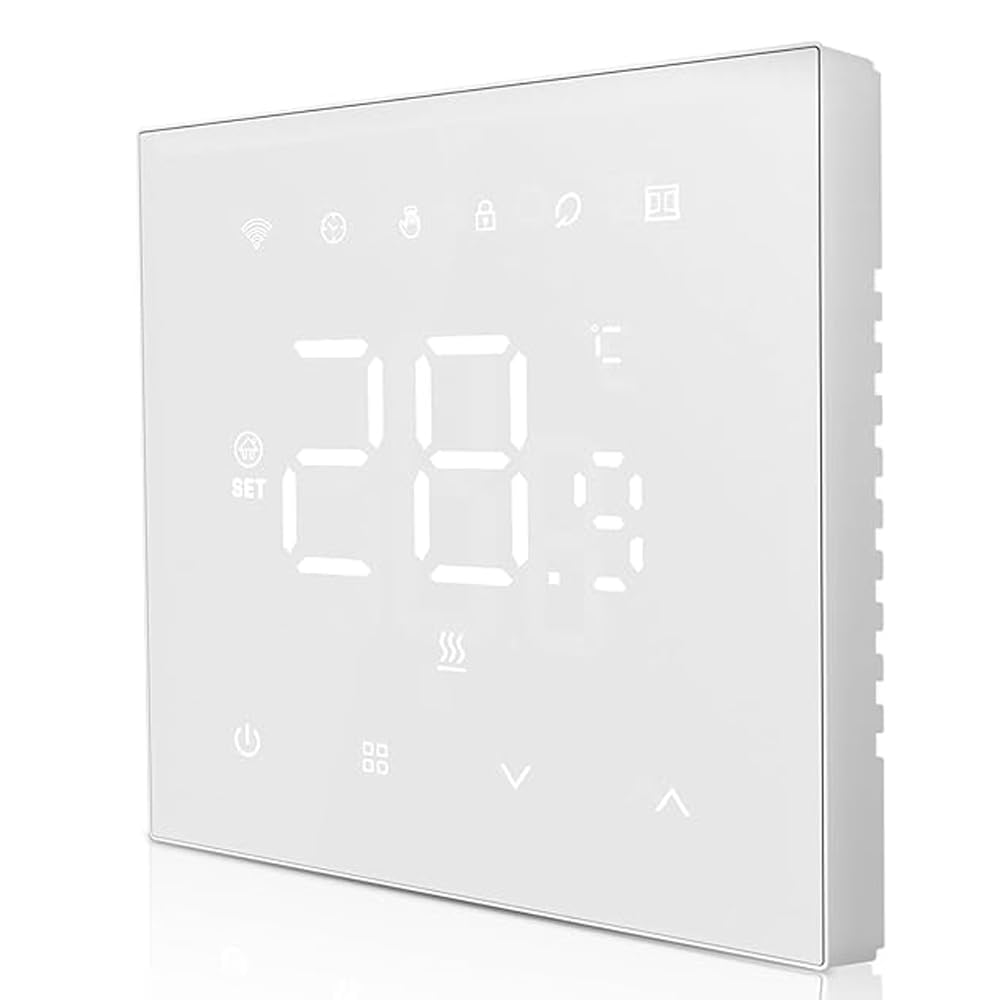
図1: フロント view of the AVATTO WT410-BH-3A-W Smart Thermostat, showing its sleek design and LED display.
2. 安全情報
- 電気による危険: Installation must be performed by a qualified electrician. Disconnect power at the circuit breaker before installation to prevent electrical shock.
- 巻tage互換性: サーモスタットの容量を確認するtage requirements match your electrical system.
- ボイラーの互換性: This thermostat is designed for gas boiler systems with a maximum load of 3A. Verify compatibility with your boiler before installation.
- 環境条件: Do not install in areas with high humidity, direct sunlight, or extreme temperatures.
- 子供の安全: デバイスを子供の手の届かない場所に保管してください。
3. パッケージ内容
パッケージに以下の項目が含まれているか確認してください。
- AVATTO WT410-BH-3A-W Smart Thermostat Unit
- 取付ネジ(2本)
- ユーザーマニュアル(このドキュメント)
4. インストール
重要: Installation should only be carried out by a qualified professional. Ensure the main power supply to your heating system is turned off before proceeding.
- 電源切断: Turn off the main power supply to your boiler system at the circuit breaker. Verify that the power is off using a voltageテスター。
- 古いサーモスタットを取り外します(該当する場合): 既存のサーモスタットを壁から慎重に取り外します。取り外す前に配線の接続を確認してください。
- ベースプレートの取り付け: Separate the front panel of the AVATTO thermostat from its base plate. Secure the base plate to the wall using the provided mounting screws. Ensure it is level.
- 配線: Connect the wires from your boiler system to the appropriate terminals on the thermostat's base plate. Refer to the "Wiring Diagram" section for detailed instructions. Ensure all connections are secure.
- サーモスタットユニットの取り付け: Carefully attach the front panel of the thermostat onto the mounted base plate, ensuring it clicks securely into place.
- 電力を回復する: 主電源をブレーカーで再びオンにしてください。サーモスタットのディスプレイが点灯するはずです。
5.配線図
The AVATTO WT410-BH-3A-W thermostat typically requires connections for power supply and boiler control.
Standard Wiring (Gas Boiler 3A):
- L(ライブ): Connect to the live wire from your power supply.
- N(中立): Connect to the neutral wire from your power supply.
- いいえ(通常開): Connect to the boiler's control input (often labeled as 'SW' or 'COM' on the boiler).
- COM(共通): Connect to the other boiler control input.
Note: Always refer to your boiler's specific wiring diagram and consult a qualified electrician if you are unsure about any connections. Incorrect wiring can damage the thermostat or your boiler system.
6. アプリとWi-Fiの設定
To unlock the full potential of your AVATTO Smart Thermostat, connect it to your home Wi-Fi network and the compatible mobile application.
- アプリをダウンロード: 検索する "Smart Life" or "Tuya Smart" in your mobile app store (iOS or Android) and download the application.
- 登録/ログイン: アプリを開いて新しいアカウントを登録するか、すでにアカウントをお持ちの場合はログインしてください。
- デバイスを追加: In the app, tap the "+" icon (usually in the top right corner) to add a new device. Select "Thermostat" or "Heater" from the device list.
- ペアリングモード: On the thermostat, press and hold the Wi-Fi icon button (or a similar pairing button) until the Wi-Fi indicator light starts blinking rapidly. This indicates it's in pairing mode.
- Wi-Fiに接続します: Follow the on-screen instructions in the app. You will need to enter your home Wi-Fi network name (SSID) and password. Ensure your phone is connected to a 2.4GHz Wi-Fi network (5GHz networks are generally not supported by smart home devices).
- 確認: Once connected, the Wi-Fi indicator on the thermostat will become solid, and the app will confirm successful pairing. You can now control your thermostat remotely.
For voice assistant integration (e.g., Amazon Alexa, Google Assistant), follow the instructions within the "Smart Life" or "Tuya Smart" app to link your account.
7。 動作モード
The AVATTO WT410-BH-3A-W thermostat supports four main operating modes to suit your heating needs:
- 手動モード: In this mode, the thermostat maintains a constant temperature set by the user until manually changed. It overrides any programmed schedules.
- プログラミングモード: The thermostat follows the pre-set weekly schedule, automatically adjusting the temperature at specified times.
- Temporary Programming Mode: While in Programming Mode, you can temporarily adjust the temperature. The thermostat will maintain this new temperature until the next scheduled program change, then revert to the schedule.
- Absence Mode (Holiday Mode): Designed for extended periods away from home. You can set a lower, energy-saving temperature for a specified duration, and the thermostat will automatically resume normal operation afterward.
Switch between modes using the dedicated mode button on the thermostat or through the mobile application.
8. 週間プログラミング
The thermostat allows for advanced weekly programming, enabling you to set different temperatures for specific time periods throughout the week. This helps optimize comfort and energy efficiency.
You can set up to 6つの期間 for weekdays (Monday-Friday) and 2つの期間 for weekends (Saturday-Sunday).
- アクセスプログラミング: Press and hold the "M" (Mode) button or navigate to the "Schedule" section in the mobile app.
- Set Weekday Schedule: For Monday to Friday, define up to 6 time periods (e.g., Wake, Leave, Return, Sleep) and their corresponding desired temperatures.
- Set Weekend Schedule: For Saturday and Sunday, define up to 2 time periods and their desired temperatures.
- 設定を保存: Confirm and save your programming. The thermostat will now follow this schedule when in Programming Mode.
The thermostat offers high precision with temperature settings, accurate to 0.5°C, and displays temperature with 0.1°C precision. An adjustable hysteresis function (0.5°C to 10°C) allows fine-tuning of temperature deviation.
9. メンテナンス
The AVATTO WT410-BH-3A-W Smart Thermostat requires minimal maintenance to ensure long-term performance.
- クリーニング: ディスプレイを軽く拭いて、asing with a soft, dry cloth. Do not use abrasive cleaners, solvents, or chemical sprays, as these can damage the device.
- 障害物を避けてください: Ensure no objects are blocking the thermostat's vents or sensors, as this can affect temperature readings.
- ソフトウェアアップデート: Periodically check the mobile application for firmware updates for your thermostat. Updates can improve performance and add new features.
10。 トラブルシューティング
| 問題 | 考えられる原因 | 解決 |
|---|---|---|
| サーモスタットのディスプレイが空白です。 | 電源がありません。 | Check the circuit breaker for your heating system. Ensure wiring is correct and secure. |
| サーモスタットが Wi-Fi に接続できません。 | Incorrect Wi-Fi password; 5GHz network; thermostat too far from router. | Ensure correct 2.4GHz Wi-Fi password. Move thermostat closer to router or use a Wi-Fi extender. Re-enter pairing mode. |
| Boiler not responding to thermostat. | Incorrect wiring; boiler issue; thermostat not in heating mode. | Verify wiring connections. Check boiler's power and status. Ensure thermostat is set to a temperature higher than the current room temperature and is in an active heating mode. |
| 温度の測定値が不正確です。 | Thermostat placed near heat sources/drafts; sensor obstruction. | Relocate thermostat if possible. Ensure no objects are blocking the internal sensor. |
If you encounter issues not listed here or require further assistance, please contact AVATTO customer support.
11. 仕様
| 特徴 | 詳細 |
|---|---|
| ブランド | アヴァット |
| モデル番号 | WT410-BH-3A-W |
| 互換性 | Gas Boiler (3A Max Load) |
| 接続性 | Wi-Fi(2.4GHz) |
| 温度精度 | 0.5℃ |
| 温度表示精度 | 0.1℃ |
| ヒステリシス範囲 | 0.5℃~10℃ |
| プログラミング | 6 periods (Mon-Fri), 2 periods (Sat-Sun) |
| 音声アシスタントサポート | Yes (via Smart Life/Tuya Smart app integration) |
12. 保証とサポート
AVATTO products are manufactured to the highest quality standards. For information regarding warranty coverage, please refer to the warranty card included with your purchase or visit the official AVATTO webサイト。
For technical support, troubleshooting assistance, or any questions about your AVATTO WT410-BH-3A-W Smart Thermostat, please contact AVATTO customer service through their official channels.
Webサイト: www.avatto.com (注: これはプレースホルダーです URL as no official support link was provided.)