
導入
Thank you for choosing the Thunderobot K87 Wired Mechanical Keyboard. This manual provides essential information for the proper setup, operation, maintenance, and troubleshooting of your new keyboard. Please read this manual thoroughly before using the product to ensure optimal performance and longevity.

図1: 角度付き view of the Thunderobot K87 Mechanical Keyboard.
設定
パッケージ内容
続行する前に、パッケージに次の項目が含まれていることを確認してください。
- Thunderobot K87 Wired Mechanical Keyboard
- USBケーブル
- ユーザーマニュアル(このドキュメント)
キーボードの接続
- Unpack the Thunderobot K87 keyboard and the included USB cable.
- Connect the USB-C end of the cable to the port located on the keyboard.
- ケーブルの USB-A 端子をコンピューターの使用可能な USB ポートに接続します。
- キーボードはオペレーティングシステムによって自動的に認識されます。通常、基本的な機能を使用するために追加のドライバーは必要ありません。

図2:下 view of the keyboard, illustrating adjustable feet and cable management options.
操作手順
基本機能
The Thunderobot K87 is a standard 87-key (TKL) layout mechanical keyboard. Simply plug it into your computer, and it is ready for typing. The keyboard features Red mechanical switches, known for their linear feel and quiet operation, making them suitable for both typing and gaming.
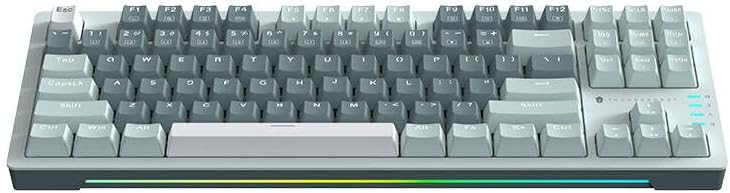
図3: トップダウン view of the Thunderobot K87 keyboard layout.
マルチメディアキーとファンクションキー
The keyboard includes a Function (Fn) key, typically located near the right Alt key. This key, when pressed in combination with the F1-F12 keys, activates various multimedia and system functions. Refer to the keycap legends for specific functions.
- Fn + F1-F12: Typically control media playback, volume, and other system shortcuts.
- Fn + Windowsキー: ゲーム中に誤って押されることを防ぐために、Windows キーをロック/ロック解除します。
バックライト制御
The Thunderobot K87 keyboard features customizable RGB backlighting. Specific key combinations allow you to change lighting modes, brightness, and speed. Consult the keyboard's keycap legends or the manufacturer's website for detailed instructions on lighting customization.

図4: 前面 view showing the RGB lighting strip.

図5: サイドプロfile view demonstrating keycap height and keyboard angle.
メンテナンス
キーボードの掃除
定期的にクリーニングすると、キーボードの外観と機能性を維持するのに役立ちます。
- 切断: 清掃する前に必ずキーボードをコンピューターから取り外してください。
- ほこりの除去: 圧縮空気缶を使用して、キーキャップ間のほこりやゴミを吹き飛ばします。
- 表面洗浄: キーキャップとキーボードの表面を、柔らかく糸くずの出ない布で軽く拭いてください。amp水または低刺激性で研磨剤を含まない洗浄液で拭き取ってください。過度の湿気を避けてください。
- 避ける: Do not use harsh chemicals, solvents, or abrasive materials, as these can damage the keyboard's finish or keycap legends.
ストレージ
When not in use for extended periods, store the keyboard in a dry, cool place away from direct sunlight and extreme temperatures. Consider covering it to prevent dust accumulation.
トラブルシューティング
If you encounter issues with your Thunderobot K87 keyboard, please refer to the following common solutions:
| 問題 | 考えられる原因 | 解決 |
|---|---|---|
| キーボードが反応しない | USB 接続が緩んでいる、USB ポートに障害がある、ドライバーに問題がある。 | USBケーブルがしっかりと接続されていることを確認してください。コンピュータの別のUSBポートを試してください。コンピュータを再起動してください。 |
| 特定のキーが機能しない | キーキャップの下にゴミがあり、スイッチが故障しています。 | Use compressed air to clear debris. If the issue persists, contact customer support. |
| バックライトが機能しない、または正しくない | Lighting mode disabled, software conflict. | Check keyboard's lighting control key combinations (Fn + specific keys). Ensure no conflicting software is running. |
| キーボード入力の遅れ | USB port issues, system performance. | Try a different USB port. Close unnecessary background applications. |
If the problem persists after trying these solutions, please contact Thunderobot customer support for further assistance.
仕様
| 特徴 | 詳細 |
|---|---|
| モデル番号 | JM03NQ002 |
| ブランド | Thunderobot |
| 接続性 | 有線(USB) |
| スイッチタイプ | 赤いメカニカルスイッチ |
| レイアウト | 87キー(テンキーレス) |
| バックライト | RGB |
| メーカー | Thunderobot |
| ASIN | B0CWS77B83 |
| 保証 | 2 years manufacturer |
保証情報
The Thunderobot K87 Wired Mechanical Keyboard (Model JM03NQ002) comes with a 2年間のメーカー保証 from the date of purchase. This warranty covers defects in materials and workmanship under normal use. It does not cover damage caused by accident, misuse, abuse, neglect, unauthorized modification, or improper installation.
To claim warranty service, please retain your proof of purchase. For detailed warranty terms and conditions, or to initiate a warranty claim, please contact Thunderobot customer support.
サポート
For technical assistance, product inquiries, or warranty claims, please visit the official Thunderobot website or contact their customer support team. Please have your product model number (JM03NQ002) and proof of purchase ready when seeking support.
Official Thunderobot Webサイト: www.thunderobot.com (注意:これはプレースホルダーです URL 具体的なサポートがないため URL was provided in the product data. Refer to your product packaging or official Thunderobot documentation for the correct support contact information.)