
FLEXISPOT QS1M-1675-IE
FLEXISPOT Lite 電動スタンディングデスク ユーザーマニュアル
Model: QS1M-1675-IE
導入
Thank you for choosing the FLEXISPOT Lite Electric Standing Desk. This manual provides essential information for the safe and efficient assembly, operation, and maintenance of your new desk. Please read this manual thoroughly before use and retain it for future reference.
The FLEXISPOT Lite Electric Standing Desk is designed to promote a healthier working environment by allowing seamless transitions between sitting and standing positions. Its robust construction and intuitive controls ensure a comfortable and productive workspace.
安全に関する注意事項
- 組み立て前に、すべての部品が揃っていて損傷がないことを確認してください。部品が不足または破損している場合は使用しないでください。
- 怪我を防ぐため、操作中は子供やペットをデスクから遠ざけてください。
- 高さ調整中は、デスクフレームの可動部分の近くに手やその他の物を置かないでください。
- 電源コードが正しく接続され、損傷していないことを確認してください。コードやプラグが損傷している状態でデスクを操作しないでください。
- デスクに過度の荷重をかけないでください。最大荷重については仕様セクションを参照してください。
- Only use the desk on a level surface to ensure stability.
- 清掃やメンテナンスを行う前に電源を切ってください。
パッケージ内容
パッケージに以下のすべてのコンポーネントが含まれていることを確認してください。
- Desktop (160 x 75 cm, White+Maple)
- Desk Legs/Frame (Alloy Steel)
- 電動モーターと制御ボックス
- コントロールパネル
- 電源アダプターとケーブル
- カップホルダー
- ストレージフック
- Cable Management Accessories (Cable ties, Bundle Clamp)
- 組み立て用ハードウェア(ネジ、六角レンチなど)
- ユーザーマニュアル
画像1: 以上view of desk components, including the desktop, frame, and control panel, ready for assembly.
セットアップと組み立て
Follow these steps to assemble your FLEXISPOT Lite Electric Standing Desk. It is recommended to have two people for assembly, especially when handling the desktop.
- コンポーネントを解凍します: Carefully remove all parts from the packaging and lay them out on a clean, soft surface to prevent scratches. Refer to the "Package Contents" section to ensure all parts are present.
- Attach Lifting Columns to Feet: Secure the lifting columns to the desk feet using the provided screws and tools. Ensure they are firmly attached.
- クロスバーを接続: Attach the crossbar between the two lifting columns. This forms the main frame of the desk.
- コントロールボックスとモーターをインストールします。 Mount the control box and motor onto the designated areas of the desk frame. Connect the motor cables to the control box.
- デスクトップを添付: Carefully place the desktop upside down on a soft surface. Position the assembled frame onto the desktop, aligning the pre-drilled holes. Secure the frame to the desktop using the provided screws.
- コントロール パネルをインストールします。 Mount the control panel to the underside of the desktop in an easily accessible location. Connect its cable to the control box.
- 付属品を取り付ける: Install the cup holder and storage hook to the desired locations on the desktop edge.
- ケーブル管理 Use the provided cable management accessories to organize and secure all cables, including the power cord.
- ポジションデスク: With assistance, carefully flip the desk upright and place it in its desired location. Ensure it is on a stable, level surface.
- 接続電源: Plug the power adapter into the control box, then plug the power cord into a wall outlet.
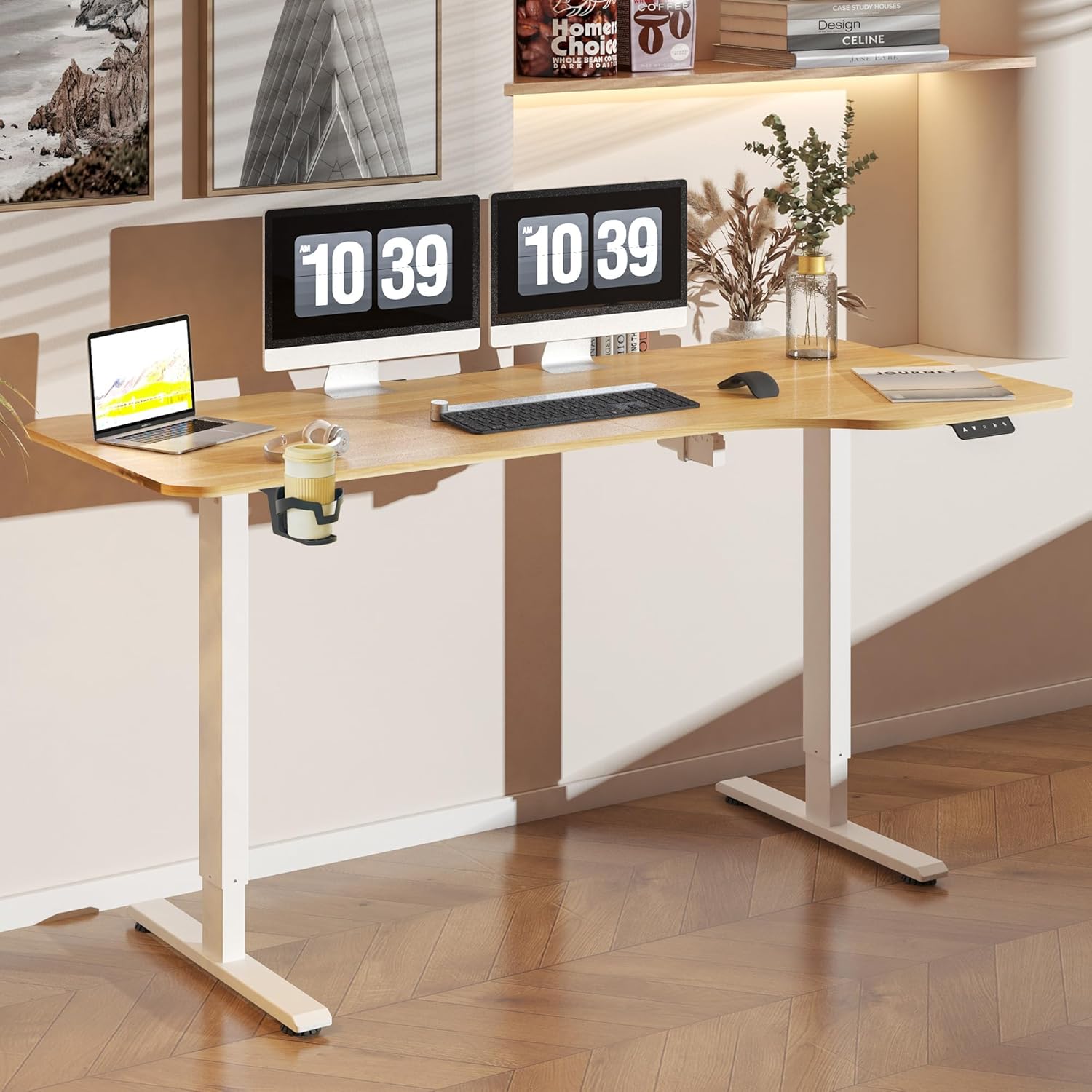
画像2: The FLEXISPOT Lite Electric Standing Desk fully assembled and set up in a modern home office environment.
操作手順
コントロールパネルオーバーview

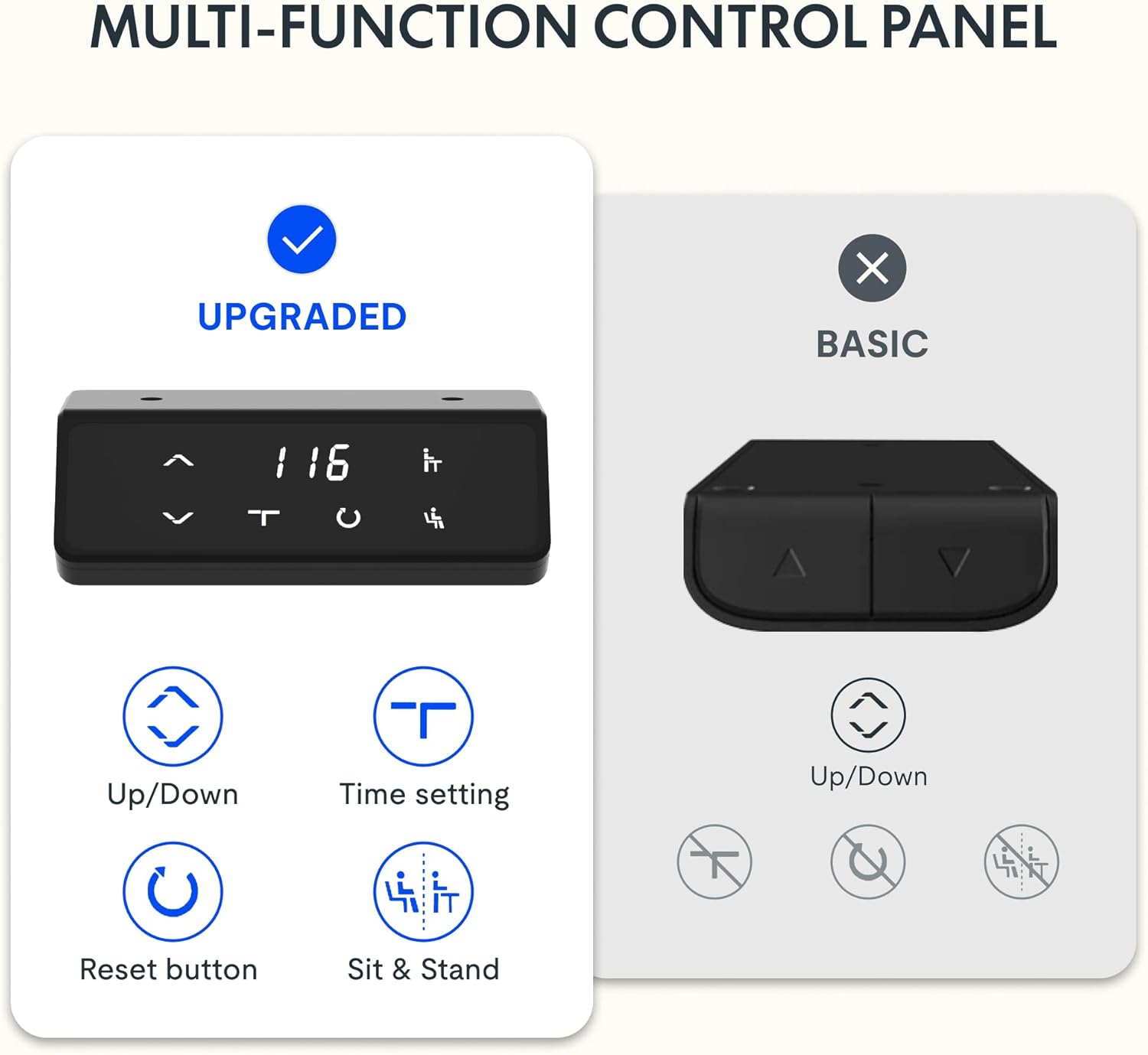
画像3: 詳細 view of the desk's control panel, showing buttons for Up/Down adjustment, Time Setting, Reset, and Sit & Stand memory presets.
Your FLEXISPOT Lite Electric Standing Desk features an intuitive control panel for easy height adjustment and memory functions.
- 上/下ボタン (⌃ / ⌄): Press and hold these buttons to manually adjust the desk height upwards or downwards. Release the button to stop at the desired height.
- メモリプリセット: The control panel allows you to save and recall preferred height settings.
- Adjust the desk to your desired height (e.g., a comfortable sitting or standing position) using the Up/Down buttons.
- Press and hold the 'Sit & Stand' button (person icon) for approximately 3-5 seconds until the display flashes or beeps, indicating the height is saved.
- To recall a saved height, simply press the 'Sit & Stand' button. The desk will automatically move to the last saved height. (If your model supports multiple presets, consult the full product manual for specific instructions on saving and recalling each position.)
- リセットボタン(R): If the desk encounters an error or does not respond correctly, a reset may be required.
- Press and hold the 'R' button (often indicated by a circle icon or 'Reset' text).
- The desk will move to its lowest position, then slightly rise. Release the button once this sequence is complete. The desk is now reset.
- Time Setting (T): This button, often labeled with a clock icon, may be used to set a timer for sit/stand reminders, if available on your model. Consult the full product manual for detailed instructions on using this feature.

画像4: The FLEXISPOT Lite Electric Standing Desk in use, highlighting the accessible placement of the control panel for easy height adjustments.
特徴
高さ調整範囲
The desk offers a wide range of height adjustment to accommodate various user preferences and activities, from a minimum of 71 cm to a maximum of 117 cm.

画像5: Visual representation of the desk's height adjustment capabilities, illustrating the minimum and maximum heights.
統合アクセサリ
- カップホルダー: A convenient cup holder is included to keep your beverages secure and prevent spills on your workspace.
- 収納フック: A practical hook is provided for hanging headphones, bags, or other items, helping to keep your desktop clear and organized.

画像6: 詳細 view of the integrated cup holder and storage hook, designed for convenience and organization.
ケーブル管理
The desk includes features to help manage and organize your cables, ensuring a tidy and safe workspace.
- Cable Management Tray/Clips: Utilize the provided cable management solutions to route and secure power cords and peripheral cables.
- Bundle Clamp/Grommet: The desktop features a grommet hole and clamp for neatly passing cables through the desk surface.

画像7: Examples of the desk's cable management features, including a cable routing system and a desktop grommet for organized wiring.
メンテナンス
- クリーニング: 机の表面とフレームを柔らかくて乾いた布で拭いてください。amp 布で拭いてください。仕上げを傷める可能性のある研磨剤入りの洗剤や刺激の強い化学薬品は使用しないでください。
- 検査: すべてのネジと接続部がしっかりと締まっているか定期的に確認してください。必要に応じて締め直してください。
- ケーブル管理 特に高さ調整中に、ケーブルが挟まれたり絡まったりしていないことを確認してください。
- モーターケア: The electric motor is designed for maintenance-free operation. Do not attempt to open or service the motor or control box.
トラブルシューティング
| 問題 | 考えられる原因 | 解決 |
|---|---|---|
| 机は動きません。 | 電源コードが外れている、モーターケーブルが緩んでいる、過負荷になっている。 | Check power connections. Ensure motor cables are securely plugged in. Reduce weight on the desk. Perform a reset. |
| 机の動きが不均一であったり、異常な音がしたりします。 | Loose connections; obstruction; uneven load. | Check all assembly screws. Ensure no objects are obstructing the lifting columns. Distribute weight evenly on the desktop. Perform a reset. |
| コントロールパネルにエラーコードが表示されます。 | 特定のシステム エラーです。 | Refer to the specific error code in the full product manual (if available) or contact customer support. Often, a reset can resolve minor errors. |
| メモリプリセットが機能しません。 | Presets not saved correctly; system glitch. | Re-save your desired height presets. Perform a reset if the issue persists. |
仕様
| 特徴 | 詳細 |
|---|---|
| モデル番号 | QS1M-1675-IE |
| デスクトップサイズ | 160 x 75 cm |
| デスクトップ素材 | 木材 |
| フレーム素材 | 合金鋼 |
| 色 | White+Maple |
| 最小高さ | 71センチ |
| 最大高さ | 117センチ |
| 最大重量容量 | 150ポンド(約68kg) |
| モーター騒音レベル | 50dB未満 |
| 組み立てが必要 | はい |
保証とサポート
FLEXISPOT stands behind the quality of its products. Your FLEXISPOT Lite Electric Standing Desk comes with the following warranty:
- 5年間保証: デスクフレームに適用されます。
- 3年間保証: Applies to controllers and motors.
For warranty claims, technical support, or any questions regarding your product, please contact FLEXISPOT customer service. Please have your model number (QS1M-1675-IE) and proof of purchase ready.

画像8: Official FLEXISPOT warranty details, outlining coverage for the desk frame, controllers, and motors.
関連文書QS1M-1675-IE


Ask a question about this manual
Ask about setup, troubleshooting, compatibility, parts, safety, or missing instructions. Manuals+ will review the question and use this page’s manual context to help answer it.