
1.製品オーバーview
The LIORQUE Digital Kitchen Timer Model YGH5249 is a multi-functional device designed to assist with various timing needs. It features a large LCD display, adjustable alarm volume, and multiple placement options. This timer can function as a countdown timer, a count-up stopwatch, and a digital clock.

画像1.1:正面 view of the LIORQUE Digital Kitchen Timer, highlighting its large LCD screen and control buttons.
主な特徴:
- 3-in-1 機能: Timer, Stopwatch, and Clock modes.
- 大型LCDディスプレイ: Ensures clear readability of time.
- 調整可能なアラーム音量: Three levels (Mute, Low, High) to suit different environments.
- カスタムモード: Save frequently used countdown times for quick access.
- 多彩な配置: Magnetic back, foldable stand, and lanyard hole for flexible use.
- Delay Reminder: Automatically starts counting up after countdown finishes.
- Auto-Restore: Remembers the last set countdown time.

Image 1.2: Visual representation of the timer's main features and functions.
2. セットアップとバッテリーの取り付け
The timer requires 2 AAA batteries (included) for operation. Follow these steps to install them:
- タイマーの背面にある電池ボックスのカバーを見つけます。
- カバーをスライドさせて開きます。
- 電池ボックス内の指示に従って、極性 (+ と -) が正しいことを確認して、単 4 電池 2 本を挿入します。
- 電池カバーをしっかりと閉じてください。
電池を入れるとタイマーは自動的に電源が入ります。
3. 操作手順
3.1 Switching Modes (Timer/Stopwatch/Clock)
The LIORQUE timer offers three modes: Timer (countdown), Stopwatch (count-up), and Clock. To switch between Timer mode and Clock mode, press and hold the ST / SP button for 2 seconds. The timer will display the current time in Clock mode or the timer interface in Timer mode.

Image 3.1: Switching between Counting Mode and Clock Mode.
3.2 カウントダウンタイマーの設定
- Ensure the timer is in Timer mode (displaying H:M:S).
- 使用 1H, 5M, 1M、 そして 5S buttons to set the desired countdown time. Each press adds the corresponding time increment.
- を押す ST / SP カウントダウンを開始するボタン。
- カウントダウンを一時停止するには、 ST / SP もう一度押すと再開します。
- タイマーをゼロにリセットするには、 リセット ボタン。
- When the countdown reaches zero, the alarm will sound for 1 minute.
3.3 Using Stopwatch (Count-Up)
- Ensure the timer is in Timer mode and reset to 00:00:00.
- を押す ST / SP カウントアップを開始するボタン。
- ストップウォッチを一時停止するには、 ST / SP もう一度押すと再開します。
- ストップウォッチをゼロにリセットするには、 リセット ボタン。

Image 3.2: Illustration of Count-up and Countdown modes.
3.4 Shortcut Setting
The timer allows for quick setting of common intervals:
- プレス 1H 1時間。
- プレス 5M 5分間。
- プレス 1M 1分間。
- プレス 5S 5秒間。

図3.3: 例amples of using shortcut buttons for quick time setting.
3.5 カスタムモード
The Custom Mode allows you to save a frequently used countdown time for instant recall.
- In Timer mode, set your desired countdown time using the 1H, 5M, 1M、 そして 5S ボタン。
- を押し続けます カスタム button for 2 seconds. The timer will remember this setting.
- 以降の短い押下ごとに カスタム button will automatically load the saved time.

Image 3.4: Setting and recalling a custom timer value.
3.6 アラーム音量の調整
The timer features a 3-level alarm volume adjustment (Mute, Low, High). A switch on the side of the timer allows you to select the desired volume level.

Image 3.5: Volume adjustment switch and its three settings.
3.7 配置オプション
The LIORQUE timer offers flexible placement options:
- 磁気: Attach the timer to metal surfaces like refrigerators using its strong magnetic back.
- 立つ: Use the integrated foldable stand to place the timer on any flat surface, such as a countertop or desk.
- ストラップホール: Hang the timer using a rope through the designated lanyard hole.
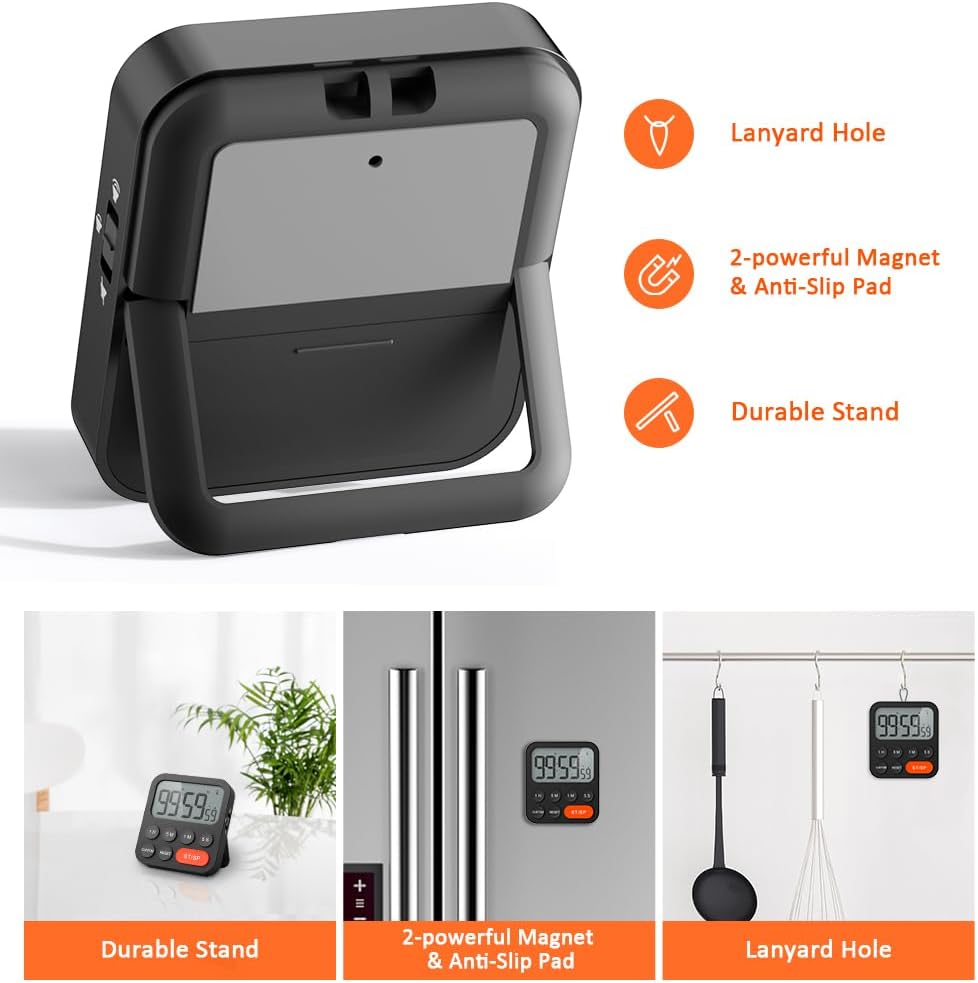
Image 3.6: Various ways to place and use the timer.
3.8追加機能
- Delay Reminder: After a countdown finishes, the timer will automatically start counting up, indicating the elapsed time since the alarm.
- Auto-Restore: Once a countdown is complete and the alarm has sounded, pressing the ST / SP button will restore the timer to the last set countdown time, making it convenient for repetitive tasks.

Image 3.7: Explanation of Delay Reminder and Auto-restore features.
4. メンテナンス
- Clean the timer with a soft, dry cloth. Do not use abrasive cleaners or immerse in water.
- Replace batteries when the display becomes dim or the timer functions erratically.
- 長期間使用しない場合は、タイマーを涼しく乾燥した場所に保管してください。
5。 トラブルシューティング
- タイマーが応答しません: 電池が正しく取り付けられ、十分に充電されていることを確認してください。必要に応じて交換してください。
- アラームが静かすぎる/大きすぎる: Adjust the volume switch on the side of the timer to your preferred level.
- 表示が空白です: Ensure batteries are installed and functional. If the issue persists, contact customer support.
6. 仕様
| 特徴 | 詳細 |
|---|---|
| ブランド | リオルク |
| モデル番号 | YGH5249 |
| 色 | 黒 |
| 製品寸法 | 奥行き0.94インチ×高さ0.94インチ |
| アイテム重量 | 4.2オンス |
| 電源 | 単2電池XNUMX本(付属) |
| 設定数 | 3 (ボリューム) |
| 画面サイズ | 1E+1 センチメートル |
7. 保証とサポート
For warranty information or technical support, please refer to the product packaging or contact LIORQUE customer service through their official webご購入いただいたサイトまたは販売店にお問い合わせください。保証請求のために購入レシートを保管してください。