
1. はじめに
This manual provides essential instructions for the safe and effective operation of your HIKMICRO B01S Thermal Camera. Please read this manual thoroughly before using the device and retain it for future reference. The HIKMICRO B01S is a handheld thermal imaging camera designed for various applications, including home inspection, electrical maintenance, and mechanical fault detection.
2. 安全情報
怪我やデバイスの損傷を防ぐために、次の安全上の注意事項を守ってください。
- Do not point the camera directly at intense heat sources such as the sun or lasers, as this may damage the thermal sensor.
- デバイスを乾燥した状態に保ってください。雨や湿気にさらさないでください。
- Operate the camera within the specified temperature and humidity ranges.
- HIKMICRO が提供または承認した充電器とアクセサリのみを使用してください。
- 本製品を分解または改造しないでください。修理は必ず認定された担当者のみが行ってください。
- 初めて使用する前に、バッテリーが完全に充電されていることを確認してください。
3. セットアップ
3.1 パッケージ内容
パッケージにすべてのアイテムが含まれていることを確認します。
- HIKMICRO B01S Thermal Camera
- 2-in-1 USB C to USB A and USB C Cable
- Carrying Case with Shoulder Strap
- リストストラップ
- ユーザーマニュアル
- キャリブレーションカード

Figure 3.1: Included items in the HIKMICRO B01S Thermal Camera package.
3.2デバイスオーバーview
Familiarize yourself with the physical components of the HIKMICRO B01S Thermal Camera.

図3.2: 前面 view of the HIKMICRO B01S Thermal Camera and included accessories.

Figure 3.3: The 3.2-inch LCD screen provides a clear display for thermal imaging.
3.3 初回電源投入と充電
- バッテリーの充電: Connect the camera to a power source using the provided USB-C cable. The charging indicator will illuminate. A full charge supports approximately 6 hours of continuous operation.
- 電源のオン/オフ: Press and hold the power button until the screen illuminates to power on. Repeat the action to power off.
- リストストラップアタッチメント: Attach the wrist strap to the designated loop on the camera for secure handling.
- 三脚の取り付け: The camera features a standard tripod mount for stable, scheduled captures. This is useful for monitoring temperature changes over time in a fixed location.

Figure 3.4: The camera can be mounted on a tripod for stable, continuous monitoring.
4. 操作手順
4.1 基本的な熱画像
The HIKMICRO B01S provides clear thermal imagery with a 25Hz refresh rate for smooth viewing。
- Viewライブ画像: Once powered on, the camera displays a live thermal image on the 3.2-inch LCD screen.
- 画像のキャプチャ: Press the capture button to save a thermal image to the internal 16GB eMMC flash storage, which can hold over 90,000 images.
- カラーパレット: The camera supports 6 color palettes to visualize temperature differences. Cycle through these palettes using the dedicated button to find the most suitable display for your inspection.

Figure 4.1: Multiple color palettes are available for different viewing preferences and analysis.
4.2温度測定
The B01S offers precise temperature measurement capabilities:
- 測定プリセット: Utilize automatic Center Spot, Hot Spot, and Cold Spot tracking to quickly identify temperature extremes. Three user-defined spots can also be set for specific areas of interest.
- 温度範囲: The camera measures temperatures from -20°C to 550°C (-4°F to 1022°F).
- 調整可能な設定: For improved accuracy, adjust emissivity settings based on the material being inspected and input the distance to the object.
- 高温/低温アラーム: Configure the camera to trigger an audio alarm and warning light when temperatures exceed or fall below preset thresholds.
- Level and Span Selection: Switch between automatic and manual level and span adjustments to precisely highlight specific temperature ranges.

Figure 4.2: Instant temperature display with automatic and user-defined spot measurements.

Figure 4.3: High/Low temperature alarm indicators on the display.

Figure 4.4: Adjustable settings for emissivity and temperature range to enhance measurement accuracy.

Figure 4.5: Manual level and span selection for precise temperature visualization.
4.3つの高度な機能
- SuperIR Image Enhancement: The B01S utilizes HIKMICRO's SuperIR technology to upscale thermal images from 256x192 pixels to 640x480 pixels, providing enhanced detail for analysis.
- SuperScene Detection: This feature, powered by deep learning, automatically detects potential moisture leaks and insulation defects, simplifying inspections.
- Pro Scene Color Alarm: For advanced diagnostics, the Pro Scene Color Alarm provides customized data-driven alerts for thermal anomalies, such as condensation or insulation issues.
- Image Transfer & Auto-Update: Wirelessly transfer images and reports to mobile devices using the HIKMICRO Viewer app (available on Google Play and Apple App Store). The app also facilitates seamless firmware updates.
- Image Analysis & Instant Projection: Use the HIKMICRO Analyzer PC software for comprehensive image analysis, screen projection, real-time monitoring, and 3D plotting.

Figure 4.6: SuperIR technology enhances thermal image resolution for greater detail.

Figure 4.7: SuperScene detection highlights potential water leaks and insulation voids.

Figure 4.8: Pro Scene Color Alarm identifies specific thermal anomalies like condensation.

Figure 4.9: Wireless image transfer and auto-update functionality via the HIKMICRO Viewerアプリ。
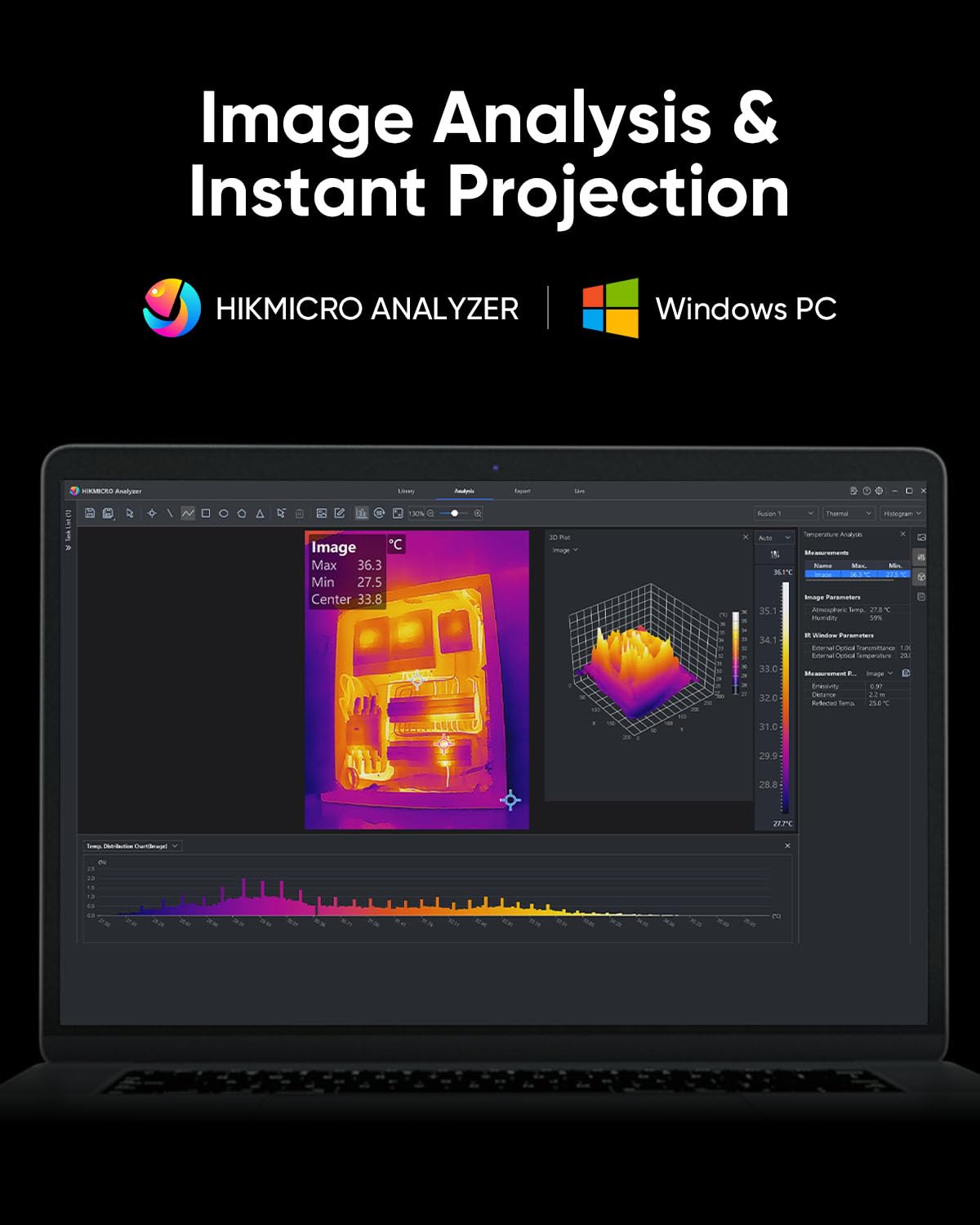
Figure 4.10: HIKMICRO Analyzer PC software for detailed image analysis and projection.
5. メンテナンス
5.1 クリーニング
- カメラ本体を清掃する際は、柔らかく乾いた布を使用してください。
- レンズには、傷を防ぐために専用のレンズクリーニングクロスと洗浄液を使用してください。
- 研磨剤や溶剤は使用しないでください。
5.2 ストレージ
- Store the camera in its protective carrying case when not in use.
- デバイスは直射日光や極端な温度を避け、涼しく乾燥した場所に保管してください。
- 長期間保管する場合は、バッテリーが部分的に(約 50%)充電されていることを確認し、バッテリーの状態を維持するために数か月ごとに充電してください。
5.3 耐久性
The HIKMICRO B01S is designed for durability, featuring an IP54 rating for dust and water resistance and a 2-meter (6.6 ft) drop resistance.

Figure 5.1: The B01S is built to be durable with IP54 protection and 6.6 ft drop resistance.
6。 トラブルシューティング
If you encounter issues with your HIKMICRO B01S, refer to the following common problems and solutions:
| 問題 | 考えられる原因 | 解決 |
|---|---|---|
| デバイスの電源が入らない | バッテリー残量が少ない; 電源ボタンが正しく押されていない | Charge the battery; Press and hold the power button firmly for a few seconds |
| Fuzzy or unclear image | Lens is dirty; Incorrect focus (if applicable); Extreme temperature difference | Clean the lens; Adjust focus (if manual focus is available); Allow camera to acclimate to environment |
| 不正確な温度測定 | Incorrect emissivity setting; Incorrect distance setting; Object outside temperature range | Adjust emissivity for the material; Input correct distance; Ensure object temperature is within camera's range |
| Cannot connect to app/PC software | Wi-Fi/USB connection issue; Outdated app/software; Firewall blocking connection | Ensure Wi-Fi is enabled on camera and device; Check USB cable connection; Update app/software; Temporarily disable firewall |
| バッテリー寿命が短い | Battery degradation; Frequent use of power-intensive features | Contact support for battery replacement; Reduce screen brightness or turn off Wi-Fi when not needed |
7. 仕様
| 特徴 | 仕様 |
|---|---|
| IR解像度 | 256×192(49,152ピクセル) |
| SuperIR解像度 | 640×480(307,200ピクセル) |
| 熱感度(NETD) | < 40mK |
| 温度範囲 | -20°C ~ 550°C (-4°F ~ 1022°F) |
| 温度精度 | ±2°Cまたは±2%(いずれか大きい方) |
| リフレッシュレート | 25Hz |
| ディスプレイ画面 | 3.2" LCD, 640 x 480 resolution |
| ストレージ | 16GB eMMC(90,000枚以上の画像を保存) |
| 接続性 | Wi-Fi、USB-C |
| 電池のタイプ | リチウムイオン電池1個(付属) |
| バッテリー寿命 | 約6時間連続動作 |
| IP 定格 | IP54 |
| 落下耐性 | 2メートル(6.6フィート) |
| 寸法(区画) | 31.2 x 21.1 x 11.8 cm |
| 重量(小包) | 1.08キロ |
| モデル番号 | HM-TP52+-3AQF/W-B01S |
| メーカー | ヒクマイクロ |
| 原産国 | 中国 |
8. 保証とサポート
HIKMICRO products are covered by a limited warranty. Please refer to the warranty card included in your package for specific terms and conditions. For technical support, service, or warranty claims, please contact HIKMICRO customer service through their official website or the contact information provided on your calibration card.