導入
The YANZEO SR290 is a versatile handheld terminal designed for efficient data capture, combining UHF RFID reading capabilities with 1D/2D QR barcode scanning. This device offers multiple connectivity options and reading modes, making it suitable for various environments such as retail stores, supermarkets, and warehouses. Its robust design ensures durability for daily operational demands.

Figure 1: YANZEO SR290 Handheld Terminal Barcode Scanner. This image displays the main unit of the scanner along with its USB dongle and cables, highlighting its compact and ergonomic design.
設定
パッケージ内容
始める前に、パッケージにすべてのアイテムが揃っていることを確認してください。
- YANZEO SR290 Handheld Terminal
- USB充電ケーブル
- 2.4GワイヤレスUSBドングル
- ユーザーマニュアル(このドキュメント)
デバイスの充電
The SR290 is equipped with a 2000mAh lithium-ion battery. For optimal performance, fully charge the device before first use.
- USB充電ケーブルをスキャナーの充電ポートに接続します。
- USB ケーブルのもう一方の端を互換性のある USB 電源アダプター (別売) またはコンピューターの USB ポートに接続します。
- The indicator lights on the device will show charging status. A full charge typically takes several hours.

Figure 2: The SR290 scanner connected to a laptop via USB, illustrating its connectivity options and highlighting its 2000mAh battery capacity for long-lasting performance.
電源オン/オフ
Locate the power button on the device. Press and hold the power button for a few seconds to turn the scanner on or off. The device will emit an audible beep and indicator lights will illuminate upon successful power-on.
Operating Modes and Connectivity
接続オプション
The YANZEO SR290 offers three primary methods for connecting to your host device:
- ブルートゥース: For wireless connection to Bluetooth-enabled devices like smartphones, tablets, or computers. Effective range is approximately 0-20 meters in an open environment.
- 2.4Gワイヤレス: Utilizes a dedicated USB dongle for wireless connection to computers. Offers an extended range of approximately 0-80 meters in an open environment.
- 有線USB: Direct connection via USB cable for reliable and secure data transmission, also used for charging.
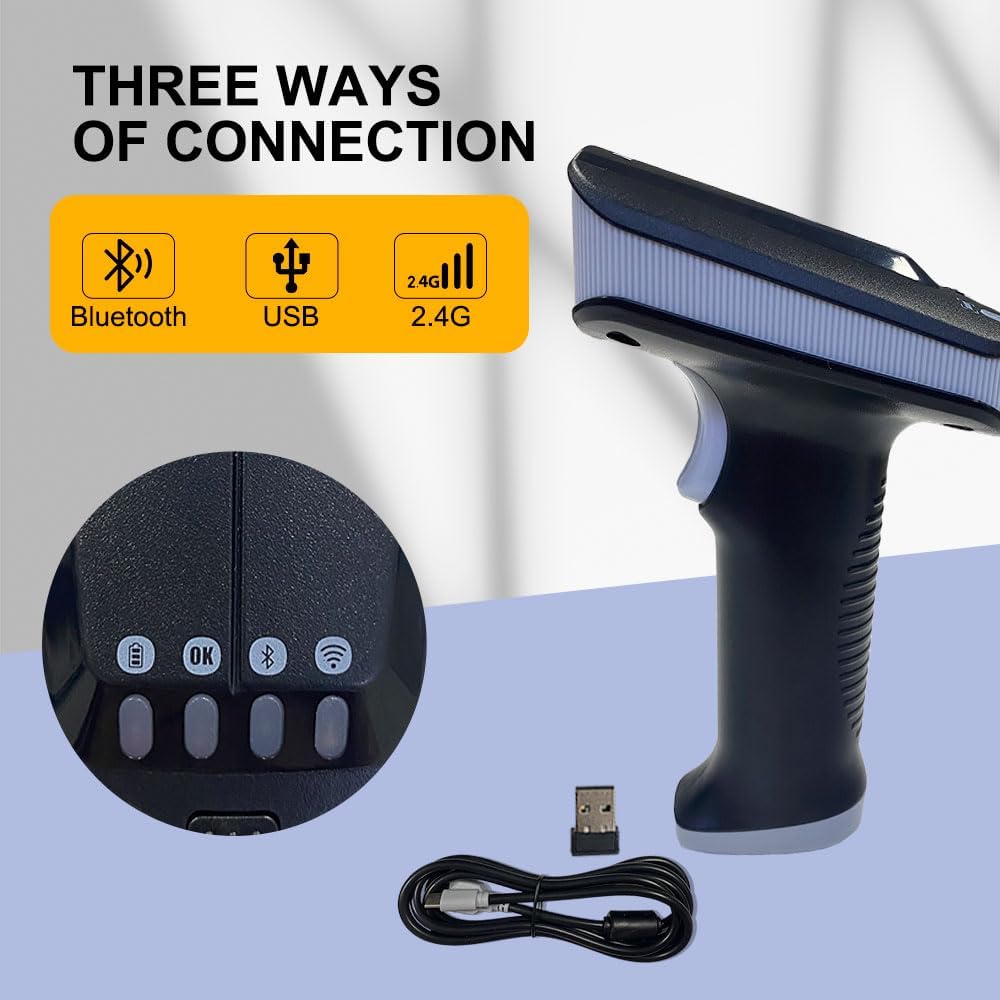
Figure 3: Illustration of the three connection methods: Bluetooth, USB, and 2.4G wireless, along with the 2.4G USB dongle and USB cable.

Figure 4: Diagram showing the wireless communication distances for 2.4G (0-80m) and Bluetooth (0-20m) in an open environment.
Multiple Reading Modes
The SR290 supports various data capture modes to meet diverse operational needs:
- RFID Tags のみ: Dedicated mode for reading UHF RFID tags.
- 1D-2D QR Barcodes Only: For scanning traditional 1D barcodes and 2D QR codes.
- RFID Tags and 1D 2D QR Codes Simultaneously: A combined mode for comprehensive data capture.
To switch between modes, use the dedicated mode switching key on the device. Refer to the indicator lights for the active mode.

Figure 5: Visual representation of the scanner's ability to read 1D barcodes, 2D QR codes, and RFID tags.

図6:詳細 view of the mode switching key and instructions for selecting UHF-Mode, Barcode Mode, or UHF+Barcode Mode.
スキャンプロセス
To scan a barcode or RFID tag:
- スキャナーの電源がオンになっており、ホスト デバイスに接続されていることを確認します。
- Select the appropriate reading mode (RFID, Barcode, or combined).
- Point the scanner's reading window at the barcode or RFID tag.
- Press the trigger button. The scanner will emit a light beam or RFID signal.
- Upon successful read, the scanner will provide vibration feedback and/or an audible beep, and the indicator lights will change. The data will be transmitted to the connected device.
機能とインジケーター
The SR290 is designed with user feedback and clear indicators:
- 振動フィードバック: The device provides tactile feedback upon successful scans, confirming data capture.
- Four-Color Indicator Lights: A set of four distinct colored lights (Red, Yellow, Blue, Green) provide visual cues for battery status, connection status, and scanning feedback.

図 7: 拡大図 view of the SR290's indicator lights and a visual representation of its vibration feedback capability.
耐久性とデザイン
The YANZEO SR290 is built for demanding environments, featuring:
- Outstanding Durability: Engineered to withstand a 1.5-meter drop onto a concrete floor, ensuring resilience in active work settings.
- 人間工学に基づいたデザイン: The handheld form factor is designed for comfortable grip and prolonged use, reducing operator fatigue.

Figure 8: Depiction of the SR290's drop-proof design, illustrating its ability to withstand a 1.5-meter fall onto a hard surface.
メンテナンス
デバイスのクリーニング
To maintain optimal performance and hygiene, regularly clean your SR290 scanner:
- 柔らかく糸くずの出ない布で軽く拭き取ってください。amp水または、研磨剤を含まない穏やかな洗浄液で洗い流してください。
- Wipe the exterior of the device, paying attention to the scanning window.
- デバイスを損傷する恐れがあるため、強力な化学薬品、溶剤、研磨材は使用しないでください。
- 充電ポートやその他の開口部に液体が入らないようにしてください。
バッテリーケア
To maximize the lifespan of the lithium-ion battery:
- バッテリーを頻繁に完全に放電することは避けてください。
- 長期間使用しない場合は、デバイスを涼しく乾燥した場所に保管してください。
- Charge the device regularly, even if not in daily use, to prevent deep discharge.
トラブルシューティング
This section addresses common issues you might encounter with your YANZEO SR290 scanner.
デバイスの電源が入っていない
- バッテリーを確認してください: Ensure the battery is charged. Connect the scanner to a power source and allow it to charge for at least 30 minutes before attempting to power on again.
- 電源ボタン: 電源ボタンを必要な時間(通常は 2 ~ 3 秒)押し続けていることを確認します。
スキャンの問題
- 不正なモード: Verify that the scanner is set to the correct reading mode (RFID, 1D/2D Barcode, or combined) for the item you are trying to scan.
- 距離/角度: Adjust the distance and angle between the scanner and the barcode/RFID tag. Ensure the entire code/tag is within the scanning area.
- ダメージ: Inspect the barcode or RFID tag for damage, smudges, or poor print quality.
- 環境要因: Strong ambient light can sometimes interfere with barcode scanning. Try scanning in a different lighting condition.
接続の問題
- Bluetooth接続:
- Ensure Bluetooth is enabled on your host device and the scanner is in Bluetooth pairing mode.
- Delete previous pairings on your host device and re-pair.
- Check the distance between the scanner and host device; ensure it's within the 20m range.
- 2.4Gワイヤレス接続:
- Ensure the 2.4G USB dongle is securely plugged into your computer.
- Verify the scanner is in 2.4G wireless mode.
- Check the distance between the scanner and the dongle; ensure it's within the 80m range.
- 有線USB接続:
- USB ケーブルがスキャナーとホスト デバイスの両方にしっかりと接続されていることを確認します。
- コンピュータの別のUSBポートを試してください。
- 可能であれば、別の USB ケーブルでテストしてください。
仕様
Detailed technical specifications for the YANZEO SR290:
| 特徴 | 仕様 |
|---|---|
| モデル番号 | SR290 |
| パッケージ寸法 | 7.68 x 4.21 x 3.27インチ |
| アイテム重量 | 12.1オンス |
| 電池のタイプ | 1 リチウムポリマー電池 (付属) |
| バッテリー容量 | 2000mAh |
| 接続技術 | Bluetooth、USBケーブル、2.4Gワイヤレス |
| Wireless 2.4G Range | 0-80m (open environment) |
| Bluetooth範囲 | 0-20m (open environment) |
| 対応デバイス | デスクトップ、ラップトップ、スマートフォン |
| 電源 | 電池駆動 |
| メーカー | ヤンゼオ |
| 初回利用可能日 | 15年2024月XNUMX日 |
保証とサポート
YANZEO products are manufactured to high quality standards. For information regarding warranty coverage, technical support, or service, please contact YANZEO customer support.
You can find more information and contact details on the official YANZEO webサイト: