
1. はじめに
The HIKMICRO ECO-V Handheld Thermography Camera is a versatile thermal imaging device designed for various professional applications. It offers thermal, bi-spectrum image fusion, and visible light modes to meet diverse business needs. This manual provides essential information for the safe and effective operation of your ECO-V camera.
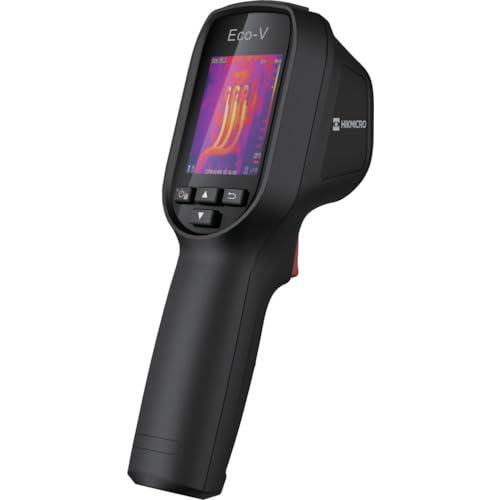
Figure 1: HIKMICRO ECO-V Handheld Thermography Camera
2. 安全情報
本製品をご使用になる前に、すべての安全に関する警告と指示をよくお読みになり、理解してください。これらの指示に従わない場合、感電、火災、または重傷を負う可能性があります。
一般的な安全上の注意事項
- 可燃性の液体、ガス、粉塵などが存在する爆発性の雰囲気内でデバイスを操作しないでください。
- デバイスを水やその他の液体から遠ざけてください。
- 本装置を開けたり改造したりしないでください。修理は必ず資格のある担当者にご依頼ください。
- Use only HIKMICRO-approved accessories.
- Avoid direct exposure of the thermal lens to strong light sources (e.g., sun, laser) as this may damage the detector.
バッテリーの安全性
- The device contains a built-in Lithium-ion battery. Do not expose the battery to excessive heat, direct sunlight, or fire.
- バッテリーに穴を開けたり、開けたり、分解したりしないでください。
- Charge the battery only with the provided USB cable and a compatible power adapter.
- 地域の規制に従ってバッテリーを廃棄してください。
3. パッケージ内容
The HIKMICRO ECO-V package includes the following items:
- HIKMICRO Handheld Thermography Camera ECO-V
- USB Type-Cケーブル
- Quick Start Guide (not explicitly mentioned but standard)
- Calibration Certificate (not explicitly mentioned but standard)
Video 3.1: Unboxing the HIKMICRO M-Series (similar to ECO-V, showing typical package contents and device appearance).
4.デバイスオーバーview
Familiarize yourself with the physical components and interface of your HIKMICRO ECO-V camera.
外観とインターフェース
The ECO-V features a compact, ergonomic design for comfortable handheld use. Key components include the thermal lens, optical lens, laser indicator, white light, trigger button, navigation buttons, and a 2.4-inch display.
Video 4.1: This video demonstrates the physical appearance and interface of a HIKMICRO M-Series camera, which shares similar design elements and interface components with the ECO-V.
5. セットアップ
5.1デバイスの充電
Before initial use, fully charge the device's built-in Lithium-ion battery.
- 付属の USB Type-C ケーブルをデバイスの USB ポートに接続します。
- Connect the other end of the USB cable to a compatible power adapter (5V2A recommended) and plug it into a power outlet.
- The charging indicator will show red during charging and turn green when fully charged.
Video 5.1: This HIKMICRO ECO operation video demonstrates the charging process for the device.
5.2 電源オン/オフ
To power on the device, press and hold the power button for more than 6 seconds. To power off, press and hold the power button again until the device shuts down.
Video 5.2: This HIKMICRO ECO operation video demonstrates how to power on the device.
6. 操作手順
This section covers the basic and advanced operational features of your ECO-V camera.
6.1 Image Capture and Display
To capture a thermal image, aim the camera at the target and press the trigger button. The captured image will be saved to the internal EMMC storage. To view saved images, navigate to the 'Albums' section in the menu.
Video 6.1: This HIKMICRO ECO operation video demonstrates image capture and viewing saved snapshots.
6.2 測定ツール
The ECO-V provides various measurement tools to analyze thermal images:
- ホットスポット: Automatically identifies and displays the highest temperature point.
- コールドスポット: Automatically identifies and displays the lowest temperature point.
- センタースポット: 画面中央に温度を表示します。
Video 6.2: This HIKMICRO ECO operation video demonstrates the use of measurement tools like hot, cold, and center spots.
6.3 SuperIR画像強化
SuperIR technology enhances the thermal image resolution, providing more detail for analysis. You can enable or disable this feature in the settings menu.
Video 6.3: This HIKMICRO ECO operation video demonstrates how to enable and use the SuperIR image enhancement feature.
6.4つの画像モード
The ECO-V supports multiple image modes for different inspection needs:
- サーマル: 熱画像のみを表示します。
- 融合: 熱画像と可視光画像をブレンドして詳細を強調します。
- PIP (ピクチャーインピクチャー): Overlays a smaller thermal image on a visible light image.
- 光学: 可視光画像のみを表示します。
Video 6.4: This HIKMICRO B10S product video demonstrates switching between different image modes, including Thermal, Fusion, PIP, and Optical.
6.5 Parallax Correction
When using fusion modes, adjust the parallax correction based on the distance to the target to ensure accurate alignment between thermal and visible images.
Video 6.5: This HIKMICRO B10S product video demonstrates how to adjust parallax correction for accurate image fusion.
6.6 Palette Adjustment
Select from various color palettes (e.g., White Hot, Black Hot, Rainbow, Ironbow) to visualize temperature differences more effectively. This can be adjusted in the settings menu.
Video 6.6: This HIKMICRO B10S product video demonstrates how to adjust color palettes.
6.7 放射率と距離の設定
For accurate temperature measurements, it is crucial to set the correct emissivity value for the target material and the distance to the target. Refer to the general emissivity reference table in the specifications section.
Video 6.7: This HIKMICRO ECO operation video demonstrates setting emissivity and distance for accurate temperature readings.
6.8 レーザーポインター
The built-in laser pointer helps to precisely identify the measurement target. It can be enabled or disabled in the settings menu.
Video 6.8: This HIKMICRO ECO operation video demonstrates how to enable and use the laser pointer.
6.9 高温アラーム
Set a high temperature alarm threshold to be notified when temperatures exceed a predefined limit. This feature is useful for identifying potential overheating issues.
Video 6.9: This HIKMICRO B10S product video demonstrates how to set a high temperature alarm.
6.10 Hotspot Connection
The ECO-V can connect to a mobile device via Wi-Fi hotspot for live viewing and data transfer. Enable the Wi-Fi hotspot function in the device settings and connect your mobile device.
Video 6.10: This HIKMICRO M-Series video demonstrates how to establish a hotspot connection with a mobile device.
6.11 ヒクマイクロ Viewer App Connection
HIKMICROをダウンロード Viewer app on your mobile device to access live view, manage images and videos, and generate reports. Connect the device to your phone via Wi-Fi.
Video 6.11: This HIKMICRO Pocket series video demonstrates connecting the device to the HIKMICRO Viewer app for various functions.
7. メンテナンス
7.1 クリーニング
- デバイス本体を柔らかくて乾いた布で拭いてください。amp 布で拭いてください。研磨剤や溶剤は使用しないでください。
- Gently clean the lenses with a lens cleaning cloth. Avoid touching the lens surface with bare hands.
7.2 ストレージ
- デバイスは直射日光や極端な温度を避け、涼しく乾燥した場所に保管してください。
- 長期間保管する場合は、バッテリーが部分的に(約 50%)充電されていることを確認し、バッテリーの状態を維持するために数か月ごとに充電してください。
8。 トラブルシューティング
If you encounter issues with your HIKMICRO ECO-V, refer to the following common problems and solutions:
| 問題 | 考えられる原因 | 解決 |
|---|---|---|
| デバイスの電源が入らない | バッテリー残量が少ない、デバイスの故障 | バッテリーを充電してください。サポートにお問い合わせください。 |
| 不正確な温度測定 | Incorrect emissivity/distance settings; Dirty lens | Adjust emissivity/distance; Clean the lens |
| Cannot connect to Wi-Fi hotspot | Incorrect password; Hotspot not enabled | Verify password; Enable hotspot in settings |
9. 仕様
Detailed technical specifications for the HIKMICRO ECO-V camera:
| 特徴 | 仕様 |
|---|---|
| モデル | エコ-V |
| 測定温度範囲 | -20°C ~ 550°C |
| Minimum Temperature Display | 0.1℃ |
| 分野 View (FOV) | 50° × 50° |
| 空間解像度 (IFOV) | 8.89ミリラド |
| 動作温度範囲 | -10°C ~ 50°C |
| 保管温度範囲 | -40°C ~ 70°C |
| 表示サイズ | 2.4インチ |
| 電源 | 内蔵リチウムイオン電池 |
| バッテリー駆動時間 | 8時間 |
| Wi-Fi | 利用不可 |
| 保護レベル | IP54 |
| インタフェース | USBタイプC |
| ピクセルピッチ | 12μm |
| Measuring Wavelength | 7.5-14μm |
| ネットワーク | < 40 mK (@ 25°C、F#=1.0) |
| 焦点距離 | 1.35ミリメートル |
| 絞り | F1.0 |
| 最小焦点距離 | 0.1メートル(0.33フィート) |
| フレームレート | 25Hz |
| フォーカスシステム | フォーカスフリー |
| 記録メディア | EMMC (4GB) |
| 画像ストレージ容量 | 30,000枚の画像 |
| 画像 File 形式 | BMP (includes measurement data) |
| 熱画像解像度 | 96×96 (9,216 pixels) |
| Visible Image Resolution | 640×480 |
| 正確さ | ±2°C or ±2% (whichever is greater), when ambient temperature is 15°C to 35°C and target temperature is 0°C or above. |
| 材料 | ポリカーボネート、ABS樹脂 |
| 重さ | 360グラム |
General Emissivity Reference
| 材料 | Emissivity(放射率) |
|---|---|
| 人間の皮膚 | 0.98 |
| プリント基板 | 0.91 |
| セメントコンクリート | 0.95 |
| 陶芸 | 0.92 |
| ゴム | 0.95 |
| ペイント | 0.93 |
| 木材 | 0.85 |
| レンガ | 0.96 |
| 砂 | 0.90 |
| 土壌 | 0.92 |
| コットン | 0.98 |
| 厚紙 | 0.90 |
| ホワイトペーパー | 0.96 |
| 水 | 0.96 |
10. 保証とサポート
HIKMICRO products are covered by a limited warranty. For detailed warranty terms and conditions, please refer to the official HIKMICRO webサイトをご覧いただくか、お近くの販売店にお問い合わせください。
カスタマーサポート
If you require technical assistance, troubleshooting, or have questions about your ECO-V camera, please contact HIKMICRO customer support through their official webサイトまたは製品パッケージに記載されている連絡先情報を参照してください。