
1.製品オーバーview
The ARPHA D280k is a versatile 5-in-1 keyless entry door lock designed for enhanced home security and convenience. It offers multiple unlocking methods including fingerprint, password, mobile application control, electronic key, and traditional mechanical key. This smart lock integrates advanced biometric technology with user-friendly features to provide a secure and accessible solution for your home or property.

Figure 1.1: ARPHA D280k Smart Door Lock with App Control Interface.
This image shows the ARPHA D280k smart door lock, a sleek black and gold unit with a keypad and fingerprint sensor, installed on a white door. To the left, a smartphone displays the lock's mobile application, indicating a successful unlock operation. This illustrates the seamless integration of the physical lock with its digital control features.
主な特徴:
- 5つのロック解除方法: Fingerprint, Passcode, Mobile App, E-Key, and Mechanical Key.
- 高度な指紋認識: AI self-learning with 99.99% accuracy, unlocking in approximately 1 second.
- 完全なアプリ制御: Generate and share unique, permanent, scheduled, or recurring codes remotely. Manage users and view アクセス記録。
- 自動ロック機能: Customizable auto-lock timer from 10 to 30 minutes.
- ワンタッチロック: Convenient single-button locking.
- 覗き見防止パスワード: Protect your passcode by entering random digits before or after your actual code.
- スマートホーム統合: Compatible with Alexa and Google Assistant via the ARPHA G1 Gateway (sold separately).
- 耐久性のある構造: Made from Zinc Alloy, designed for reliability.
2. セットアップとインストール
The ARPHA D280k lock is designed for easy installation and programming, fitting most standard American left and right-handed doors without requiring additional drilling. Please follow these instructions carefully for a successful setup.
2.1 Door Compatibility and Dimensions
ドアが以下の仕様を満たしていることを確認してください。
- ドアの厚さ: 35 mm~55 mm(1.38インチ~2.17インチ)
- バックセット: 60 mm (2-3/8") or 70 mm (2-3/4")
- ドア穴の直径: Only suitable for 54 mm (2-1/8") door holes.

Figure 2.1: Door Compatibility and Lock Dimensions.
This diagram illustrates the necessary door measurements for installing the ARPHA D280k smart lock. It shows the backset options (60mm or 70mm), door thickness range (35-55mm), and the required door hole diameter (54mm). It also provides dimensions for the lock's exterior and interior components, ensuring proper fitment for both left and right-handed doors.
2.2 インストール手順
- ドアの準備: Ensure the door is clean and the existing hardware is removed. Verify door dimensions match the requirements.
- ラッチを取り付けます。 ラッチをドアの端に差し込み、ネジで固定します。ラッチボルトがドアの開き方向と合っていることを確認してください。
- 外装アセンブリを取り付けます。 Route the cable through the door hole and align the exterior lock assembly with the latch.
- 内部取り付けプレートを取り付けます。 ケーブルがプレートを通過するように、ネジを使用して内部取り付けプレートを外部アセンブリに固定します。
- Connect the Cable and Install the Interior Assembly: Connect the cable from the exterior assembly to the interior assembly. Carefully tuck excess cable into the door. Attach the interior assembly to the mounting plate and secure it with screws.
- バッテリーの取り付け: 内部アセンブリの電池ボックスに単三電池 4 本 (別売) を挿入します。
- ロックをテストします。 Manually test the deadbolt and handle to ensure smooth operation.
A detailed video guide is available to walk you through the entire installation and setup process. Refer to the product's online resources for the video guide.
3. 操作手順
The ARPHA D280k offers multiple convenient ways to unlock your door. Familiarize yourself with each method for optimal use.

Figure 3.1: Multiple Unlocking Methods.
This image displays four distinct methods for unlocking the ARPHA D280k smart lock: fingerprint recognition, traditional mechanical keys, numerical password entry on the keypad, and a one-time code generated and used via a mobile application. This highlights the lock's versatility and convenience for various user preferences.
3.1 指紋ロック解除
Your finger is your key. The lock features an advanced biometric sensor for quick and secure access.
- 指紋を登録: Use the mobile application to enroll up to 50 unique fingerprints. Follow the in-app instructions for proper scanning.
- ロック解除: Place your enrolled finger firmly on the fingerprint sensor. The lock will recognize your fingerprint in approximately 0.3 seconds and unlock the door within 1 second.
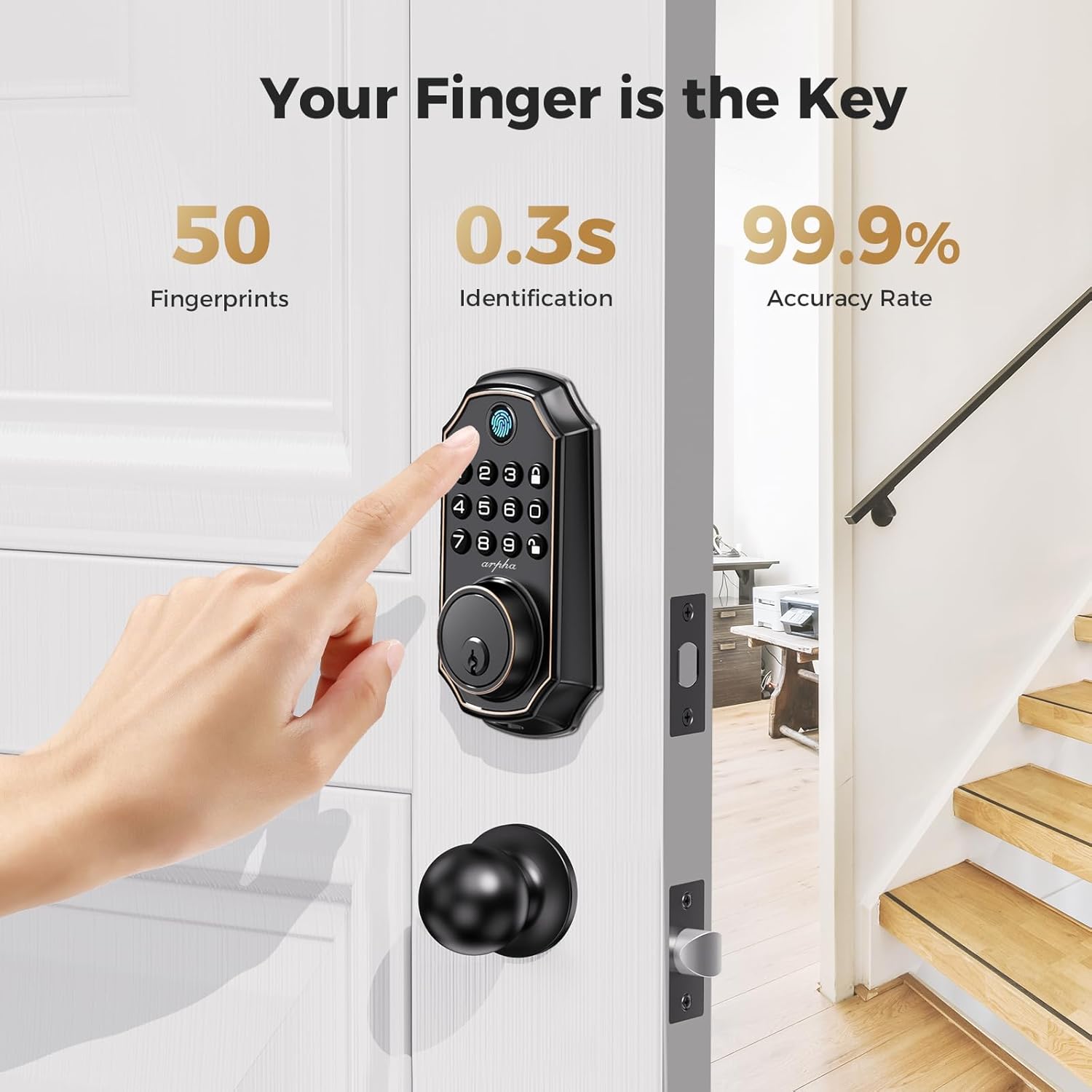
Figure 3.2: Fingerprint Unlocking in Action.
This image demonstrates the fingerprint unlocking feature of the ARPHA D280k smart lock. A hand is shown placing a finger on the lock's integrated fingerprint sensor. Accompanying text highlights key performance metrics: the ability to store up to 50 fingerprints, a rapid 0.3-second identification time, and a high 99.9% accuracy rate, emphasizing the convenience and reliability of biometric access.
3.2 Passcode Unlocking
The keypad allows for secure entry using numerical passcodes.
- Generate Passcodes: Use the mobile application to generate over 250 unique PIN codes. These can be permanent, one-time, scheduled, or recurring.
- パスコードを入力してください: On the lock's keypad, enter your valid passcode followed by the '#' key.
- 覗き見防止パスワード: To prevent others from guessing your code, you can enter random digits before or after your actual passcode. For example, if your code is 123456, you can enter 987123456098. The lock will only recognize the correct sequence within the longer string.

Figure 3.3: Anti-Peeking Password Feature.
This image visually explains the Anti-Peeking Password function of the ARPHA D280k smart lock. It shows a numerical keypad and a graphic demonstrating how random digits can be entered both before and after the actual PIN code. This feature enhances security by making it difficult for onlookers to discern the correct passcode, even if they observe the entry process.
3.3 モバイルアプリケーション制御
The ARPHA app provides comprehensive control over your lock from anywhere.
- Remote Unlocking/Locking: Lock or unlock your door remotely via the app (requires ARPHA G1 Gateway for remote access).
- ユーザー管理: Add, delete, or modify user access (fingerprints, passcodes, e-keys).
- アクセス記録: View 誰がいつ入場したかの履歴。
- 一時アクセス: Share temporary e-keys or one-time codes with guests or service providers.
3.4 自動ロックとワンタッチロック
These features enhance convenience and ensure your door is always secure.
- オートロック: Enable this feature via the app and set a timer (10 to 30 minutes). The lock will automatically engage the deadbolt after the set time if the door is closed.
- ワンタッチロック: Simply press and hold the '#' key on the keypad to instantly lock the door from the outside.

Figure 3.4: Auto-Lock and One-Touch Locking Features.
This image highlights the convenience of the ARPHA D280k's auto-lock and one-touch locking features. It shows a person returning home with groceries, emphasizing how these functions simplify daily life. Illustrations depict the adjustable auto-lock timer (10-30 minutes) and the dedicated one-touch lock button on the lock's interior side, ensuring the door is secured effortlessly.
3.5 Mechanical Key Unlocking
For emergency situations or as a backup, traditional mechanical keys are provided.
- Insert the mechanical key into the keyhole located at the bottom of the lock's exterior assembly.
- Turn the key to unlock the deadbolt.
4. メンテナンス
Proper maintenance ensures the longevity and optimal performance of your ARPHA D280k smart lock.
4.1 バッテリー管理
The lock operates on 4 AA batteries (not included) and offers an impressive battery life.
- バッテリー寿命: Up to 180 days of battery life under normal usage.
- 低バッテリーインジケーター: The lock will provide a visual or audible alert when batteries are low. Replace all four batteries promptly when this indicator appears to avoid being locked out.
- 電池のタイプ: Use high-quality alkaline AA batteries for best performance. Do not mix old and new batteries or different battery types.
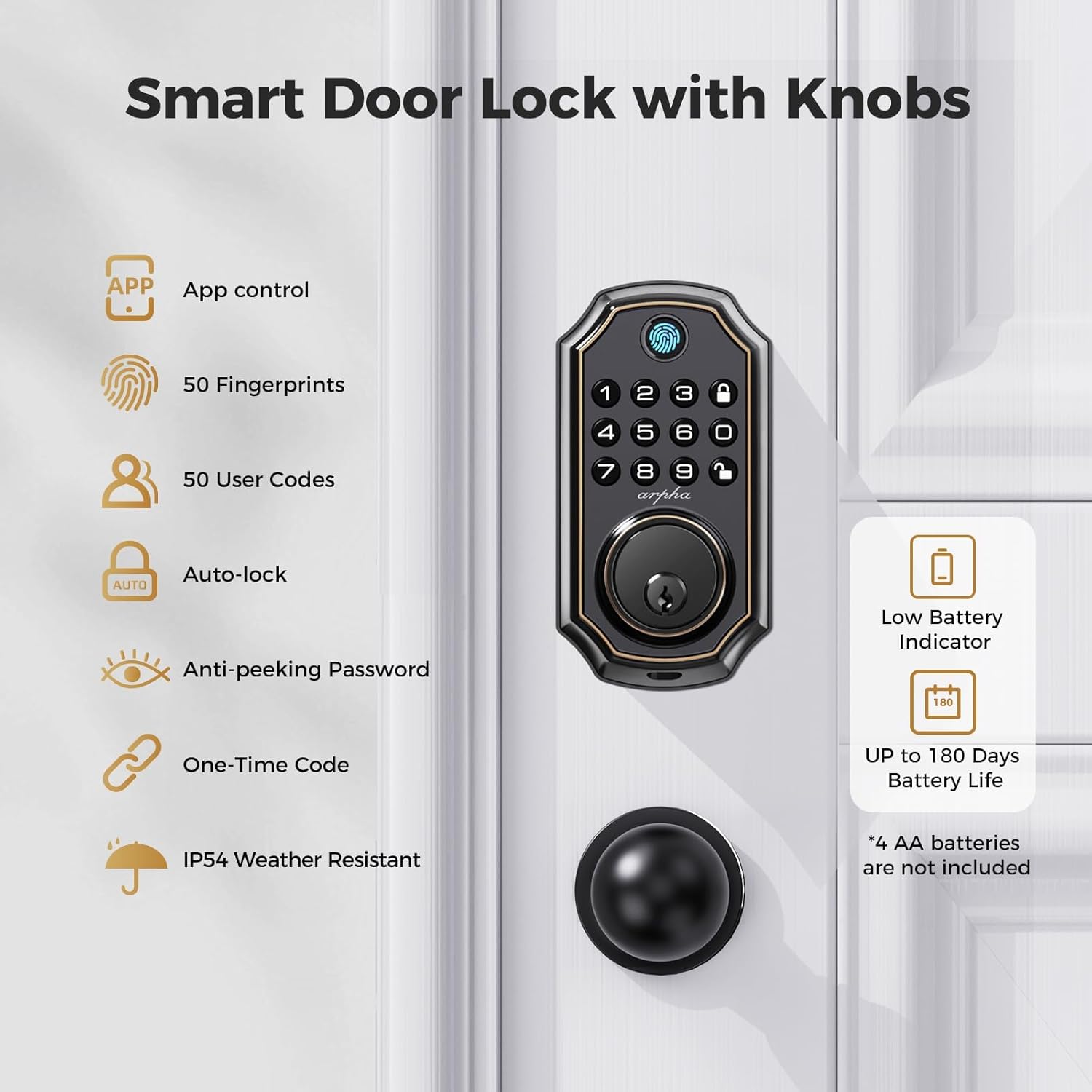
Figure 4.1: Smart Lock Features including Battery Information.
この画像は包括的な概要を提供しますview of the ARPHA D280k smart door lock's features. It visually lists capabilities such as app control, support for 50 fingerprints and 50 user codes, auto-lock, anti-peeking password, one-time code generation, and IP54 weather resistance. Crucially for maintenance, it highlights the low battery indicator and an impressive battery life of up to 180 days, noting that 4 AA batteries are required but not included.
4.2クリーニングとお手入れ
- ロックの外側の表面を柔らかくて乾いた布で拭いてください。amp 布で拭いてください。研磨剤入りの洗剤、溶剤、または刺激の強い化学薬品は、仕上げを傷める可能性があるため、使用しないでください。
- Do not spray cleaning solutions directly onto the lock.
- Keep the fingerprint sensor clean and free of dirt or debris for optimal performance.
5。 トラブルシューティング
If you encounter issues with your ARPHA D280k smart lock, refer to the following common problems and solutions.
5.1 ロックが応答しない
- バッテリーを確認してください: Ensure batteries are correctly installed and not depleted. Replace all four AA batteries if the low battery indicator is active or if the lock is unresponsive.
- 電源サイクル: Remove the batteries, wait for 30 seconds, and then reinsert them.
5.2 指紋が認識されない
- クリーンセンサー: 指紋センサーが清潔で、汚れ、湿気、油などがないことを確認してください。
- 適切な配置: Ensure your finger covers the entire sensor surface. Try different angles or pressures.
- Re-enroll Fingerprint: If issues persist, delete the existing fingerprint and re-enroll it through the mobile application.
5.3 Passcode Not Working
- 確認コード: Double-check that you are entering the correct passcode.
- Anti-Peeping: If using the anti-peeping feature, ensure the correct passcode sequence is embedded within the random digits.
- コードタイプ: Confirm if the code is permanent, one-time, or scheduled, and if it is still valid.
- リセットコード: Generate a new passcode via the app if necessary.
5.4 アプリの接続の問題
- ブルートゥース: スマートフォンで Bluetooth が有効になっており、ロックの範囲内にいることを確認してください。
- アプリの更新: Ensure your ARPHA app is updated to the latest version.
- アプリ/電話を再起動します: アプリを閉じて再度開くか、スマートフォンを再起動してください。
- Gateway (for remote access): If using remote access, ensure your ARPHA G1 Gateway is properly connected to Wi-Fi and powered on.
For further assistance, please contact ARPHA customer support.
6. 仕様
Detailed technical specifications for the ARPHA D280k Keyless Entry Door Lock.
| 特徴 | 仕様 |
|---|---|
| モデル番号 | D280k |
| 寸法(長さ×幅×高さ) | 26.42 x 22.99 x 9.3 cm(10.4 x 9.05 x 3.66インチ) |
| 重さ | 1.51 kg (3.32 ポンド) |
| 材料 | 亜鉛合金 |
| 仕上げる | Matte or Polished |
| 色 | D280K (Black with Gold Accents) |
| ロックタイプ | Biometric, Keypad, Deadbolt, Combination Lock |
| 電源 | 単三電池4本(別売) |
| 特集 | Bluetooth App Control, Passcode Unlock, Fingerprint Unlock, Anti-Peeping Password, One-Touch Locking |
| ドアの厚さの互換性 | 35mm~55mm |
| バックセットの互換性 | 60mmまたは70mm |
| ドア穴の直径 | 54 mm(2-1/8インチ) |
| ANSIグレード | 3年生 |
| キーパッド寿命テスト | 100,000サイクル |
| 塩水噴霧試験 | 218時間 |
| Face Plate Impact Test | 2850N |
| 湿度テスト | 176時間 |
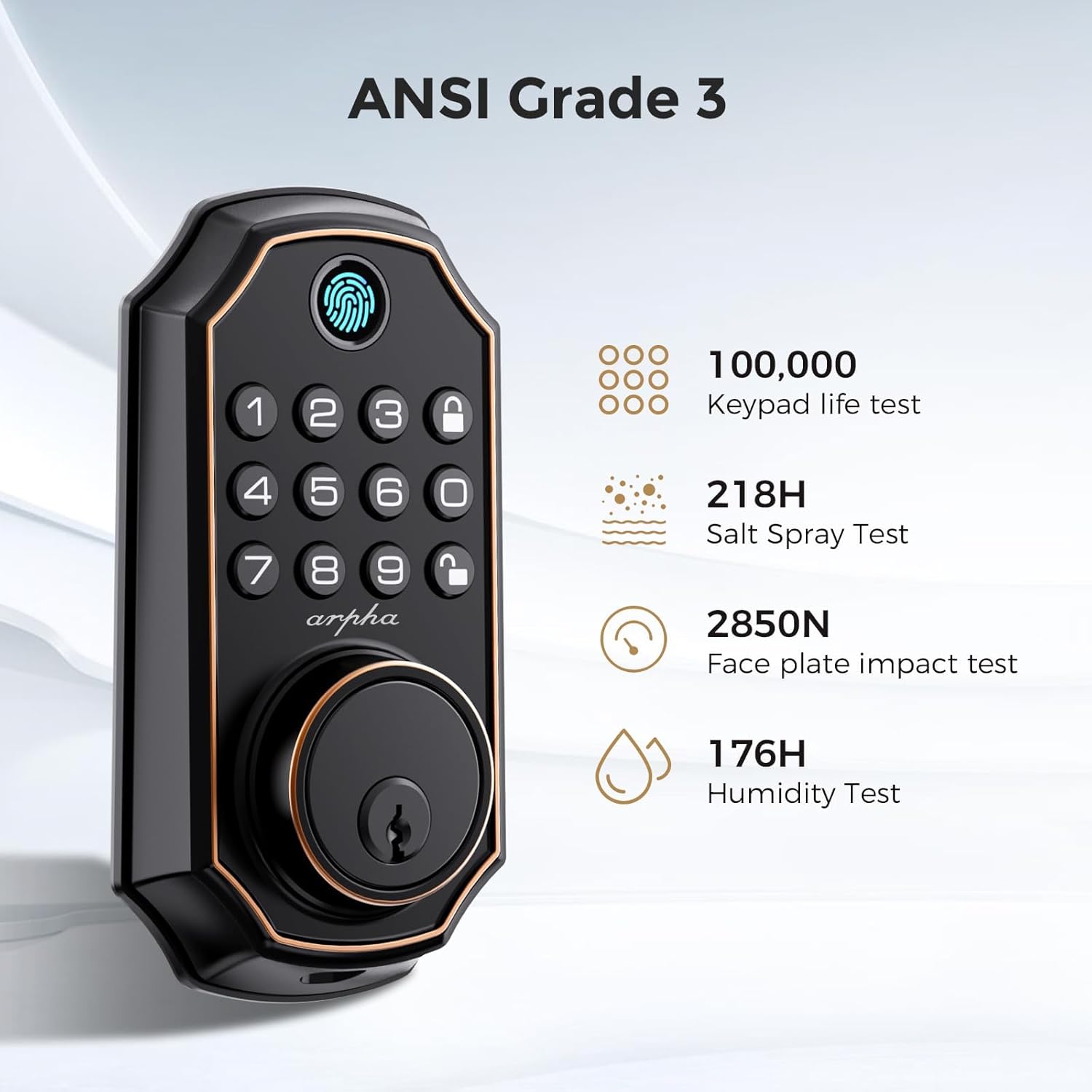
Figure 6.1: ANSI Grade 3 Certifications.
This image highlights the ARPHA D280k smart lock's compliance with ANSI Grade 3 standards, indicating its durability and reliability. It lists specific test results: 100,000 keypad life tests, 218 hours of salt spray testing, a 2850N face plate impact test, and 176 hours of humidity testing, assuring users of the product's robust construction and performance under various conditions.
7. 保証とサポート
ARPHA is committed to providing excellent customer service and product reliability.
7.1 保証情報
The ARPHA D280k smart lock comes with an 18ヶ月保証 ご購入日から有効です。この保証は、通常の使用における製造上の欠陥および故障を対象としています。
7.2 テクニカルサポート
A dedicated support team is available 24時間7日 to assist you with any questions or issues you may encounter. For technical assistance, troubleshooting, or warranty claims, please do not hesitate to contact us.
Refer to your product packaging or the official ARPHA web最新の連絡先情報については、サイトをご覧ください。