
VCHICS DPS305U 30V 5A
VCHICS DPS305U DC Power Supply User Manual
Model: DPS305U (30V 5A)
1. はじめに
ご購入ありがとうございますasing the VCHICS DPS305U Variable DC Regulated Power Supply. This device is designed for laboratory, electronic repair, DIY projects, communication equipment maintenance, product lines, scientific research, and educational units. It offers high precision, low noise, and multiple safety features to ensure reliable and safe operation. Please read this manual thoroughly before use to ensure proper operation and to maximize the lifespan of your power supply.
2. 安全上の注意
To prevent electric shock, fire, or damage to the device, please observe the following safety guidelines:
- 電源は必ずアース付きコンセントに接続してください。
- 濡れた状態や濡れた状態でデバイスを操作しないでください。amp 条件。
- 適切な換気を確保してください。冷却ファンや通気口を塞がないでください。
- cを開けないでくださいasing. 内部にはユーザーが修理できる部品はありません。修理はすべて資格のある担当者にご依頼ください。
- Before connecting or disconnecting loads, ensure the power supply is turned off.
- デバイスには短絡保護機能が備わっていますが、出力端子を長時間短絡させないでください。
- 入力ボリュームを確認してくださいtage switch (115V/230V) on the back matches your local power supply before connecting.
3. パッケージ内容
パッケージを開封したら、以下にリストされているすべてのアイテムが同梱されており、良好な状態であることを確認してください。
- 1 x VCHICS DPS305U DC Power Supply Host
- 1 x Output Power Cord (Alligator clips)
- 1 x Input Power Cord
- ユーザーマニュアル x 1
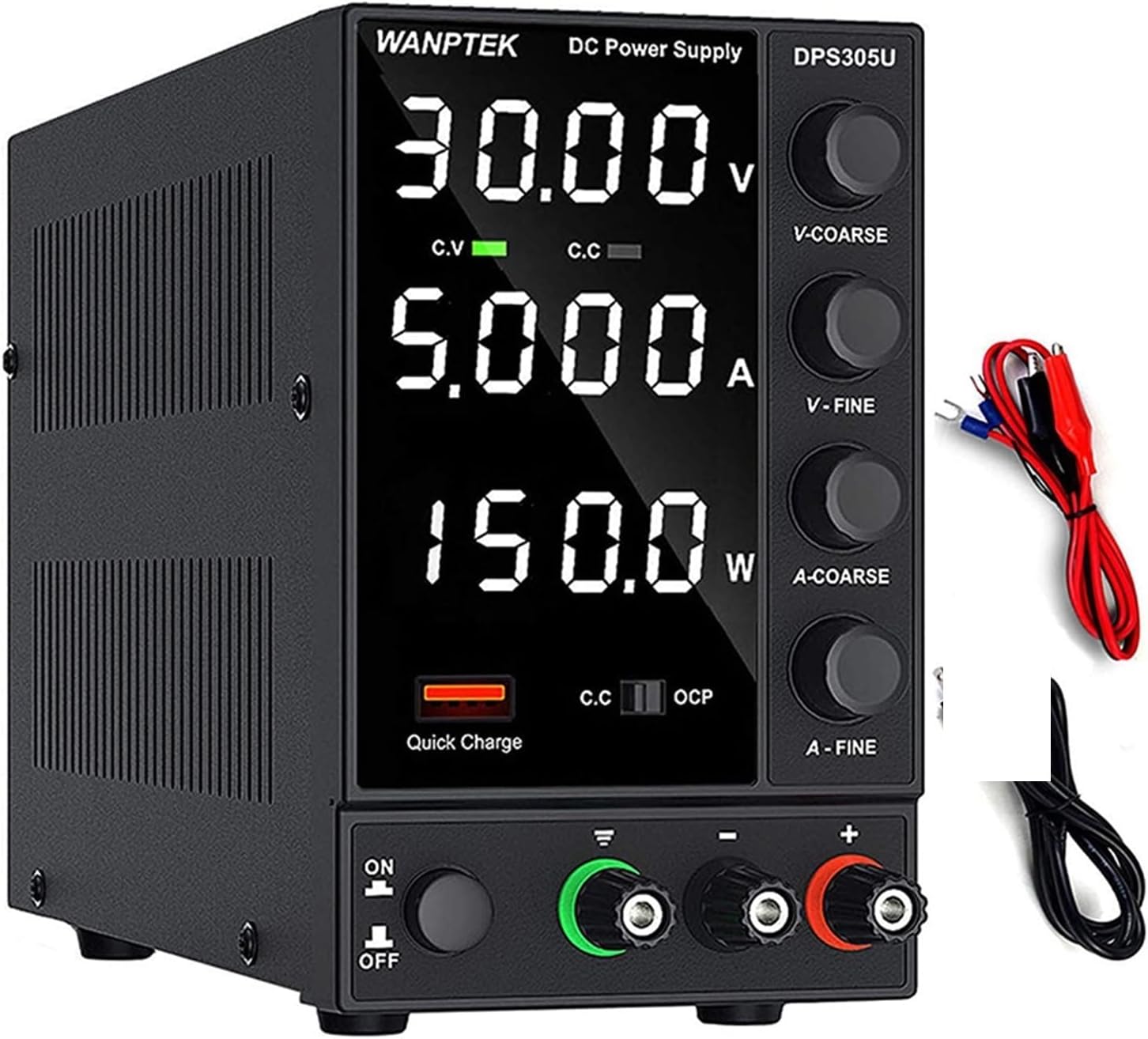
Image: The VCHICS DPS305U DC Power Supply unit shown with its included output power cords (red and black with alligator clips) and input power cord.
4 製品の特徴
- 自動電力計算: Unlike other DC power supplies, the WANPTEK DPS305U automatically calculates the power value. It simultaneously displays voltage, current, and power values with a precision of 0.01V, 0.001A, and 0.001W.
- 5V / 3.6A USB Interface: Equipped with a high-speed charging protocol identification chip, this variable power supply supports USB fast charging. It provides a 5V / 3.6A output, allowing for quick charging of mobile phones and other devices, or for powering devices under repair.
- 短絡警報: Designed to enhance safety and extend the lifespan of the DC power supply. When a short circuit occurs, the adjustable DC power supply unit stops output and emits an alarm. The bench power supply includes safety protections such as over-voltage, over-current, over-temperature, and overload protection.
- 幅広い用途: This adjustable power supply features an electrically controlled fan and an excellent heat sink for efficient heat dissipation. It is particularly suitable for laboratories, electronic repair DIY, communication equipment maintenance, product lines, scientific research, and educational units.
- 高精度: The power supply boasts a high resolution of 0.01V and 0.001A, ensuring accurate and stable output.

画像: クローズアップ view highlighting the Short Circuit Alarm indicator and the USB Quick-Charge Interface on the front panel of the power supply.

画像: 内部 view of the power supply, illustrating the cooling fan and heat sink components responsible for intelligent temperature control and heat dissipation.

Image: The power supply unit displayed alongside a digital multimeter, demonstrating its high precision output readings for voltage と現在。
5.製品オーバーview およびコンポーネント
Familiarize yourself with the various parts and controls of your VCHICS DC Power Supply:

Image: A detailed diagram of the power supply, clearly labeling its front panel controls and rear panel connections.
- 表示画面: 番組表tage (V), Current (A), and Power (W) readings.
- 保護フィルム: A film on the display screen to prevent scratches during transport. Remove it for clearer viewing。
- 巻tage Coarse Knob (V-COARSE): ボリュームを調整しますtage をより大きな増分で増加します。
- 巻tage Fine Knob (V-FINE): ボリュームを調整しますtage はより小さく正確な増分単位で行われます。
- Current Coarse Knob (A-COARSE): Adjusts current limit in larger increments.
- Current Fine Knob (A-FINE): Adjusts current limit in smaller, precise increments.
- USB Quick Charging Interface: デバイス充電用の5V/3.6A出力。
- Short Circuit Alarm Indicator: Lights up and unit alarms when a short circuit is detected.
- 電源オン/オフスイッチ: ユニットの電源をオンまたはオフにします。
- GND端子: アース端子。
- プラス端子(+): プラス接続用の赤い出力端子。
- マイナス端子(-): マイナス接続用の黒色出力端子。
- 冷却ファン: 自動的に作動して熱を放散します。
- 230V/115V±10% Switch: 巻tage selection switch for input power. Ensure this matches your local voltage.
- AC電源入力: Connects the input power cord.
- ヒューズボックス: 保護ヒューズを内蔵しています。
6. セットアップ
- 開梱: 電源装置をパッケージから慎重に取り出します。
- 巻tage選択: Locate the 230V/115V switch on the rear panel. Ensure it is set to the correct voltage for your region (e.g., 115V for North America, 230V for Europe/Asia). 間違ったボリュームtag選択を誤るとユニットが損傷する可能性があります。
- 電源接続: Connect the provided input power cord to the AC Power Input on the rear of the unit and then to a grounded wall outlet.
- 出力接続:
- Connect the red output power cord (alligator clip) to the Positive Terminal (+).
- Connect the black output power cord (alligator clip) to the Negative Terminal (-).
- If grounding is required for your application, connect a separate ground wire to the GND terminal.
- 初期チェック: Before connecting any load, ensure all knobs (V-COARSE, V-FINE, A-COARSE, A-FINE) are turned fully counter-clockwise to their minimum settings.
7. 操作手順
7.1 基本操作
- 電源オン: Flip the Power On/Off switch to the "ON" position. The display will light up.
- ボリュームの調整tage(Constant Voltage Mode - CV):
- Turn the V-COARSE knob clockwise to set the approximate desired voltage.
- Use the V-FINE knob to precisely adjust the voltage to the exact desired value.
- The "C.V" indicator on the display will light up when the unit is operating in Constant Voltageモード。
- Adjusting Current Limit (Constant Current Mode - CC):
- To set the current limit, first short-circuit the output terminals (connect the red and black alligator clips together). The "C.C" indicator will light up.
- Turn the A-COARSE knob clockwise to set the approximate desired current limit.
- Use the A-FINE knob to precisely adjust the current limit.
- Remove the short circuit from the output terminals. The unit will return to Constant Voltage mode if no load is connected or if the load draws less current than the set limit.
- The "C.C" indicator will light up when the unit is operating in Constant Current mode (i.e., the load is drawing the maximum set current).
- 接続負荷: 希望の音量を設定した後tage and current limits, connect your device or circuit to the output terminals. Ensure correct polarity.
- 監視: Observe the display for real-time voltage、電流、および電力の読み取り値。
7.2 USB急速充電インターフェース
The 5V/3.6A USB port on the front panel can be used to quickly charge compatible devices. Simply connect your device's USB cable to this port. This output is independent of the main DC output settings.
8. メンテナンス
- クリーニング: Disconnect the power supply from the main power outlet before cleaning. Use a soft, dry cloth to wipe the exterior. Do not use abrasive cleaners or solvents.
- 換気: Ensure the cooling fan and vents are free from dust and obstructions. Periodically check for dust buildup and gently clean with compressed air if necessary.
- ストレージ: 長期間使用しない場合は、電源装置を直射日光や極端な温度を避け、涼しく乾燥した場所に保管してください。
- ヒューズの交換: If the unit does not power on, check the fuse located in the fuse box on the rear panel. Replace it only with a fuse of the same type and rating. Refer to the specifications for fuse details.
9。 トラブルシューティング
| 問題 | 考えられる原因 | 解決 |
|---|---|---|
| ユニットの電源が入りません。 | No power from outlet; Power cord not connected; Blown fuse; Power switch off. | Check outlet with another device; Ensure power cord is securely connected; Replace fuse (refer to Maintenance); Flip power switch to ON. |
| 出力なしvoltage / current。 | 出力端子が接続されていません。Voltage/Current knobs set to minimum; Overload/Short circuit protection activated. | Ensure load is properly connected; Adjust voltage/current knobs clockwise; Check for short circuit in load, reduce load, or increase current limit. |
| Short Circuit Alarm activates. | Short circuit in the connected load or output cables. | Immediately disconnect the load. Identify and resolve the short circuit in your circuit/cables. Reconnect after resolving. |
| 表示がぼやけたり不鮮明になったりします。 | Protective film still on the display. | Carefully peel off the protective film from the display screen. |
| ユニットが過度に熱くなります。 | Blocked ventilation; Overload. | Ensure cooling fan and vents are clear; Reduce load or operating time. |
10. 仕様
| 特徴 | 詳細 |
|---|---|
| モデル | DPS305U |
| ブランド | VCHICS |
| 出力巻tage | 0~30V(調整可能) |
| 出力電流 | 0~5A(調整可能) |
| 出力電力 | 150W(最大) |
| 巻tage 表示精度 | 0.01V |
| 現在の表示精度 | 0.001A |
| Power Display Accuracy | 0.001W |
| USB出力 | 5V / 3.6A |
| 冷却方法 | Air Cooling (Intelligent Fan) |
| 製品重量 | 約2kg(4.4ポンド) |
| 入力ボリュームtageスイッチ | 115V/230V ±10% (selectable) |

Image: A visual comparison illustrating the compact and lightweight design of the switching power supply (DPS3010U model shown) compared to a traditional linear power supply, highlighting its space-saving benefits.
11. 保証とサポート
VCHICS products are manufactured to high quality standards. This product comes with a standard manufacturer's warranty against defects in materials and workmanship. For specific warranty terms and conditions, please refer to the warranty card included in your package or contact your point of purchase.
For technical support, troubleshooting assistance, or warranty claims, please contact VCHICS customer service through the retailer where you purchased the product.
Ask a question about this manual
Ask about setup, troubleshooting, compatibility, parts, safety, or missing instructions. Manuals+ will review the question and use this page’s manual context to help answer it.