
導入
This manual provides essential information for the installation, operation, maintenance, and troubleshooting of the Cisco Catalyst C9300L-24P-4X-E Network Essentials Switch. This device is designed for enterprise-grade access, offering 24 Gigabit PoE+ ports and four 10 Gbps SFP+ uplinks for robust network connectivity.
This image displays the rear panel of the Cisco Catalyst C9300L-24P-4X-E switch, highlighting the various ports, cooling fans, and the power supply unit.
安全情報
怪我や機器の損傷を防ぐために、次の安全上の注意事項を守ってください。
- 電源を接続する前に、適切な接地を確認してください。
- 濡れた環境や湿度の高い環境ではスイッチを操作しないでください。
- 承認された電源コードとアクセサリのみを使用してください。
- 過熱を防ぐために十分な換気を確保してください。
- メンテナンスやインストール手順を実行する前に、電源を切断してください。
パッケージ内容
パッケージに次のアイテムが含まれていることを確認してください。
- Cisco Catalyst C9300L-24P-4X-E Switch
- 電源コード
- ラックマウントキット(該当する場合)
- コンソール ケーブル (RJ-45 から DB-9)
- ドキュメント(クイックスタートガイド、安全情報)
身体的特徴
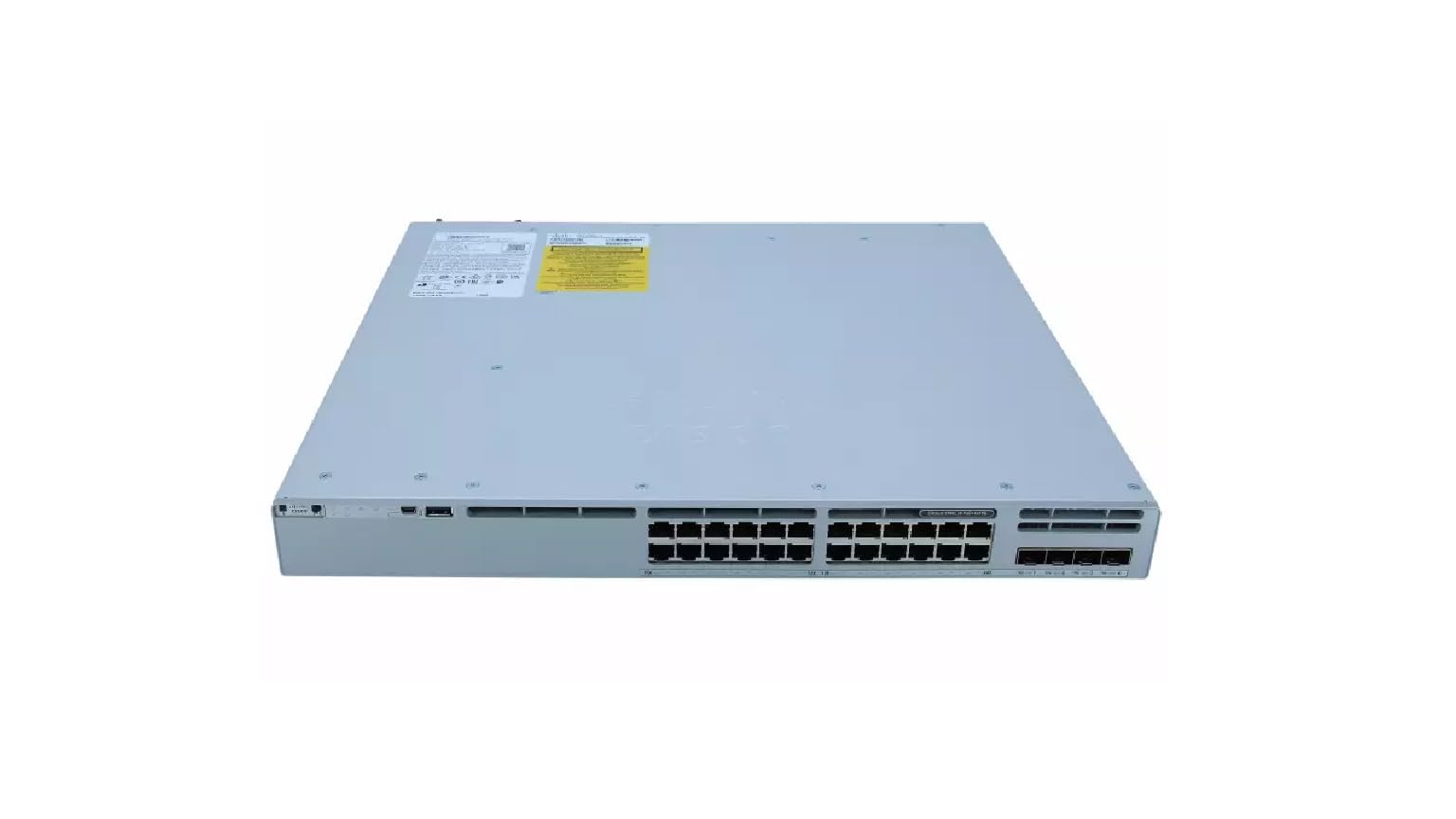
The Cisco Catalyst C9300L-24P-4X-E switch features a robust design for network deployments. The rear panel includes:
- 24 Gigabit Ethernet PoE+ Ports: For connecting network devices and providing power over Ethernet.
- 4x 10Gbps SFP+ Uplink Ports: For high-speed connections to the distribution or core layer.
- コンソールポート: コマンドライン インターフェイス アクセス用。
- USB ポート: のために file management and system configuration.
- Modular Power Supply Bay: For installing power supply units.
- 冷却ファン: 熱管理用。
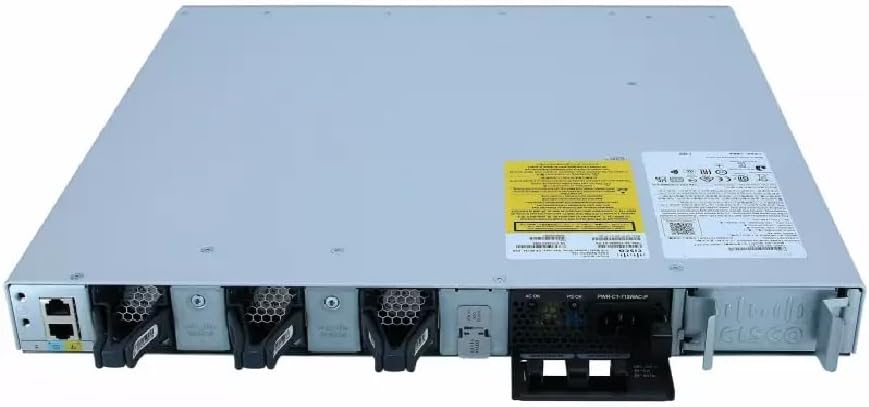
詳細な view of the rear panel of the Cisco Catalyst C9300L-24P-4X-E switch, illustrating the 24 Gigabit PoE+ ports, four 10Gbps SFP+ uplink ports, and the modular power supply bay.
設定
1。 開梱と検査
Carefully remove the switch from its packaging. Inspect the device for any signs of physical damage. If damage is found, contact your supplier immediately.
2. スイッチの取り付け
The switch can be mounted in a standard 19-inch equipment rack or placed on a desktop.
- ラックマウント設置: Attach the provided rack-mount brackets to the sides of the switch using the screws. Secure the switch into the rack using appropriate rack screws.
- デスクトップのインストール: Ensure the surface is flat, stable, and allows for adequate ventilation around the switch. Attach the rubber feet (if provided) to the bottom of the switch.
3. 電源の接続
Insert the power cord into the AC power connector on the rear of the switch. Connect the other end of the power cord to a grounded electrical outlet. Ensure the power supply is properly seated in its bay.
4. ネットワーク接続
- PoE+ ポート: Connect Ethernet cables from your network devices (e.g., IP phones, access points, surveillance cameras) to the 24 Gigabit PoE+ ports. These ports will provide both data connectivity and power.
- SFP+ アップリンク ポート: Insert compatible SFP+ transceivers into the four 10Gbps SFP+ uplink ports. Connect fiber optic cables from these transceivers to your distribution or core network devices.
- コンソールポート: For initial configuration or troubleshooting, connect a console cable from your management workstation to the console port on the switch.
スイッチの操作
1. 初回電源投入
After connecting power, the switch will automatically power on. Observe the system LED indicators for boot status. The system LED should turn green once the boot process is complete.
2. 基本設定
The Cisco Catalyst C9300L-24P-4X-E runs on Cisco IOS XE. Initial configuration can be performed via the console port using a command-line interface (CLI) or through a web-based graphical user interface (GUI) if enabled. Refer to Cisco's official documentation for detailed configuration guides.
3.LEDインジケーター
The switch features various LED indicators to provide status information:
- システムLED: Indicates overall system status (e.g., green for normal operation, amber for warning).
- PoE LED: Indicates Power over Ethernet status for the ports.
- ポートステータス LED: 各ネットワーク ポートのリンク ステータスとアクティビティを示します。
メンテナンス
Regular maintenance ensures optimal performance and longevity of your switch:
- クリーニング: スイッチの外装は、定期的に柔らかく乾いた布で拭いてください。通気口に埃やゴミが付着していないことを確認してください。液体クリーナーを直接デバイスに使用しないでください。
- ファームウェアの更新: Keep the switch firmware updated to the latest version provided by Cisco. This ensures access to new features, security patches, and performance improvements.
- 環境制御: Maintain the operating environment within specified temperature and humidity ranges to prevent hardware failure.
- ケーブル管理 Ensure all cables are neatly organized and properly secured to prevent accidental disconnections or damage.
トラブルシューティング
スイッチで問題が発生した場合は、次のトラブルシューティング手順を検討してください。
- 電源なし: Verify the power cord is securely connected to both the switch and the power outlet. Check the power source and any circuit breakers. Ensure the power supply unit is correctly installed.
- ネットワーク接続なし: Check the link status LEDs on the affected ports. Ensure Ethernet cables are properly connected and undamaged. Verify connected devices are powered on and functioning correctly.
- PoE デバイスの電源が入らない: Confirm the PoE+ port is enabled and the device is PoE compatible. Check the PoE budget and ensure it's not exceeded.
- パフォーマンスが遅い: Check for network congestion, duplex mismatches, or errors on ports. Ensure uplink bandwidth is sufficient.
- Accessing the Switch: If unable to access via network, try connecting directly to the console port for CLI access.
仕様
| 特徴 | 詳細 |
|---|---|
| ブランド | シスコ |
| モデル番号 | C9300L-24P-4X-E |
| ポート数 | 24 Gigabit PoE+ ports, 4x 10Gbps SFP+ uplinks |
| インタフェース | PoE、SFP+ |
| データ転送速度 | 1 Gigabits Per Second (Gigabit Ethernet), 10 Gigabits Per Second (Uplinks) |
| 巻tage | 240ボルト(AC) |
| スイッチタイプ | Managed, Fixed, PoE+, Layer 2 |
| ケース素材の種類 | プラスチック |
| 対応デバイス | Desktop, Laptop, Printer (and other network devices) |
保証情報
この製品には、 90日間の限定保証. Please refer to the warranty documentation provided with your purchase for specific terms and conditions. For warranty claims, contact your reseller or the manufacturer's support channels.
テクニカルサポート
For further assistance, technical support, or advanced configuration guidance, please refer to the official Cisco documentation available on their website. You may also contact your authorized Cisco reseller or support provider for specialized assistance.
シスコサポート Webサイト: https://www.cisco.com/c/en/us/support/index.html