
1. はじめに
ご購入ありがとうございますasing the Kaiser Professional 15-inch Speaker System, Model GEM-9520. This manual provides essential information for the safe and efficient operation of your new speaker system. Please read it thoroughly before use and retain it for future reference.
2. 安全情報
- 電源: 指定された電源アダプタのみを使用してください。tage はお住まいの地域の電源に適合します。
- 水と湿気: Do not expose the speaker to water, rain, or high humidity. Avoid placing liquid-filled objects on the speaker.
- 換気: スピーカーの周囲に十分な換気を確保してください。通気口を塞がないでください。
- 熱: スピーカーは、ラジエーター、暖房送風口、ストーブ、その他の熱を発生する装置などの熱源から遠ざけてください。
- クリーニング: 清掃する前に電源を切ってください。乾いた柔らかい布を使用してください。液体クリーナーやエアゾールクリーナーは使用しないでください。
- サービス: この製品を自分で修理しようとしないでください。 すべてのサービスを資格のあるサービス担当者に依頼してください。
- 配置: Place the speaker on a stable, flat surface or securely mount it on the provided tripod. Avoid placing it in direct sunlight or near strong magnetic fields.
3. パッケージ内容
パッケージにすべてのアイテムが揃っていることを確認します。
- Kaiser GEM-9520 Professional 15-inch Speaker System
- 有線マイク
- スピーカー三脚スタンド
- 電源ケーブル
- ユーザーマニュアル(このドキュメント)

Image: Kaiser GEM-9520 speaker system with included microphone and tripod stand.
4.製品オーバーview
The Kaiser GEM-9520 is a versatile 15-inch professional speaker system designed for various audio applications. It features multiple input options, LED lighting, and a robust design.
フロントパネル
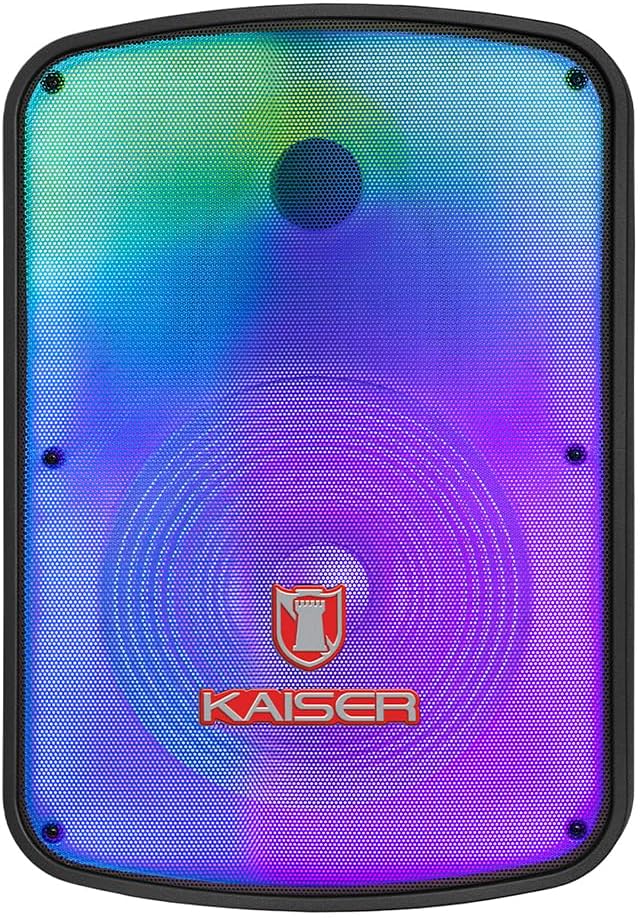
画像: 正面 view of the Kaiser GEM-9520 speaker, showcasing the 15-inch driver and integrated LED lighting.
リアコントロールパネル
The rear panel houses all input/output connections and control knobs.

画像: 背面 view of the Kaiser GEM-9520 speaker, displaying the control panel with various inputs and adjustments.

画像: 詳細 view of the control panel, showing the display, volume, equalizer, and input ports.
Included Microphone and Tripod

Image: The wired microphone included with the Kaiser GEM-9520 speaker system.
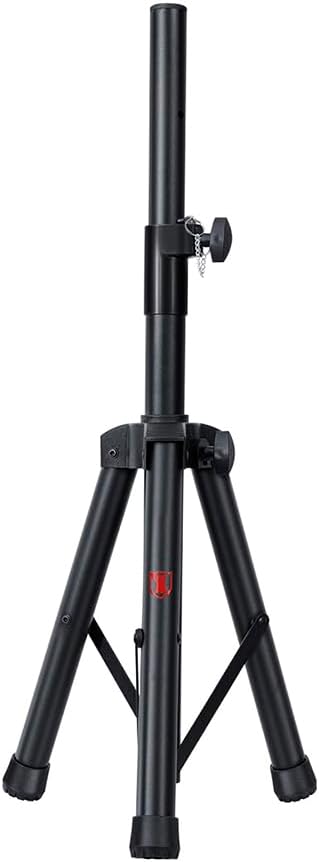
Image: The adjustable tripod stand for mounting the speaker.
5. セットアップ
5.1 開梱と初期配置
- パッケージからすべてのコンポーネントを慎重に取り出します。
- Place the speaker on a flat, stable surface or prepare for tripod mounting.
5.2 Tripod Assembly and Speaker Mounting
- Unfold the tripod legs and extend them to a stable position. Ensure all locking mechanisms are secure.
- Adjust the height of the tripod to your desired level and secure the locking pin and knob.
- Carefully lift the speaker and place its bottom mounting hole onto the tripod pole. Ensure it is seated firmly.

Image: Close-up of the tripod stand, showing its adjustable components.
5.3 Power Connection and Initial Charge
- Connect the provided power cable to the speaker's power input port on the rear panel.
- 電源ケーブルのもう一方の端を適切な電源コンセントに差し込みます。
- For optimal battery life, fully charge the speaker before its first use. The charging time is approximately 3 hours.
6. 操作手順
6.1 電源オン/オフ
Locate the power switch on the rear control panel. Flip it to the 'ON' position to power on the speaker. Flip it to 'OFF' to power off.
6.2 モード選択
Press the 'MODE' button on the control panel to cycle through available input modes: Bluetooth, USB, Micro SD, AUX, and FM Radio.
6.3 Volume and Equalizer Controls
- 音量: Rotate the 'VOLUME' knob to adjust the overall output volume.
- Treble (Agudos): Use the 'AGUDOS' knob to adjust the high-frequency response.
- Bass (Bajos): Use the 'BAJOS' knob to adjust the low-frequency response.
6.4 Bluetooth接続
- Switch the speaker to Bluetooth mode. The display will show 'BLUE' and a pairing indicator will flash.
- モバイル デバイス (スマートフォン、タブレット、ラップトップ) で Bluetooth を有効にし、利用可能なデバイスを検索します。
- Select 'Kaiser GEM-9520' (or similar name) from the list.
- ペアリングされると、スピーカーから確認音が鳴り、Bluetooth インジケーターの点滅が停止します。
6.5 USB/マイクロSD再生
- Insert a USB flash drive or Micro SD card (pre-loaded with MP3 audio files) をそれぞれのポートに挿入します。
- The speaker will automatically switch to USB/Micro SD mode and begin playback. If not, press the 'MODE' button.
- Use the playback controls (Play/Pause, Next/Previous Track) on the control panel to manage your music.
6.6 AUX入力
- Connect an external audio device (e.g., MP3 player, computer) to the 'AUX' input port on the speaker using a 3.5mm audio cable.
- 「MODE」ボタンを使用してスピーカーをAUXモードに切り替えます。
- 接続されたデバイスから再生と音量を制御します。
6.7 マイクの使用
- Connect the wired microphone to the 'MIC' input port on the rear panel.
- Adjust the microphone volume using the 'VOL MIC' knob.
- Adjust the echo effect using the 'ECO' knob.

Image: Close-up of the wired microphone, showing its ON/OFF switch.
6.8 Microphone Audio Priority Function
This function automatically lowers the background music volume when the microphone is in use, making the voice clearer and more prominent. To activate/deactivate this function, refer to the specific button or switch on the control panel labeled for 'Mic Priority' or similar.

Image: Diagram illustrating the microphone audio priority function, which lowers music volume when the microphone is active.
6.9 KSR-LINK Function
The KSR-LINK function allows you to wirelessly connect two compatible Kaiser speakers for a stereo sound experience. Refer to the specific instructions for KSR-LINK pairing, usually involving pressing a dedicated button on both speakers simultaneously.
7. メンテナンス
- クリーニング: Wipe the speaker's exterior with a soft, dry cloth. Do not use abrasive cleaners, waxes, or solvents.
- ストレージ: 長期間使用しない場合は、スピーカーを直射日光や極端な温度を避け、涼しく乾燥した場所に保管してください。
- バッテリーのケア: To prolong battery life, avoid fully discharging the battery frequently. Recharge the speaker regularly, even if not in use.
8。 トラブルシューティング
| 問題 | 考えられる原因 | 解決 |
|---|---|---|
| 電源なし | Power cable not connected; Battery discharged; Power switch off. | 電源ケーブルがしっかりと接続されていることを確認してください。バッテリーを充電してください。電源スイッチを「ON」にしてください。 |
| 音が出ない | Volume too low; Incorrect input mode; External device not playing. | Increase the master volume. Select the correct input mode. Ensure the connected device is playing and its volume is up. |
| Bluetoothが接続されない | Speaker not in pairing mode; Device too far; Previously paired device connected. | Ensure speaker is in Bluetooth pairing mode. Move device closer to speaker. Disconnect from other Bluetooth devices. |
| マイクが機能しない | Microphone not connected; Microphone volume too low; Microphone switch off. | Ensure microphone is securely plugged in. Increase 'VOL MIC' knob. Turn the microphone's ON/OFF switch to 'ON'. |
| FM ラジオの受信状態が悪い | 信号が弱い。外部アンテナがありません。 | Reposition the speaker. Extend any built-in antenna or connect an external one if available. |
9. 仕様
| 特徴 | 仕様 |
|---|---|
| モデル | ジェム9520 |
| 出力ワットtage | 25000ワット(PMPO) |
| スピーカーサイズ | 15インチ |
| 電源 | バッテリー |
| バッテリー寿命(平均) | 6時間 |
| 充電時間 | 3時間 |
| 接続技術 | AUX、Bluetooth、USB |
| オーディオ入力 | Microphone, USB, Micro SD, 3.5 mm, 6.3 mm |
| 特集 | High-resolution audio, LED light, USB port, Microphone Audio Priority, KSR-LINK |
| 取り付けタイプ | Floor Mount (Tripod included) |
| 材料 | プラスチック |
| 製品寸法(長さ x 幅 x 高さ) | 45 x 35 x 64 cm |
| 製品重量 | 10.85キロ |
10. 保証とサポート
This Kaiser product is covered by a manufacturer's warranty. For specific warranty terms and conditions, please refer to the warranty card included in your product packaging or contact Kaiser customer support. For technical assistance or service inquiries, please visit the official Kaiser webサイトまたは顧客サービス部門に連絡してください。