
1. はじめに
This manual provides detailed instructions for the installation, operation, and maintenance of the IXITAB KWS-AC301 and KWS-AC300 series Digital AC Power Energy Meters. These devices are designed to measure and display various electrical parameters including voltage, current, power, energy consumption (Kwh), timing, temperature, frequency, and power factor (for KWS-AC301 models). Please read this manual thoroughly before use to ensure proper and safe operation.
2. 安全情報
- Ensure all power is disconnected before installation or wiring to prevent electric shock.
- 設置は有資格者のみが行ってください。
- 濡れた状態や濡れた状態でデバイスを操作しないでください。amp 条件。
- 指定された容量を超えないでくださいtage and current ratings of the meter.
- 電源を投入する前に、すべての接続が安全であることを確認してください。
3 製品の特徴
The IXITAB KWS-AC300 and KWS-AC301 series meters offer comprehensive monitoring of AC electrical parameters:
- Real-time display of AC Voltage (V), Current (A), and Active Power (W).
- Measurement of cumulative Electrical Energy (Kwh) and Timing (H).
- 温度測定。
- Frequency measurement (Hz).
- Power Factor measurement (PF) (KWS-AC301 models only).
- Electrical energy and timing reset function.
- Power-down memory function for electrical energy and timing.
- Optional 485 communication interface for data transmission (KWS-AC301L models).
4. 仕様
KWS-AC300 Series
| パラメータ | AC300-20A | AC300-100A |
|---|---|---|
| 巻tage | 交流50-300V | 交流50-300V |
| 現在 | 0-20A | 0-100A |
| 力 | 0~3000W | 0-30KW |
| Capacity (Kwh) | 0.01~19999Kwh | 0.01~19999Kwh |
| タイミング | 0-200H | 0-200H |
| 温度 | -10°C ~ 99°C | -10°C ~ 99°C |
| 頻度 | 45-65Hz | 45-65Hz |
KWS-AC301 Series
| パラメータ | AC301-20A / AC301L-20A | AC301-100A / AC301L-100A |
|---|---|---|
| 巻tage | 交流50-300V | 交流50-300V |
| 現在 | 0-20A | 0-100A |
| Shunt Way | 内蔵 | 内蔵 |
| 485 コミュニケーション | AC301-20A: No, AC301L-20A: Yes | AC301-100A: No, AC301L-100A: Yes |
| 力 | 0~4400W | 0-22KW |
| Capacity (Kwh) | 0.01~99999Kwh | 0.01~99999Kwh |
| タイミング | 0-999H | 0-999H |
| 温度 | -10°C ~ 150°C | -20°C ~ 150°C |
| 頻度 | 50-60Hz | 50-60Hz |
| 力率 | 0.01-1PF | 0.01-1PF |
Note: Dimensions for KWS-AC300 are approximately 79mm x 37.5mm x 20.7mm. Dimensions for KWS-AC301 are approximately 73mm x 44mm x 24mm. Both models use a CT coil with a diameter of 15mm.

Figure 4.1: Physical dimensions of KWS-AC300 and KWS-AC301 models, including CT coil measurements.
5. パッケージ内容
- 1 x Digital AC Power Energy Meter (KWS-AC300 or KWS-AC301 model)
- ユーザーマニュアル x 1
- For 100A models: 1 x 100A Shunt / CT Coil
- For 20A models: No external shunt/CT Coil (built-in)
6. セットアップとインストール
正しくインストールするには、次の手順に注意深く従ってください。
6.1 Wiring Diagram (KWS-AC301L-100A Example)
The following diagram illustrates the wiring for the KWS-AC301L-100A model with a closed sensor (CT coil). Ensure all connections are made correctly before applying power.

Figure 6.1: Wiring connections for the KWS-AC301L-100A model, showing input voltage (IN-AC), load connection, and CT coil placement around the live wire.
- 電源入力: Connect the AC 50-300V power supply to terminals L and N (typically labeled 3 and 4 on the meter).
- 負荷接続: Connect the load in series with the live wire (L). The CT coil should be placed around the live wire that feeds the load.
- CT Coil: Connect the CT coil wires to the designated CT terminals on the meter (typically labeled 1 and 2). Ensure the direction of the CT coil is correct as indicated by any arrows on the coil or meter.
- 20A Models: For 20A models without an external CT coil, the current measurement is internal. Connect the AC 50-300V power supply to the meter's input terminals, and the load directly through the meter's designated load terminals.
6.2 485 Communication and Temperature Sensor (KWS-AC301L Models)
For KWS-AC301L models, additional interfaces are available for 485 communication and an external temperature sensor.

Figure 6.2: KWS-AC301L model showing the dedicated interfaces for the temperature sensor and 485 communication (RS485 A+ and B- terminals).
- 温度センサー: Connect the external temperature sensor to the dedicated interface.
- 485インターフェース: Connect the RS485 A+ and B- terminals to your 485 communication network for data acquisition. PC software may be available for data logging and analysis (refer to product documentation or manufacturer's website for download links).
7. 操作
The meter features a clear digital display and intuitive buttons for navigation and settings.
7.1ディスプレイオーバーview
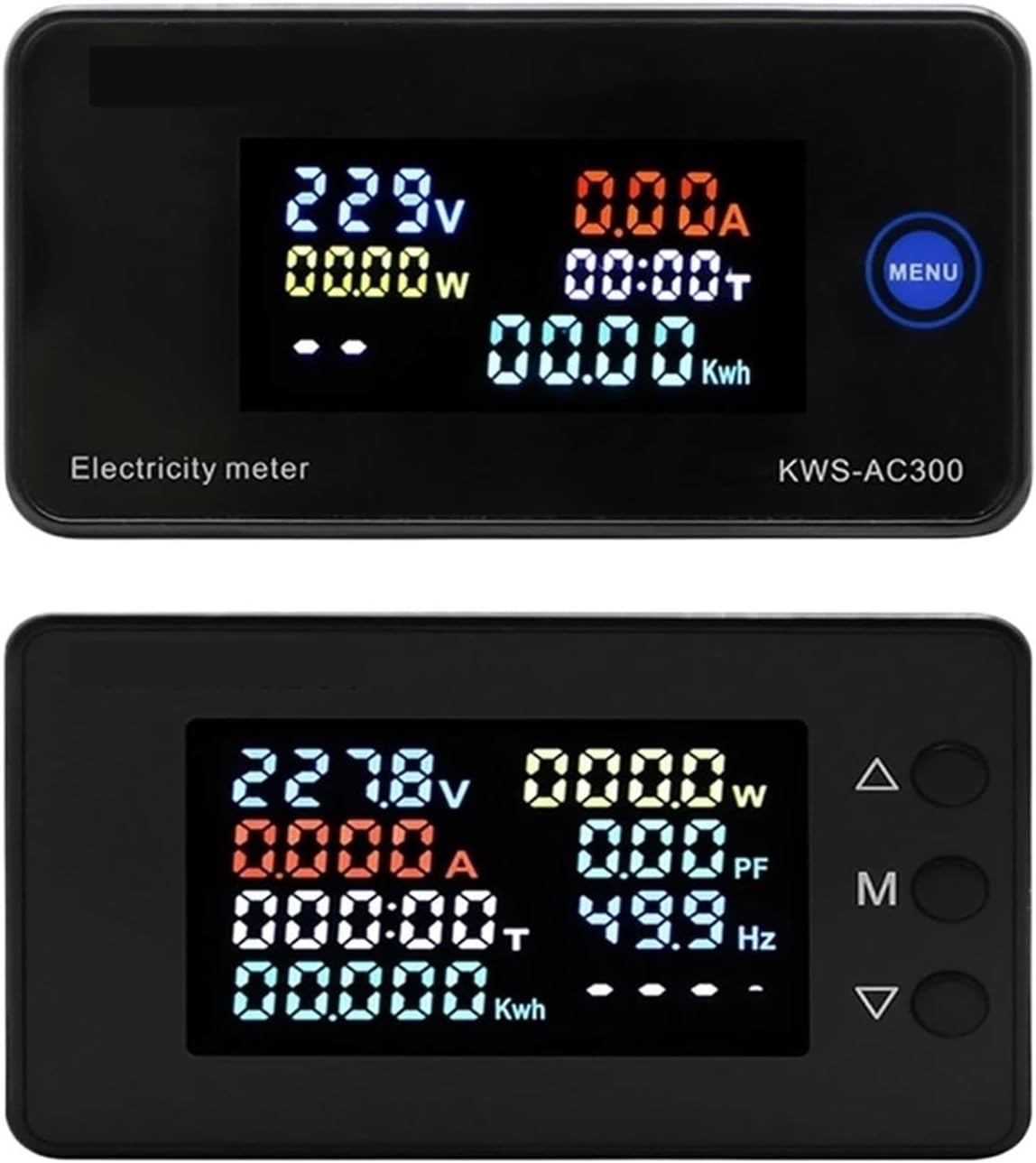
Figure 7.1: Top display shows KWS-AC300 with Voltage, Current, Power, Timing, and Kwh. Bottom display shows KWS-AC301 with Voltage, Current, Power, Timing, Kwh, Power Factor, and Frequency.
The display shows various parameters simultaneously. The KWS-AC300 typically displays Voltage, Current, Power, Timing, and Kwh. The KWS-AC301 models additionally display Frequency and Power Factor.
7.2 ボタンの機能
The meters typically feature one or more buttons for interaction:
- KWS-AC300: Features a "MENU" button. Pressing this button allows cycling through display modes or accessing settings.
- KWS-AC301: Features three buttons: Up (Δ), Middle (M), and Down (∇).

Figure 7.2: KWS-AC301 button interaction. Pressing the 'M' button for 3 seconds allows entry into setting or alarm value adjustment modes.
- "M" Button (KWS-AC301):
- ショートプレス: Cycles through different display parameters (e.g., Voltage, Current, Power, Kwh, Timing, Temperature).
- 長押し(3秒): Enters the setting mode or alarm value adjustment mode. Use the Up (Δ) and Down (∇) buttons to navigate and adjust values.
- Up (Δ) and Down (∇) Buttons (KWS-AC301): Used to navigate menus, increase or decrease values in setting modes.
7.3 Resetting Electrical Energy and Timing
To reset the cumulative electrical energy (Kwh) and timing (H) values, typically a long press on a specific button (often the "M" or "MENU" button) while in the Kwh or Timing display mode will initiate the reset process. Confirm the reset if prompted by the display.
8. メンテナンス
- メーターは清潔に保ち、ほこりを取り除いてください。清掃には柔らかく乾いた布を使用してください。
- デバイスを極端な温度、直射日光、腐食性の環境にさらさないでください。
- Do not attempt to open or repair the meter yourself, as this may void the warranty and pose a safety risk.
- Ensure all wiring connections remain secure over time.
9。 トラブルシューティング
- 表示なし:
- Check if the power supply (AC 50-300V) is connected correctly and active.
- 入力ボリュームを確認するtageは指定された範囲内です。
- Incorrect Current/Power Reading:
- For 100A models, verify the CT coil is correctly installed around the live wire and connected to the meter.
- Ensure the CT coil direction is correct.
- Check if the load is properly connected.
- Parameters Not Resetting:
- Refer to Section 7.3 for the correct procedure to reset Kwh and Timing. Ensure the button is pressed for the required duration.
- 485 Communication Issues (KWS-AC301L):
- Verify the A+ and B- connections are correct.
- Check communication settings (baud rate, parity, stop bits) on both the meter and the connected device.
10. 保証とサポート
保証情報、テクニカルサポート、またはサービスに関するお問い合わせは、メーカーまたは正規販売店までお問い合わせください。ご購入の証明として、ご購入時のレシートを保管してください。
Manufacturer: IXITAB