
1. はじめに
This manual provides detailed instructions for the setup, operation, and maintenance of your Nitho Hexagon Wireless Gaming Controller. Please read this manual thoroughly before using the product to ensure optimal performance and longevity.
主な特徴:
- マルチプラットフォーム互換性: Supports Nintendo Switch, Switch Lite, Switch OLED, Windows PC, Android, and iOS devices.
- Accurate Motion Control: Integrated 6-axis gyroscope for responsive motion sensing.
- 調整可能なRGB照明: Features 8 selectable colors and 4 lighting modes with adjustable brightness.
- 交換可能なコンポーネント: Includes replaceable mini joysticks and D-Pads for personalized control.
- 長いバッテリー寿命: Built-in rechargeable battery provides up to 9 hours of playtime.
- Detachable Phone Clamp: For mobile gaming convenience.
- プログラム可能なバックボタン: M1 and M2 buttons for custom functions or macros.
2. パッケージ内容
以下にリストされているすべてのアイテムがパッケージに含まれていることを確認してください。
- Nitho Hexagon Wireless Gaming Controller
- USB充電ケーブル
- 2x Detachable Trigger Extensions
- 2x Interchangeable D-Pads
- 6x Interchangeable Mini-Stick Caps (3 pairs of different heights/shapes)
- Detachable Phone Clamp

Image: Nitho Hexagon Wireless Gaming Controller with all included accessories, such as the phone clamp, interchangeable D-pads, and joystick caps.
3. コントローラーのレイアウト
Familiarize yourself with the buttons and features of your Nitho Hexagon controller.

画像: 正面 view of the Nitho Hexagon Wireless Gaming Controller, showing the joysticks, D-pad, action buttons (A, B, X, Y), N button, Turbo, Options, Share, and Capture buttons.

Image: Diagram highlighting key features of the controller, including the Phone Holder (1), M1 & M2 Back Programmable Buttons (2), RGB LED Lights (3), and USB Port (4).
4. コントローラーの充電
Before first use, fully charge the controller. A full charge provides up to 9 hours of gameplay.
- Connect the supplied USB charging cable to the controller's USB port.
- ケーブルのもう一方の端を USB 電源 (PC、USB 壁アダプタなど) に接続します。
- The LED indicators on the controller will show charging status. They will typically stop blinking or change color when fully charged.

Image: A Nitho Hexagon controller with a phone attached, displaying a battery indicator showing high capacity and 9 hours of battery life.
5. セットアップと接続
The Nitho Hexagon controller supports multiple connection modes. The specific pairing method depends on the platform you are connecting to.
一般的なペアリング手順:
To enter pairing mode, typically press and hold a combination of buttons (e.g., 'N' button + 'X' for Xbox/PC, 'N' button + 'A' for Switch, 'N' button + 'B' for Android, 'N' button + 'Y' for iOS) until the indicator lights begin to flash rapidly. Then, search for the controller on your device's Bluetooth settings and select it to pair.
Platform-Specific Connection:
- ニンテンドースイッチ: Navigate to 'Controllers' > 'Change Grip/Order' on your Switch console. Press and hold the designated pairing button combination on the controller until it connects.
- Windowsパソコン: For wired connection, simply plug the USB cable into your PC. For Bluetooth, ensure your PC has Bluetooth enabled. The controller may register as an Xbox controller (XInput) or a DualShock controller (DInput) depending on the pairing mode. Some users report that for Bluetooth connectivity on Windows 11, installing and running DS4Windows may be necessary to ensure proper functionality, especially if it detects as a DualShock controller.
- Android/iOS: Enable Bluetooth on your mobile device. Press and hold the appropriate pairing button combination on the controller. Select the controller from the list of available Bluetooth devices to connect.

Image: The Nitho Hexagon controller with icons indicating its multi-standard compatibility across PC, iOS, Android, and Nintendo Switch platforms.
Video: An official Nitho video demonstrating the Hexagon Controller's features and compatibility with Switch, Switch Lite, OLED, and PC.
6. カスタマイズ
The Nitho Hexagon controller offers several customization options to enhance your gaming experience.
交換可能なコンポーネント:
The controller comes with 3 replaceable mini joysticks and 2 D-Pads. To change them, gently pull the existing component upwards to remove it, then align and push down the desired component until it clicks into place.

Image: An exploded diagram illustrating the various customizable components of the Nitho Hexagon controller, including different joystick caps, D-pads, and trigger extensions.
Detachable Phone Clamp:
電話 CL を添付しますamp to the designated slot on the controller to securely hold your smartphone for mobile gaming. Ensure the clamp is firmly attached before placing your device.
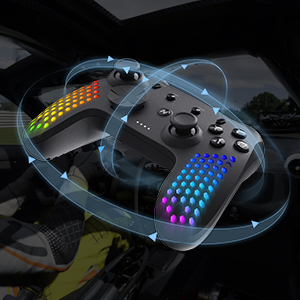
Image: A close-up of the detachable phone holder accessory, designed to integrate with the Nitho Hexagon controller for mobile gaming.
7. 高度な機能
調整可能なRGB照明:
The controller features RGB LED lights with 8 selectable colors and 4 lighting modes. Use the dedicated button (refer to controller layout) to cycle through colors and modes. Brightness can also be adjusted to suit your preference.

Image: Three Nitho Hexagon controllers showcasing various RGB lighting effects on their grips, illustrating the multiple light options.
6軸モーションセンサー:
The built-in 6-axis gyroscope and accelerometer detect motion, tilt, and rotation, providing responsive motion control for compatible games.

Image: A Nitho Hexagon controller depicted with circular arrows, symbolizing its 6-axis motion sensor capabilities for detecting movement and orientation.
Vibration Module:
The ultra-lightweight HD vibrating motors deliver realistic in-game feedback, enhancing immersion.

Image: A Nitho Hexagon controller with visual effects suggesting vibration, indicating the presence of a vibration module for haptic feedback.
プログラム可能なバックボタン(M1およびM2):
The M1 and M2 buttons on the back of the controller can be programmed for various functions, including rudimentary macro recording. This allows for simultaneous or sequential inputs, though joystick movements and time modulations may not be precisely recorded.
ターボ機能:
The controller supports two turbo modes: on-press turbo (button rapidly repeats while held) and autoclicker turbo (button rapidly repeats without needing to be held). Consult the full online manual for specific button combinations to activate and configure these modes.
8. メンテナンスとケア
To ensure the longevity of your Nitho Hexagon controller, follow these care guidelines:
- クリーニング: コントローラーのお手入れには、柔らかく乾いた布を使用してください。頑固な汚れには、軽く湿らせた布で拭いてください。amp 布で拭いても構いませんが、開口部に水分が入らないようにしてください。刺激の強い化学薬品や研磨剤入りの洗剤は使用しないでください。
- ストレージ: コントローラーは、直射日光や極端な温度を避け、涼しく乾燥した場所に保管してください。
- バッテリーのケア: Do not expose the battery to high temperatures or attempt to disassemble it. Charge the controller regularly, even if not in use, to maintain battery health.
- ドロップを避ける: 内部コンポーネントを損傷する可能性のある落下や衝撃からコントローラーを保護します。
9。 トラブルシューティング
If you encounter issues with your Nitho Hexagon controller, refer to the following common solutions:
- コントローラーが起動しない: Ensure the controller is sufficiently charged. Connect it to a power source using the USB cable and allow it to charge for at least 30 minutes before attempting to power it on again.
- 接続の問題:
- Verify that the correct pairing mode is selected for your device (PC, Switch, Android, iOS).
- Ensure Bluetooth is enabled on your device and the controller is within range.
- Remove any previous pairings of the controller from your device's Bluetooth list and attempt to pair again.
- For PC Bluetooth connectivity, especially on Windows 11, if the controller is detected as a DualShock, consider installing and running DS4Windows to ensure proper driver recognition.
- If wireless connection fails, try connecting the controller via USB cable to confirm basic functionality.
- ボタン/ジョイスティックが反応しない:
- コントローラーが正しく接続され、充電されていることを確認してください。
- Test the controller on another device or game to determine if the issue is specific to one setup.
- Perform a factory reset if available (consult the full online manual for specific instructions).
- RGB ライトが機能しない: Check if the lighting feature is enabled and adjust brightness settings. Ensure the controller is charged.
If problems persist, please contact Nitho customer support or refer to the official Nitho webさらにサポートが必要な場合は、サイトをご覧ください。
10. 仕様
| 特徴 | 仕様 |
|---|---|
| モデル番号 | MLT-EXPC-K |
| 寸法 | 167 x 62 x 116 mm (6.57 x 2.44 x 4.57 インチ) |
| 重さ | ~165g (~0.463lb) / 10.2 ounces |
| バッテリー容量 | 900mAhリチウムイオン(付属) |
| 動作温度 | 5℃~35℃ |
| 送信電力 | ≤20dBm (EIRP) |
| 現在および巻tage | DC5V-350mA |
| メーカー | ニトー |
| 初回利用可能日 | 30年2024月XNUMX日 |

Image: A visual representation of the Nitho Hexagon controller's dimensions and a table summarizing its key specifications.
11. 保証とサポート
The Nitho Hexagon Wireless Gaming Controller is covered by a manufacturer's warranty. For specific warranty terms, duration, and to register your product, please refer to the official Nitho webサイトをご覧いただくか、カスタマー サポートに直接お問い合わせください。
さらに詳しいサポート、製品登録、または view the most up-to-date information, please visit the official Nitho webサイト: Nitho Official Store