1. はじめに
Thank you for choosing the Amazon Basics Automatic Pet Feeder with Cooling Pack. This device is designed to help you manage your pet's feeding schedule by automatically dispensing dry pet food meals and treats. It features a programmable timer and includes a cooling pack to help keep food fresh. Please read this manual thoroughly before use to ensure proper operation and maintenance.

図1:上 view of the Amazon Basics Automatic Pet Feeder.
2. 安全情報
- This product is for pet use only.
- Do not submerge the unit in water. The feeder tray is removable for cleaning.
- 転倒を防止するために、フィーダーが安定した水平な面に設置されていることを確認してください。
- お子様の手の届かない場所に保管してください。
- Use only dry pet food. Do not use wet food without the cooling pack, and ensure the cooling pack is properly frozen if using wet food.
- Batteries are not included. Use 3 AA batteries. Replace batteries within 1 minute to keep settings.
- Do not force the rotation of the food tray manually.
3. パッケージ内容
Before setting up your feeder, please verify that all components are present:
- 自動ペットフィーダーユニット
- 取り外し可能なフードトレイ(6つのコンパートメント)
- Cooling Pack (2 pieces)
- 取扱説明書

図 2: 分解 view フィーダーコンポーネントの。
開封ビデオ
Video 1: An unboxing demonstration of a similar automatic pet feeder, showing typical package contents and initial setup steps.
4.製品オーバーview
自動ペットフィーダーの主な部品について理解しておきましょう。
- 上蓋: Covers the food tray and programming interface.
- フードトレイ: Contains 6 individual compartments for pet food.
- コントロールパネル: Located on the top, it includes an LCD display and buttons for setting time and schedules.
- Cooling Pack Compartment: Located beneath the food tray, designed to hold the cooling packs.
- バッテリーコンパートメント: ユニットの下側にあります。
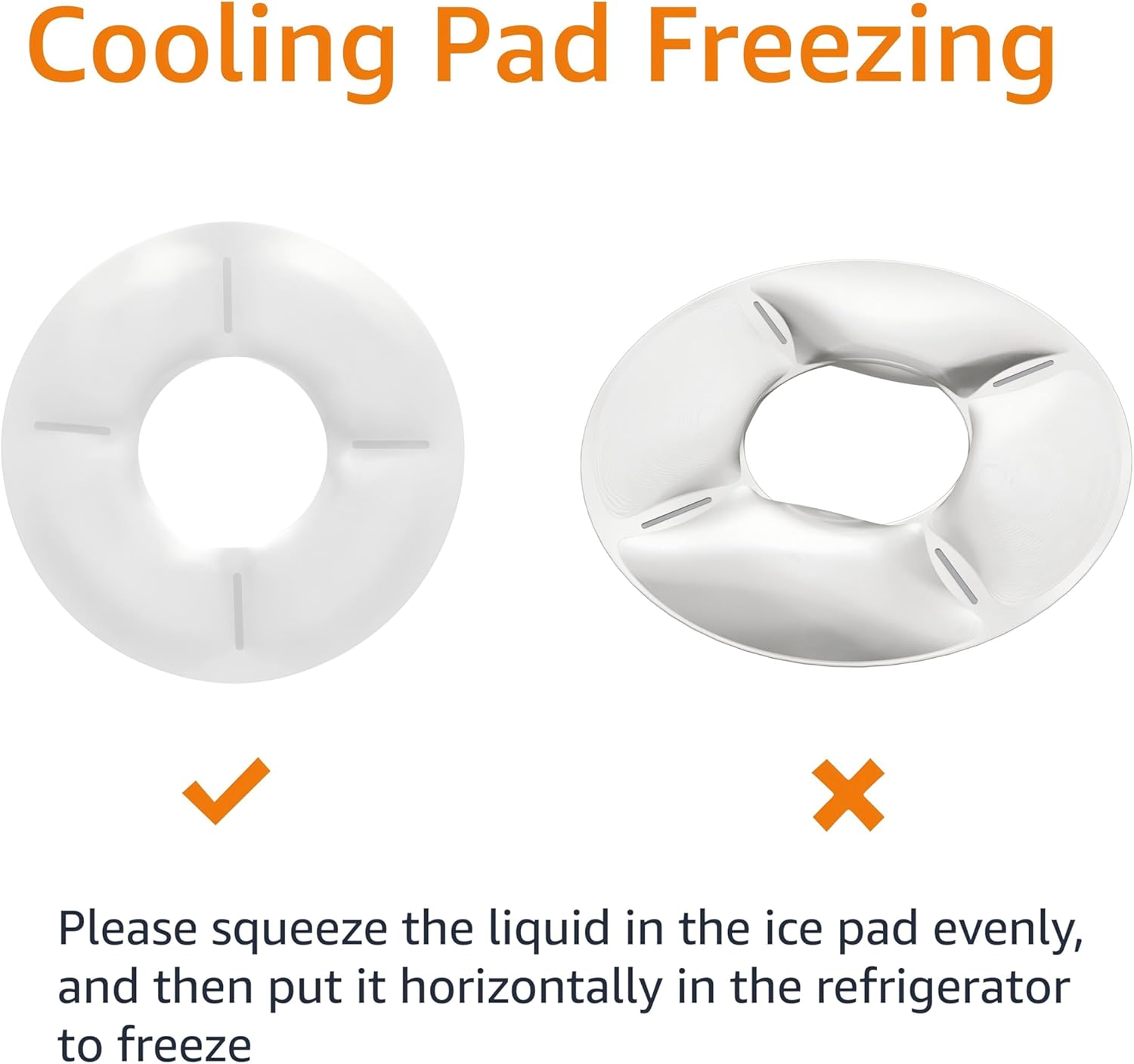
Figure 3: Product dimensions for the Amazon Basics Automatic Pet Feeder.
5. セットアップ
5.1 バッテリーの取り付け
- フィーダーを逆さまにします。
- 電池ケースのカバーを見つけます。
- Open the cover and insert 3 new AA batteries, ensuring correct polarity (+/-).
- 電池カバーをしっかりと閉じてください。

図4:下 view of the feeder with the battery compartment indicated.
5.2 Cooling Pack Preparation
For wet food or to keep dry food fresh longer, use the included cooling packs:
- Place the cooling packs horizontally in a freezer until completely frozen.
- Remove the food tray from the feeder.
- Place the frozen cooling packs into the designated compartment at the base of the feeder.
- Reinsert the food tray.

Figure 5: Proper method for freezing the cooling pack.
5.3 食品トレイへの充填
- フィーダーの上蓋を開けます。
- Fill each of the 6 compartments of the food tray with the desired amount of dry pet food or treats.
- 上蓋をしっかり閉めてください。
6. 操作手順
The feeder allows you to program up to 6 meals per day. The tray will rotate to expose the next meal at the scheduled time.
6.1 現在の時刻の設定
- Press and hold the 'SET' button until the hour digits on the LCD display start flashing.
- Use the 'UP' or 'DOWN' arrow buttons to adjust the hour.
- Press 'SET' again to move to the minute digits, then use 'UP' or 'DOWN' to adjust the minutes.
- Press 'SET' one more time to confirm and save the current time.
6.2 給餌スケジュールのプログラミング
You can program up to 6 meal times. Each meal corresponds to one compartment of the food tray.
- After setting the current time, press 'SET' to enter the first meal setting (P1). The hour digits for P1 will flash.
- Use 'UP' or 'DOWN' to set the desired hour for the first meal.
- Press 'SET' to move to the minute digits, then use 'UP' or 'DOWN' to adjust the minutes.
- Press 'SET' to confirm P1 and move to the next meal setting (P2).
- Repeat steps 2-4 for up to 6 meals (P1-P6). If you do not wish to set all 6 meals, simply press 'SET' to skip to the next program or exit programming mode.
- After setting all desired meals, press 'SET' until the display returns to the current time. The feeder is now programmed.
6.3 手動給餌
To dispense a meal immediately, press the 'MANUAL' button. The tray will rotate to the next available compartment.

Figure 6: A pet enjoying a meal from the automatic feeder.
7. メンテナンス
7.1 クリーニング
The food tray is dishwasher safe for easy cleaning. The main unit should be wiped clean with a damp 布で拭いてください。本体を水に浸さないでください。
- Remove the top lid and food tray.
- Wash the food tray in the dishwasher or by hand with warm, soapy water.
- 本体を拭いてamp cloth, ensuring no water enters the battery compartment or control panel.
- 再度組み立てる前に、すべての部品を完全に乾燥させてください。
7.2 電池の交換
When the battery indicator on the LCD display shows low power, replace the batteries promptly. To retain your settings, replace all 3 AA batteries within 1 minute.
8。 トラブルシューティング
| 問題 | 考えられる原因 | 解決 |
|---|---|---|
| フィーダーがオンになりません。 | 電池が切れているか、正しく取り付けられていません。 | 正しい極性を確認して、新しい電池と交換してください。 |
| Feeder does not dispense food at scheduled time. | Incorrect time or schedule settings; low batteries. | Verify current time and feeding schedules. Replace batteries if low. |
| Tray does not rotate smoothly. | Food debris obstructing mechanism; tray not properly seated. | Clean the feeder thoroughly, especially around the central mechanism. Ensure the tray is correctly aligned. |
| Pet is able to access food prematurely. | 蓋がしっかり閉まっていない。 | Ensure the top lid is firmly snapped into place after filling. |
9. 仕様
- モデル: DE116471
- ブランド: Amazonベーシック
- 材料: ポリエチレンテレフタレート
- 色: 白
- 寸法: 31.5 x 31.5 x 7.59 cm(12.4 x 12.4 x 3.0インチ)
- 重さ: 640グラム
- 力: 単三電池3本(別売)
- メーカー: アマゾン
- 原産国: 中国
10. 保証とサポート
This Amazon Basics product is backed by a limited warranty. For specific warranty details, please refer to the warranty information provided at the time of purchase or visit the Amazon Basics webサイト。
For customer support, troubleshooting assistance, or to inquire about replacement parts, please contact Amazon customer service through your Amazon account or the Amazon Basics support page.