
1. はじめに
Thank you for choosing the TECLAST Mini PC N15. This compact and powerful mini computer is designed for a wide range of applications, from home entertainment and office tasks to creative work and light gaming. Featuring an Intel N5095 processor, 16GB DDR4 RAM, and a 512GB PCI-e 3.0 SSD, it offers efficient performance in a small form factor. This manual provides essential information for setting up, operating, maintaining, and troubleshooting your device.
2. パッケージ内容
Please verify that all items listed below are included in your package. If any items are missing or damaged, please contact TECLAST customer support.
- 1x TECLAST N15 Mini PC
- ユーザーマニュアル x 1
- HDMIケーブル x 1
- VESAマウント×1
- 電源アダプター x 1
- 電源ケーブル x 1

Image: Package contents of the TECLAST N15 Mini PC.
3.製品オーバーview
3.1. 主な特徴
- プロセッサ: Intel N5095 (4 Cores, 4 Threads, up to 2.9GHz Turbo Frequency)
- グラフィック: インテルUHDグラフィックス
- メモリ: 16GB DDR4 メモリ
- ストレージ: 512GB PCI-e 3.0 SSD
- 接続性: Dual 2.5GbE RJ45 Ethernet, Wi-Fi (2.4G+5G ac), Bluetooth 4.2
- ビデオ出力: Supports up to three 4K displays (HDMI, DisplayPort, Full-Function Type-C)
- ポート: Multiple USB 3.2, USB 2.0, Full-Function Type-C, DisplayPort, HDMI, COM Port, Micro SD Card Reader, Headphone Output, Microphone Input
- デザイン: Compact (0.53L volume, 400g weight), Aluminum Body, VESA Mountable

Image: Intel N5095 Processor specifications and architecture.
3.2. ポートとインターフェース
The TECLAST N15 Mini PC offers a comprehensive set of ports for versatile connectivity:
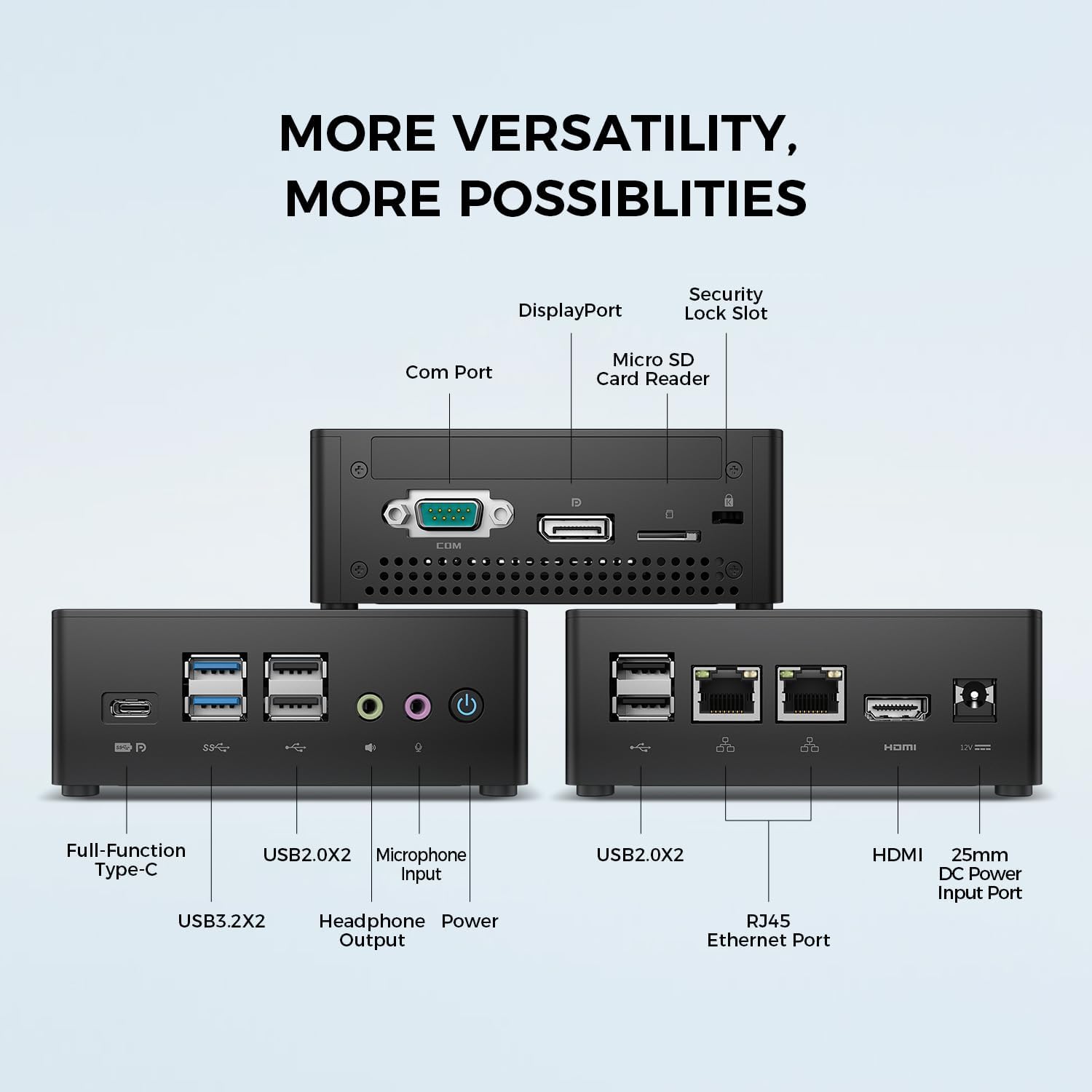
画像: 詳細 view of the TECLAST N15 Mini PC's front, side, and rear ports.
- フロントパネル: Full-Function Type-C (supports charging, data, video, audio), 2x USB 3.2, 2x USB 2.0, Headphone Output, Microphone Input, Power Button.
- サイドパネル: COM Port, DisplayPort, Micro SD Card Reader, Security Lock Slot.
- 後面パネル: 2x USB 2.0, 2x RJ45 Ethernet Ports (2.5GbE), HDMI, DC Power Input.

Image: Dual 2.5GbE RJ45 Ethernet Ports for high-speed networking.
3.3. 冷却システム
The N15 Mini PC is designed for efficient heat dissipation to ensure stable and quiet operation. It features a 15W TDP, nickel-plated heat pipe, and a turbo fan, providing over 16000mm² of heat dissipation area.

Image: Internal cooling system design for quiet and efficient operation.
3.4. コンパクトなデザイン
With a compact volume of approximately 0.53L and a weight of 400g, the N15 Mini PC is highly portable and can be easily integrated into any workspace. Its aluminum body ensures durability.

Image: Compact size and lightweight design of the Mini PC.
4. セットアップ手順
4.1. 周辺機器の接続
- モニターを接続: Use the provided HDMI cable to connect your monitor to the HDMI port on the Mini PC. Alternatively, use a DisplayPort cable or a Full-Function Type-C cable for compatible monitors.
- キーボードとマウスを接続します。 USB キーボードとマウスをミニ PC の使用可能な USB ポートに接続します。
- ネットワークに接続する(オプション): For a wired connection, connect an Ethernet cable from your router or modem to one of the RJ45 ports on the Mini PC. For wireless, ensure your Wi-Fi network is available during initial setup.
- 接続電源: Connect the power adapter to the DC Power Input port on the Mini PC, then plug the power cable into a wall outlet.
4.2. 電源投入と初期設定
- ミニ PC の前面にある電源ボタンを押します。
- The system will boot up. If it's the first time, it will guide you through the Windows operating system setup process. Follow the on-screen instructions to configure language, region, network, and user accounts.
- すべてのドライバーがインストールされていることを確認してください。通常、Windows Update はこれを自動的に処理します。
5. 操作手順
5.1. 基本操作
Once setup is complete, your TECLAST N15 Mini PC functions like a standard desktop computer. You can launch applications, browse the internet, and manage files using your connected keyboard and mouse.
5.2. マルチディスプレイ設定
The Mini PC supports connecting up to three 4K displays simultaneously, enhancing productivity and entertainment experiences.
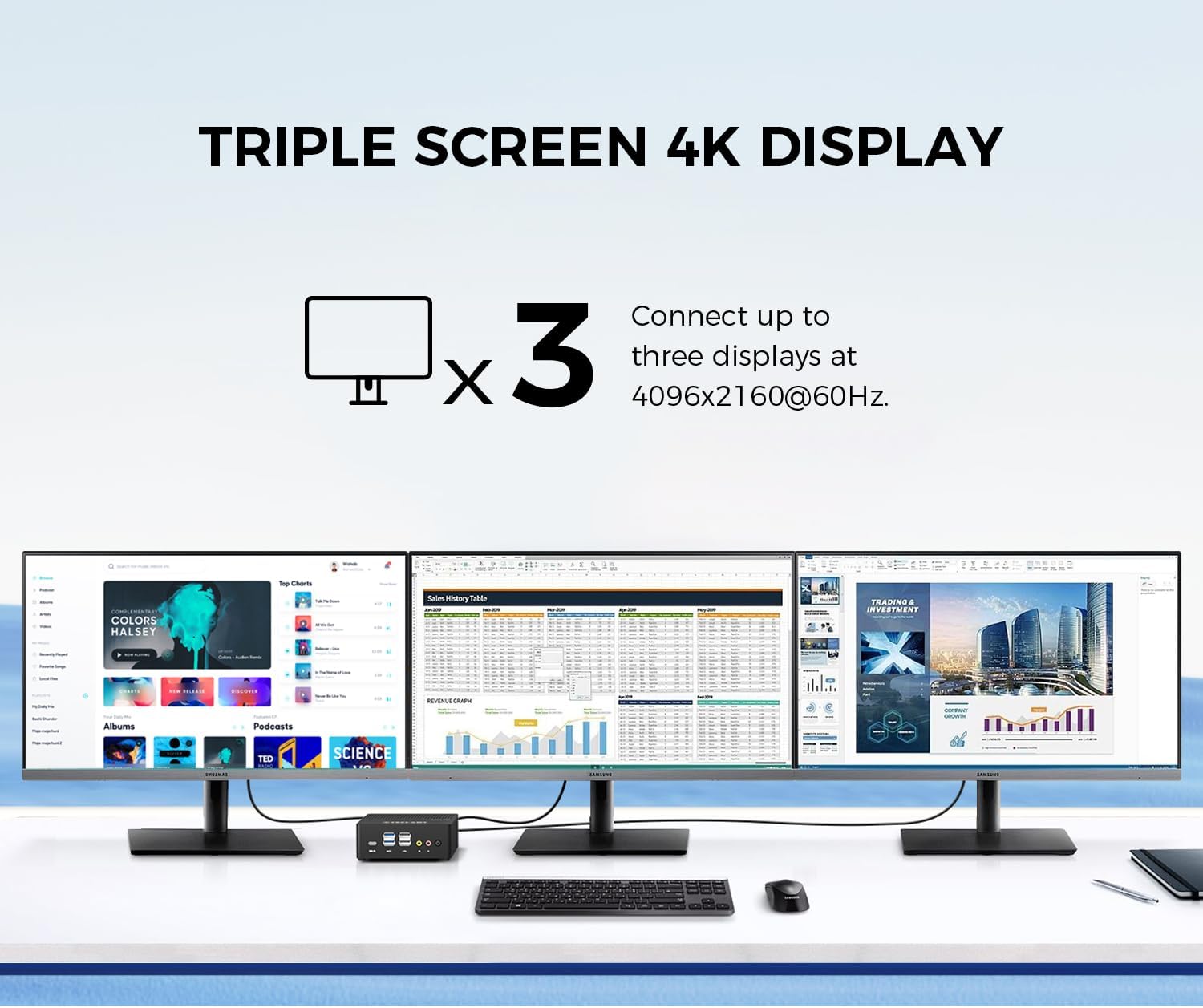
Image: Triple screen 4K display setup with the Mini PC.
- プライマリモニターを HDMI 経由で接続します。
- Connect a second monitor via DisplayPort.
- Connect a third monitor via the Full-Function Type-C port (requires a compatible Type-C to DisplayPort/HDMI adapter or monitor).
- In Windows, right-click on the desktop and select "Display settings" to configure your multiple displays (extend, duplicate, or show only on one).
5.3.ワイヤレス接続
The Mini PC supports 2.4G+5G ac Wi-Fi and Bluetooth 4.2 for wireless connections.
- Wi-Fi: Access Wi-Fi settings in Windows to connect to your preferred wireless network.
- ブルートゥース: Pair Bluetooth devices like keyboards, mice, or headphones through Windows Bluetooth settings.
6. メンテナンス
定期的なメンテナンスを行うことで、ミニ PC の寿命が長くなり、最適なパフォーマンスが確保されます。
- クリーニング: 外装の清掃には、柔らかく乾いた布をご使用ください。通気口に溜まった埃には、圧縮空気をご使用ください。清掃の前に、必ずデバイスの電源を切り、プラグを抜いてください。
- ソフトウェアアップデート: Regularly check for and install Windows updates and driver updates to maintain system security and performance.
- ストレージ管理: 不要なものを定期的に掃除する files and applications to free up storage space and improve system responsiveness.
- 換気: 過熱を防ぐために、Mini PC は換気のよい場所に設置し、通気口が塞がれないようにしてください。
7。 トラブルシューティング
If you encounter issues with your TECLAST N15 Mini PC, refer to the following common troubleshooting steps:
| 問題 | 考えられる解決策 |
|---|---|
| モニターに何も表示されない | Check all cable connections (HDMI, DisplayPort, Type-C). Ensure the monitor is powered on and set to the correct input source. Try a different cable or monitor if possible. |
| ミニPCが電源が入らない | Verify the power adapter is securely connected to both the Mini PC and a working power outlet. Try a different power outlet. |
| インターネット接続なし(Wi-Fi) | Windowsの設定でWi-Fiが有効になっているかご確認ください。正しいネットワークに接続していること、およびパスワードが正しく入力されていることを確認してください。ルーター/モデムを再起動してください。 |
| No internet connection (Wired) | Ensure the Ethernet cable is securely connected to both the Mini PC and your router/modem. Check the network status in Windows. Restart your router/modem. |
| パフォーマンスが遅い | 不要なアプリケーションを閉じてください。リソースを消費しているバックグラウンドプロセスがないか確認してください。十分な空きストレージ容量を確保してください。マルウェアがないかシステムスキャンを実行してください。 |
| Peripheral devices not recognized | Try connecting the device to a different USB port. Ensure device drivers are installed. Restart the Mini PC. |
これらの手順を試しても問題が解決しない場合は、TECLAST カスタマー サポートに問い合わせて、さらにサポートを受けてください。
8. 仕様
Detailed technical specifications for the TECLAST N15 Mini PC:
| 特徴 | 仕様 |
|---|---|
| ブランド | テクラスト |
| モデル番号 | 15円 |
| CPUモデル | インテル セレロン N5095 |
| CPU速度 | Up to 2.9 GHz (Turbo Frequency) |
| プロセッサ数 | 4 |
| RAMメモリ搭載 | 16GB DDR4 |
| RAMメモリ最大サイズ | 16ギガバイト |
| メモリストレージ容量 | 512 GB PCI-e 3.0 SSD |
| グラフィックスコプロセッサ | インテルUHDグラフィックス |
| ディスプレイ解像度最大 | 3840 x 2160 ピクセル (4K) |
| ビデオ出力インターフェース | HDMI, DisplayPort, Type-C |
| 接続技術 | Ethernet (Dual RJ45 2.5GbE), HDMI, LAN, Wi-Fi (802.11ac), Bluetooth 4.2 |
| USBポート合計 | 6 (USB 3.2 x 2、USB 2.0 x 4) |
| アイテム重量 | 400グラム |
| 消費電力 | 15ワット |
| 冷却方法 | Air (with Turbo Fan and Nickel-Plated Heat Pipe) |
| 色 | 黒 |
9. 保証とサポート
TECLAST products are designed for quality and reliability. For any product-related inquiries, technical support, or warranty claims, please contact TECLAST customer service. Most questions are answered within 24 hours.
For further assistance, please visit the official TECLAST website or contact their support channels directly.
10. 製品ビデオ
ビジュアルについては、この公式製品ビデオをご覧ください。view of the TECLAST N15 Mini PC's features and connectivity.
ビデオ: 終了view of the TECLAST N15 Mini PC, showcasing its design, ports, and internal components.