
導入
This manual provides detailed instructions for the installation, operation, and maintenance of your XTRONS IQ72DLRP Car Stereo GPS unit. Please read this manual thoroughly before using the product to ensure proper functionality and to prevent damage. Keep this manual for future reference.
安全情報
- Do not attempt to operate the unit while driving. Distracted driving can lead to accidents.
- Ensure all wiring is correctly connected before powering on the unit to avoid short circuits or damage.
- Consult a professional for installation if you are unsure about any steps. Incorrect installation can void your warranty.
- ユニットを極端な温度、長時間の直射日光、過度の湿気にさらさないでください。
- Do not disassemble the unit. This may cause damage and will void the warranty.
パッケージ内容
インストールを続行する前に、パッケージにすべてのアイテムが揃っていることを確認してください。
- XTRONS IQ72DLRP Head Unit
- GPSアンテナ
- パワーハーネス
- USBケーブル
- RCAケーブル
- 外部マイク
- ユーザーマニュアル(このドキュメント)
- Other accessories as pictured below.

図1: 付属アクセサリ
設定
1.インストールオーバーview
The XTRONS IQ72DLRP is designed for specific integration with the Land Rover Freelander 2. Professional installation is recommended. Ensure the vehicle's battery is disconnected before starting any electrical work.
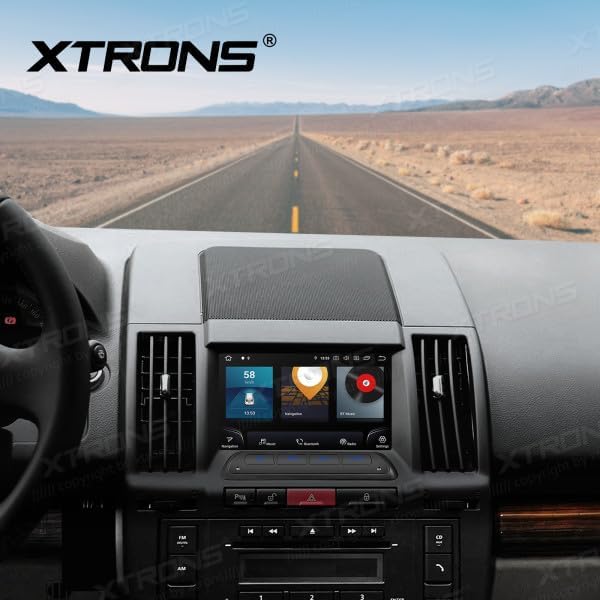
Figure 2: Unit installed in Land Rover Freelander 2 dashboard
2. 配線接続
Connect the main power harness, speaker wires, and other auxiliary cables according to your vehicle's wiring diagram and the provided XTRONS harness. Pay close attention to the following connections:
- 力: Connect the yellow wire (constant 12V), red wire (accessory 12V), and black wire (ground).
- 講演者: Connect the speaker wires to the corresponding vehicle speaker wires (e.g., Front Left +, Front Left -).
- GPSアンテナ: GPSアンテナは、障害物のない場所に設置してください。 view 通常はダッシュボードの上やフロントガラスの下に設置される空。
- USB: Connect the USB cables for external storage or smartphone connectivity.
- 外部マイク: 通話品質を向上させるには、外部マイクを接続します。
3. 初回電源投入
After all connections are secure, reconnect the vehicle's battery. Turn on the ignition. The unit should power on automatically. Follow any on-screen prompts for initial setup, such as language selection and time zone.
操作手順
1.基本機能
- 電源オン/オフ: 電源ボタン(ある場合)を長押しするか、車両のイグニッションのオン/オフを切り替えます。
- 音量コントロール: 音量ノブまたは画面上のコントロールを使用してオーディオレベルを調整します。
- ホーム画面: ホームアイコンをタップして、Android のメインインターフェースに戻ります。

Figure 3: Main Android Home Screen
2. Android OSナビゲーション
The unit runs on Android 12. Navigate through menus and applications by tapping, swiping, and dragging on the touchscreen, similar to a smartphone or tablet.

Figure 4: Application Drawer
3. 無線操作
Access the "Radio" application from the home screen. You can scan for stations, save presets, and switch between AM/FM bands.
4. Bluetooth接続
携帯電話をペアリングするには:
- へ移動 設定 > ブルートゥース.
- Enable Bluetooth on both the head unit and your mobile device.
- 検索する available devices on your mobile phone and select "XTRONS IQ72DLRP" (or similar name).
- 両方のデバイスでペアリングコードを確認します。
ペアリングすると、ハンズフリー通話やオーディオのストリーミングが可能になります。
5. CarPlay / Android Auto
Connect your compatible smartphone via USB to use Apple CarPlay or Android Auto. The system will automatically detect and launch the respective interface, allowing access to navigation, music, messages, and more directly from your phone.
6. GPSナビゲーション
The unit comes with a built-in GPS module and antenna. You can use pre-installed navigation apps or download others from the Google Play Store. Ensure the GPS antenna is properly installed for optimal signal reception.
7. USB / Media Playback
Insert a USB drive into one of the provided USB ports. Use the "Music" or "Video" applications to browse and play media files. The unit supports various audio and video formats.
8. DSP設定
The Digital Sound Processor (DSP) allows for advanced audio customization. Access the "DSP" application to adjust equalizer settings, balance, fader, and other sound effects to optimize your listening experience.

図5: DSP設定インターフェース
9. Wi-Fi and 4G Connectivity
Wi-Fiネットワークに接続するには 設定 > ネットワークとインターネット > Wi-Fi. For 4G connectivity, insert a compatible SIM card (if the unit supports it and a slot is available) or use a USB 4G dongle (sold separately) and configure network settings.
メンテナンス
1. ユニットのクリーニング
画面と本体の外側は、柔らかく乾いた布で拭いてください。頑固な汚れには、軽く湿らせた布で拭いてください。amp cloth with a mild, non-abrasive cleaner can be used. Avoid spraying liquids directly onto the unit.
2. ソフトウェアの更新
Periodically check for software updates to ensure optimal performance and access to new features. Updates can usually be found in the system settings or on the official XTRONS website. Follow the instructions provided with the update package carefully.
トラブルシューティング
| 問題 | 考えられる原因 | 解決 |
|---|---|---|
| ユニットの電源が入りません。 | 配線が間違っている、ヒューズが切れている、車両のバッテリーが外れている。 | Check power connections (yellow, red, black wires). Inspect vehicle fuses. Ensure battery is connected. |
| スピーカーから音が出ない。 | スピーカー配線が正しく接続されていない、音量が低すぎる、ミュート機能が有効になっている。 | Verify speaker wiring. Increase volume. Check if the unit is muted. |
| GPS 信号が弱いか利用できません。 | GPS アンテナが正しく取り付けられていないか、または遮られています。 | GPSアンテナがクリアであることを確認する view 空の。アンテナの接続を確認してください。 |
| Bluetoothのペアリングが失敗します。 | Bluetooth not enabled; Incorrect pairing code; Device out of range. | Enable Bluetooth on both devices. Re-enter pairing code. Ensure devices are close. |
| タッチスクリーンが反応しない。 | Temporary software glitch; Unit frozen. | Restart the unit (turn vehicle ignition off and on). If issue persists, perform a factory reset (refer to settings). |
仕様
- モデル番号: IQ72DLRP
- ブランド: エクストロン
- オペレーティング·システム: アンドロイド12
- 画面サイズ: 7インチ
- 接続性: Bluetooth, Wi-Fi, 4G (optional), Apple CarPlay, Android Auto, USB
- 対応デバイス: 携帯電話
- 色: 黒
- プロセッサ: オクタコア
- ラム: 8GB LPDDR4
- ロム: 256GB SSD
- ディスプレイ技術: クォリティLED
- オーディオ出力: Optical Coaxial, RCA Audio Out
Note: Specifications are subject to change without prior notice. Some product images may show Android 13, but the product title specifies Android 12.
保証とサポート
1. 保証情報
XTRONS products typically come with a limited warranty covering manufacturing defects. Please refer to the warranty card included with your product or visit the official XTRONS webお住まいの地域に固有の詳細な保証条件については、こちらのサイトをご覧ください。
2. カスタマーサポート
If you encounter any issues not covered in the troubleshooting section or require further assistance, please contact XTRONS customer support. You can usually find contact information (email, phone, or support portal) on the official XTRONS webサイト:
When contacting support, please have your product model number (IQ72DLRP) and purchase details ready.