
GreenLaw GreenLaw Surface Pro 9 Keyboard
GreenLaw Bluetooth キーボード(Surface Pro 9/8/X(13インチ)用) - 取扱説明書
Model: GreenLaw Surface Pro 9 Keyboard | Brand: GreenLaw
導入
This manual provides comprehensive instructions for the setup, operation, and maintenance of your GreenLaw Bluetooth Keyboard. This keyboard is designed for use with Microsoft Surface Pro 9, Surface Pro 8, and Surface Pro X 13-inch models, offering enhanced functionality and protection.

Image: The GreenLaw Bluetooth Keyboard seamlessly integrated with a Microsoft Surface Pro tablet, showcasing its use as a laptop replacement.
互換性
The GreenLaw Bluetooth Keyboard is compatible with the following Microsoft Surface models:
- サーフェスプロ9
- サーフェスプロ8
- サーフェスプロX
注記: This keyboard is not compatible with Surface Pro 7+, Surface Pro 7, Surface Pro 6, Surface Pro 5, Surface Pro 4, Surface Pro 3, or Surface Go models.
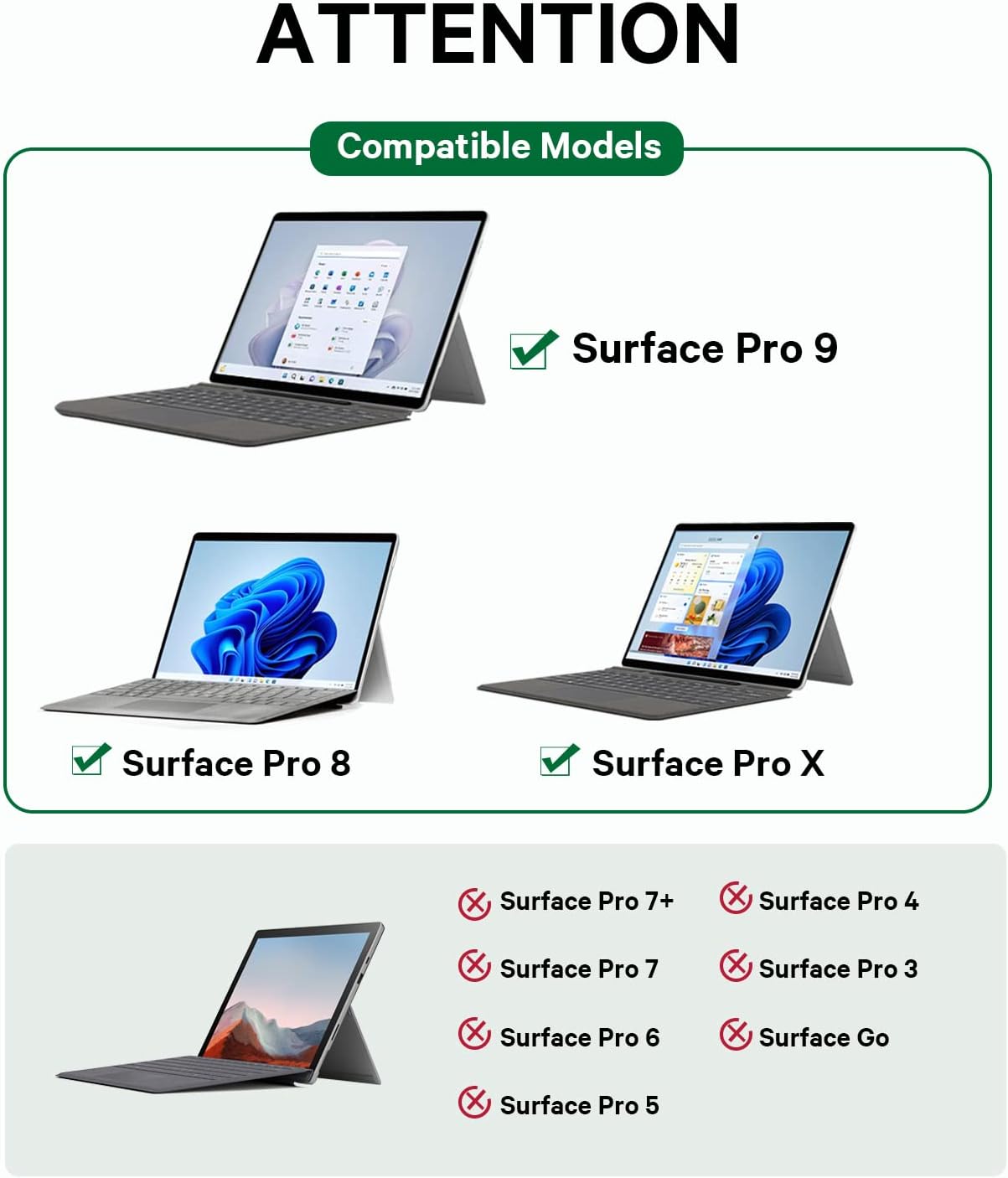
Image: A visual guide illustrating the compatible and incompatible Microsoft Surface Pro models for the keyboard.
主な特徴
- Multi-Gesture Touchpad: Microfiber touch panel with intelligent core design for efficient navigation and simplified operations.
- 7色バックライト: Adjustable 3 brightness levels and 7 color options for enhanced visibility in various lighting conditions.
- ワイヤレス Bluetooth 5.1 接続: Stable long-distance connection (up to 10 meters) allowing separate use of keyboard and tablet.
- 超スリムなデザイン: Lightweight and ergonomic keys with 7° tilt support to reduce typing pressure and wrist fatigue.
- 肌に優しい素材: Faux microfiber fabric provides protection for the tablet screen and is dirt-resistant.
セットアップガイド
1. 初期充電
Before first use, ensure the keyboard is fully charged. Connect the provided USB-C charging cable to the keyboard's charging port and a power source. The battery indicator will show charging status.

画像: 詳細な view キーボードの USB-C 充電ポートの、充電ケーブルを接続する場所を示します。
2. タブレットの取り付け
The keyboard features a magnetic attachment for easy connection to your Surface Pro. Align the bottom edge of your Surface Pro with the magnetic strip on the keyboard and allow it to snap into place.

Image: A user demonstrating the magnetic attachment of the Surface Pro tablet to the keyboard, forming a laptop-like setup.
3.Bluetoothペアリング
- Flip the power switch on the right side of the keyboard to the "ON" position. The indicator light will turn on.
- を押す "Fn" + "C" keys simultaneously to enter Bluetooth pairing mode. The Bluetooth indicator will flash.
- Surface Proで、 設定 > Bluetoothとデバイス.
- 選択 "Add device" 選択して "ブルートゥース".
- 位置特定 「Bluetoothキーボード」 in the list of available devices and click to connect. The indicator light will stop flashing once connected.
Video: A step-by-step demonstration of how to connect the Bluetooth keyboard to a Microsoft Surface tablet, including activating pairing mode and selecting the device in settings.
操作手順
キーボード機能
- バックライト制御: プレス "Fn" + "Shift" to adjust the 3 brightness levels or cycle through the 7 available colors.
- ファンクションキー: The top row of keys (F1-F12) can be used for multimedia control or standard function keys. Refer to the key legends for specific actions.
- タッチパッド: The integrated multi-gesture touchpad supports various gestures for navigation and control.

Image: A user interacting with the multi-gesture touchpad, highlighting its functionality for precise control.

Image: The keyboard's keys glowing with a vibrant 7-color backlight, demonstrating its visibility in low-light conditions.
タッチパッドジェスチャ
The touchpad supports various multi-finger gestures for efficient navigation:
- 1本指タップ: 左クリックします。
- 2本指タップ: 右クリック。
- 2本指でスクロール: 上/下または左/右にスクロールします。
- ピンチしてズーム: ズームイン/ズームアウトします。
- 3本指で上にスワイプ: タスクを開く View (Windows)
- 3本指で下にスワイプ: Show desktop (Windows).
- 3本指で左/右にスワイプ: Switch between open applications (Windows).
メンテナンス
- クリーニング: キーボードの表面を拭くときは、柔らかく乾いた布を使用してください。頑固な汚れには、軽く湿らせた布で拭いてください。amp 布を使用することで、キーの隙間やポートに水分が入らないようにすることができます。
- ストレージ: When not in use, close the keyboard cover to protect the tablet screen and keyboard from dust and scratches.
- バッテリーのケア: To prolong battery life, avoid fully discharging the keyboard frequently. Charge it regularly, especially if it will not be used for an extended period.
トラブルシューティング
| 問題 | 解決 |
|---|---|
| キーボードが Bluetooth 経由で接続されません。 |
|
| バックライトが機能しない、または 1 色のままになる。 |
|
| タッチパッドが反応しません。 |
|
仕様
- 製品寸法: 12.4 x 9.28 x 0.4インチ
- 商品の重量: 1.23ポンド
- 接続技術: ブルートゥース5.1
- バッテリー: 1 リチウムポリマー電池 (付属)
- 特別な機能: Backlit, Lightweight, Multi-Gesture Trackpad
- 色: Grey (RGB backlighting)
- メーカー: グリーンロー
- モデル番号: GreenLaw Surface Pro 9 Keyboard
保証とサポート
For warranty registration and product support, please refer to the documentation included with your product or contact GreenLaw customer service. If you encounter any difficulties or have inquiries, please do not hesitate to reach out to us at your earliest convenience.
For the quickest and most efficient support experience, please contact us directly through Amazon or via the provided contact information in your product packaging.
追加リソース
製品終了view ビデオ
ビデオ: 販売者による公式製品ビデオasing the Microsoft Surface Pro 11 / Pro 10 / Pro 9 / Pro 8 / Pro X keyboard, highlighting its features and compatibility.
Ask a question about this manual
Ask about setup, troubleshooting, compatibility, parts, safety, or missing instructions. Manuals+ will review the question and use this page’s manual context to help answer it.