
ベースス CCGAN240CS
Baseus 240W スマート USB C 充電器 取扱説明書
モデル: CCGAN240CS
1.製品オーバーview
The Baseus 240W Smart USB C Charger is a versatile 5-port desktop charging station designed for efficient power delivery to multiple devices simultaneously. It features PD 3.1 and GAN technology, an LED display, and smart app control, making it suitable for charging laptops, smartphones, tablets, and other USB-C compatible devices.

Figure 1: Baseus 240W Smart USB C Charger and its accompanying cables.
主な特徴:
- Compact 5-Port 240W Desktop Charger: Combines AC adapters with USB-C adapters in a compact design.
- Simultaneous Laptop Fast-Charging: Supports 140W PD3.1 for one laptop and 100W PD3.0 for another simultaneously.
- Unique One-Touch Display and App Control: Features an edge-to-edge display and remote control via the Baseus smart app.
- Intelligent Core with Extensive Safety: Utilizes an upgraded Baseus chip with advanced cooling technology (glue-fill and Graphene) and 9 protective charging protocols.
2. 箱の中身
以下にリストされているすべてのアイテムがパッケージに含まれていることを確認してください。
- 1 x 240W 5-Port GaN Charger
- 240W USB-C充電ケーブル x 1
- 1 x Square Tip DC Adapter
- 2 x Round Tip DC Adaptors

Figure 2: The 5-port layout of the charger, including DC, USB-C, and USB-A ports.
3.セットアップガイド
- 電源に接続: Plug the charger's power cable into a standard AC wall outlet. The LED display on the charger should illuminate.
- ポートを識別します: The charger features 3 USB-C ports, 1 USB-A port, and 1 DC port. Identify the appropriate port for your device.
- デバイスを接続する:
- For USB-C devices (laptops, phones, tablets): Use the provided 240W USB-C to USB-C cable or another compatible USB-C cable.
- For DC-powered laptops: Select the appropriate round tip or square tip DC adapter and connect it to the charger's DC port, then to your laptop. Refer to Figure 8 for connector compatibility.
- For USB-A devices: Use a standard USB-A cable.
- 初期表示チェック: Upon connecting a device, the LED display will show the real-time wattage output for each active port and a total wattage.
- Smart App Setup (Optional):
- Download the Baseus smart app from your device's app store.
- スマートフォンでBluetoothを有効にします。
- Open the app and follow the on-screen instructions to pair with your charger. This allows for remote control, temperature monitoring, and custom charging profiles.

Figure 3: Illustrates simultaneous fast charging of two laptops.

Figure 4: The Baseus smart app interface for customizing charging settings.
4. 操作手順
4.1 LEDディスプレイの理解
The integrated LED display provides real-time information about the charging status:
- Individual Port Wattage: Shows the power output (in Watts) for each connected device.
- 総ワットtage: Displays the combined power output of all active ports.
- タッチボタン: A touch-sensitive area on the display allows for interaction, such as cycling through display modes or activating certain functions (refer to app for full control).
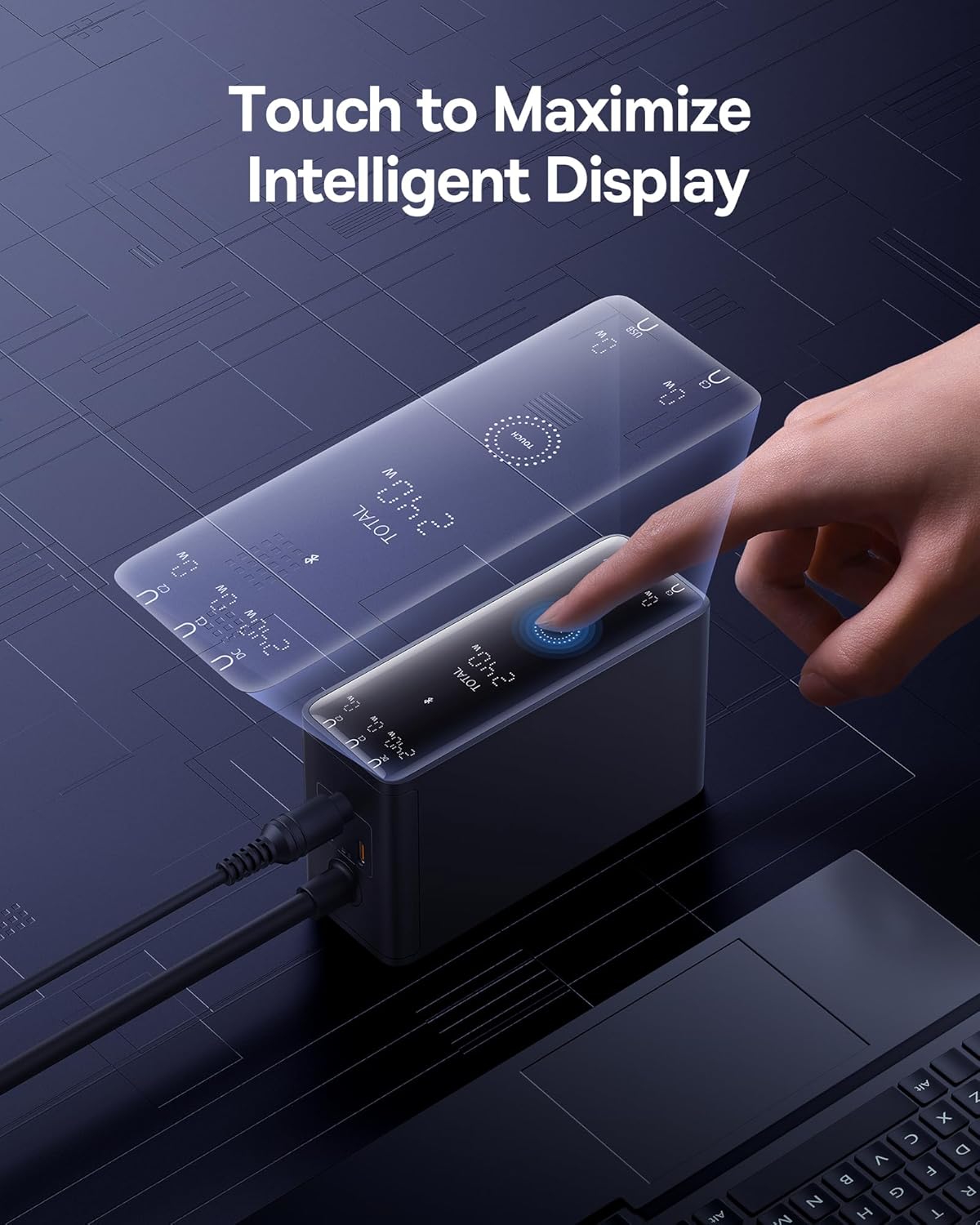
Figure 5: Interacting with the charger's intelligent touch display.
4.2 複数のデバイスの充電
The charger is designed to intelligently distribute power across its 5 ports. When multiple devices are connected, the power output to each port may adjust based on the device's power requirements and the charger's total available wattag(240W)です。
- ノートパソコンの充電: The charger can fast-charge two laptops simultaneously, with one USB-C port supporting up to 140W (PD3.1) and another up to 100W (PD3.0).
- Mixed Device Charging: You can charge a combination of laptops, tablets, smartphones, and other USB-powered devices. The charger's intelligent chip will optimize power delivery.
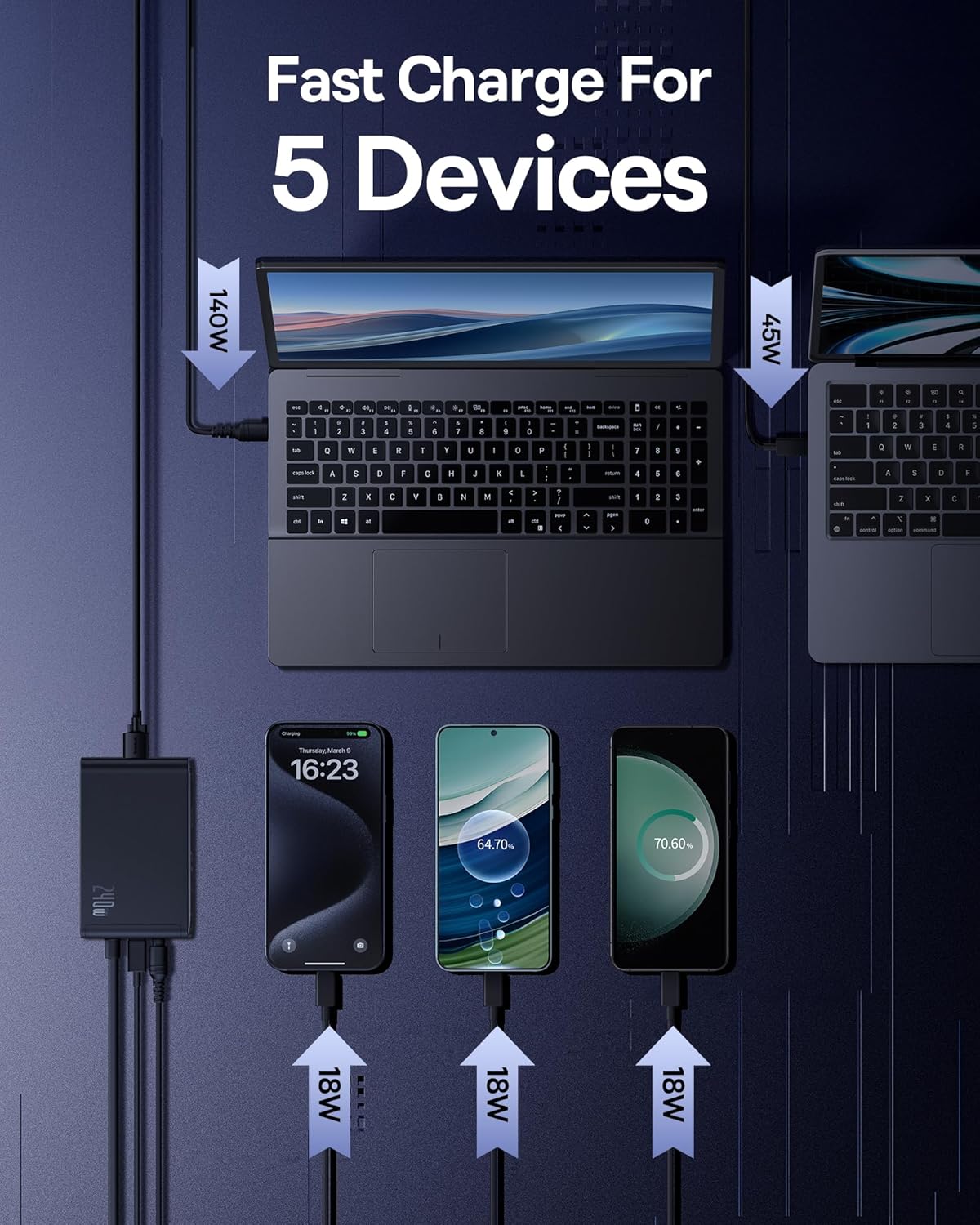
図6:例ample of charging five devices simultaneously with optimized power distribution.
4.3 コネクタの互換性
The charger includes various DC adapters to ensure compatibility with a wide range of laptops. Always verify the shape and dimensions of your device's charging port before connecting.

Figure 7: Guide to different DC and USB-C connector types for compatibility.
5. 仕様
| 特徴 | 詳細 |
|---|---|
| 製品寸法 | 4.5 x 1.65 x 2.6インチ |
| アイテム重量 | 1.39ポンド |
| モデル番号 | CCGAN240CS |
| ブランド | ベースス |
| 接続技術 | 電力線 |
| コネクタタイプ | DC, USB-C, USB-A |
| 入力ボリュームtage | 240ボルト(AC) |
| 特集 | 240W Fast Charging, App Control, LED Display |
| 対応デバイス | Smartphones, Tablets, Laptops (MacBook Pro, Dell XPS, Lenovo, HP), Earbuds, Nintendo Switch, Steam Deck, and Other USB-C Devices. |
6. メンテナンス
To ensure the longevity and optimal performance of your Baseus 240W Smart USB C Charger, follow these maintenance guidelines:
- クリーニング: 清掃する前に、充電器をコンセントとすべてのデバイスから取り外してください。表面は柔らかく乾いた布で拭いてください。液体クリーナーや研磨剤は使用しないでください。
- ストレージ: 充電器は直射日光や極端な温度を避け、涼しく乾燥した場所に保管してください。
- ケーブルのお手入れ: Avoid bending or crimping cables excessively, especially near the connectors, to prevent damage.
- 換気: Ensure the charger is placed in an area with adequate ventilation to prevent overheating. Do not cover the charger during operation.

Figure 8: Internal cooling technologies designed for efficient heat dissipation.
7。 トラブルシューティング
| 問題 | 考えられる原因 / 解決策 |
|---|---|
| Charger display shows 0W or is blank. |
|
| デバイスが充電されない、または充電速度が遅い。 |
|
| 充電器は動作中に暖かくなります。 |
|
| Smart app cannot connect to the charger. |
|
8. 保証とサポート
Baseus products are designed and manufactured to the highest quality standards. For information regarding warranty coverage, technical support, or service inquiries, please refer to the warranty card included with your product or visit the official Baseus webサイト。
保証請求のために購入証明書を保管してください。
Ask a question about this manual
Ask about setup, troubleshooting, compatibility, parts, safety, or missing instructions. Manuals+ will review the question and use this page’s manual context to help answer it.