
1.製品オーバーview
The Vertiv Liebert EXS is a compact, monolithic uninterruptible power system (UPS) designed to provide continuous, conditioned, and regulated output voltage. It utilizes true on-line, double-conversion technology, making it suitable for protecting sensitive equipment such as computers, servers, networking devices, and other IT infrastructure. This UPS delivers economical, efficient, and reliable three-phase power for critical loads up to 20kVA.
主な機能は次のとおりです。
- 信頼性の高い3相電源: Offers a high level of power protection for critical systems.
- オンラインダブルコンバージョン: Ensures high availability of IT systems by continuously conditioning power.
- 高い運用効率: Achieves over 93% efficiency in double conversion mode and up to 99% in eco mode, contributing to energy savings.
- 高度なバッテリー監視: Capable of monitoring battery capacity, temperature, humidity, access, and leaks.
- 1.0 出力力率: Delivers maximum usable power to connected loads.
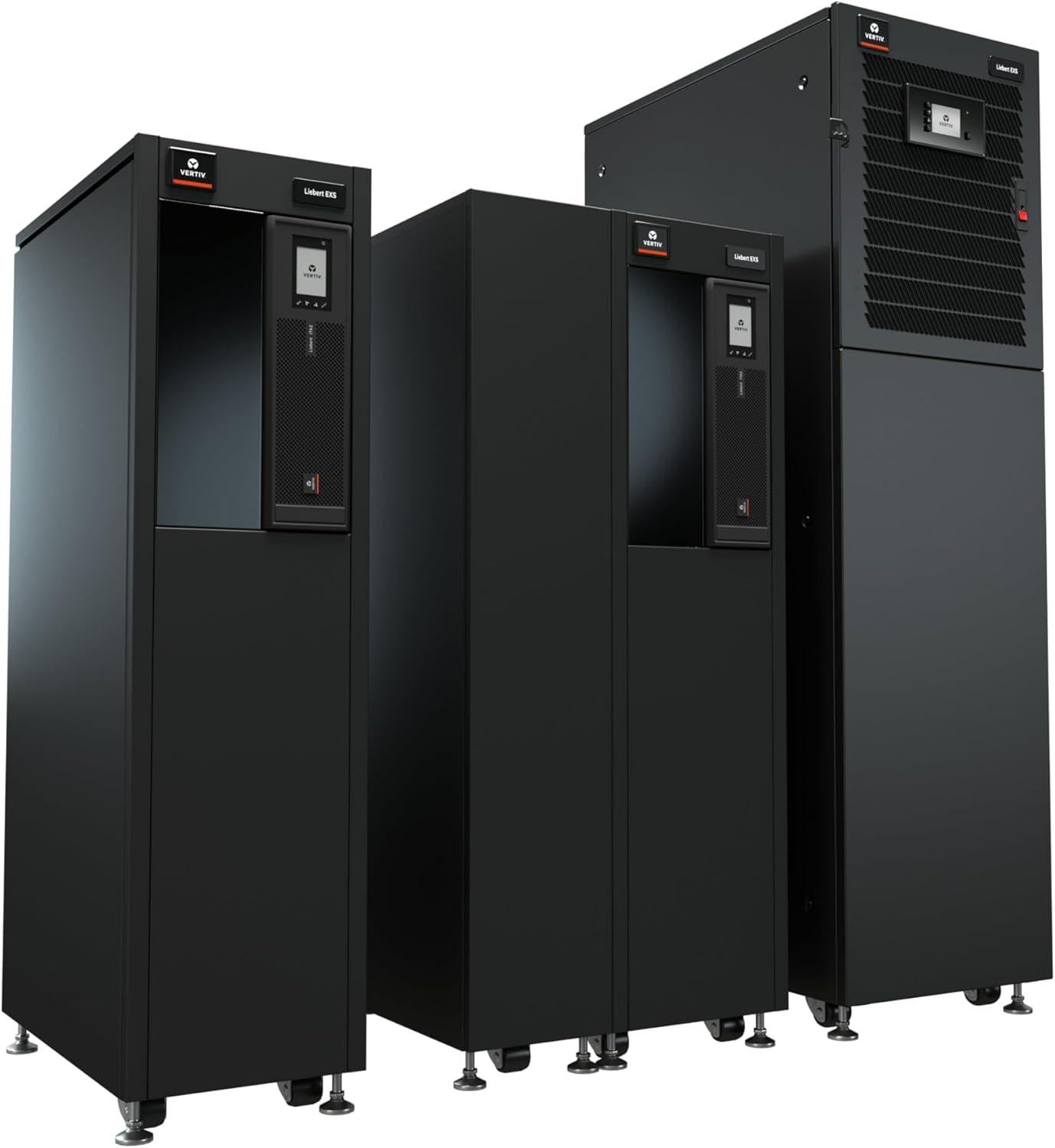
Figure 1: Vertiv Liebert EXS UPS units, showcasing different capacities.
2. セットアップとインストール
The Liebert EXS UPS is designed for straightforward installation. It features an optimized design with flexible power distribution and battery arrangements to meet specific capacity and runtime requirements.
2.1 コンポーネントの識別

図2:内部 view and port layout of the Liebert EXS UPS, highlighting USB port, programmable dry contacts, Liebert IntelliSlot ports, ventilation holes, and flexible PDU power distribution.
Refer to Figure 2 for the location of key components and ports:
- USBポート: For local communication and configuration.
- Programmable Dry Contacts: Provides 2 input and 2 output contacts for external system integration.
- Liebert IntelliSlot Ports: Two ports are standard for simultaneous use of Unity and Relay cards, enabling advanced monitoring and communication.
- 通気孔: Ensure proper airflow for cooling the UPS and batteries.
- Flexible PDU Power Distribution: Supports one PDU for 10kVA models and up to two for 15kVA and 20kVA models.
2.2 初期設定手順
- 開梱と設置: Carefully unpack the UPS. Ensure the installation location meets environmental requirements (temperature, humidity) and has adequate space for ventilation and maintenance access.
- 電気接続: Connect the UPS to the facility's power supply and connect critical loads to the UPS output. All electrical work should be performed by qualified personnel.
- バッテリー接続: Connect the internal or external battery cabinets as per the specific model's instructions. The UPS features internal battery cabinets with auto-detection for accurate runtime reporting.
- 通信設定: Install the Liebert IS-UNITY DP communication card (factory installed) for remote management. Connect necessary network cables to the IntelliSlot ports for monitoring.
- 電源オン: Follow the specific power-on sequence detailed in the full product manual to energize the UPS and bring it online.
3. 操作手順
Once installed and powered on, the Liebert EXS UPS operates automatically to protect connected equipment. The front panel display provides status information and allows for basic configuration.
3.1 監視と制御
The UPS is integrated with the Liebert monitoring platform, supporting SNMP, Modbus, and relay communication protocols. This allows for comprehensive remote monitoring and management of the UPS status and performance.
ビデオ1: 終了view of the Liebert Uninterruptible Power Supply - EXS Series, demonstrating its features and benefits.
Vertiv Power Insight Management Software (available for download from Vertiv.com) can be used for advanced monitoring and management capabilities.
4. メンテナンス
Regular maintenance ensures the longevity and optimal performance of your Liebert EXS UPS.
4.1 統合メンテナンスバイパス
The UPS includes an integrated maintenance bypass cabinet. This feature allows for UPS maintenance or replacement without requiring a shutdown of the connected critical loads, ensuring continuous operation.
4.2バッテリーケア
The advanced battery monitoring system helps in maintaining battery health. Periodically inspect batteries for any signs of damage or leakage. Follow manufacturer guidelines for battery replacement intervals.
4.3 一般的なメンテナンス
- 過熱を防ぐため、通気口を障害物がないようにしてください。
- Regularly check all cable connections for tightness and integrity.
- Consult the full user manual for detailed maintenance schedules and procedures.

Figure 3: Key features of the Liebert EXS UPS, including the Internal Maintenance Bypass Cabinet and Factory Installed Network Card.
5。 トラブルシューティング
This section provides general guidance for common issues. For specific error codes and advanced troubleshooting, refer to the comprehensive product manual.
5.1 一般的な問題と解決策
- UPS の電源が入らない: Verify that the input power cable is securely connected and that the facility's power supply is active. Check the main circuit breaker.
- アラーム音: An alarm indicates a system event or fault. Check the UPS front panel display for specific error messages or status indicators. Consult the manual for the meaning of the alarm code.
- Short Runtime on Battery: This may indicate aging batteries or an excessive load. Check battery health via the monitoring system and ensure the load does not exceed the UPS capacity.
- 接続された機器に電力が供給されていない: Verify that the UPS is online and that output circuit breakers are not tripped. Check connections to the critical loads.
If an issue persists after attempting these basic troubleshooting steps, contact Vertiv technical support.
6. 仕様
| 仕様 | 価値 |
|---|---|
| モデル番号 | EXS20KXRN |
| 出力定格 | 20kVA / 20kW |
| 入出力ボリュームtage | 208/120VAC (220/127VAC) |
| 段階 | 三相3線式 |
| 製品寸法(奥行き×幅×高さ) | 29.5 x 17.3 x 62.9 インチ (74.9 x 43.9 x 159.8 cm) |
| アイテム重量 | 1042ポンド(472.6kg) |
| バッテリーセルの構成 | 鉛蓄電池 |
| 統合カード | Liebert Intellislot Card (is-Unity-DP) |
| ランタイム | 15-Min Extended Runtime |
| 色 | 黒 |
7. 保証とサポート
7.1製品保証
The Vertiv Liebert EXS UPS comes with comprehensive warranty coverage. A standard 1-year warranty is included, with an option to extend to a 3-year warranty. Please refer to your purchase documentation for specific terms and conditions.
7.2 テクニカルサポート
For technical assistance, troubleshooting beyond basic steps, or warranty claims, please contact Vertiv customer support. Contact information can typically be found on the Vertiv official webサイトまたは製品パッケージに記載されています。