
導入
Thank you for choosing the Bigben 5000mAh MagSafe Compatible Wireless Power Bank. This portable power bank is designed to provide convenient wireless charging for compatible devices, as well as wired charging via its USB-C port. Please read this manual carefully before using the product to ensure safe and optimal performance.
安全情報
怪我やデバイスの損傷を防ぐために、次の安全上の注意事項を守ってください。
- パワーバンクを極端な温度、直射日光、火気にさらさないでください。
- パワーバンクを水やその他の液体に浸さないでください。
- パワーバンクを落としたり、ぶつけたり、分解したりしないでください。
- お子様の手の届かない場所に保管してください。
- 認定された充電ケーブルとアダプターのみを使用してください。
- パワーバンクが膨張したり、異臭がしたり、過度に熱くなったりした場合は、直ちに使用を中止してください。
- パワーバンクは地域の規制に従って責任を持って廃棄してください。
パッケージ内容
パッケージに以下の項目が含まれているか確認してください。
- Bigben 5000mAh MagSafe Compatible Wireless Power Bank
- USB-C-USB-C充電ケーブル
- ユーザーマニュアル(このドキュメント)
製品終了view
パワーバンクのコンポーネントについて理解しておきましょう。

画像: 正面 view of the Bigben 5000mAh Power Bank, highlighting the LED indicator lights and the USB-C port.
- LEDインジケーターライト: Four small lights indicating the remaining battery level.
- USB-Cポート: For charging the power bank and for wired device charging.
- ワイヤレス充電面: The flat surface designed for MagSafe compatible wireless charging.
- 電源ボタン: Activates wireless charging and checks battery level.
設定
パワーバンクの充電
初めて使用する前に、パワーバンクを完全に充電してください。
- 付属の USB-C ケーブルをパワーバンクの USB-C ポートに接続します。
- USB-C ケーブルのもう一方の端を互換性のある USB 壁アダプター (別売) に接続します。
- LEDインジケーターライトが点灯して充電状態を示します。4つのLEDがすべて点灯すると、パワーバンクは完全に充電されています。
LEDインジケーターのステータス:
- 1つのLED: 0~25%充電
- 2つのLED: 25~50%充電
- 3つのLED: 50~75%充電
- 4つのLED: 75~100%充電
オペレーティング
ワイヤレス充電(MagSafe対応)
This power bank supports MagSafe compatible wireless charging up to 10W.
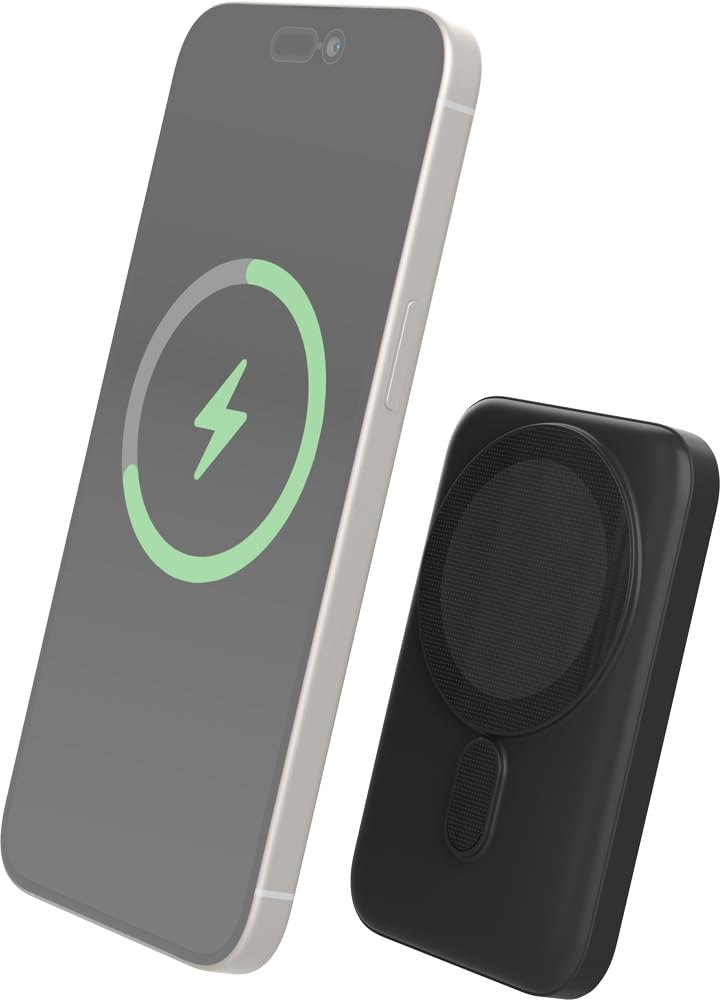
Image: The Bigben power bank magnetically connected to the back of a smartphone, illustrating the wireless charging function.
- Ensure your device is MagSafe compatible or has a MagSafe compatible case.
- モバイルバッテリーをデバイスの背面に合わせます。磁石がカチッとはまり、所定の位置に固定されます。
- The power bank will automatically begin charging your device. The LED indicators on the power bank will show its remaining charge.
- 充電を停止するには、パワーバンクをデバイスから取り外すだけです。
Note: For optimal magnetic attachment and charging efficiency, ensure there are no obstructions between the power bank and your device.
有線充電
You can also charge devices using a USB-C cable.
- Connect one end of a USB-C cable (not included, or use the provided one if suitable) to the power bank's USB-C port.
- ケーブルのもう一方の端をデバイスの充電ポートに接続します。
- パワーバンクは自動的にデバイスの充電を開始します。
メンテナンス
クリーニング
- Disconnect the power bank from all devices and power sources before cleaning.
- 柔らかく乾いた、糸くずの出ない布で表面を拭いてください。
- 過酷な化学薬品、洗浄溶剤、または強力な洗剤は使用しないでください。
ストレージ
- パワーバンクは、直射日光や極端な温度を避け、涼しく乾燥した場所に保管してください。
- 長期間保管する場合は、バッテリーの状態を維持するために、3 か月ごとにパワーバンクを約 50% まで充電してください。
トラブルシューティング
| 問題 | 考えられる解決策 |
|---|---|
| パワーバンクが充電されない |
|
| デバイスがワイヤレス充電されない |
|
| ケーブル経由でデバイスが充電されない |
|
| LEDインジケーターが機能しない |
|
仕様
| 特徴 | 詳細 |
|---|---|
| モデル番号 | 6128 |
| バッテリー容量 | 5000mAh |
| ワイヤレス出力 | Up to 10W (MagSafe Compatible) |
| 入力/出力ポート | USB-C |
| 重さ | 約300g |
保証とサポート
Bigben products are designed and manufactured to the highest standards. For warranty information or technical support, please refer to the warranty card included with your purchase or visit the official Bigben webサイト。
For further assistance, please contact Bigben customer service.