
導入
This manual provides detailed instructions for the installation, operation, and maintenance of your GREATHTEK HDMI KVM Switch. This device allows you to control up to four computers using a single monitor, keyboard, and mouse, enhancing workspace efficiency and reducing cable clutter. Please read this manual thoroughly before use to ensure proper functionality and to maximize your product experience.
パッケージ内容
下記のすべての品目がパッケージに含まれていることをご確認ください。不足または破損している品目がある場合は、カスタマーサポートまでご連絡ください。
- KVM Switch Unit x1
- HDMI 2.0ケーブル×1
- USB3.0ケーブルx4
- USB C Power Cable x1
- Desktop Controller x1
- 取扱説明書 x1
- フットパッド×4

製品の特徴
- 4ポートKVM機能: Control up to four computers (PCs) with a single set of keyboard, mouse, and monitor.
- 高解像度サポート: Supports resolutions up to 4K@60Hz (3840x2160@60Hz), and is backward compatible with 2K and 1080P. Ensure your source devices, monitor, and HDMI cables all support 4K@60Hz for optimal performance.
- 高速USB 3.0ポート: Equipped with 3 USB 3.0 ports and 1 USB C port, offering data transfer speeds up to 5 Gbit/s, which is ten times faster than USB 2.0. These ports can connect keyboards, mice, USB drives, printers, scanners, and other USB devices.
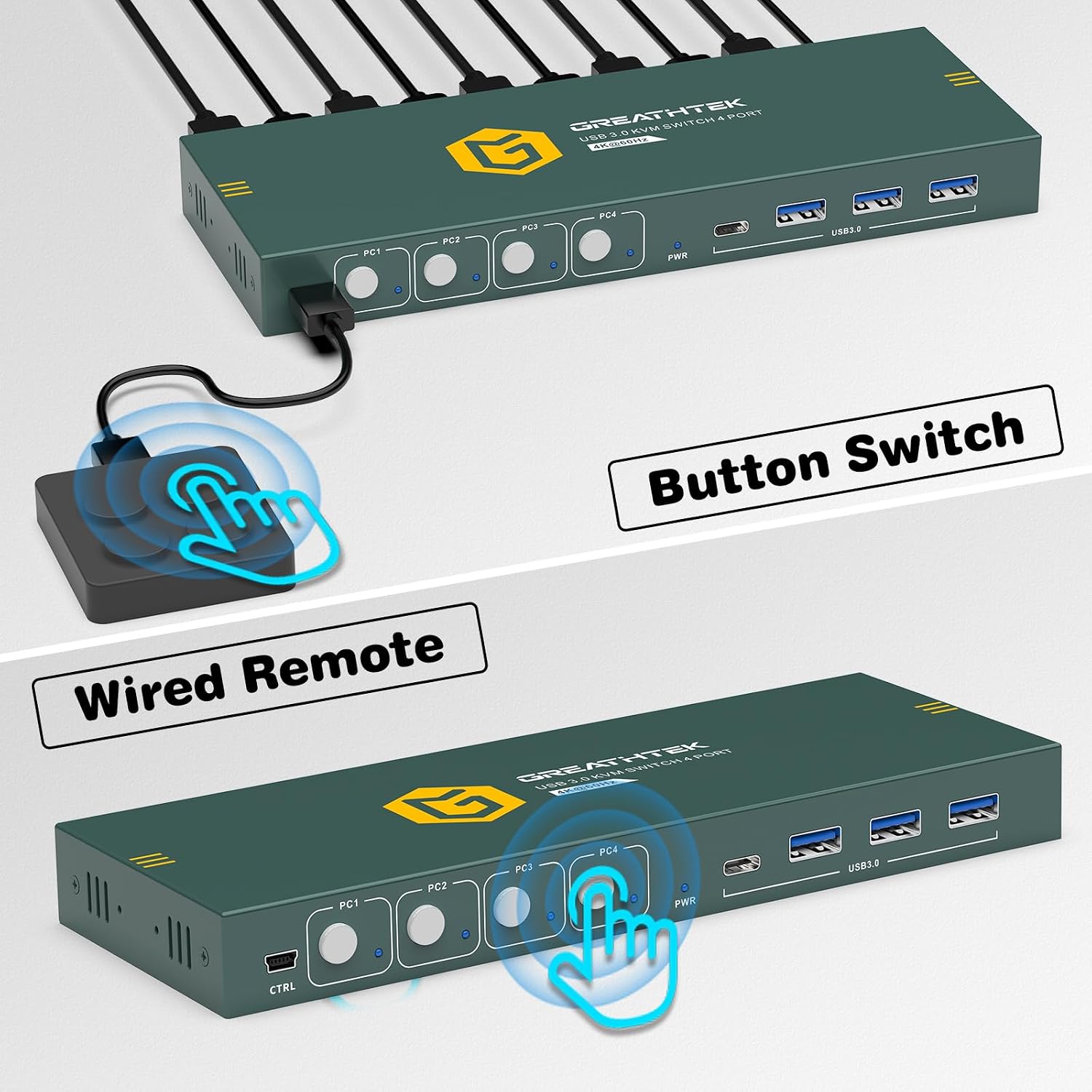
- デュアルスイッチング方式: Easily switch between connected computers using either the physical button on the KVM switch or the included 1.5m wired desktop controller.
- EDID Adaptation: Features EDID adaptation to maintain consistent window and resolution settings when switching between computers, preventing display disruption.
- 幅広い互換性: Compatible with various operating systems including Windows, Linux, Unix, and Mac.


セットアップ手順
Follow these steps to properly set up your GREATHTEK HDMI KVM Switch:
- すべてのデバイスの電源をオフにします。 Before starting, ensure all computers and your monitor are powered off and unplugged from their power sources.
- モニターを接続します。 Connect your monitor to the "HD OUT" port on the KVM switch using an HDMI cable.
- コンピューターを接続する(HDMI): For each computer, connect an HDMI cable from the computer's HDMI output to an available "HD IN" port (PC1, PC2, PC3, PC4) on the KVM switch.
- コンピューターを接続する(USB): For each computer, connect a USB 3.0 cable from the computer's USB port to the corresponding "USB 3.0" input port (PC1, PC2, PC3, PC4) on the KVM switch. These connections enable keyboard, mouse, and other USB device sharing.
- キーボードとマウスを接続します。 Connect your keyboard and mouse to the dedicated USB 3.0 ports on the KVM switch. You can also connect other USB peripherals like a USB drive or printer to the remaining USB 3.0 ports.
- 接続電源: Connect the USB C power cable to the KVM switch's power input and then to a suitable USB power adapter (not included) or a powered USB port.
- 電源オン: KVM スイッチ、モニター、コンピュータの電源を入れます。

操作手順
Once the KVM switch is set up, you can easily switch between your connected computers.
コンピュータ間の切り替え
The GREATHTEK HDMI KVM Switch offers two methods for switching:
- フロントパネルボタン: Press the corresponding button (PC1, PC2, PC3, or PC4) on the front panel of the KVM switch to select the desired computer. The LED indicator next to the button will illuminate to show the active computer.
- 有線デスクトップ コントローラー: Use the included wired desktop controller. Press the button on the controller to cycle through the connected computers. This allows for convenient switching without reaching for the KVM unit itself.

メンテナンス
KVM スイッチの寿命を延ばし、最適なパフォーマンスを確保するには、次のメンテナンス ガイドラインに従ってください。
- クリーニング: デバイスの外装を清掃する際は、柔らかく乾いた布をご使用ください。液体クリーナーやエアゾールはデバイスを損傷する可能性があるため、使用しないでください。
- 換気: KVMスイッチは過熱を防ぐため、必ず換気の良い場所に設置してください。通気口を塞がないでください。
- ケーブル管理 損傷を防ぎ、安定した接続を確保するために、ケーブルを整理し、よじれや過度の曲げがないようにしてください。
- 環境条件: デバイスを極端な温度、湿度、または直射日光にさらさないでください。
トラブルシューティング
KVM スイッチで問題が発生した場合は、次の一般的な問題と解決策を参照してください。
- ディスプレイ出力なし:
- すべての HDMI ケーブルが KVM スイッチとコンピューター/モニターの両方にしっかりと接続されていることを確認します。
- KVM スイッチの電源がオンになっていることを確認します。
- モニターで正しい入力ソースが選択されているかどうかを確認します。
- KVM スイッチと接続されているコンピューターを再起動してみてください。
- Confirm that your HDMI cables support the desired resolution (e.g., 4K@60Hz).
- キーボード/マウスが応答しない:
- Ensure the USB 3.0 cables from the computers to the KVM switch are properly connected.
- Verify that the keyboard and mouse are connected to the dedicated USB 3.0 ports on the KVM switch.
- キーボードとマウスをコンピューターに直接接続して、機能することを確認してください。
- 一部の特殊なゲーミングキーボード/マウスでは、直接接続または特定のドライバーが必要になる場合があります。まずは標準のキーボード/マウスを試してください。
- Display Resolution/Refresh Rate Issues:
- Ensure all connected devices (computers, monitor, HDMI cables) support the desired resolution and refresh rate (e.g., 4K@60Hz).
- Adjust display settings on your computer to match the capabilities of your monitor and KVM switch.
- スイッチング遅延:
- A slight delay during switching is normal as the system re-establishes connections. Excessive delays might indicate a cable issue; try replacing HDMI or USB cables.
If these steps do not resolve your issue, please contact GREATHTEK customer support for further assistance.
仕様
| 特徴 | 仕様 |
|---|---|
| モデル番号 | GHT-S7415H-01 |
| ブランド | グレーテック |
| KVM ポート | 4 Computers, 1 Monitor |
| ビデオ解像度 | Up to 4K@60Hz (3840x2160@60Hz) |
| USBポート | 3 x USB 3.0, 1 x USB C |
| USB転送速度 | 最大5ギガビット/秒 |
| 切り替え方法 | Button Switch, Desktop Controller |
| Desktop Controller Cable Length | 1.5メートル |
| 互換性 | Windows, Linux, Unix, Mac |
| コネクタタイプ | HDMI, USB-A, USB-C |
| 材料 | 銅(接点材質) |
| 色 | 黒 |
| 寸法(区画) | 25.2 x 18.3 x 6.9 cm |
| 重量(小包) | 810グラム |
保証とサポート
GREATHTEK products are designed for reliability and performance. This product comes with a standard manufacturer's warranty. For specific warranty details, please refer to the warranty card included in your package or contact GREATHTEK customer support.
If you encounter any issues or have questions regarding your KVM switch, please do not hesitate to contact our customer support team. We are committed to providing prompt and helpful assistance.