
導入
ご購入ありがとうございますasing the mooas Wooden Frame LED Silent Wall Clock. This manual provides detailed instructions for setting up, operating, and maintaining your new clock. Please read this manual thoroughly before use to ensure proper functionality and to maximize your product experience.
安全情報
- Ensure the clock is powered by the provided adapter only.
- デバイスを水や過度の湿気にさらさないでください。
- 時計を直射日光の当たる場所や熱源の近くに置かないでください。
- お子様の手の届かない場所に保管してください。
- 自分でデバイスを分解したり修理したりしないでください。 サポートが必要な場合は、カスタマー サポートにお問い合わせください。
パッケージ内容
パッケージにすべてのアイテムが含まれていることを確認します。
- mooas Wooden Frame LED Silent Wall Clock
- リモートコントロール
- USB-C電源ケーブル
- US (110V) Power Adapter
- 木製デスクスタンド
- Wall Mounting Accessories (Wall mount pin, Art wall hook, Cable clip, Screw anchor, Wall mount screw)
- ユーザーマニュアル

図1: パッケージ内容view
設定
1. 電源接続
Connect the provided USB-C power cable to the clock and plug the US (110V) power adapter into a wall outlet. The clock requires continuous power via the adapter to function. The built-in CR2032 battery is for time memory only and does not power the clock.

Figure 2: Updated US Power Adapter
2. リモートコントロールの起動
Before first use, remove the protective film from the back of the remote control. If the remote control does not respond, separate both the battery and cable from the clock and remote control, then reconnect them. This will reset the time, which you will need to set again.
3. 取り付けオプション
The clock offers two display options: wall mounting or desk standing.
- 壁掛け: Use the hanging hole on the back of the clock and the provided wall mounting accessories (wall mount pin, art wall hook, screw anchor, wall mount screw) to securely hang the clock on a wall.
- デスクスタンディング: Insert the clock into the included wooden desk stand for stable placement on any flat surface.

Figure 3: Wall Mounting and Desk Standing Options
4.ケーブル管理
The clock features a thin cable (0.043 inch) designed for neat installation, making it less visible when the clock is set up.

Figure 4: Thin Cable for Discreet Installation
操作手順
1. Basic Display
The LED display shows the time, date, and day of the week. The day of the week can be set in 8 languages: English, German, Italian, French, Dutch, Spanish, Danish, and Russian.

図5: 表示要素
2。 動作モード
The clock features three operating modes:
- 時計モード: 時刻、日付、曜日を表示します。
- 常夜灯モード: Activates the backlight nightlight only.
- ナイトライトと時計モード: Displays time, date, day with the backlight nightlight active.

図6: 3つの動作モード
3. Nightlight Features
The backlight nightlight offers three color options to suit your preference:
- Yellow (Warm White): 2700K
- White (Daylight): 4000K
- Blue (Cool White): 5500K
You can also set a nightlight timer for automatic shut-off, with a maximum setting of 120 minutes and a default of 30 minutes.

Figure 7: Nightlight Color Options
4.明るさの調整
The LED display and mood light brightness can be adjusted to 5 levels. The clock also features an automatic brightness adjustment function controlled by an illuminance sensor. To activate auto-brightness, long-press the display brightness button on the remote; the display will blink twice to confirm activation.
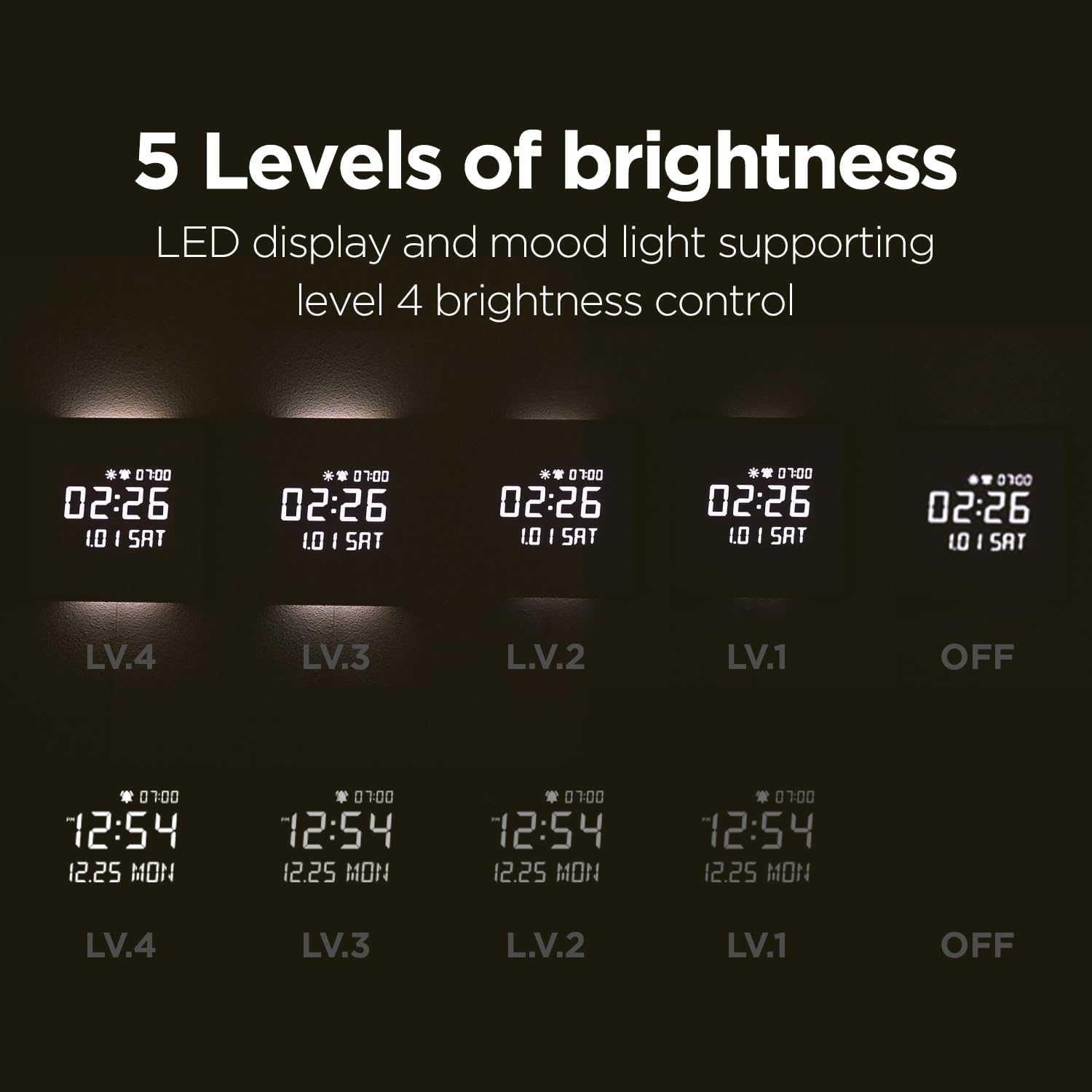
Figure 8: 5 Levels of Brightness

Figure 9: Auto Brightness Control
5. アラーム機能
- 日の出アラーム: Set a 10, 20, or 30-minute sunrise mode where the backlight gradually brightens before the alarm time, providing a gentle wake-up experience.
- 平日アラーム: Configure alarms to activate only on weekdays, allowing for uninterrupted rest on weekends.
- メロディー: Choose from 5 available melodies, including bird sounds, rain sounds, and a standard beep.
- アラーム音量コントロール: Adjust the alarm volume to High (03), Mid (02), Low (01), or Off. The sequence for adjustment is High (03) → Off → Low (01) → Mid (02).

Figure 10: Melody Alarm Feature

Figure 11: Alarm Volume Control
6. リモートコントロールview
The remote control provides easy access to all clock functions. Refer to the diagram below for button functions:
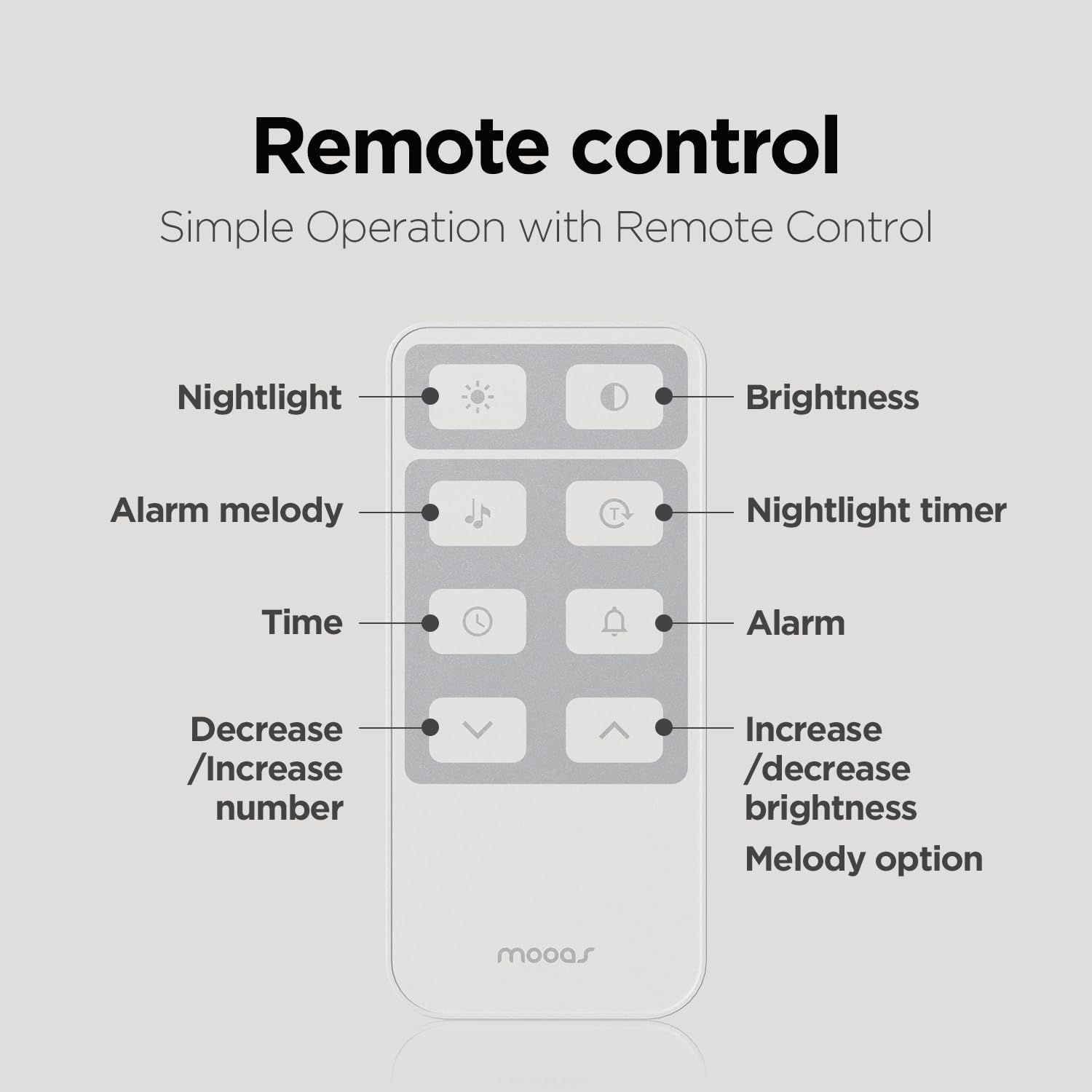
図12: リモートコントロール機能
7. 温度表示(摂氏/華氏)
To switch between Celsius (C) and Fahrenheit (F) temperature display, short press the UP リモコンのボタン。
メンテナンス
To maintain your mooas clock, gently wipe the surface with a soft, dry cloth. Avoid using abrasive cleaners or solvents, as these may damage the wooden frame or LED display. Ensure the clock is unplugged before cleaning.
トラブルシューティング
- 時計が点灯しない: 電源アダプタが時計と電源コンセントの両方にしっかりと接続されていることを確認します。
- リモコンが応答しない: Remove the protective film from the remote. If issues persist, disconnect and reconnect the battery and cable from both the clock and remote to reset.
- Display too bright: Adjust the brightness manually using the remote control or activate the auto-brightness function.
- 時刻/日付が正しくありません: Reset the time and date using the remote control. The internal CR2032 battery helps retain settings during brief power outages。
仕様
| 特徴 | 仕様 |
|---|---|
| ブランド | ムーアス |
| モデル番号 | MC-L8 |
| 製品寸法 | 幅11.4インチ x 高さ11.4インチ |
| 材質タイプ | 木材 |
| 表示タイプ | デジタルLED |
| 電源 | Corded Electric (5V 2A adapter) |
| 特集 | Alarm, Backlit Nightlight, Remote Control, Auto Brightness Adjustment, Sunrise Alarm, Nightlight Timer |
| 取り付けタイプ | 壁掛け、デスクスタンド |
製品終了view ビデオ
ビジュアルについてはこの公式ビデオをご覧くださいview of the mooas Wooden Frame LED Silent Wall Clock's features and design.
Video 1: mooas Wooden Frame LED Clock Overview
保証とサポート
For warranty information or technical support, please refer to the product packaging or contact mooas customer service directly. Keep your purchase receipt for warranty claims.