
glo 10189920
glo HYPER PRO Device User Manual
モデル: 10189920
1. はじめに
The glo HYPER PRO is an advanced tobacco heating device designed to provide an enhanced experience. It features an EasyView LED display for monitoring device status, a TasteSelect selector for choosing between Standard and Boost modes, and HeatBoost technology for consistent intensity. The device also includes fast charging capabilities and extended battery life.
Important Safety Notice: This product is not risk-free and contains nicotine, which is addictive.
2.安全上の警告
- This product, when used with its intended tobacco sticks, is not risk-free and delivers nicotine, a highly addictive substance.
- The device itself does not contain tobacco sticks, liquids, pre-filled cartridges, or refills. These must be purchased separately.
- The glo HYPER PRO operates without combustion, producing zero ash and less odor compared to traditional cigarettes.
- Always read the label, warnings, and instructions provided on the product packaging before use. Information on the packaging may differ from online descriptions.
- お子様やペットの手の届かない場所に保管してください。
- デバイスを極端な温度、直射日光、水にさらさないでください。
- Use only the charging cable provided or a certified USB-C cable with a compatible power adapter.
3. パッケージ内容
Please check that your glo HYPER PRO package contains the following items:
- glo HYPER PRO Device
- USB-C充電ケーブル
- クリーニングブラシ
- ユーザーマニュアル(このドキュメント)
4.デバイスオーバーview
Familiarize yourself with the components of your glo HYPER PRO device.
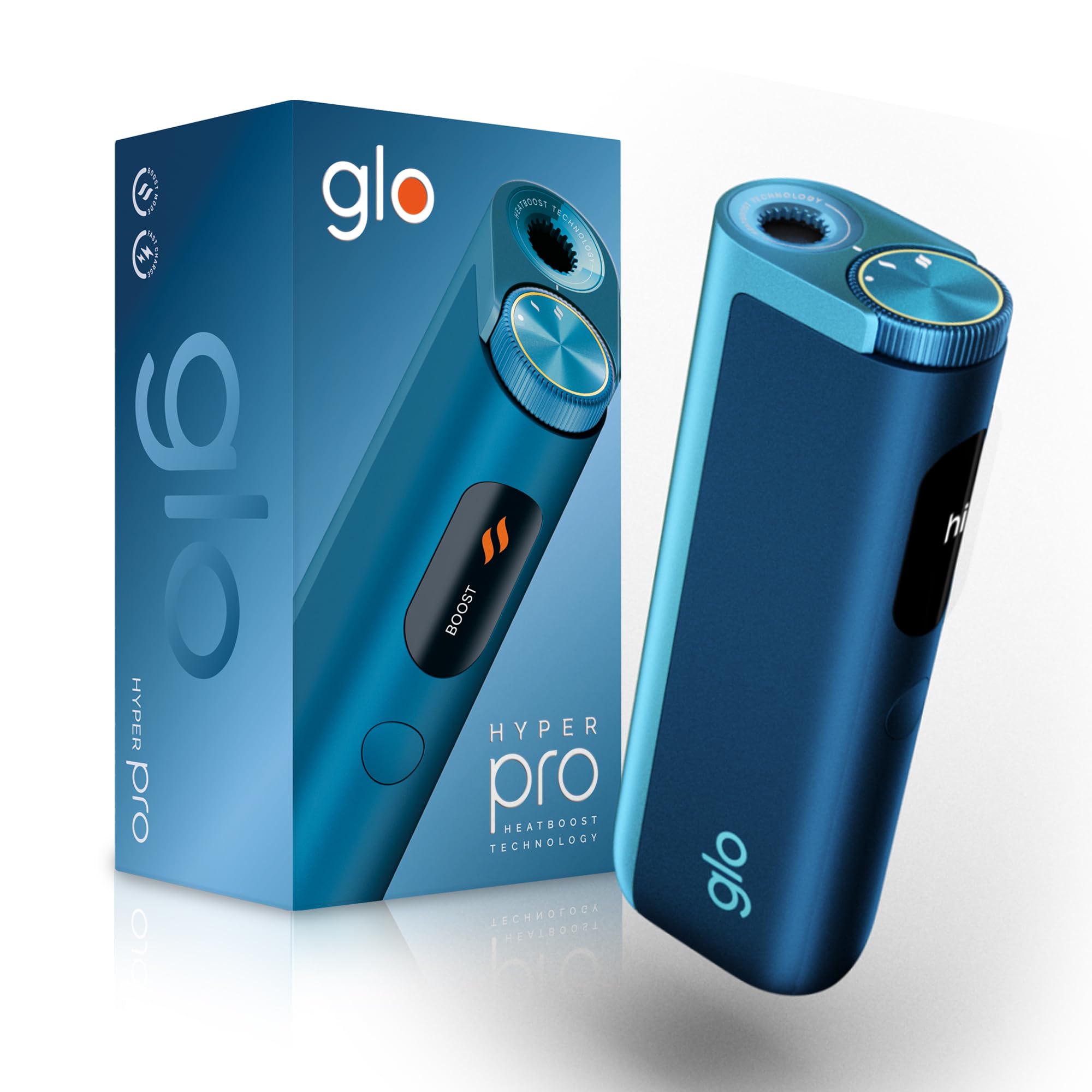
This image displays the glo HYPER PRO device in blue, highlighting its compact dimensions (96.4mm height, 36.5mm width) and weight (92 grams). Key features such as Boost Mode, EasyView Display, and Fast Charge are indicated.
- 加熱室: Where the tobacco stick is inserted.
- TasteSelect Selector: Button to switch between Standard and Boost modes.
- 簡単View LEDディスプレイ: Shows selected mode, session progress, and battery status.
- USB-Cポート: デバイスの充電用。
5. 初期設定
5.1デバイスの充電
Before first use, fully charge your glo HYPER PRO device. The device features fast charging and extended battery life.
- USB-C 充電ケーブルをデバイスの USB-C ポートに接続します。
- ケーブルのもう一方の端を互換性のある USB 電源アダプタに差し込みます。
- 簡単View LED display will indicate the charging progress.
- 完全に充電されたら、デバイスを充電器から取り外します。
5.2 初回使用
To turn on the device for the first time:
- Press the TasteSelect button 5 times rapidly.
- The device will vibrate and the EasyView LED display will illuminate, indicating it is ready for use.
6.デバイスの操作
6.1 Inserting a Tobacco Stick
Ensure the device is clean before inserting a tobacco stick.
- Gently insert a compatible tobacco stick into the heating chamber at the top of the device.
- Do not force the stick.
6.2 Selecting a Mode (Standard or Boost)
The TasteSelect selector allows you to choose your preferred intensity.

This image illustrates two glo HYPER PRO devices, demonstrating the selection between Standard and Boost intensity modes.
- 標準モード: For a balanced experience. Press and hold the TasteSelect button until the device vibrates once.
- ブーストモード: For superior intensity, featuring HeatBoost technology. Press and hold the TasteSelect button until the device vibrates twice.
簡単View LED display will show the selected mode and the heating progress.
6.3 セッションの開始
- After inserting the tobacco stick and selecting your mode, the device will begin heating.
- 簡単View LED display will show a countdown or progress indicator.
- The device will vibrate when it is ready for use.
- Once the session is complete, the device will vibrate again and the display will turn off.
6.4 セッションの終了
セッション後:
- Remove the used tobacco stick from the heating chamber.
- Dispose of the used stick responsibly.
- 清掃または保管する前に、デバイスが冷めるまで待ちます。
7. メンテナンスと清掃
Regular cleaning ensures optimal performance and longevity of your glo HYPER PRO device.
7.1 Cleaning the Heating Chamber
- クリーニングする前に、デバイスの電源がオフになっており、完全に冷えていることを確認してください。
- Use the provided cleaning brush to gently remove any tobacco residue from the heating chamber.
- Avoid using water or liquid cleaners directly on the heating element.
- For stubborn residue, a dry cotton swab can be used carefully.
7.2 外部洗浄
Wipe the exterior of the device with a soft, dry cloth as needed.
8。 トラブルシューティング
If you encounter issues with your glo HYPER PRO, refer to the following common problems and solutions:
| 問題 | 考えられる原因 | 解決 |
|---|---|---|
| デバイスの電源が入らない | バッテリー残量が少ない、または全くない | 付属のUSB-Cケーブルを使用してデバイスを完全に充電します。 |
| デバイスが加熱されていない | Tobacco stick not inserted correctly; Device malfunction | Ensure the tobacco stick is fully and correctly inserted. Try restarting the device. If the issue persists, contact customer support. |
| 充電が遅い、または機能しない | Faulty cable or adapter; Dirty charging port | Check the USB-C cable and power adapter for damage. Try a different compatible cable/adapter. Clean the charging port gently with a dry, soft brush. |
| LEDディスプレイが動作しない | デバイスの故障 | デバイスを再起動してください。問題が解決しない場合は、カスタマーサポートにお問い合わせください。 |
9. 仕様
| 特徴 | 詳細 |
|---|---|
| ブランド | グロー |
| モデル番号 | 10189920 |
| 寸法(長さx幅x高さ) | 9.6 x 3.6 x 2.1 cm |
| 重さ | 150グラム |
| バッテリー容量 | 2580mAh(リチウムイオン) |
| 充電ポート | USB-C |
| 特集 | コンパクトなデザイン |
| メーカー | Nicoventures Trading Limited |
10. 保証とサポート
10.1 保証情報
For detailed warranty information, please refer to the warranty card included in your product packaging or visit the official glo webサイトをご覧ください。保証条件は地域によって異なる場合があります。
10.2 カスタマーサポート
If you have any questions, require assistance, or need to report an issue with your glo HYPER PRO device, please contact glo customer support through their official webサイトまたは製品ドキュメントに記載されている連絡先の詳細をご覧ください。
Ask a question about this manual
Ask about setup, troubleshooting, compatibility, parts, safety, or missing instructions. Manuals+ will review the question and use this page’s manual context to help answer it.