
1. はじめに
This manual provides detailed instructions for the setup, operation, and maintenance of your CLXEAST 18-inch Illuminated Outdoor/Indoor Atomic Analog Wall Clock. This clock features atomic time synchronization, a smart LED light sensor for automatic illumination, and integrated temperature and humidity displays. Designed for both indoor and outdoor use, it is UV resistant and weatherproof.

図1: 前面 view of the CLXEAST 18-inch Atomic Analog Wall Clock.
2. 安全情報
- Ensure the clock is mounted securely to prevent falling.
- 指定された種類の電池のみを使用し、取り付け時には極性が正しいことを確認してください。
- Do not expose the clock to extreme temperatures beyond its operating range (-40°F to 140°F).
- Avoid direct, prolonged exposure to harsh elements like intense sunlight or constant heavy rain to maximize product lifespan, despite its weatherproof design.
- 電池はお子様の手の届かないところに保管してください。
3. パッケージ内容
- 1 x CLXEAST 18 Inch Illuminated Outdoor/Indoor Atomic Analog Wall Clock
- 取扱説明書 x 1
- Note: Batteries (1 x AA, 4 x D) are not included.
4. セットアップ
4.1 バッテリーの取り付け
- 時計の裏側にある電池ボックスを見つけます。
- Insert 1 AA battery into the central compartment for the clock's atomic movement. Ensure correct polarity.
- Insert 4 D-size batteries into the two larger compartments (two in each) for the LED light sensor. Ensure correct polarity.
- Securely close all battery covers.

図2:背面 view of the clock with battery compartments.
4.2 Time Zone and Daylight Saving Time (DST) Settings
- On the back of the clock, locate the time zone selector switch (P, M, C, E for Pacific, Mountain, Central, Eastern). Slide the switch to your desired time zone.
- Locate the DST (Daylight Saving Time) switch. Set it to 'ON' for automatic adjustment or 'OFF' to disable DST adjustment.
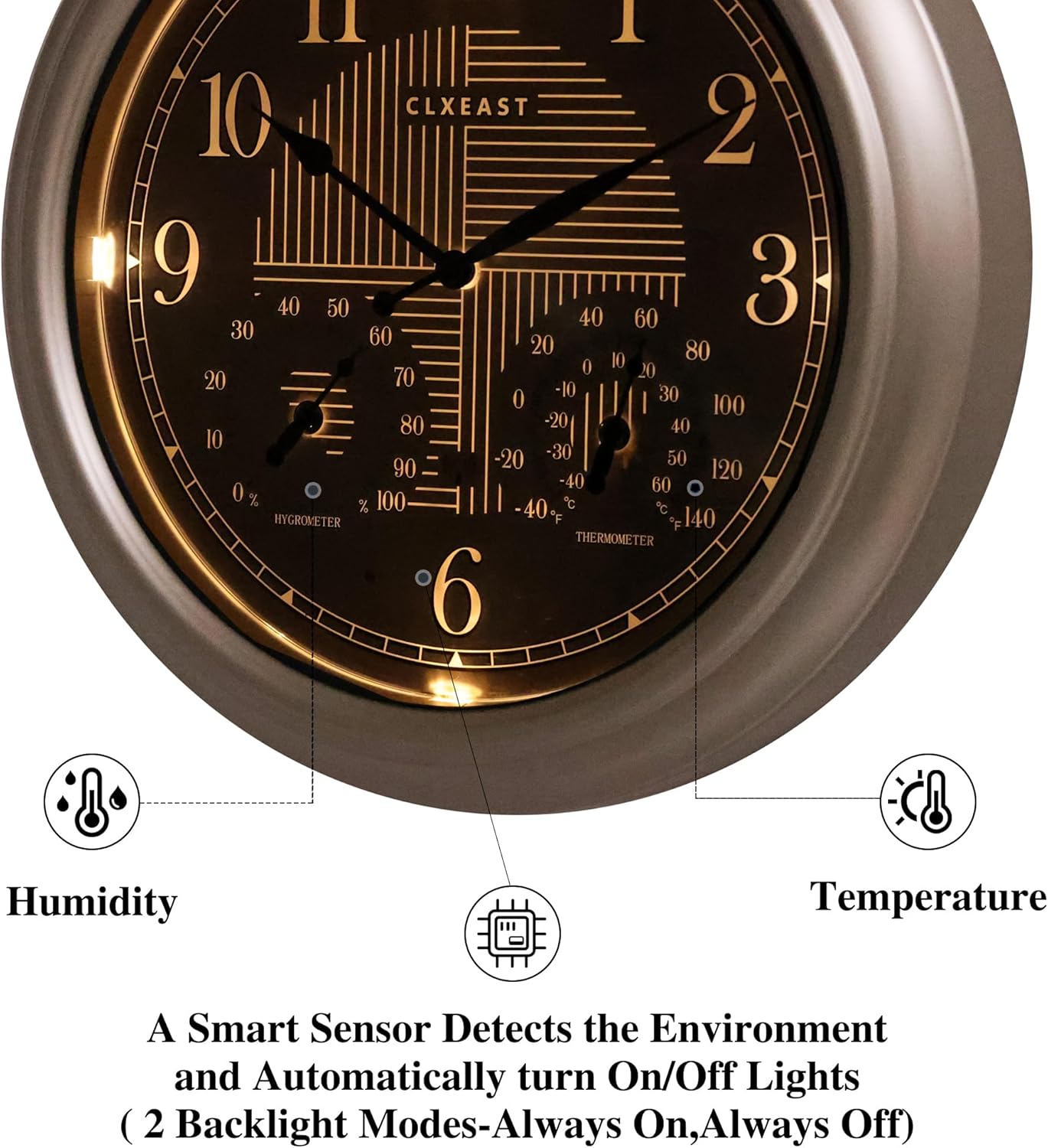
Figure 3: Time zone and DST adjustment switches.
4.3 原子時刻同期
After battery installation and setting the time zone, the clock will automatically attempt to synchronize with the WWVB radio transmission from Fort Collins, CO. This process ensures accurate timekeeping to the second. The clock hands may move rapidly as it searches for the signal and sets itself. Allow up to 24 hours for initial synchronization, especially in areas with weak signals.

Figure 4: Clock face with atomic signal indicator.
4.4 Thermometer & Hygrometer Calibration
The built-in thermometer and hygrometer sensors require approximately 3 hours to fully calibrate to the ambient environment. For accurate readings, allow this time after placing the clock in its desired location.

図5:詳細 view of temperature and humidity gauges.
4.5 取り付け
The clock features a keyhole slot on the back for easy wall mounting. Choose a location that is visible and, for outdoor use, ideally protected from direct, prolonged exposure to extreme weather conditions to ensure longevity.

Figure 6: Clock displayed in an outdoor patio setting.

Figure 7: Clock displayed in an indoor living room setting.
Video 1: This video demonstrates the battery installation, setting of time zones, and the automatic time synchronization feature of the CLXEAST 18-inch Outdoor Lighted Atomic Clock with Temperature & Humidity.
5. 操作手順
5.1 Smart LED Light Sensor
The clock is equipped with a smart light sensor that automatically activates a warm, ambient dial backlight during dark conditions and turns off in normal daylight. There are two backlight modes: 'Always On' and 'Always Off'. You can select your preferred mode using the switch on the back of the clock.

Figure 8: Daytime and illuminated nighttime view 時計の。

Figure 9: Close-up of the illuminated clock face.
5.2 Reading Time, Temperature, and Humidity
The large analog display clearly shows the current time. The smaller gauges on the clock face indicate the ambient temperature in Fahrenheit and Celsius, and the relative humidity percentage.
6. メンテナンス
- クリーニング: 時計を柔らかくてdで拭いてくださいamp cloth. Avoid using abrasive cleaners or solvents that may damage the finish or display.
- バッテリー交換: Replace batteries when the clock hands stop moving or the LED illumination dims significantly. It is recommended to replace all D-size batteries simultaneously for optimal LED performance.
7。 トラブルシューティング
| 問題 | 考えられる原因 | 解決 |
|---|---|---|
| Clock not setting time automatically | Weak atomic signal, incorrect time zone, or dead battery. | Ensure clock is in an area with good signal reception. Verify time zone setting. Replace AA battery. Press the 'RESET' button on the back. |
| LEDライトが点灯しない | Dead D-size batteries, light sensor switch off, or insufficient darkness. | Replace D-size batteries. Ensure the LED light sensor switch is set to 'ON'. Test in a completely dark environment. |
| 温度/湿度の測定値が不正確 | Sensors not fully calibrated or exposed to direct elements. | Allow 3 hours for sensors to calibrate after placement. Ensure clock is not in direct sunlight or extreme heat/cold sources. |
| Clock hands stuck or moving erratically | Low battery or mechanical obstruction. | Replace AA battery. Gently check for any obstructions to the clock hands. |
8. 仕様
| 特徴 | 詳細 |
|---|---|
| ブランド | CLXEAST |
| モデル番号 | T2888S10-N-RC |
| 表示タイプ | アナログ |
| 寸法 | 幅18インチ x 高さ18インチ |
| 電源 | 1 x AA battery (for clock movement), 4 x D batteries (for LED light sensor) |
| 特集 | Atomic Time, Daylight Saving Time by WWVB, Illuminated, Temperature & Humidity Display, Waterproof, Weatherproof |
| 屋内/屋外での使用 | 屋外 |
| 材料 | Acrylic, Acrylonitrile Butadiene Styrene (ABS), Glass |
| 温度範囲 | -40°F ~ 140°F |
| 湿度範囲 | 1%から99%の相対湿度 |
| アイテム重量 | 5.3 ポンド |
9. 保証とサポート
For information regarding product warranty, returns, or technical support, please refer to the retailer's policy or visit the official CLXEAST store. Extended protection plans may be available for purchase through the retailer.
訪問する CLXEAST Store その他の製品とサポートについては、こちらをご覧ください。