
1. はじめに
This manual provides essential information for setting up, operating, maintaining, and troubleshooting your Xiaomi Redmi 13C smartphone. Please read this guide carefully to ensure proper use and optimal performance of your device.
The Xiaomi Redmi 13C is a new product featuring 128GB storage and 6GB RAM, with Dual SIM capability, in Midnight Black. This device is supplied by a specialized distributor.
2. 箱の中身
Xiaomi Redmi 13C を開梱したら、次のアイテムがすべて含まれていることを確認してください。
- Xiaomi Redmi 13Cスマートフォン
- USBケーブル
- 充電器
- SIMトレイ取り出しツール
3.デバイスオーバーview
Familiarize yourself with the key components of your Redmi 13C.

図3.1:以上view of Xiaomi Redmi 13C key features, including its 6.74-inch 90Hz display, 50MP AI triple camera, 5000mAh battery with 18W fast charging, and powerful octa-core processor.
The Redmi 13C features a large 6.74-inch display with a 90Hz refresh rate for smooth visuals. It is equipped with a 50MP AI triple camera system and a robust 5000mAh battery supporting 18W fast charging. The device is powered by an octa-core processor, ensuring efficient performance.
4. セットアップ
4.1. SIMカードとSDカードの挿入
Your Redmi 13C supports Dual SIM cards and expandable storage via a microSD card (up to 128GB). Use the provided SIM tray ejector tool to open the SIM card slot.
- 携帯電話の側面にある SIM トレイを見つけます。
- SIM イジェクタ ツールをトレイの横にある小さな穴に挿入し、トレイが飛び出すまでしっかりと押します。
- Nano-SIMカードまたはmicroSDカードをトレイの指定されたスロットに挿入します。金色の接点が下を向いていることを確認してください。
- トレイを慎重に電話機に再度挿入します。
4.2. 初回電源投入と設定
- Xiaomi ロゴが表示されるまで電源ボタンを押し続けます。
- 画面上の指示に従って言語と地域を選択し、Wi-Fi に接続して、Google アカウントを設定します。
- You can also set up fingerprint recognition for enhanced security during this initial setup.
5. デバイスの操作
5.1. 表示機能

Figure 5.1: The Redmi 13C features an immersive 6.74-inch display, providing a fluid visual experience.
The Redmi 13C boasts a 6.74-inch display with a 90Hz refresh rate, offering a smooth and immersive viewing experience for all your content. The maximum display resolution is 720x1600 pixels with a 16:9 aspect ratio.
5.2. カメラの使用
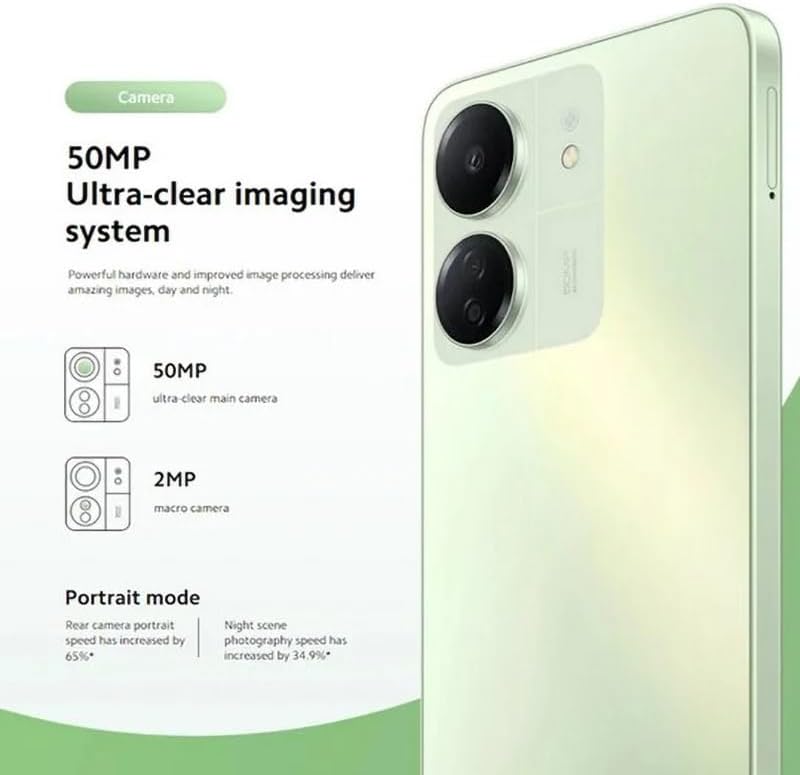
Figure 5.2: The Redmi 13C's 50MP Ultra-clear imaging system includes a 50MP main camera and a 2MP macro camera, supporting Portrait and Night modes.
The device is equipped with a 50MP Ultra-clear imaging system. The rear camera setup includes a 50MP main sensor and a 2MP macro camera. The front camera has an 8MP sensor. Utilize various shooting modes such as Portrait mode and Night mode to capture high-quality photos in different conditions.
5.3.バッテリー管理
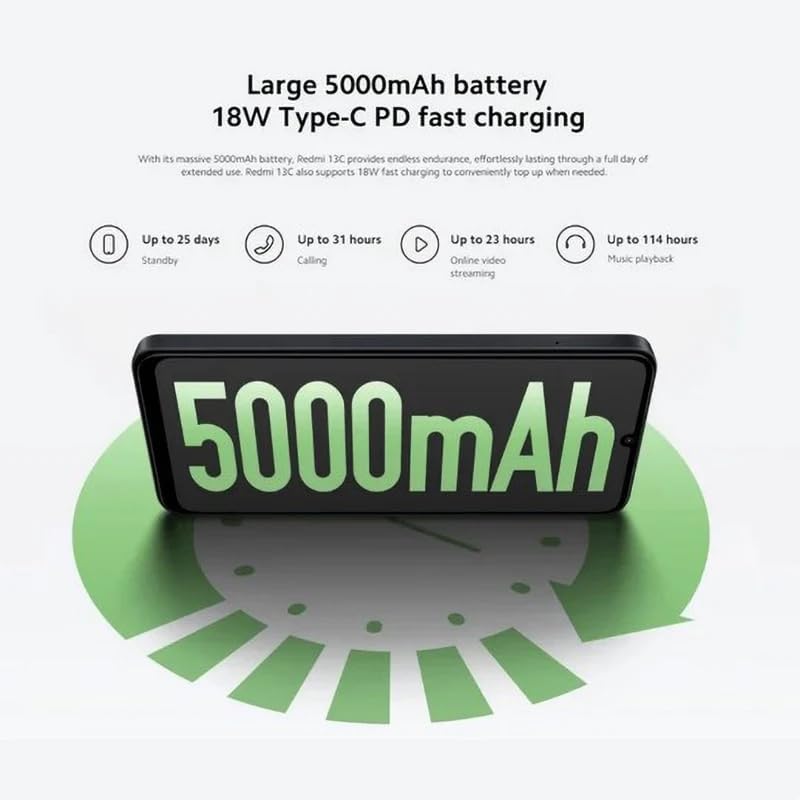
Figure 5.3: The Redmi 13C features a large 5000mAh battery with 18W Type-C PD fast charging, offering extended usage times.
Your Redmi 13C comes with a large 5000mAh Lithium-ion battery, providing extended usage. It supports 18W Type-C PD fast charging, allowing for quick power-ups. For optimal battery life, use the provided charger and avoid extreme temperatures.
- 最大25日間のスタンバイ
- 最大31時間の通話
- Up to 23 hours online video streaming
- 最大114時間の音楽再生
5.4. パフォーマンス

Figure 5.4: The Redmi 13C is powered by an Octa-core MediaTek Helio G85 processor, delivering smooth and stable performance.
The Redmi 13C is powered by a MediaTek Helio G85 octa-core processor, ensuring smooth and stable performance for daily tasks and applications. It comes with 6GB of RAM and 128GB of internal storage, expandable up to 1TB with a microSD card.
5.5. 接続性とセキュリティ
The device supports Wi-Fi, Bluetooth, and 4G cellular technology. It is an unlocked phone, allowing use with various wireless carriers. For security, the Redmi 13C includes a fingerprint recognition feature.
6. メンテナンス
6.1. デバイスのクリーニング
To clean your Redmi 13C, use a soft, lint-free cloth. Avoid using harsh chemicals or abrasive materials, as these can damage the screen and finish. The device is not water-resistant, so avoid exposure to liquids.
6.2. ソフトウェアの更新
Regularly check for and install software updates to ensure your device has the latest features, security patches, and performance improvements. You can usually find this option in the phone's settings under "About phone" or "System updates."
6.3. バッテリーのお手入れ
To prolong battery life, avoid fully discharging the battery frequently. Charge your phone using the original charger and cable. Do not expose the device to extreme heat or cold.
7。 トラブルシューティング
このセクションでは、Redmi 13C で発生する可能性のある一般的な問題について説明します。
- デバイスの電源が入らない: バッテリーが充電されていることを確認してください。携帯電話を充電器に接続し、数分間待ってから再度電源を入れてみてください。
- アプリがクラッシュまたはフリーズする: Close background apps. Clear the cache of the problematic app or reinstall it. If the issue persists, consider a factory reset (back up your data first).
- バッテリー寿命が短い: 画面の明るさを下げ、使用していないときは GPS や Bluetooth などの不要な機能を無効にし、バッテリー設定で過剰な電力を消費しているアプリがないか確認します。
- ネットワーク接続の問題: Ensure your SIM card is properly inserted. Try restarting the device. Check your network settings and contact your carrier if problems persist.
- 指紋センサーが動作しない: 指が清潔で乾いていることを確認してください。セキュリティ設定で指紋を再登録してください。
8. 仕様
| 特徴 | 仕様 |
|---|---|
| ブランド | 小米 |
| モデル名 | レッドミ13C |
| オペレーティング·システム | アンドロイド |
| インストールされているRAMサイズ | 6ギガバイト |
| メモリストレージ容量 | 128 GB(最大1TBまで拡張可能) |
| CPUモデル | MediaTek Helio G85(オクタコア) |
| CPU速度 | 最大2.0GHz |
| 表示タイプ | アモルファス |
| 表示サイズ | 6.74インチ |
| 最大ディスプレイ解像度 | 720x1600 |
| リフレッシュレート | 90Hz |
| Rear Camera Sensor Resolution | 50 Megapixels (Main), 2 Megapixels (Macro) |
| Front Camera Sensor Resolution | 8メガピクセル |
| バッテリー容量 | 5000 mAh(リチウムイオン) |
| 充電 | 18W Type-C PD急速充電 |
| 接続技術 | Bluetooth, Wi-Fi, 4G LTE |
| SIM カードスロット | デュアルSIM(ナノ) |
| 生体認証セキュリティ | 指紋認識 |
| ヘッドホンジャック | USBタイプC |
| 色 | ミッドナイトブラック |
| アイテム重量 | 410グラム |
| 耐水性レベル | 耐水性はありません |
| モデル年 | 2023 |
9. 保証とサポート
9.1. 保証情報
The Xiaomi Redmi 13C comes with a standard manufacturer's warranty. Please refer to the warranty card included with your product for specific terms and conditions. Spare parts availability is stated as 2 years.
9.2. Official Documents and Support
For additional information and support, you can refer to the official user guide and data transparency statement:
For further assistance, please visit the official XIAOMI support webサイトにアクセスするか、カスタマーサービスにお問い合わせください。