
1. はじめに
This manual provides essential information for the safe and efficient use of your Amazon Basics 24 Inch FHD 100Hz Monitor. Please read these instructions carefully before operating the device and retain them for future reference.
The Amazon Basics 24 Inch Monitor features a 23.8-inch viewable IPS panel with Full HD (1080p) resolution and a maximum refresh rate of 100Hz. It includes built-in speakers and is VESA compatible for flexible mounting options. The monitor is designed for various uses, including office work, entertainment, and gaming.

フロント view of the Amazon Basics 24 Inch FHD 100Hz Monitor.
2. パッケージ内容
パッケージにすべてのアイテムが揃っていることを確認します。
- Amazon Basics 24 Inch Monitor
- スタンドベース
- スタンドネック
- 電源アダプター
- HDMIケーブル

Image showing the monitor's package contents: stand base, stand neck, power adapter, and HDMI cable.
3. セットアップ手順
3.1 スタンドの取り付け
- Insert the stand neck into the stand base until it clicks securely into place.
- Align the assembled stand with the mounting slot on the back of the monitor. Push the stand into the slot until it locks. Ensure it is firmly attached.
3.2接続ケーブル
The monitor features multiple input ports for connectivity:
- DP 1.2: DisplayPort input for high-resolution video and audio.
- HDMI 1.4: HDMI input for video and audio from compatible devices.
- VGA: VGA input for analog video signals.
- 音声入力: 3.5mm audio input for external audio sources.
- 音声出力: ヘッドフォンまたは外部スピーカー用の 3.5mm オーディオ出力。
- Connect the provided HDMI cable from your computer's video output port to the HDMI input port on the monitor. Alternatively, use a DisplayPort or VGA cable if your device supports those connections.
- Connect the power adapter to the monitor's power input port, then plug the power adapter into a wall outlet.
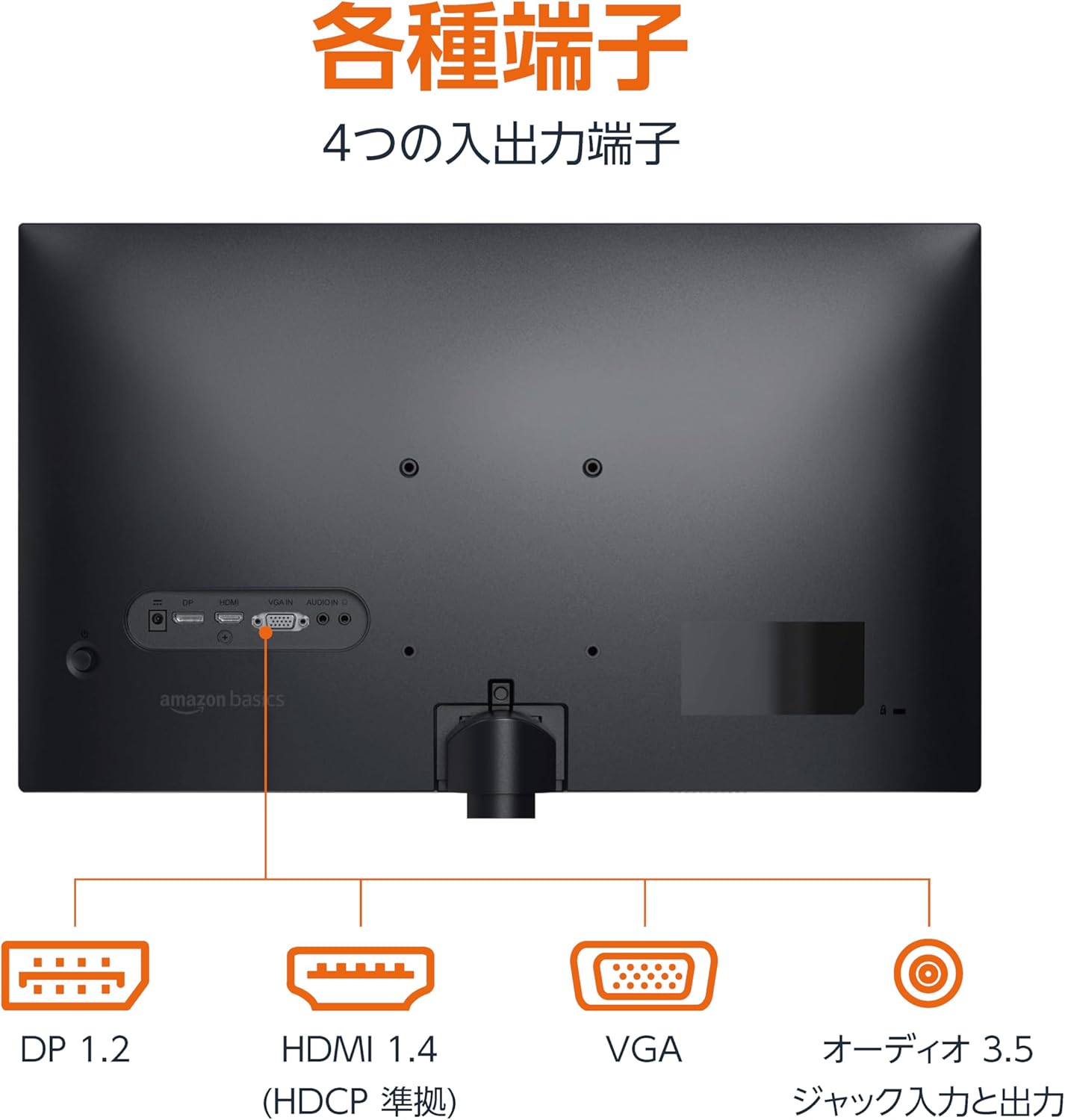
後方 view さまざまな入力ポートと出力ポートを表示するモニターの。
3.3電源オン
Press the power button located on the back or bottom of the monitor to turn it on. The monitor will automatically detect the active input signal.
3.4 傾き調整
The monitor allows for tilt adjustment to achieve an optimal viewing angle. Gently hold the top and bottom edges of the monitor and tilt it forward or backward. The tilt range is approximately -5° to 20°.

Monitor demonstrating its tilt adjustment capability.
3.5 Optional: VESA Mounting and Cable Lock
The monitor is VESA compatible, allowing it to be mounted on a wall or an adjustable arm (mounting hardware sold separately). Refer to the VESA mount's instructions for installation.
An optional cable lock slot is available on the rear of the monitor to secure it to a stable object, preventing theft.
3.6 セットアップビデオガイド
For a visual guide on setting up your Amazon Basics monitor, please watch the video below:
This video demonstrates the assembly of the stand, connecting cables, and basic adjustments for the Amazon Basics monitor.
4. 操作手順
4.1 オンスクリーンディスプレイ(OSD)メニュー
The monitor features an On-Screen Display (OSD) menu for adjusting various settings. Use the buttons located on the back or bottom of the monitor to navigate the menu. Common settings include:
- 輝度コントラスト: ディスプレイの輝度とコントラストのレベルを調整します。
- 色の設定: 色温度、色相、彩度を変更します。
- 入力選択: Manually switch between DP, HDMI, and VGA inputs.
- オーディオ: 内蔵スピーカーまたは接続されたヘッドフォンの音量を調整します。
- 画像モード: Select from preset display modes (e.g., Standard, Game, Movie).
4.2 Using Built-in Speakers
The monitor includes integrated speakers. Audio will be played through these speakers when connected via HDMI or DisplayPort. If using a VGA connection, ensure an audio cable is connected to the 'AUDIO IN' port on the monitor and your computer's audio output.
5. 仕様
| 特徴 | 仕様 |
|---|---|
| ブランド | Amazonベーシック |
| モデル番号 | 24M2020DJP |
| 画面サイズ | 24 Inches (23.8 inch viewできる) |
| パネルタイプ | IPS |
| 解決 | FHD 1080p (1920 x 1080) |
| リフレッシュレート | 最大100Hz |
| アスペクト比 | 16:9 |
| 内蔵スピーカー | はい |
| VESA互換性 | はい |
| 入力ポート | 1x DisplayPort 1.2, 1x HDMI 1.4, 1x VGA, 1x Audio In (3.5mm) |
| 出力ポート | オーディオ出力 x 1 (3.5mm) |
| 製品重量 | 2.8キロ |
| ベゼルの厚さ | 1.44 mm (slim bezel) |
| 保証 | 1年間の限定保証 |
5.1 寸法
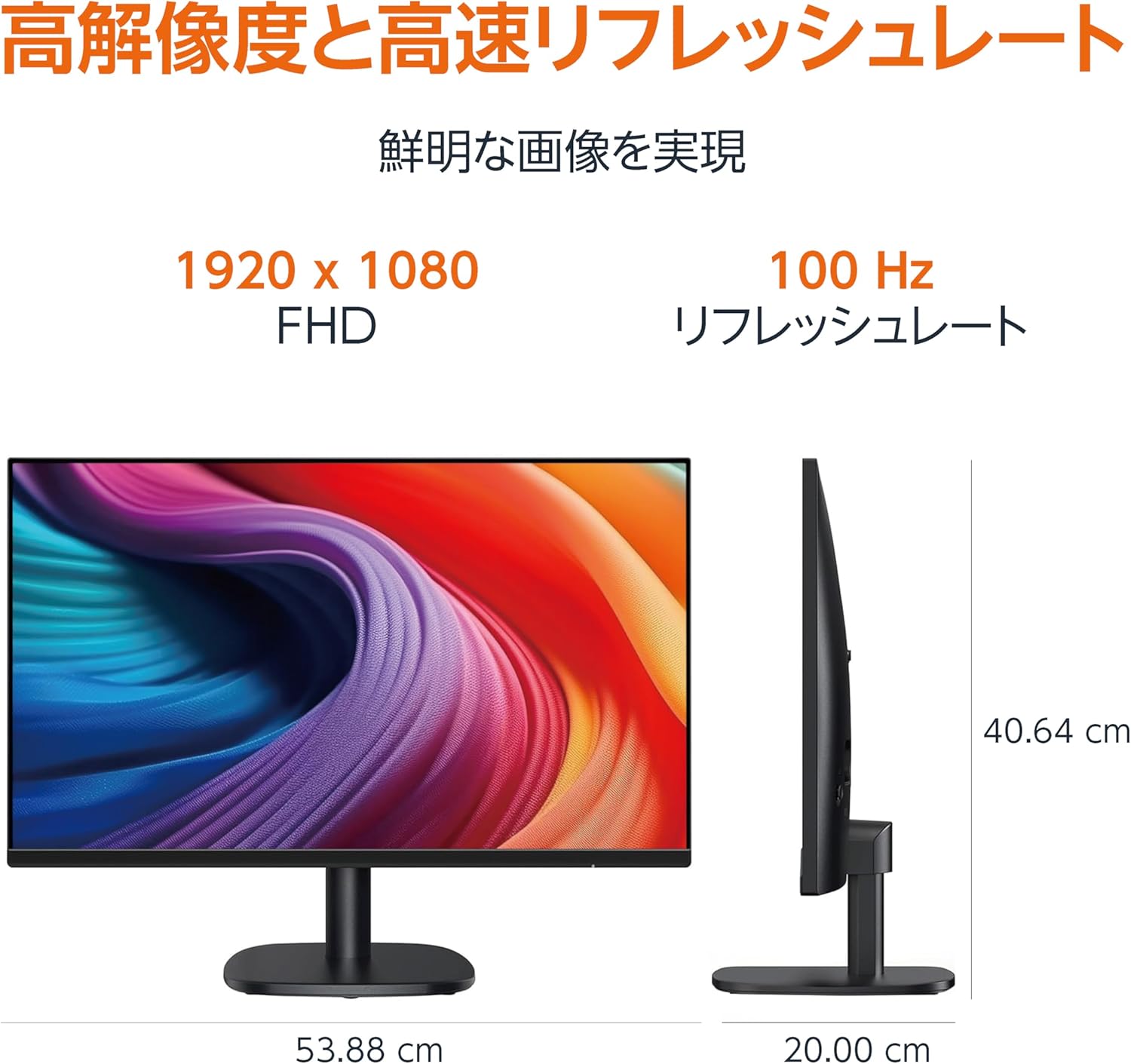
Diagram showing the monitor's dimensions (Width: 53.88 cm, Height: 40.64 cm, Depth: 20.00 cm).
5.2 スリムベゼルデザイン

Detail showing the monitor's slim bezel design, measuring 1.44 mm.
6。 トラブルシューティング
モニターに問題が発生した場合は、次の一般的な解決策を参照してください。
- 電源なし: Ensure the power cable is securely connected to both the monitor and a working power outlet. Check if the power adapter's indicator light is on.
- 信号なし: Verify that the video cable (HDMI, DP, or VGA) is firmly connected to both the monitor and your computer. Ensure the correct input source is selected in the monitor's OSD menu. Try restarting your computer.
- 画面のちらつき: Check the video cable for damage or loose connections. Ensure your computer's graphics driver is up to date. Adjust the refresh rate in your computer's display settings.
- スピーカーから音声が出ない: If using HDMI or DisplayPort, ensure the audio output is set to the monitor in your computer's sound settings. If using VGA, confirm the 3.5mm audio cable is connected. Check the volume level on both the monitor and your computer.
- 画像品質の問題: Adjust brightness, contrast, and color settings via the OSD menu. Ensure the display resolution on your computer matches the monitor's native resolution (1920 x 1080).
これらの手順を試しても問題が解決しない場合は、カスタマー サポートにお問い合わせください。
7. メンテナンス
Proper maintenance helps ensure the longevity and performance of your monitor:
- 画面の掃除: 柔らかく糸くずの出ない布で画面を優しく拭いてください。頑固な汚れには、軽くamp布を水または専用のスクリーンクリーナーで拭いてください。刺激の強い化学薬品、アルコール、研磨剤の使用は避けてください。
- Cのクリーニングasing: モニターの表面を拭くときは、柔らかく乾いた布を使用してください。asing.
- 換気: 過熱を防ぐために、モニターの通気口が塞がれていないことを確認してください。
- 使用しないときは電源を切ります: 長期間モニターを使用しない場合は電源をオフにして、電力を節約し、モニターの寿命を延ばしてください。
8. 保証とサポート
This Amazon Basics monitor comes with a 1年間の限定保証 ご購入日から有効です。この保証は、通常の使用における製造上の欠陥および仕上がりをカバーします。
For warranty claims, technical support, or further assistance, please refer to the Amazon Basics support page or contact Amazon customer service directly. Keep your proof of purchase for warranty validation.