
導入
ご購入ありがとうございますasing the Paladone PlayStation LED Neon Light. This manual provides essential information for the safe and optimal use of your new gaming accessory. Please read these instructions carefully before setup and operation, and retain them for future reference.
製品終了view
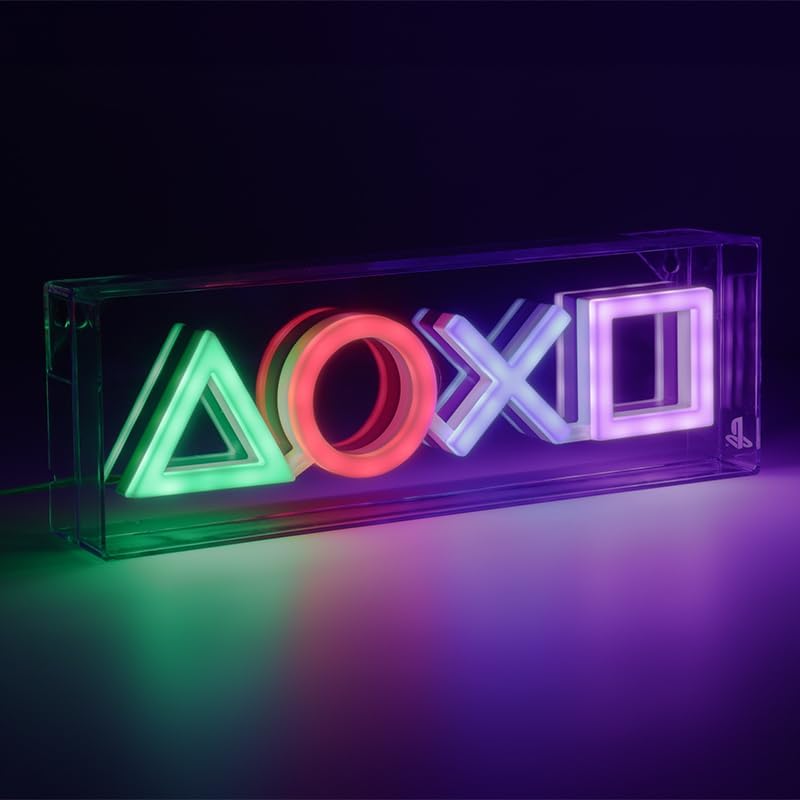
The Paladone PlayStation LED Neon Light is designed to add a vibrant, gaming-themed ambiance to any space. Featuring the iconic PlayStation controller symbols (triangle, circle, cross, square) in a four-color LED glow, this light is suitable for both free-standing display and wall mounting.
主な特徴:
- 象徴的なデザイン: Displays the PlayStation controller symbols in vibrant LED colors.
- 多彩な配置: Can be used as a free-standing desk light or mounted on a wall.
- USB電源: Conveniently powered via a USB cable (included).
- 正式にライセンスを取得: An authentic PlayStation product.
含まれるもの
- Paladone PlayStation LED Neon Light
- USB電源ケーブル
Note: A USB wall adapter (power brick) is not included and must be supplied by the user.
設定
1. 電源接続:
- Locate the USB power cable.
- Insert the small end of the USB cable into the power port on the back or side of the LED Neon Light.
- Insert the larger end of the USB cable into a compatible USB power source (e.g., a USB wall adapter, computer USB port, or power bank).
2. 配置オプション:
The PlayStation LED Neon Light offers two primary placement methods:
- 自立型: Place the light on any flat, stable surface such as a desk, shelf, or bedside table. Ensure it is positioned securely to prevent accidental falls.
- 壁掛け: The light features keyholes on the back for wall mounting. Use appropriate wall fasteners (not included) suitable for your wall type and the weight of the light. Ensure the fasteners are securely installed before hanging the light.

操作手順
To operate the Paladone PlayStation LED Neon Light:
- Ensure the light is properly connected to a USB power source as described in the Setup section.
- Locate the on/off switch on the power cable.
- Press the switch to turn the light ON. The PlayStation symbols will illuminate in their respective colors.
- もう一度スイッチを押すとライトが消えます。
お手入れとメンテナンス
- Keep the light dry and away from moisture or liquids.
- 表面は柔らかく乾いた布で拭いてください。研磨剤入りの洗剤や溶剤は使用しないでください。
- Avoid dropping the light or subjecting it to strong impacts.
- Do not attempt to disassemble or modify the light, as this will void the warranty and may cause damage or injury.
トラブルシューティング
ライトが点灯しない:
- USB ケーブルがライトと電源の両方にしっかりと接続されていることを確認してください。
- Verify that the USB power source (e.g., wall adapter, computer port) is functioning correctly. Try a different USB port or adapter if available.
- Check the on/off switch on the cable to ensure it is in the 'ON' position.
Light Flickers or is Dim:
- Ensure the power source provides sufficient power (typically 5V USB).
- Check for any damage to the USB cable or connections.
仕様
| ブランド | パラドン |
| モデル番号 | PP12716PS |
| 製品寸法 | 11.81"L x 1.97"W (approx. 29.8cm wide) |
| アイテム重量 | 8.8オンス |
| ライトタイプ | Neon (LED) |
| スタイル | プレイステーション |
| 材料 | プラスチック |
| 色 | マルチカラー |
| 電源 | USB(5V) |

保証とサポート
Specific warranty details are not provided within this manual. For information regarding warranty, returns, or technical support, please refer to the official Paladone web公式サイトをご覧いただくか、カスタマーサービスに直接お問い合わせください。保証請求の際に必要となりますので、購入証明書を保管してください。