
OQIMAX CP212-Vitt
OQIMAX Bluetooth 5.0/5.3 Transmitter Receiver 2-in-1 Audio Adapter
Model: CP212-Vitt
導入
The OQIMAX Bluetooth 5.0/5.3 Transmitter Receiver is a versatile 2-in-1 audio adapter designed to enhance your audio experience. It allows you to wirelessly transmit audio from non-Bluetooth devices or receive audio on non-Bluetooth devices, offering flexibility for various home and car audio setups. Featuring Bluetooth 5.3 technology and CVC noise reduction, it ensures stable connections and clear sound quality.
This adapter supports both Transmitter (TX) and Receiver (RX) modes, making it compatible with a wide range of devices such as TVs, PCs, MP3/MP4 players, car audio systems, speakers, and headphones. Its compact design and long battery life provide convenience for both stationary and portable use.
製品終了view
Familiarize yourself with the components and controls of your OQIMAX Bluetooth Audio Adapter.

画像: Detailed diagram of the OQIMAX Bluetooth adapter, highlighting its key features: the 3.5mm Audio Port, Type-C Charging Port, RX/TX mode switch, Multi-function Button, and the Connection Indicator Light with its different states (Pairing State - Red/Blue flash, Low Battery Warning - Red flash, Connected - Blue/Red solid).
- 3.5mmオーディオポート: For connecting to audio sources or output devices using the included AUX cable.
- Type-C充電ポート: For charging the device using the provided Micro USB cable.
- RX/TXスイッチ: 受信機 (RX) モードと送信機 (TX) モードを切り替えます。
- 多機能ボタン: Used for powering on/off, pairing, answering/ending calls, and playing/pausing music.
- Connection Indicator Light: Displays the device's status:
- Blue Light (fast flashing): Ready for pairing in RX mode.
- Red Light (fast flashing): Ready for pairing in TX mode.
- Blue Light (solid): Connected in RX mode.
- Red Light (solid): Connected in TX mode.
- Red Light (flashing slowly): バッテリー残量低下の警告。

画像: The OQIMAX Bluetooth adapter package contents, showing the white adapter unit, a 3.5mm audio cable, and a USB charging cable.
パッケージ内容:
- OQIMAX Bluetooth 5.0/5.3 Transmitter Receiver
- 3.5mmオーディオケーブル
- マイクロUSB充電ケーブル
- ユーザーマニュアル
セットアップと充電
初期充電
初めて使用する前に、デバイスを完全に充電してください。
- Connect the provided Micro USB charging cable to the Type-C Charging Port on the adapter.
- USB ケーブルのもう一方の端を標準の USB 電源アダプタ (別売) またはコンピュータの USB ポートに接続します。
- The indicator light will show charging status (specific color/behavior not detailed in source, assume it indicates charging).
- フル充電には通常約 2 時間かかります。

画像: The OQIMAX Bluetooth adapter next to a battery icon, illustrating its battery life: up to 8 hours for music playback and 2 hours for a full charge.
注記: It is not recommended to use the device while charging, as this may introduce current noise.
操作手順
モードの切り替え
The device features a physical switch to select between Receiver (RX) and Transmitter (TX) modes. Always shut down the device before switching modes.

画像: An illustration demonstrating the ease of operation, showing the RX/TX switch on the OQIMAX Bluetooth adapter. The top panel shows TX mode used with a TV and headphones, while the bottom panel shows RX mode used with a smartphone and wired headphones.
レシーバーモード(RX)
In RX mode, the adapter receives Bluetooth audio from your smartphone or other Bluetooth-enabled devices and outputs it to non-Bluetooth audio equipment like wired headphones, car audio systems, or home speakers.
- デバイスが充電されていることを確認してください。
- Connect the OQIMAX adapter (B-10S) to your non-Bluetooth audio device (e.g., headphones, car AUX input, speaker) using the 3.5mm audio cable.
- モードスイッチをスライドさせて RX 位置。
- Press and hold the Multi-function Button to power on the device. The blue indicator light will flash rapidly, indicating it is in pairing mode.
- On your Bluetooth-enabled device (e.g., smartphone), search for Bluetooth devices and select "B-10S" to pair.
- Once connected, the blue indicator light will become solid. You can now stream audio wirelessly to your connected non-Bluetooth device.
- To answer/end calls or play/pause music, press the Multi-function Button.

画像: The OQIMAX Bluetooth adapter in Receiver (RX) mode, wirelessly connected to a smartphone and outputting audio to a speaker, demonstrating its use in a home setting.
送信機モード(TX)
In TX mode, the adapter transmits audio from non-Bluetooth devices (like TVs or PCs) to Bluetooth-enabled headphones or speakers.
- デバイスが充電されていることを確認してください。
- Connect the OQIMAX adapter (B-10S) to your non-Bluetooth audio source (e.g., TV, PC, CD player) using the 3.5mm audio cable.
- モードスイッチをスライドさせて TX 位置。
- Press and hold the Multi-function Button to power on the device. The red indicator light will flash rapidly, indicating it is in pairing mode.
- Bluetooth ヘッドフォンまたはスピーカーをペアリング モードにします。
- The OQIMAX adapter will automatically search for and connect to nearby Bluetooth receiving devices.
- Once connected, the red indicator light will become solid. Audio from your non-Bluetooth source will now be transmitted wirelessly to your Bluetooth headphones/speaker.
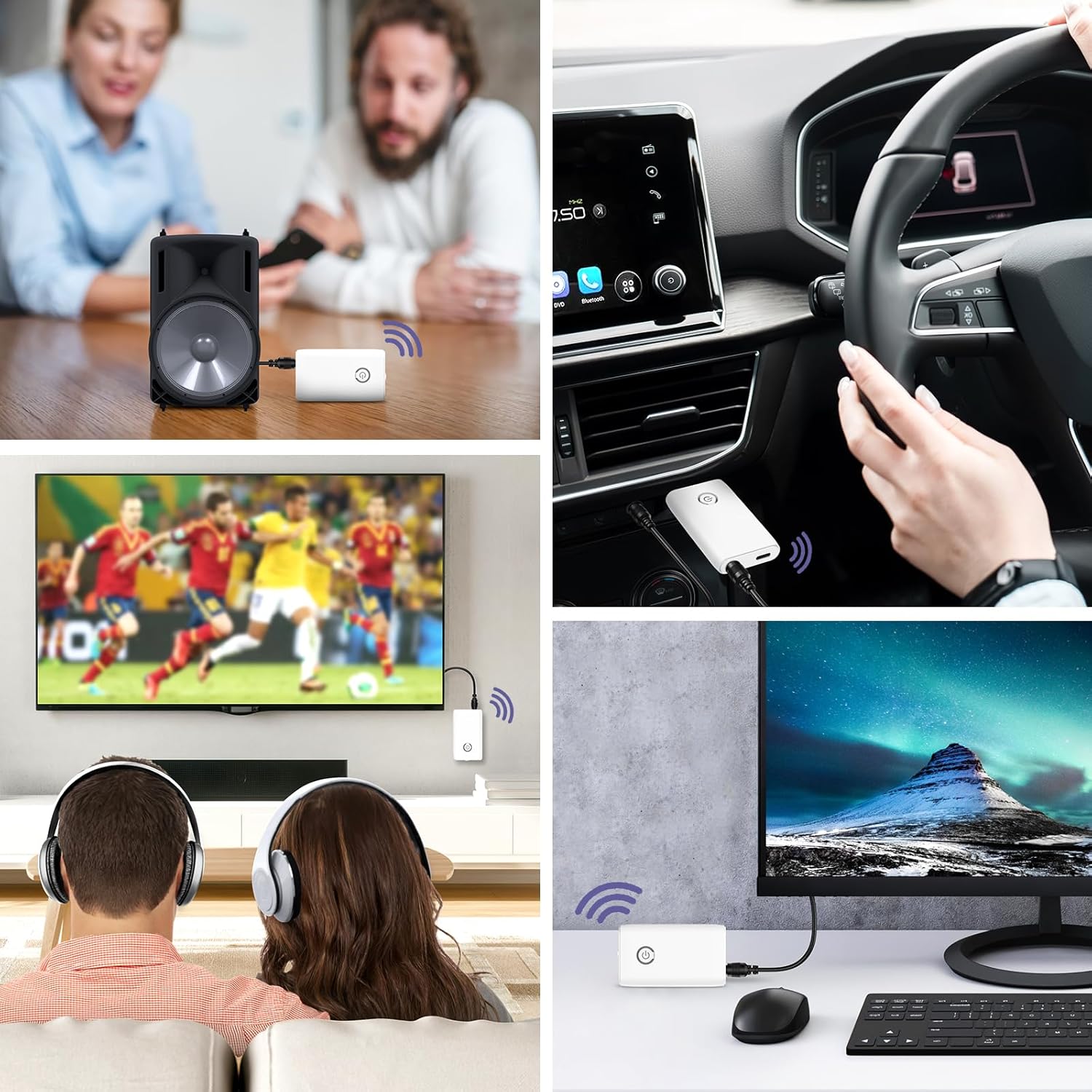
画像: A collage of usage scenarios for the OQIMAX Bluetooth adapter. It shows the adapter transmitting audio from a TV to headphones, from a PC to headphones, and receiving audio from a phone to a car audio system or a portable speaker.
メンテナンス
- デバイスを乾燥した状態に保ってください。湿気は電子回路に損傷を与える可能性があります。
- デバイスを極端な温度にさらさないでください。高温は電子機器の寿命を縮め、バッテリーを損傷し、特定のプラスチックを変形させたり溶かしたりする可能性があります。
- デバイスの清掃には、刺激の強い化学薬品、洗浄溶剤、または強力な洗剤を使用しないでください。柔らかく、やや硬めの布で拭いてください。amp 布。
- デバイスを落としたり、ぶつけたり、振ったりしないでください。乱暴に扱うと、内部の回路基板や精密機械が破損する可能性があります。
トラブルシューティング
| 問題 | 考えられる原因 | 解決 |
|---|---|---|
| デバイスの電源が入りません。 | バッテリー残量が少なくなりました。 | デバイスを完全に充電します。 |
| Cannot pair with another device. | 間違ったモードが選択されました (TX/RX)。 デバイスがペアリングモードではありません。 Other device not in pairing mode. Too far from the other device. | Ensure the correct mode is selected and the device is powered off before switching. Press and hold the Multi-function Button until the indicator light flashes rapidly. 対象の Bluetooth デバイスもペアリング モードになっていることを確認します。 デバイスを近づけます(10 メートル以内)。 |
| 音声が出ない、または音質が悪い。 | ケーブル接続が正しくありません。 音量が小さすぎる。 干渉。 充電しながら使用しています。 | Check that the 3.5mm audio cable is securely connected to both the adapter and the audio device. Adjust volume on both the adapter and the connected audio device. 他のワイヤレス デバイスや干渉源から離れてください。 Avoid using the device while it is charging to prevent current noise. |
| 接続が頻繁に切断されます。 | 距離が長すぎます。 障害物。 バッテリー残量が少なくなりました。 | アダプタと接続されたデバイス間の距離を短くします。 デバイス間に大きな障害物(壁、大きな金属物)がないことを確認してください。 デバイスを充電します。 |
仕様
| ブランド | オキマックス |
| モデル番号 | CP212-Vitt |
| Bluetoothバージョン | 5.3 |
| 接続技術 | Bluetooth, AUX (3.5mm), USB (for charging) |
| 特集 | Hands-free calling, CVC Noise Reduction, Low Latency, 2-in-1 Transmitter/Receiver |
| 対応デバイス | Headphones, Speakers, Computers, Radios, Car Stereo Systems, Televisions |
| 電源 | 電池式(充電式) |
| バッテリー容量 | 250mAh |
| Play Time (Receiver Mode) | 最大8時間 |
| Play Time (Transmitter Mode) | 最大6時間 |
| 充電時間 | 約2時間 |
| Bluetooth範囲 | 最大10メートル(33フィート) |
| 製品寸法 | 長さ6.4 x 幅3.7 x 高さ1.2センチメートル |
| アイテム重量 | 11グラム |
| 色 | 白 |
安全上の警告
Please adhere to the following safety guidelines for battery use:
- Do not expose the battery to high heat or open flames.
- バッテリーを火中に廃棄しないでください。
- Recycle or dispose of the battery according to local regulations.
- お子様の手の届かない場所に保管してください。
保証とサポート
For warranty information and technical support, please refer to the contact details provided with your purchase or visit the official OQIMAX webサイト。
顧客サービス: Please contact your retailer or OQIMAX customer support for assistance.
Ask a question about this manual
Ask about setup, troubleshooting, compatibility, parts, safety, or missing instructions. Manuals+ will review the question and use this page’s manual context to help answer it.