
Micool Y30
Micool Y30 オープンイヤーヘッドホン ユーザーマニュアル
モデル: Y30
1. はじめに
Thank you for choosing the Micool Y30 Open Ear Headphones. These wireless Bluetooth 5.3 earbuds are designed to provide a comfortable and safe listening experience by resting gently on your ears without blocking the ear canal. This design allows you to remain aware of your surroundings while enjoying high-quality audio, making them ideal for sports and daily activities.
2. 箱の中身
- Micool Y30 Open Ear Headphones (Left and Right)
- ワイヤレス充電ケース
- USB-C充電ケーブル
- ユーザーマニュアル
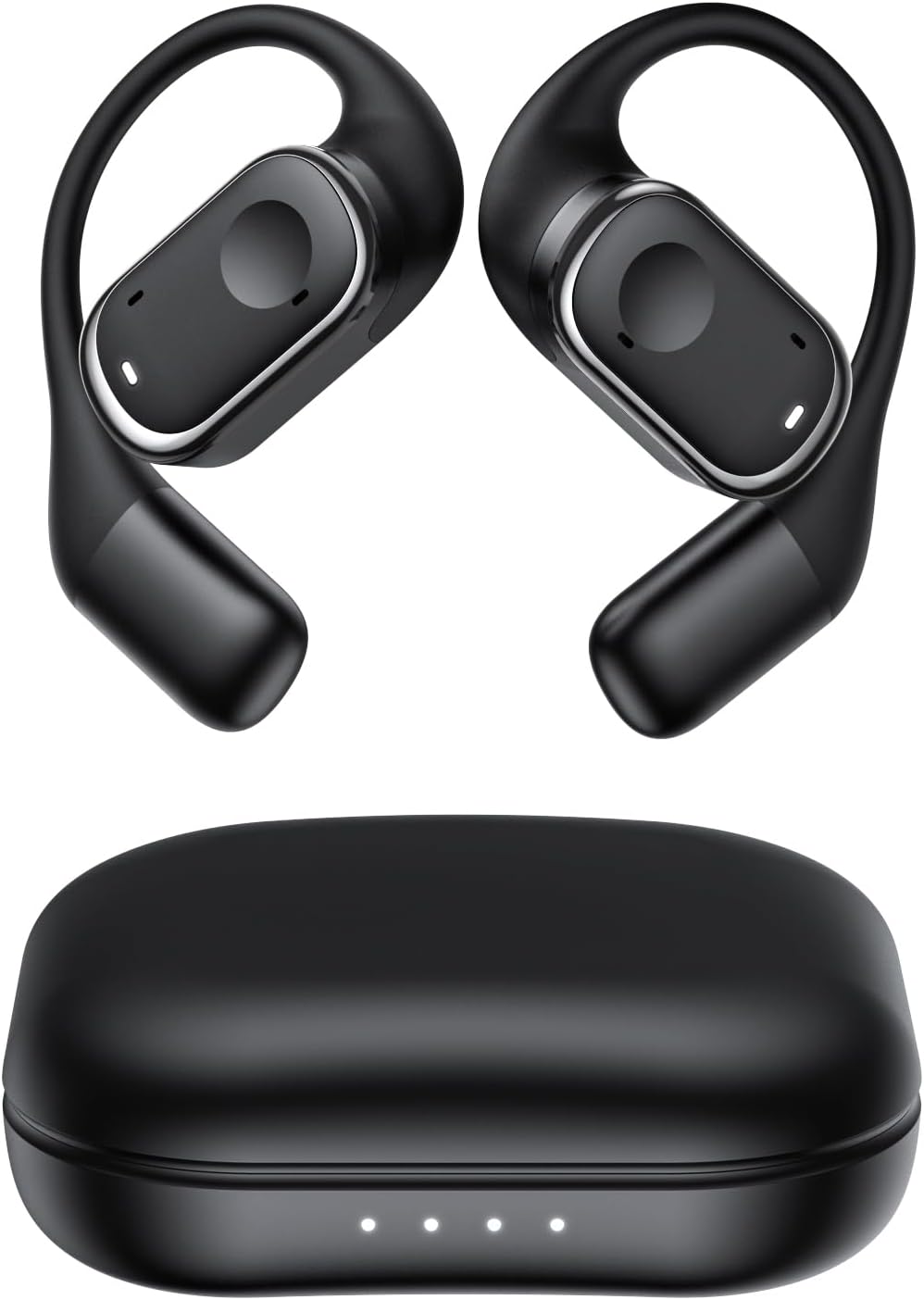
図2.1: Micool Y30 Open Ear Headphones and their charging case. The image shows two black open-ear earbuds with ear hooks, positioned above a sleek black charging case with four LED indicator lights on the front.
3.製品オーバーview
3.1 イヤホンのコンポーネント
Each earbud features an ergonomic design with a soft silicone ear hook for secure and comfortable placement. The main body houses the speaker and touch control area.

図3.1: 閉じる view illustrating the ergonomic design of the Micool Y30 earbud. The image highlights the curved ear hook and the soft silicone material designed for comfort and secure fit, conforming to the ear's contour.
3.2充電ケース
The charging case protects the earbuds and recharges them. It has a USB-C charging port and LED indicators to show battery status.

図3.2: 内部 view of the Micool Y30 charging case, showcasing the earbuds nestled inside. The image highlights the Bluetooth 5.3 technology and the digital display indicating battery levels, emphasizing fast response and stable connection.
4. セットアップ
4.1デバイスの充電
初めて使用する前に、イヤホンと充電ケースを完全に充電してください。
- ケースの充電: Connect the provided USB-C cable to the charging port on the case and to a USB power adapter (not included). The LED indicators on the case will show the charging status. A full charge takes approximately 1-2 hours.
- イヤホンの充電: Place the earbuds into the charging case. Ensure they are correctly seated. The earbuds will automatically begin charging. The case can charge the earbuds 4-5 times, providing up to 6 hours of playback per single earbud charge.
4.2Bluetoothペアリング
To connect your Micool Y30 headphones to your device:
- イヤホンが充電されていることを確認します。
- 充電ケースを開けると、イヤホンは自動的にペアリングモードになります。
- デバイス(スマートフォン、タブレットなど)で Bluetooth 設定に移動し、Bluetooth をオンにします。
- 検索する available devices. Select "Micool Y30" from the list.
- 接続されると確認音が聞こえ、イヤホンが使用できるようになります。
The headphones support Bluetooth 5.3 for stable and efficient connection.
5. 操作手順
5.1 電源オン/オフ
- 電源オン: 充電ケースを開けると、イヤフォンの電源が自動的にオンになります。
- 電源を切る: イヤホンを充電ケースに戻し、蓋を閉めます。自動的に電源がオフになり、充電が開始されます。
5.2音楽の再生
The Micool Y30 headphones feature touch controls for media management.
- 再生/一時停止: どちらかのイヤフォンをXNUMX回タップします。
- 次のトラック: 右のイヤフォンをダブルタップします。
- 前のトラック: 左のイヤフォンをダブルタップします。
- ボリュームアップ: 右のイヤフォンをトリプルタップします。
- ボリュームダウン: 左のイヤフォンをトリプルタップします。
5.3 通話管理
- 通話の応答/終了: どちらかのイヤフォンをXNUMX回タップします。
- 通話を拒否: どちらかのイヤフォンを2秒間押し続けます。
5.4 シングルおよびデュアルイヤホンモード
The Micool Y30 headphones support seamless switching between using a single earbud or both earbuds.
- シングルイヤホンモード: 左右どちらかのイヤホンを単独で使用できます。片方のイヤホンをケースから取り出すだけで、デバイスに接続できます。
- デュアルイヤホンモード: Take both earbuds out of the case, and they will automatically connect to each other and then to your device for a stereo audio experience.

図5.1: Illustration of the Micool Y30's flexible usage modes. The diagram shows how the earbuds can be used independently in "Single Earphone Mode" or together in "Dual Headphone Mode" for a synchronized connection.
6. メンテナンス
6.1 クリーニング
- 柔らかく乾いた糸くずの出ない布を使用して、イヤホンと充電ケースを清掃してください。
- 過酷な化学薬品、洗浄溶剤、または強力な洗剤は使用しないでください。
- The earbuds have an IPX6 waterproof rating, meaning they are resistant to strong jets of water. However, they are not designed for submersion. Wipe them dry after exposure to sweat or water.
6.2 ストレージ
- 使用していないときは、イヤホンを保護し、充電を保つために充電ケースに保管してください。
- デバイスを極端な温度(高温または低温)や湿度の高い環境に保管しないでください。
7。 トラブルシューティング
| 問題 | 解決 |
|---|---|
| イヤホンがデバイスとペアリングされません。 |
|
| XNUMXつのイヤフォンから音が出ない。 |
|
| イヤホンが充電されません。 |
|
| 音質が悪かったり、接続が切れたりします。 |
|
8. 仕様
| 特徴 | 詳細 |
|---|---|
| モデル名 | Y30 |
| 接続技術 | ワイヤレス(Bluetooth) |
| Bluetoothバージョン | 5.3 |
| 耳の位置 | 耳を開ける |
| イヤフォンのバッテリー容量 | 100mAh(各) |
| 充電ケースのバッテリー容量 | 450mAh |
| 再生時間(1回の充電) | 最大6時間 |
| 総再生時間(ケース付き) | Up to 30 hours (4-5 full charges from case) |
| 充電時間(ケース) | 1~2時間 |
| 充電ポート | USBタイプC |
| 防水等級 | IPX6 |
| 材料 | プラスチック |
| 欧州連合 | 776584469303 |
9. 保証とサポート
Micool products are designed with quality and reliability in mind. For warranty information or technical support, please refer to the warranty card included in your product packaging or visit the official Micool webサイトをご覧ください。また、販売店にお問い合わせの上、サポートを受けることもできます。
さらに詳しいサポートについては、 Micool Store on Amazon.
Ask a question about this manual
Ask about setup, troubleshooting, compatibility, parts, safety, or missing instructions. Manuals+ will review the question and use this page’s manual context to help answer it.