
製品終了view
The VIOFO A229 Pro 3CH is a high-performance 3-channel dash camera system designed to provide comprehensive video surveillance for your vehicle. This bundle includes the A229 Pro 3CH dash cam and the HK4 Hardwire Kit, enabling advanced parking surveillance features. The system features dual Sony STARVIS 2 image sensors (IMX678 and IMX675) for superior image quality, HDR for all three channels, and an upgraded infrared cabin recording camera. It supports 4K resolution for the front camera, 2K for the rear camera, and 1080P for the interior cabin camera.
Key features include hands-free voice control, faster 5GHz Wi-Fi for quick data transfer and app control, high-precision GPS, and various parking modes when connected via the HK4 Hardwire Kit. A Circular Polarizing Lens (CPL) is also included to reduce glare and reflections.

Image: The VIOFO A229 Pro 3CH dash camera system, including the main front unit, interior camera, rear camera, HK4 hardwire kit, and CPL filter.
パッケージ内容
インストールする前に、以下にリストされているすべてのアイテムがパッケージに含まれていることを確認してください。
- VIOFO A229 Pro Dash Camera (Front Unit)
- リアカメラ
- 室内カメラ
- HK4ハードワイヤーキット
- Car Charger (USB Type-C Power Cable)
- Rear Camera Cable (6 meters / 19.7 ft)
- Interior Camera Cable (1 meter)
- タイプCデータケーブル
- トリム除去ツール
- フロントガラス用静電ステッカー(2枚)
- Circular Polarizing Lens (CPL)
- ユーザーマニュアル
- スペアマウント粘着パッド

Image: Visual representation of the VIOFO A229 Pro 3CH dash cam and HK4 Hardwire Kit package contents.
セットアップとインストール
始める前に
- MicroSDカード要件: The dashcam does not include a microSD card. A U1/U3 high-speed card (up to 512GB) is required for operation. Using a VIOFO branded card is recommended for optimal performance and reliability.
- 電源: Always use the original car charger and power cable provided. Avoid using mobile phone chargers or generic data cables, as they may not provide sufficient power.
ダッシュカムの取り付け
The VIOFO A229 Pro uses 3M adhesive stickers and static windshield stickers for secure mounting. It is recommended to apply the static sticker to the windshield first, then attach the 3M adhesive mount to the static sticker. This allows for easier repositioning or removal without leaving residue directly on the glass.

Image: Diagram illustrating the recommended placement of the front, interior, and rear cameras, and the routing of power and camera cables within a vehicle.
カメラの接続
- Connect the interior camera to the main front unit using the 1-meter interior camera cable.
- Connect the rear camera to the main front unit using the 6-meter rear camera cable. Ensure the cable is routed neatly and securely, avoiding interference with vehicle operations. Do not connect the rear camera cable to defroster lines.
Hardwire Kit Installation (for Parking Mode)
The HK4 Hardwire Kit is essential for utilizing the 24-hour buffered parking mode features. Refer to the separate HK4 Hardwire Kit user manual included in your bundle for detailed installation instructions. This kit connects directly to your vehicle's fuse box to provide continuous power.
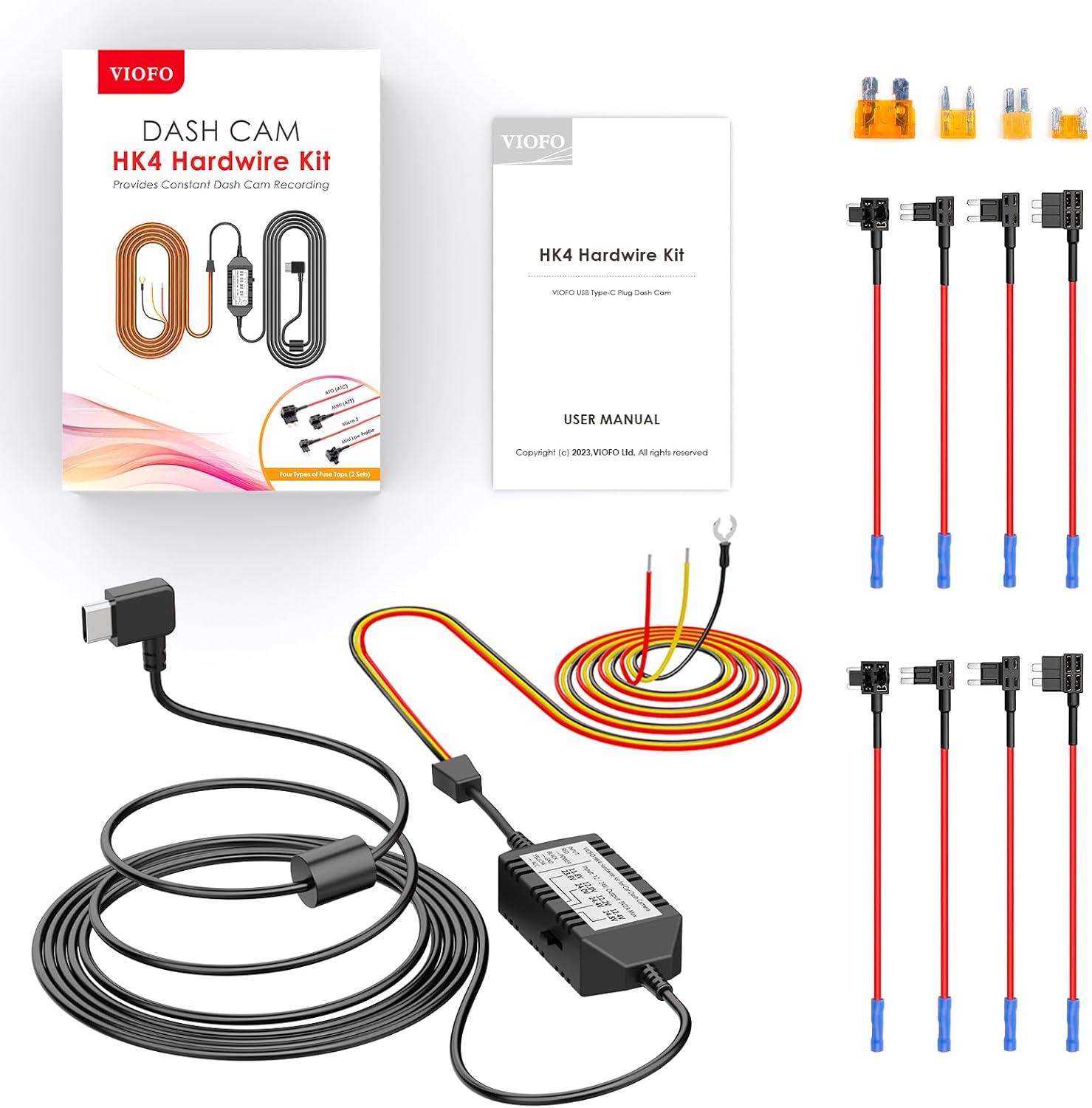
Image: The VIOFO HK4 Hardwire Kit, including the main unit, various fuse taps, and wiring for connecting to a vehicle's power supply.
操作手順
電源のオン/オフ
The dash cam will automatically power on and begin recording when connected to your vehicle's power supply and the ignition is turned on. It will power off automatically when the ignition is turned off (unless hardwired for parking mode).
音声コントロール
The A229 Pro supports hands-free voice commands for common operations. Simply speak the command clearly. Examp含まれるもの:
- 「写真を撮る」
- 「ビデオをロックする」
- 「Wi-Fiをオンにする」
- 「Wi-Fiをオフにする」
- 「音声をオンにする」
- 「音声をオフにする」
- 「フロントカメラを表示」
- 「リアカメラを表示」

Image: A driver interacting with the VIOFO dash cam using voice commands, illustrating the hands-free operation for functions like taking photos, locking video, and controlling Wi-Fi.
Wi-Fiとアプリ制御
Connect your smartphone to the dash cam via the VIOFO app using the faster 5GHz Wi-Fi connection. This allows for:
- Easy Wi-Fi configuration
- ライブプレview of recordings
- Playing back recorded videos
- Downloading videos to your mobile device
Parking Mode Options
When the HK4 Hardwire Kit is installed, the A229 Pro offers three parking mode options:
- 自動イベント検出(バッファリング): Records 15 seconds before and 30 seconds after a detected movement or impact.
- タイムラプス録画: ストレージスペースを節約するために、低いフレーム レートで継続的に録画します。
- 低ビットレート録画: Records continuously at a lower bitrate to save storage space while maintaining video quality.

Image: Visual explanation of the three parking mode options: Auto Event Detection, Time Lapse Recording, and Low Bitrate Recording, highlighting their functions.
ループ録画と緊急ロック
The dash cam continuously records, overwriting the oldest files when the memory card is full. In the event of a collision or sudden impact, the built-in G-sensor automatically locks the current video segment, preventing it from being overwritten. This ensures critical footage は保存されます。
GPS機能
The A229 Pro incorporates a Quad-Mode GPS, compatible with GPS, BEIDOU, GALILEO, and GLONASS satellite systems. This enhances accuracy and stability in positioning, providing comprehensive vehicle location, speed, and timestamp data to your video files. When GPS is enabled, the map screen is displayed during video playback in the VIOFO App or on a computer.
Circular Polarizing Lens (CPL)
The included CPL filter can be affixed to the front lens of the dash cam. It effectively diminishes reflections and glare from glass and road surfaces, significantly enhancing image clarity and contrast in various lighting conditions.

Image: Side-by-side comparison showing the effect of the Circular Polarizing Lens (CPL) on dash cam footage, demonstrating reduced glare and improved clarity when the CPL is used.
メンテナンス
MicroSDカードのお手入れ
- Regularly format your microSD card (at least once a month) within the dash cam's settings to maintain optimal performance and prevent data corruption.
- Use only high-endurance microSD cards designed for dash cam use to withstand continuous writing cycles and extreme temperatures.
- Replace the microSD card periodically (e.g., every 6-12 months) as they have a limited lifespan due to continuous recording.
デバイスのクリーニング
- Wipe the camera lenses gently with a soft, lint-free cloth to ensure clear recordings. Avoid abrasive materials.
- ドライブレコーダーの外側を乾いた布か軽く湿らせた布で拭いてください。amp 布で拭いてください。強い化学薬品や溶剤は使用しないでください。
トラブルシューティング
よくある問題と解決策
- ダッシュカムの電源が入らない: Ensure the car charger is securely connected to both the dash cam and the vehicle's power outlet. Verify the vehicle's ignition is on. If using the hardwire kit, check the fuse connections.
- Recording Errors / Card Not Recognized: Ensure a U1/U3 high-speed microSD card is inserted correctly. Format the card within the dash cam's settings. If issues persist, try a different, high-quality microSD card. Some non-VIOFO branded cards may cause issues, especially in high temperatures.
- ビデオ品質が悪い / グレア: Ensure the lenses are clean. Adjust the angle of the dash cam. If glare from the windshield is an issue, ensure the CPL filter is properly installed and rotated for optimal effect.
- No Signal from Rear/Interior Camera: Verify that the camera cables are securely connected to both the main unit and the respective cameras. Ensure the correct camera is connected to the correct port (e.g., do not swap rear and interior cameras if they have different IR capabilities).
- Overheating in Hot Climates: Ensure the dash cam is mounted in a location with adequate airflow. Using a VIOFO branded high-endurance microSD card can help, as some cards may contribute to heat issues.
さらなる支援
For more detailed usage guidance and frequently asked questions, please refer to the FAQ section on the official VIOFO webサイト。

Image: A graphic summarizing important tips for dash cam usage, including charging instructions, microSD card requirements, rear camera cable notes, screen saver settings, and GPS logger information.
仕様
| 特徴 | 詳細 |
|---|---|
| モデル名 | A229 プロ 3CH |
| ビデオキャプチャ解像度 | Front: 4K (2160P), Rear: 2K (1440P), Interior: 1080P |
| イメージセンサー | Front: Sony STARVIS 2 IMX678, Rear: Sony STARVIS 2 IMX675, Interior: Sony STARVIS IMX307 |
| 接続技術 | Wi-Fi(5GHz)、GPS |
| 特集 | Voice Control, HDR (3-channel), Parking Mode (with HK4), Loop Recording, G-Sensor, CPL Included |
| 画面 | 2.4" HD Screen |
| レンズの回転 | Rotatable Lens (Front: 30°, Interior: 360°) |
| ストレージサポート | Up to 512GB microSD card (U1/U3 high endurance recommended) |
| 取り付けタイプ | 3Mステッカー&静電気防止フロントガラスステッカー |
| 色 | 黒 |
| メーカー | ヴィオフォ |
| 最初に利用可能 | 7年2023月XNUMX日 |

Image: Visual representation of the VIOFO A229 Pro's 2.4-inch HD screen, rotatable lens, and product dimensions for the main unit and cameras.
保証とサポート
For detailed information regarding the product warranty, technical support, and frequently asked questions, please visit the official VIOFO webサイト。 NS website provides comprehensive resources to assist you with any inquiries or issues you may encounter with your A229 Pro 3CH Dash Cam and HK4 Hardwire Kit.