
1. はじめに
This instruction manual provides essential information for the safe and effective use of your Nikon D850 DSLR Camera. Please read this manual thoroughly before using the camera and keep it accessible for future reference. The Nikon D850 is a high-performance full-frame DSLR designed for professional photographers, featuring a 45.7MP BSI CMOS sensor, 4K UHD video recording, and a robust autofocus system.
This bundle includes the Nikon D850 camera body, a Nikon AF-S NIKKOR 24-120mm f/4G ED VR Lens, a Shot-Gun Microphone, a Photo Software Package, a camera case, 128GB memory, a slave flash, and a tripod.
2. パッケージ内容
Before proceeding with setup, verify that all items listed below are present in your package:
- Nikon D850 DSLR Camera Body
- Nikon AF-S NIKKOR 24-120mm f/4G ED VR Lens
- Nikon EN-EL15a Rechargeable Lithium-Ion Battery
- Extra High Capacity Battery
- Nikon MH-25A Battery Charger
- Nikon UC-E22 USB Cable
- Nikon AN-DC18 Camera Strap
- COMMANDER Deluxe Starter Kit (Mini Tripod, 5 Sensor Swabs, Cleaning Cloth, 2 Universal Screen Protectors, Memory Card Wallet, Lens Cap Keeper)
- COMMANDER 50 inch DSLR Tripod
- 2 x 64GB Sandisk Memory Cards (Total 128GB)
- USBカードリーダー
- カメラキャリングケース
- 3PC Filter Kit (UV, CPL, FLD Filters) with Filter Case
- Shot-Gun Microphone
- Photo Software Package
- Lens Pen and Lens Blower
- スレーブ フラッシュ
- Nikon DK-17F Eyepiece Cap
- ニコン DK-19 ラバーアイカップ
- Nikon BF-1B Body Cap
- Nikon Snap-On Lens Cap
- ニコン LF-4 リアレンズキャップ
3. セットアップ
3.1. バッテリーの充電
- Insert the Nikon EN-EL15a battery into the MH-25A battery charger.
- 充電器を電源コンセントに差し込みます。充電用amp will blink during charging and turn off when charging is complete.
- フル充電には通常約 2 時間かかります。
3.2. バッテリーとメモリーカードの挿入
Ensure the camera is turned off before inserting or removing batteries or memory cards.
- カメラの底面にある電池室のカバーを開きます。
- Insert the charged EN-EL15a battery with the contacts facing the correct direction until it clicks into place.
- カメラ側面のメモリカードスロットカバーを開きます。
- Insert the 64GB Sandisk memory cards into the designated slots (one XQD/CFexpress slot and one SD card slot) until they click. Ensure the cards are oriented correctly.
- 両方のカバーをしっかりと閉めてください。
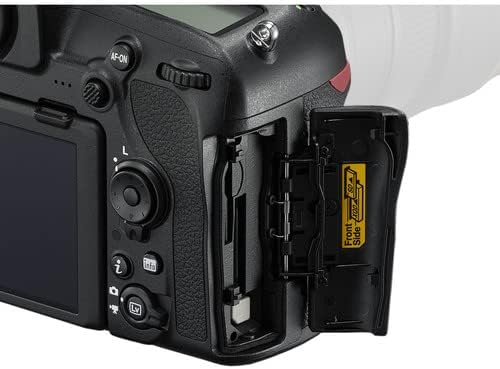
Image: Memory card and battery compartment access.
3.3. レンズの取り付け
- Remove the body cap from the camera and the rear lens cap from the NIKKOR 24-120mm lens.
- レンズの取り付けマークをカメラ本体の取り付けマークに合わせます。
- カチッと音がするまでレンズを反時計回りに回します。

Image: Nikon AF-S NIKKOR 24-120mm f/4G ED VR Lens.
3.4. カメラの初期設定
- 電源スイッチを使用してカメラの電源をオンにします。
- 画面上の指示に従って、言語、日付、時刻、タイムゾーンを設定します。
4. カメラの操作
4.1. 基本的な操作と表示
Familiarize yourself with the camera's buttons and dials. The D850 features a 3.2-inch tilting touchscreen LCD for intuitive control and review.

画像: 背面 view of the Nikon D850 with its control layout.

Image: Nikon D850 with the tilting LCD screen in an extended position.
4.2. 写真を撮る
- 撮影モードを選択してください: Rotate the mode dial (P, S, A, M) to choose your desired exposure mode.
- P(プログラムオート): カメラは最適な露出になるようにシャッタースピードと絞りを設定します。
- S(シャッター優先オート): シャッタースピードを設定すると、カメラが絞りを設定します。
- A(絞り優先オート): 絞りを設定すると、カメラがシャッタースピードを設定します。
- M(マニュアル): シャッタースピードと絞りの両方を制御します。
- 集中: 見てください viewファインダーまたはライブを使用する View on the LCD. Press the shutter-release button halfway to activate autofocus. The D850 features a 153-point AF system for precise focusing.
- 作曲: ショットをフレーミングします。
- シュート: Press the shutter-release button fully to take the picture. The camera can shoot at 7 frames per second (fps) or up to 9 fps with an optional battery grip.
4.3.ビデオの録画
The Nikon D850 supports UHD 4K video recording at 30 fps.
- Switch to Live View mode using the Lv button.
- Press the red movie-record button to start recording.
- もう一度ボタンを押すと、録音が停止します。
4.4. Connecting to Smart Devices (SnapBridge)
The D850 features SnapBridge Bluetooth and Wi-Fi connectivity for transferring images to smart devices and remote control.
- Install the SnapBridge app on your smartphone or tablet.
- Enable Bluetooth and Wi-Fi on both the camera and your smart device.
- Follow the instructions in the SnapBridge app to pair your devices.
5. メンテナンス
5.1. カメラとレンズのクリーニング
- カメラ本体を清掃するには、柔らかく糸くずの出ない布を使用してください。
- For the lens, use the included lens pen and blower to remove dust. For smudges, use a specialized lens cleaning solution and cloth.
- Avoid touching the sensor directly. If sensor cleaning is required, it is recommended to have it performed by a professional Nikon service center.
5.2. バッテリーのお手入れ
- バッテリーを使用しないときは、涼しく乾燥した場所に保管してください。
- バッテリーを極端な温度にさらさないでください。
- Recharge batteries before long periods of storage to maintain their health.
5.3. ストレージ
- カメラを長期間保管する場合は、バッテリーを取り外してください。
- Store the camera and lens in a dry, well-ventilated area, preferably in the included camera case, to prevent mold and mildew.
6。 トラブルシューティング
If you encounter issues with your Nikon D850, refer to the following common solutions:
- カメラの電源が入らない: バッテリーが完全に充電され、正しく挿入されていることを確認してください。電源スイッチの位置を確認してください。
- オートフォーカスが機能しない: Verify the lens is securely attached and the AF/M switch on the lens is set to AF. Check camera's focus mode settings.
- 画像がぼやけています: Check shutter speed (too slow can cause blur), aperture (too wide can reduce depth of field), and focus. Ensure Vibration Reduction (VR) is enabled on the lens if needed.
- メモリカードエラー: Reinsert the memory card. If the error persists, try a different card. Ensure the card is not locked.
- LCD に画像が表示されない: ディスプレイがオフになっているか、カメラがオンになっているか確認してください。 viewファインダー専用モード。
For more detailed troubleshooting or issues not covered here, please consult the official Nikon D850 reference manual or contact Nikon support.
7. 仕様
| 特徴 | 仕様 |
|---|---|
| センサータイプ | 45.7MP FX-Format BSI CMOS |
| 画像プロセッサ | エクスピード5 |
| ISO範囲 | Native 64-25600, Extended 32-102400 |
| ビデオ録画 | UHD 4K at 30 fps, 1080p |
| オートフォーカスシステム | Multi-CAM 20K 153-Point AF System |
| 液晶画面 | 3.2" 2.36m-Dot Tilting Touchscreen LCD |
| 連続撮影 | 7 fps (up to 9 fps with optional grip) |
| レンズマウント | ニコンFマウント |
| 付属レンズ | Nikon AF-S NIKKOR 24-120mm f/4G ED VR Lens |
| 接続性 | SnapBridge Bluetooth and Wi-Fi, HDMI, USB |
| メモリストレージ | 128GB (2 x 64GB SD cards) |
| 重さ | 約1.05ポンド(本体のみ) |
8. 保証とサポート
8.1. 保証情報
This Nikon D850 camera bundle comes with a 90-day limited warranty from the seller. Please retain your proof of purchase for any warranty claims. For specific details regarding coverage and terms, refer to the warranty documentation provided at the time of purchase or contact the seller directly.
8.2. カスタマーサポート
For technical assistance, additional product information, or service inquiries, please visit the official Nikon support website or contact their customer service department. You can find contact information and detailed resources at ニコンUSAサポート.


