
シャープ ES-NIH814BWA-EN
シャープ ES-NIH814BWA-EN 一体型洗濯機 ユーザーマニュアル
モデル: ES-NIH814BWA-EN | 容量: 8kg | 回転速度: 1400 rpm
1. はじめに
1.1 製品終了view
シャープ ES-NIH814BWA-EN 一体型洗濯機をお選びいただき、ありがとうございます。この洗濯機は、ご家庭で効率的かつ信頼性の高い洗濯ケアを実現するために設計されています。8kgの容量と1400rpmの回転速度で、強力な洗浄力を発揮しながら、キッチンやユーティリティスペースにシームレスに溶け込みます。

図1.1: 前面 view シャープ ES-NIH814BWA-EN 一体型洗濯機の、洗練されたデザインと一体型パネルをご紹介します。
1.2 安全情報
洗濯機をご使用になる前に、すべての安全に関する注意事項をよくお読みください。この取扱説明書は、今後の参考のために保管してください。不適切な設置、メンテナンス、または使用は、重大な傷害や損傷を引き起こす可能性があります。清掃やメンテナンスを行う前に、必ず電源プラグを抜いてください。
- アプライアンスが適切に接地されていることを確認してください。
- 子供が機器で遊ばないようにしてください。
- 洗濯サイクル中は洗剤ディスペンサーを開けないでください。
- 濡れた手で機器に触れないでください。
- 梱包材は子供の手の届かないところに保管してください。
2. セットアップとインストール
2.1 開梱
すべての梱包材を慎重に取り除いてください。輸送中の損傷がないか確認してください。設置前に、機械背面の輸送用ボルトをすべて取り外してください。これらのボルトは安全な輸送に不可欠ですが、振動や損傷を防ぐため、運転時には必ず取り外す必要があります。
2.2 位置とレベル
洗濯機はしっかりとした平らな床に設置してください。調整脚を調整して、洗濯機が完全に水平で安定していることを確認してください。これにより、運転中の過度の振動や騒音を防ぐことができます。
2.3 水接続
給水ホースを3/4インチのネジ山が付いた冷水栓に接続します。水漏れを防ぐため、すべての接続部がしっかりと締め付けられていることを確認してください。排水ホースは、しっかりとスタンドパイプに差し込むか、適切な排水システムに接続し、ねじれがないようにしてください。

図2.1:背面 view 洗濯機の給水ホースと排水ホースの接続部を示す図。
2.4 電気接続
電源コードをアース付きコンセントに差し込みます。電圧がtag電源と周波数は、機器の定格銘板に記載されている仕様と一致してください。延長コードや複数のアダプターを使用しないでください。
2.5 初回使用
最初の洗濯の前に、少量の洗剤を使って 60°C で空のサイクルを行い、ドラムを洗浄して製造時の残留物を除去します。
3. 操作手順
3.1コントロールパネルオーバーview
コントロール パネルは、プログラム選択ダイヤル、デジタル ディスプレイ、洗濯サイクルをカスタマイズするための機能ボタンで構成されています。
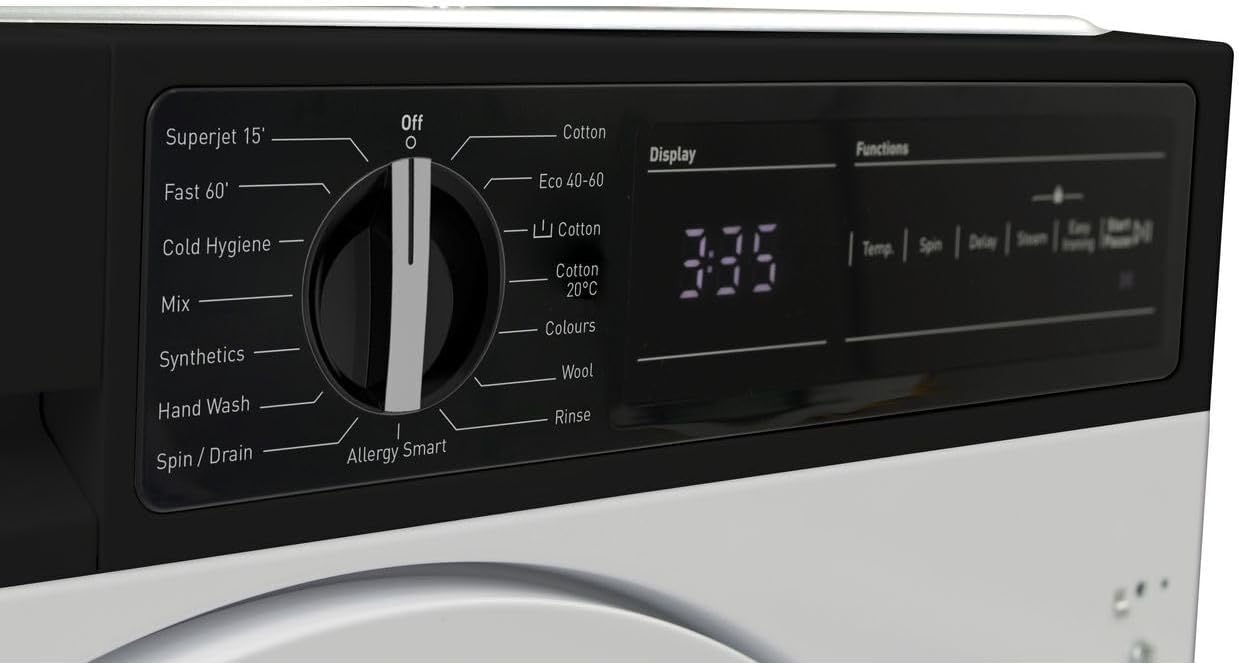
図3.1:詳細 view プログラム選択ダイヤルとデジタルディスプレイの。

図 3.2: 残り時間と、温度、回転、遅延、スチーム、イージーアイロンの機能ボタンが表示されたデジタルディスプレイのクローズアップ。
3.2 洗濯物の投入
洗濯機のドアを開けて洗濯物を入れます。詰め込みすぎに注意し、衣類が自由に回転できるスペースを確保してください。ドアはカチッと音がするまでしっかりと閉めてください。

図 3.3: 洗濯機のドアが開き、洗濯物を入れるドラムが現れます。

図3.4: 内部 view 効果的な洗浄のために設計されたステンレス製ドラム。
3.3 洗剤と添加剤の添加
洗剤投入口の引き出しを引き出します。適量の洗剤を洗濯槽に、柔軟剤を専用の投入口に入れます。洗剤の使用量については、洗剤のパッケージをご覧ください。

図 3.5: 洗剤ディスペンサーの引き出し。洗剤と柔軟剤を入れる部分を示しています。
3.4 洗濯プログラムの選択
プログラム選択ダイヤルを回して、ご希望の洗浄プログラムを選択してください。選択可能なプログラムは以下のとおりです。
- スーパージェット15フィート: 軽い汚れの場合は、クイックウォッシュをご使用ください。
- ファスト60': 毎日の洗濯に適した高速サイクル。
- 風邪の衛生: 低温で衛生的に洗浄します。
- ミックス: 混合生地の洗濯物用。
- 合成繊維: 合成繊維用。
- 手洗い: デリケートなアイテム用のデリケートサイクル。
- スピン/ドレイン:洗濯物を脱水し、水を切る。
- アレルギースマート: アレルゲンを除去するように設計されています。
- コットン: 綿製品用の標準プログラム。
- エコ40-60: 40 ~ 60°C での綿製品および混紡製品向けの省エネプログラム。
- コットン 20℃: 低温コットン洗い。
- 色: 色鮮やかな衣類の鮮やかさを保ちます。
- ウール: ウール製品用の優しいプログラム。
- リンス:洗濯物を洗わずにすすぐこと。
3.5 設定の調整
プログラムを選択した後、機能ボタンを使用して設定をカスタマイズできます。
- 温度: 洗濯温度を調整します。
- スピン: 回転速度を変更します。
- 遅れ: 遅延開始時刻を設定します。
- スチーム: 衛生状態の向上やシワの軽減のためにスチーム機能を追加します。
- 簡単アイロンがけ: creを減らすasinアイロンがけが簡単にできます。
3.6 洗濯サイクルの開始
を押す 開始/一時停止 ボタンを押して選択した洗濯サイクルを開始します。ディスプレイに残り時間が表示されます。
3.7 洗濯サイクルの終了
洗濯サイクルが完了すると、洗濯機から信号が鳴ります。しばらくするとドアがロック解除されますので、すぐに洗濯物を取り出してください。
4. メンテナンスとケア
定期的なメンテナンスにより、洗濯機の最適なパフォーマンスが確保され、寿命が延びます。
4.1 洗剤ディスペンサーの清掃
洗剤残留物の蓄積を防ぐため、洗剤ディスペンサーの引き出しを定期的に取り外し、流水で洗浄してください。
4.2 ドラムのクリーニング
毎月メンテナンス洗浄(例:洗濯機クリーナーまたは酢を使った高温サイクル)を実行してドラムを洗浄し、臭いや残留物を除去します。
4.3フィルターの清掃
排水ポンプフィルターは、通常、本体前面下部にあります。カバーを開け、残った水を排出し、フィルターを慎重に取り外して清掃してください。目詰まりを防ぐため、定期的に清掃してください。
4.4 外装の清掃
外側の表面を柔らかい布で拭きます。amp 布で拭いてください。研磨剤や溶剤は使用しないでください。
5。 トラブルシューティング
洗濯機に問題が発生した場合は、カスタマー サービスに連絡する前に、次の一般的な問題と解決策を参照してください。
| 問題 | 考えられる原因 | 解決 |
|---|---|---|
| マシンが起動しない | 電源がありません。ドアが閉まっていません。プログラムが選択されていません。開始/一時停止が押されていません。 | 電源をチェックし、ドアがラッチされていることを確認し、プログラムを選択し、「開始/一時停止」を押します。 |
| 水分摂取なし | 給水栓が閉まっている;給水ホースが曲がっている;水圧が低すぎる。 | 蛇口を開け、ホースをまっすぐにし、家庭内の水圧を確認します。 |
| 水が流れない | 排水ホースが曲がっています。排水ポンプのフィルターが詰まっています。 | 排水ホースをまっすぐにします。排水ポンプのフィルターを清掃します。 |
| 過度の振動/騒音 | トランジットボルトが取り外されていない、機械が水平でない、負荷が不均一である。 | 輸送用ボルトを外し、機械の高さに合わせて脚を調整し、洗濯物を再分配します。 |
| ディスペンサー内の洗剤残留物 | 洗剤が多すぎる、水圧が低い、ディスペンサーが詰まっている。 | 洗剤の量を減らし、水圧を確認し、ディスペンサーを清掃します。 |
6. 技術仕様
| 特徴 | 仕様 |
|---|---|
| ブランド | シャープ |
| モデル | ES-NIH814BWA-EN |
| 容量 | 8キログラム |
| 最高回転数 | 1400 回転 |
| インストールタイプ | 統合された |
| コントロールコンソール | ボタン、ダイヤル、デジタルディスプレイ |
| アクセス場所 | フロントロード |
| 素材(ドラム) | ステンレス鋼 |
| 巻tage | 2.2E+2 ボルト(AC) |
| 色 | 白 |
7. 保証と顧客サポート
シャープ ES-NIH814BWA-EN 洗濯機にはメーカー保証が付いています。保証期間や保証範囲など、具体的なご利用規約については、製品に付属の保証書をご覧ください。
技術サポート、スペアパーツ、またはサービス予約については、シャープカスタマーサポートまでお問い合わせください。連絡先は通常、シャープの公式ウェブサイトに掲載されています。 webサイトまたは保証書に記載されています。
サポートにお問い合わせいただく際は、モデル番号(ES-NIH814BWA-EN)とシリアル番号をご用意ください。シリアル番号は通常、ドア枠の内側または機器の背面に貼付されたステッカーに記載されています。
Ask a question about this manual
Ask about setup, troubleshooting, compatibility, parts, safety, or missing instructions. Manuals+ will review the question and use this page’s manual context to help answer it.