
1. はじめに
This manual provides essential information for the safe and effective operation of the CONTEC ECG 300G VET 3-Channel Electrocardiograph. Please read this manual thoroughly before using the device and keep it for future reference.
製品終了view
The CONTEC ECG 300G VET is a sophisticated 3-channel electrocardiograph designed for veterinary use. It is capable of simultaneously acquiring signals from 12 leads and printing waveforms using an integrated thermal printing system. The device allows for recording and displaying ECG waveforms in both automatic and manual modes, featuring automatic parameter measurement and analysis. It incorporates synchronous collection and digital signal processing technology to ensure high-quality ECG waveforms, utilizing power frequency, baseline, and EMG filters. Key operational parameters such as 12-lead ECG display, print mode, sensitivity, print speed, and filter status are conveniently shown on the screen. The device offers various print modes and formats, including automatic and manual, with adjustable waveform length via a timed print function.
2. 安全情報
重要な安全上の注意事項:
- 常にこのマニュアルに記載されている指示に従ってデバイスを操作してください。
- Ensure the device is connected to a properly grounded power source.
- Do not use the device in the presence of flammable anesthetics or other explosive atmospheres. This poses a significant explosion hazard.
- Only qualified personnel should operate and maintain this equipment.
- Regularly inspect cables and electrodes for damage before each use.
- デバイスを水や過度の湿気から遠ざけてください。
- Do not attempt to service the device yourself. Refer all servicing to authorized personnel.

画像の説明: クローズアップ view of the CONTEC ECG 300G VET device. The image prominently displays the thermal printer paper slot on the left side and a warning label below it. The label clearly states "DANGER Possible explosion hazard if used in the presence of flammable anesthetics," emphasizing a critical safety precaution.
3. セットアップ
3.1 開梱と検査
- Carefully remove the ECG unit and all accessories from the packaging.
- Inspect the device for any signs of damage that may have occurred during transit. If damage is found, contact your supplier immediately.
- 梱包リストに記載されているすべてのコンポーネントが揃っていることを確認します。
3.2 電源の接続
- Ensure the device's power switch is in the OFF position.
- Connect the power cord to the AC power inlet on the rear of the ECG unit.
- 電源コードのもう一方の端を接地されたコンセントに差し込みます。
- The device can also operate on its internal rechargeable battery. Ensure the battery is charged before initial use or if operating without AC power.
画像の説明: サイド view of the CONTEC ECG 300G VET device. This angle clearly shows the power input port on the right side, along with a power switch. On the left side, a multi-pin data connector (likely for lead connection) and a USB port are visible, indicating connectivity options.
3.3 リード線の接続
- Locate the multi-pin connector for the patient lead cable.
- Align the connector carefully and plug it into the corresponding port on the side of the ECG unit.
- 安全な接続を確保してください。
- Attach the individual lead wires to the appropriate electrodes according to standard veterinary ECG lead placement protocols.
4. 操作手順
4.1 電源のオン/オフ
- 電源を入れるには、 オン/オフ コントロールパネルにあるボタン。
- ディスプレイが点灯し、システムがセルフテストを実行します。
- 電源を切るには、 を長押しします オン/オフ デバイスがシャットダウンするまでボタンを押し続けます。

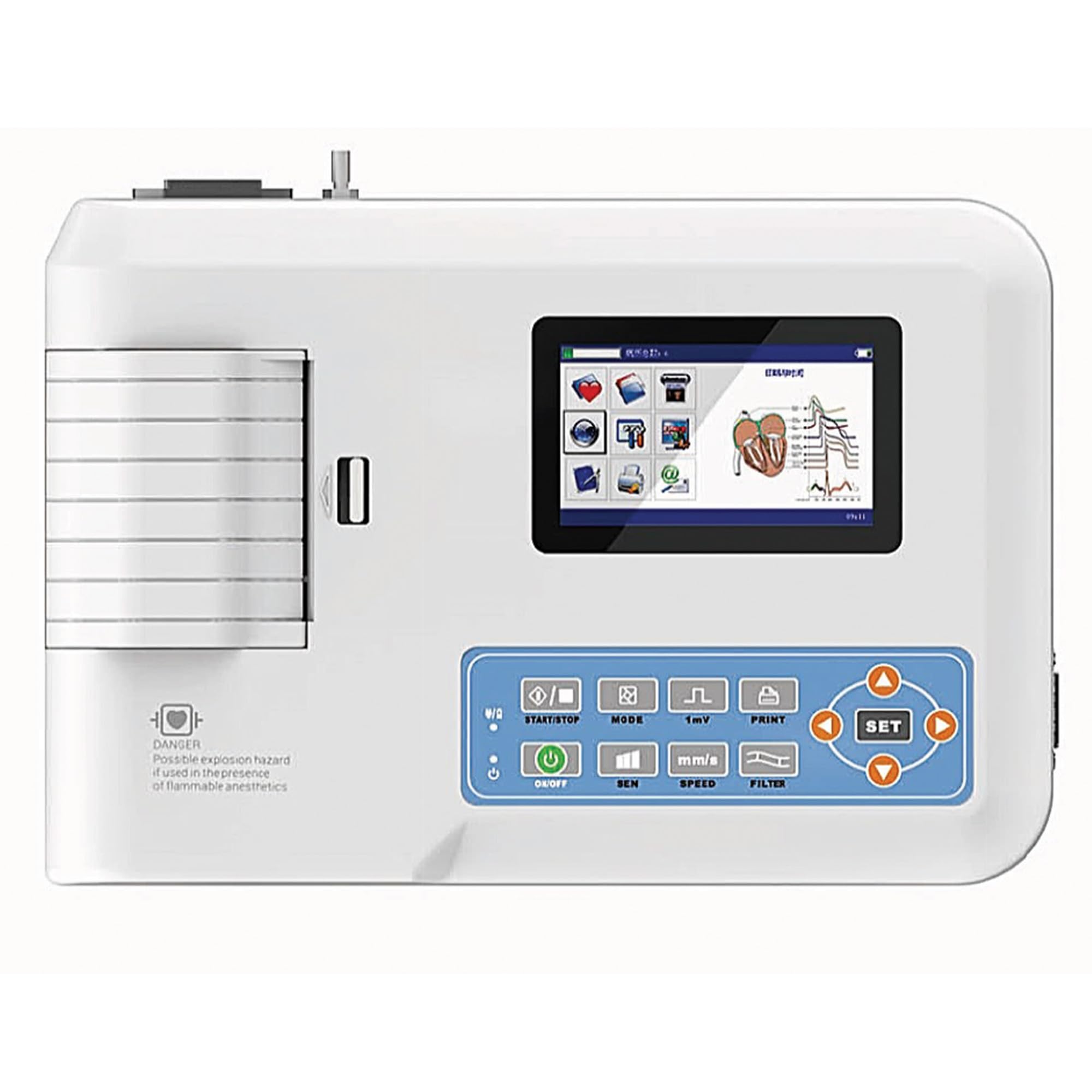
画像の説明: トップダウン view of the CONTEC ECG 300G VET. The image prominently displays the device's control panel with various buttons, including ON/OFF, MODE, SEN (Sensitivity), SPEED, PRINT, FILTER, and SET, along with directional arrows. A color display screen is also visible, showing graphical user interface elements. The thermal printer output slot is on the left.
4.2 基本操作モード
The ECG 300G VET supports both automatic and manual operation modes for recording and displaying ECG waveforms.
- 自動モード: The device automatically measures and analyzes parameters, providing a comprehensive report.
- 手動モード: Allows the user to manually control recording and printing, offering flexibility for specific diagnostic needs.
使用 モード 利用可能なモードを切り替えるボタン。
4.3 設定の調整
The control panel features dedicated buttons for adjusting key parameters:
- SEN(感度): 調整します amplitude of the ECG waveform.
- スピード: Controls the print speed of the thermal recorder, affecting the horizontal scale of the waveform.
- フィルター: Activates or deactivates various filters (power frequency, baseline, EMG) to reduce artifact interference and improve signal quality.
- 印刷: Initiates or stops the thermal printing process.
- セット: Used to enter menu options and confirm selections, often in conjunction with the directional arrow buttons.

画像の説明: A detailed close-up of the CONTEC ECG 300G VET's control panel and display. The screen shows a graphical representation of an ECG waveform and menu icons. The buttons for START/STOP, MODE, 1mV (sensitivity), PRINT, ON/OFF, SEN, SPEED, FILTER, and SET with directional arrows are clearly visible, indicating the primary user interface for device control.
4.4 Printing ECG Waveforms
- Ensure thermal paper is correctly loaded into the printer slot.
- Select the desired print mode (automatic or manual) and adjust sensitivity and speed as needed.
- を押す 印刷 button to begin printing the ECG waveform.
- The waveform length can be adjusted using the timed print function, accessible via the セット メニュー。
5. メンテナンス
5.1デバイスのクリーニング
- 清掃する前に必ずデバイスの電源をオフにし、プラグを抜いてください。
- Wipe the exterior surfaces of the unit with a soft cloth dampened with a mild, non-abrasive disinfectant.
- 液体が装置に入らないようにしてください。
- Clean the thermal print head regularly with a specialized cleaning pen or isopropyl alcohol to ensure optimal print quality.
5.2バッテリーケア
- Recharge the internal battery regularly, even if the device is not in frequent use, to maintain battery life.
- Avoid fully discharging the battery whenever possible.
- If the device will be stored for an extended period, charge the battery to approximately 50% and store in a cool, dry place.
5.3 Lead and Electrode Care
- Inspect lead wires and electrodes for wear, cracks, or damage before and after each use.
- Clean electrodes thoroughly after each use to remove gel residue and ensure good conductivity.
- Replace damaged leads or electrodes immediately to ensure accurate readings and patient safety.
6。 トラブルシューティング
| 問題 | 考えられる原因 | 解決 |
|---|---|---|
| デバイスの電源が入りません。 | 電源なし、バッテリー切れ、電源コード不良。 | Check power connection, charge battery, replace power cord if damaged. |
| Poor ECG signal quality / Excessive noise. | Poor electrode contact, damaged leads, electrical interference, incorrect filter settings. | Ensure proper electrode placement and skin preparation, check lead integrity, move device away from other electrical equipment, adjust filter settings. |
| プリンターが印刷しません。 | No thermal paper, paper loaded incorrectly, print head dirty, printer malfunction. | Load new thermal paper, ensure correct orientation, clean print head, contact support if issue persists. |
| ディスプレイが空白またはフリーズします。 | Software error, hardware malfunction. | Try restarting the device. If the problem persists, contact technical support. |
7. 仕様
| 特徴 | 詳細 |
|---|---|
| メーカー | QINHHUANGDAO CONTEC MEDICAL SYSTEMS |
| モデル番号 | 80650 |
| ASIN | B0CMJ3YR2C |
| チャンネル | 3-channel acquisition and printing |
| Lead Acquisition | Simultaneous 12-lead signal acquisition |
| 印刷システム | Thermal printing system |
| 操作モード | 自動と手動 |
| 信号処理 | Digital signal processing with power frequency, baseline, and EMG filters |
| 画面 | Screen display for ECG waveforms, print mode, sensitivity, print speed, filter status |
| 寸法(パッケージ) | 40.4 x 29.7 x 20.7 cm |
| 重量(パッケージ) | 2.95キロ |
| ソフトウェアアップデートの保証期間 | 未知 |
8. 保証とサポート
8.1 保証情報
Specific warranty terms and conditions for the CONTEC ECG 300G VET are typically provided with the product at the time of purchase. Please refer to the warranty card or documentation included in your product packaging for detailed information regarding coverage, duration, and claims procedures. Keep your proof of purchase for warranty validation.
8.2 テクニカルサポート
For technical assistance, troubleshooting beyond this manual, or service inquiries, please contact your authorized CONTEC distributor or the manufacturer directly. Contact information can usually be found on the product packaging, the manufacturer's official website, or in the accompanying documentation.