
Czgor 50w parlightW
Czgor 60 LED Stageライト取扱説明書
Model: 50w parlightW
導入
This manual provides detailed instructions for the safe and efficient operation of your Czgor 60 LED Stage Light. Please read this manual thoroughly before use and retain it for future reference.
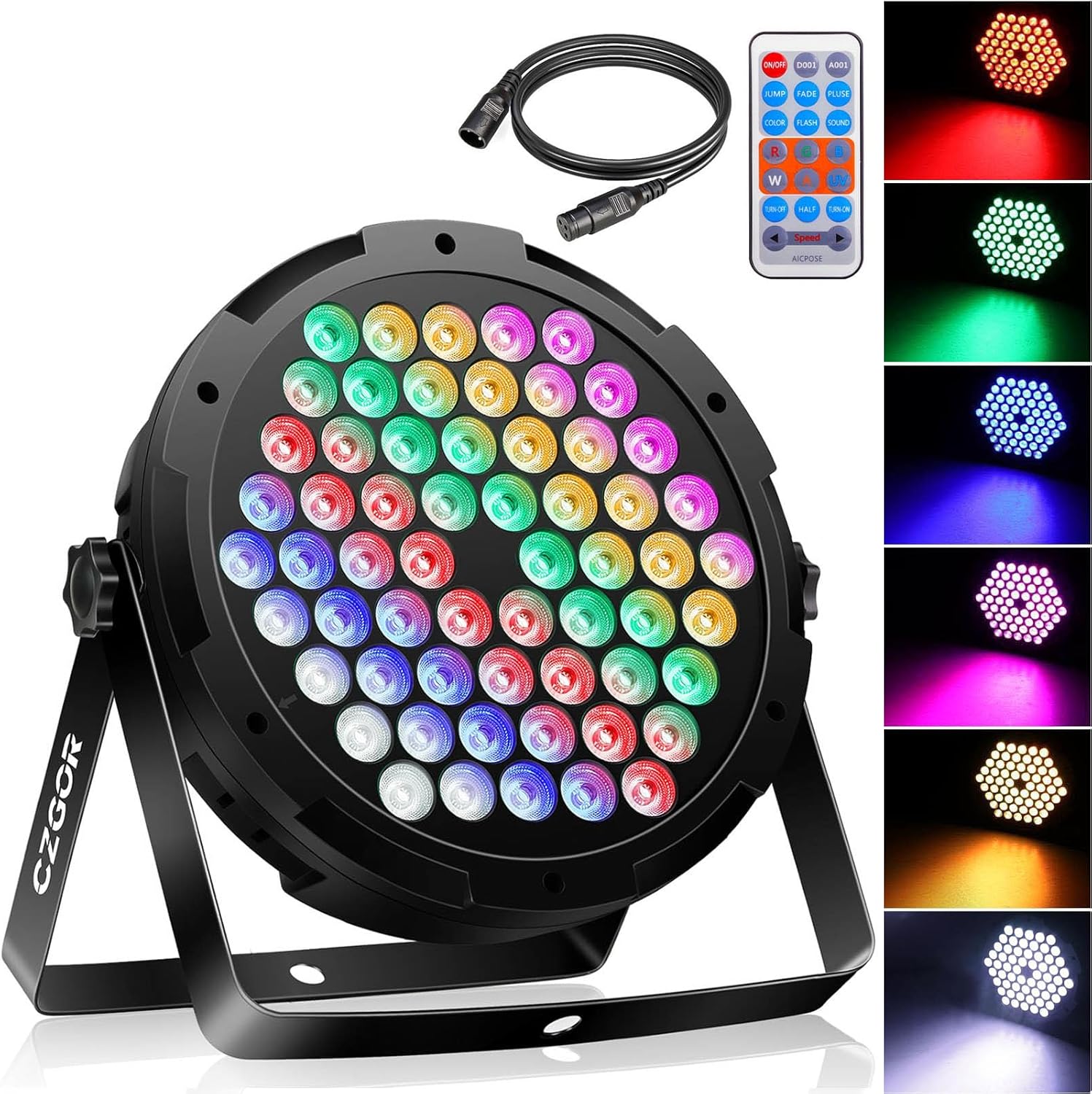
Image: The Czgor 60 LED Stage ライト、ショーasing its front LED array, included remote control, and DMX cable.
箱の中身
パッケージを開封したら、すべてのコンポーネントが揃っていることを確認してください。
- 90W Par Light x 1
- 3.2FT DMX Cable x 1
- リモートx1
- メタルスタンド×2
- ネジ×2
- マニュアル x 1

Image: All components included in the package: the 60 LED stage light, remote control, DMX cable, metal stands, and screws.
Video: An unboxing demonstration showing the contents of the Czgor 60 LED Stage ライトパッケージ。
仕様
| ブランド | Czgor |
| モデル番号 | 50w parlightW |
| 光源の種類 | 発光ダイオード(LED) |
| 光源の数 | 60 |
| ワットtage | 90ワット |
| 巻tage | 110ボルト(AC) |
| ビーム角度 | 25度 |
| 制御チャネル | 7DMXチャンネル |
| 制御モード | Auto / Master/Slave / DMX512 |
| 材料 | アクリロニトリルブタジエンスチレン(ABS)、金属、プラスチック |
| 製品寸法 | 長さ9インチ x 幅2.5インチ x 高さ9インチ |
| アイテム重量 | 2.52ポンド |

Image: Detailed technical specifications and dimensions of the Czgor 60 LED Stage ライト。
設定
- Attach the Metal Stand: Secure the two metal stands to the sides of the light using the provided screws. Ensure they are tightened for stability.
- 配置: The 360° adjustable brackets allow for flexible placement. Position the light on a table, floor, wall, or ceiling as required. Ensure the light is stable and securely mounted to prevent accidental falls.
- 電源接続: Connect the power cord to the light and then to a standard 110V AC power outlet.
- DMX接続(オプション): If using DMX control, connect the provided 3.2FT DMX cable from your DMX controller to the DMX IN port on the light. For multiple lights, connect them in a daisy chain from DMX OUT to DMX IN.

Image: The Czgor 60 LED Stage Light with its dimensions and all accessories laid out, illustrating the components for setup.
Video: A demonstration of the Czgor 60 LED Stage Light displaying various color changes and effects.
動作モード
1.リモコン操作
The included wireless remote control allows for convenient adjustment of lighting effects and colors.
- 電源オン/オフ: Press the "ON/OFF" button to power the light on or off.
- 色の選択: Use the R (Red), G (Green), B (Blue), W (White), Y (Yellow), PK (Pink), UV (Ultraviolet) buttons to select a static color. To change colors, first turn off the current color by pressing its button again, then select a new color.
- 照明モード:
- JUMP Mode: 色が急に変わります。
- FADE Mode: 色が滑らかに変化します。
- PLUSE Mode: Colors pulse.
- フラッシュモード: 色が急速に点滅します。
- SOUND Mode: Light effects react to sound.
- 明るさ/速度調整: Use the "Speed +" and "Speed -" buttons to adjust the speed of dynamic modes or the brightness of static colors.
- Half/Turn-On/Turn-Off: These buttons control brightness levels or turn off specific color channels.

Image: The remote control for the Czgor 60 LED Stage Light, highlighting buttons for power, color selection, and various lighting modes.

Image: A detailed diagram of the remote control, labeling each button and its corresponding function for controlling the light.
Video: A demonstration of the Czgor 60 LED Stage Light being controlled by its remote, showcasing various color and mode changes.
2.コントロールパネルの操作
The rear control panel provides direct access to settings and modes.
- メニュー: Press to cycle through different operating modes (e.g., DMX, Auto, Sound Active).
- 上下: Use these buttons to navigate options or adjust values within a selected mode.
- 入る: Confirm your selection or setting.
- デジタルディスプレイ: Shows the current mode or value.

Image: A labeled diagram of the light's rear control panel, indicating the digital display, menu navigation buttons, DMX input/output, and cooling fan.
3.DMXコントロール
For advanced control, connect the light to a DMX512 controller using the DMX IN/OUT ports.
- DMXアドレス設定: Use the control panel to set the DMX address for each light. Refer to the DMX Description table for channel values.
- チャンネル機能: The light utilizes 7 DMX channels for various functions including total dimming, individual RGB color control, strobe effects, program selection (jump, gradual, pulse, voice control), and speed adjustment.

Image: A table outlining the 7 DMX channels and their corresponding functions and value ranges for controlling the Czgor 60 LED Stage ライト。
メンテナンス
- クリーニング: Regularly clean the lens and exterior with a soft, dry cloth to maintain optimal light output. Do not use harsh chemicals or abrasive materials.
- 冷却ファン: Ensure the built-in cooling fan is free from dust and obstructions to prevent overheating.
- ストレージ: 使用しないときは、直射日光や極端な温度を避け、涼しく乾燥した場所にライトを保管してください。
- ケーブル検査: Periodically check power and DMX cables for any signs of wear or damage. Replace damaged cables immediately.
トラブルシューティング
| 問題 | 考えられる原因 | 解決 |
|---|---|---|
| ライトが点灯しません。 | 電源が供給されません。電源コードに障害があります。 | Check power connection and outlet. Ensure power cord is securely connected and undamaged. |
| リモコンが機能しない。 | Remote battery depleted; remote not aimed correctly. | Replace remote battery. Ensure remote is aimed directly at the light's sensor. |
| Incorrect color display via remote. | Previous color not deselected. | Press the current color button again to turn it off, then select the desired new color. |
| DMX 制御の問題。 | Incorrect DMX address; faulty DMX cable; controller issue. | Verify DMX address settings on the light. Check DMX cable connections. Test with a different DMX cable or controller if available. |
保証とサポート
For any questions or support needs regarding your Czgor 60 LED Stage Light, please refer to the contact information provided with your purchase or visit the official Czgor webサイト。 保証請求に備えて購入時のレシートを保管しておいてください。
関連文書 - 50w parlightW
 |
OPPSK 90W 60LED RGB PARライト ユーザーマニュアル - セットアップ、操作、仕様 OPPSK 90W 60LED RGB PARライトの包括的なユーザーマニュアルです。開梱、概要、機能、保証、設置、安全上の注意、セットアップ、コントロールパネルの操作、DMXモード、リモート操作、DMX特性、技術仕様について説明しています。 |
 |
Rockville Best Par 50 充電式パー缶洗浄ライト 取扱説明書 Rockville Best Par 50充電式パーカンウォッシュライトの包括的な取扱説明書。機能、安全上の注意、操作、DMX制御、設置、トラブルシューティングを詳細に説明しています。RGBWA+UVおよびワイヤレスDMX機能も搭載。 |
 |
ADJ WiFly EXR HEX PAR User Manual - Wireless DMX LED Par Light Official user manual for the ADJ WiFly EXR HEX PAR. Learn about setup, features, wireless DMX, battery operation, safety, and troubleshooting for this rechargeable LED par fixture. |
 |
QTX PAR-180 RGB PAR Light User Manual | 154.038UK User manual for the QTX PAR-180 6 x 30W RGB COB PAR Light. This document provides detailed information on installation, operation modes (static colour, auto programs, strobe, sound-to-light, master/slave, DMX), remote control functions, technical specifications, and troubleshooting for the PAR-180 lighting fixture. |
 |
LaluceNatz 36LED RGB パーライト ユーザーマニュアル LaluceNatz 36LEDs RGB パーライトの包括的なユーザー マニュアル。セットアップ、操作、DMX 制御、RF リモート機能、安全上の注意事項、仕様を網羅しています。 |
 |
RGBWA+UV LED PAR DMX Channel Modes and Functions Technical guide detailing the DMX channel configurations and function settings for the RGBWA+UV LED PAR lighting fixture. Covers 6-channel and 10-channel modes, DMX address setup, color control, strobe effects, and sound-activated modes. |
Ask a question about this manual
Ask about setup, troubleshooting, compatibility, parts, safety, or missing instructions. Manuals+ will review the question and use this page’s manual context to help answer it.