
導入
ご購入ありがとうございますasing the Baseus S-09 Pro Series Car FM Transmitter. This device allows you to stream audio from your smartphone or other devices to your car's FM radio, and also provides fast charging capabilities. Please read this manual carefully before use to ensure proper operation and to maximize the product's lifespan.
製品終了view
The Baseus S-09 Pro Series Car FM Transmitter is designed to enhance your in-car audio experience and provide convenient charging. Key features include:
- FM Transmitter Functionality: 車の FM ラジオに音声を放送します。
- Bluetooth 5.3接続: For stable wireless audio streaming from compatible devices.
- Flash Drive Playback: Supports audio playback directly from a flash drive (up to 512GB).
- 急速充電: Equipped with a USB-C port supporting PD 18W (Max) fast charging.
- デュアルマイクシステム: Provides premium sound quality and clear calls.
- Large LED Screen with Dual Display: Shows frequency band and battery voltage alternately.
- トリプル充電ポート: Offers multiple charging options.
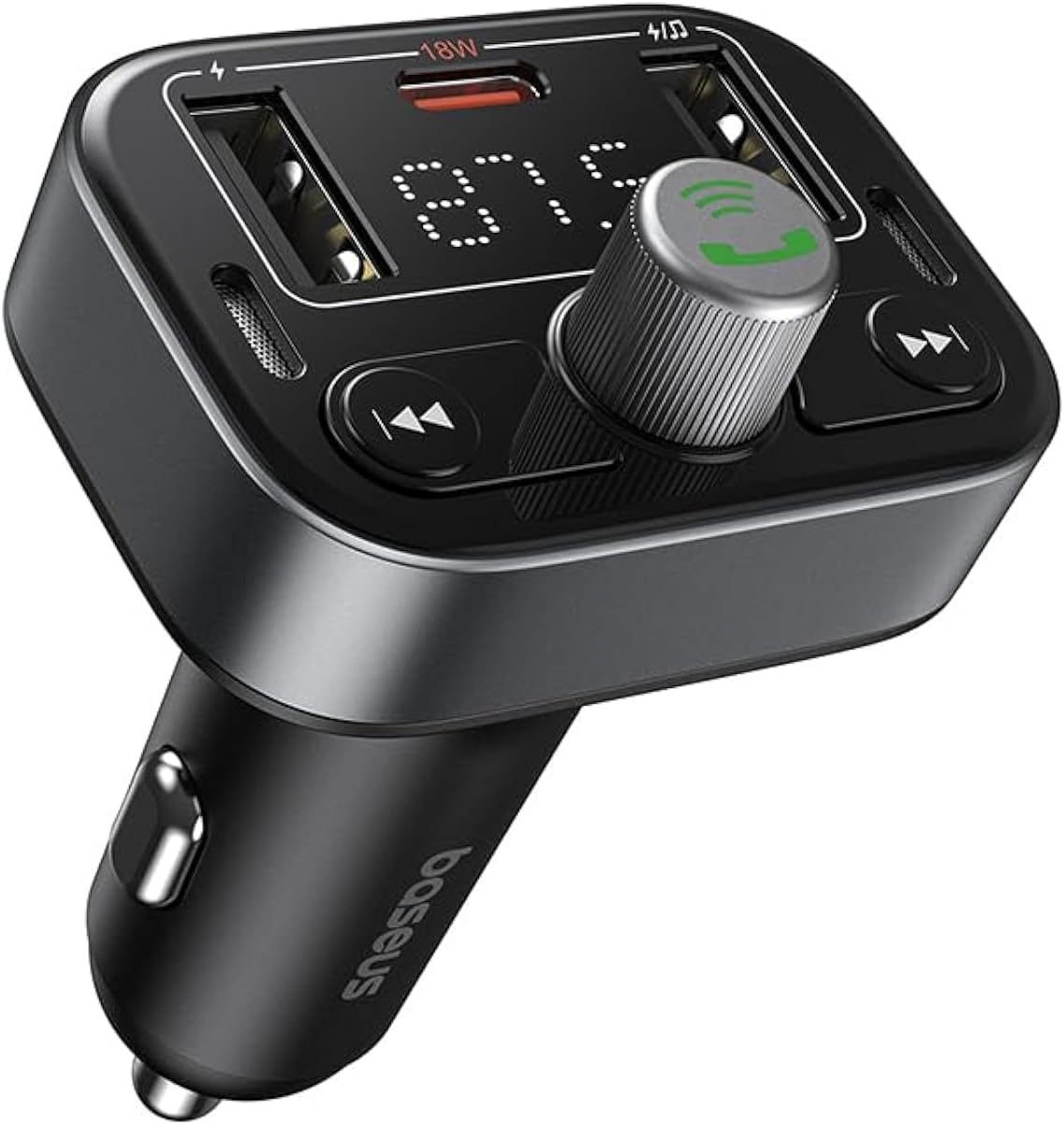
図1: 前面 view of the Baseus S-09 Pro Series Car FM Transmitter, showing the display, control knob, and USB ports.
パッケージ内容
パッケージに以下の項目が含まれているか確認してください。
- Baseus S-09 Pro Series Car FM Transmitter
- 取扱説明書(本書)

Figure 2: The Baseus S-09 Pro Series Car FM Transmitter shown in its retail packaging.
設定
- Insert into Car Cigarette Lighter Socket: Plug the Baseus S-09 Pro Series Car FM Transmitter firmly into your car's 12V/24V cigarette lighter socket. The device will power on automatically, and the LED display will light up.
- FM周波数をチューニングする:
- On the FM Transmitter, press and hold the multi-function knob (the large central knob) until the FM frequency on the LED display starts flashing.
- Rotate the multi-function knob left or right to adjust the frequency. Choose an empty FM frequency (one with no radio station broadcasting) to minimize interference.
- On your car's FM radio, tune to the exact same empty frequency you selected on the transmitter.
- Once matched, the transmitter is ready to broadcast audio to your car stereo.
- Bluetoothのペアリング:
- After the device powers on, it will automatically enter Bluetooth pairing mode. The Bluetooth icon on the display may flash.
- On your smartphone or Bluetooth-enabled device, open the Bluetooth settings and search for available devices.
- Select "Baseus S-09 Pro" (or similar name) from the list to connect. Once connected, the Bluetooth icon on the transmitter's display will stop flashing and remain solid.

Figure 3: Illustration showing connection options: via flash drive and Bluetooth 5.3 pairing with a smartphone.
操作手順
オーディオ再生
- Bluetoothオーディオ: Once paired, play music or audio from your smartphone. The audio will be transmitted to your car's FM radio.
- Flash Drive Audio: Insert a USB flash drive (up to 512GB, formatted to FAT32) containing MP3 audio files into the designated USB port on the transmitter. The device will automatically detect and play the audio files.
- コントロールボタン:
- 多機能ノブ: Rotate to adjust volume. Press once to play/pause.
- 前のトラックボタン(◀◀): を押して前のトラックに移動します。
- 次のトラックボタン(▶▶): を押して次のトラックに移動します。
ハンズフリー通話
- 通話の応答/終了: Press the multi-function knob once to answer an incoming call or end an ongoing call.
- 通話を拒否: 着信を拒否するには、マルチファンクションノブを 2 秒間押し続けます。
- 最後の番号にリダイヤル: マルチファンクションノブを 2 回押すと、最後にダイヤルした番号にリダイヤルします。
- 通話を電話に切り替える: During a call, press and hold the multi-function knob for 2 seconds to switch the call between the transmitter and your phone.

Figure 4: The device highlighting its dual-mic system for premium sound quality during calls and music playback.
充電デバイス
- The transmitter features multiple USB ports for charging your devices.
- USB-Cポート: Supports Power Delivery (PD) 18W (Max) fast charging. Use a compatible USB-C to USB-C or USB-C to Lightning cable for fast charging supported devices.
- USB-Aポート: Provide standard charging for various devices.

Figure 5: The transmitter connected via its USB-C port to an iPhone for fast charging.
情報を表示
- The large LED screen alternately displays the current FM frequency and the car battery voltage.
- FM周波数: Indicates the frequency the transmitter is broadcasting on.
- バッテリー巻tage: リアルタイムのボリュームを表示しますtage of your car's battery, allowing you to monitor its health.

Figure 6: The LED screen displaying both the FM frequency (87.5) and the car battery voltage(12.5V)。
メンテナンス
- デバイスを乾燥した状態に保ってください。湿気や極端な温度にさらさないでください。
- 柔らかく乾いた布でデバイスを拭いてください。刺激の強い化学薬品や研磨剤入りの洗剤は使用しないでください。
- 落としたり、強い衝撃を与えないでください。
- 使用しないときは涼しく乾燥した場所に保管してください。
トラブルシューティング
| 問題 | 考えられる原因 | 解決 |
|---|---|---|
| 電源なし/ディスプレイオフ | Not properly inserted into cigarette lighter; Car socket fuse blown. | Ensure firm connection. Check car's fuse box. |
| 雑音/音質が悪い | FM frequency interference; Volume too low. | Change to a different, empty FM frequency. Increase volume on both transmitter and car stereo. |
| Bluetoothをペアリングできません | Device not in pairing mode; Bluetooth disabled on phone. | Ensure transmitter is in pairing mode. Enable Bluetooth on your phone and search again. |
| 急速充電が機能しない | Cable not compatible; Device does not support fast charging. | Use a certified fast-charging cable. Ensure your device supports PD 18W. |
仕様
- モデル名: S-09 Pro Series
- モデル番号: C10762200113-00
- ハードウェアインターフェイス: ブルートゥース
- 対応デバイス: Car Stereo System, Smartphone, Tablet
- 特別な機能: FMトランスミッター
- オーディオ入力: 3.5mm補助
- オーディオ出力モード: ステレオ
- 音声出力タイプ: FMラジオ、Bluetooth
- 巻tage: 12 ボルト (DC)
- 電源: コード式電気
- ワイヤレスタイプ: ブルートゥース
- Bluetoothバージョン: 5.3
- サポートされているメディアタイプ: MP3 (from flash drive)
- パッケージ寸法: 17 x 11.6 x 3.9 cm
- 商品の重量: 80グラム
- 色: 黒
保証とサポート
Baseus products typically come with a standard manufacturer's warranty. Please refer to the warranty card included in your product packaging or visit the official Baseus web詳細な保証条件については、サイトをご覧ください。
For technical support, troubleshooting assistance, or warranty claims, please contact Baseus customer service through their official channels or the retailer from whom you purchased the product.
詳しい情報とサポートについては、 AmazonのBaseusストア.