
Garosa Garosav4dcyh3kwx
Garosa Barcode Scanner User Manual
モデル: A60Z
1. はじめに
Thank you for choosing the Garosa A60Z Barcode Scanner. This handheld barcode reader is designed for efficient and reliable 1D barcode scanning in various environments such as stores, supermarkets, and warehouses. It features 2.4G wireless connectivity, a long-lasting battery, and a comfortable design for extended use. This manual provides detailed instructions for setup, operation, maintenance, and troubleshooting to ensure optimal performance of your device.
2.製品オーバーview
The Garosa A60Z Barcode Scanner consists of the handheld scanner unit and a charging base. Key features include:
- 2.4Gワイヤレスモード: Enables a communication distance of up to 100 meters.
- 大容量バッテリー: Built-in 2200mAh lithium-ion battery provides 3-10 days of working time on a full charge.
- スキャンモード: Supports both trigger-press scanning and continuous automatic scanning.
- 幅広い互換性: Suitable for scanning 1D barcodes on labels, paper, and digital screens.
- 耐久性に優れたデザイン: Short circuit proof design and 1.8m drop test resistance.
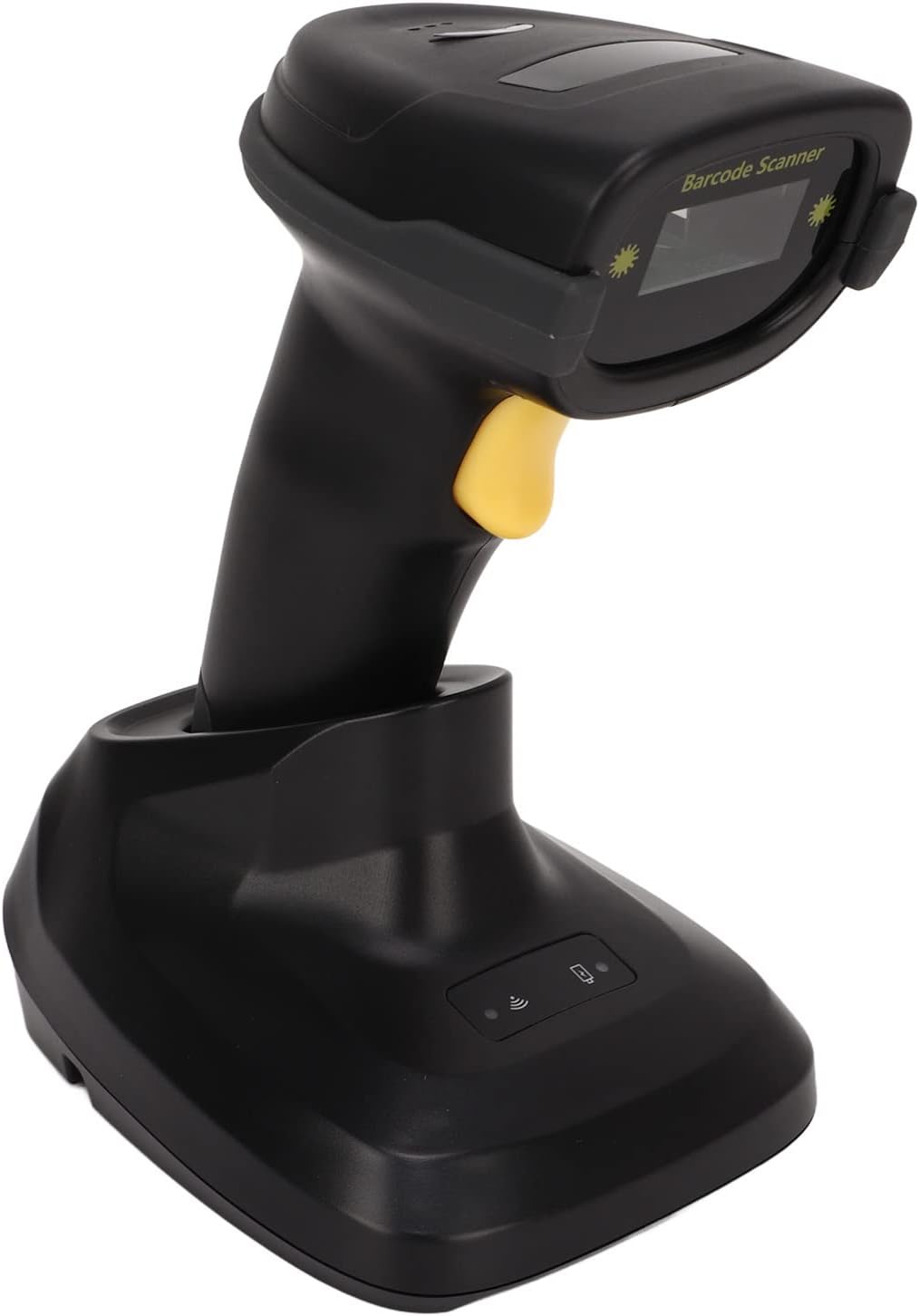
Figure 2.1: Garosa A60Z Barcode Scanner with its charging base. The scanner is black with a yellow trigger button, resting securely in its black charging base.

図2.2: トップダウン view of the Garosa A60Z Barcode Scanner, highlighting its ergonomic shape and the scanning window.
3. 仕様
| 特徴 | 説明 |
|---|---|
| モデル | A60Z |
| 材料 | ABS、TPU |
| 通信距離 | Approx. 100m / 328.08ft (2.4G mode) |
| ストレージ | 16M (8192 characters or barcode ≤ 128) |
| 勤務時間 | 3〜10日 |
| 充電電力 | 5V、400mA |
| 光源 | 650 ± 20nm VLD |
| スキャンタイプ | Bidirectional Scan |
| デコード精度 | ≥ 3mil AT PCS90% Code39 |
| スキャン幅 | 約300mm / 11.81インチ |
| デコード速度 | 300/秒 |
| Print Contract | ≥ 20% |
| スキャン角度 | Rotation ± 30°, Inclination ± 45°, Declination ± 60° |
| 干渉防止 | Unaffected by strong light and sunlight |
| デコード機能 | UPC EAN, ISBN, ISSN, Code39, Code39 all ASCII, Code32, Code128, Code11, Code93, Coda bar, industrial 2/5, Interleaved 2/5, MSI, GS1 data bars. |
| インジケーターライト | ブザーとLED |
| トリガーモード | Press key, continuous scanning |
| キーライフ | 100,000回 |
| レーザーライフ | 10,000時間 |
| 落下試験 | 1.8メートル |
| 基本インターフェース | USB, USB COM, RS232 |
| 動作温度 | -20℃~50℃ |
| 保管温度 | -30℃~60℃ |
| 湿度 | 5% - 95% 結露なし |
| 電源モード | Built-in lithium-ion battery 2200mAh |

Figure 3.1: Physical dimensions of the Garosa A60Z Barcode Scanner and its charging base. The scanner measures approximately 175mm (6.89in) in height, 83mm (3.27in) in depth, and 70mm (2.76in) in width. The base measures approximately 90mm (3.54in) in width, 120mm (4.72in) in depth, and 85mm (3.35in) in height.
4. セットアップ
Follow these steps to set up your Garosa A60Z Barcode Scanner for first use:
- 開梱: Carefully open the package and remove all components: the barcode scanner, the charging base, and the connecting cable.
- ベースを接続: Connect the barcode scanner to the charging base using the provided connecting cable. Ensure the connection is secure.
- 電源オン: Connect the charging base to a power source (e.g., a computer USB port or a USB wall adapter) using the USB cable. The scanner will begin charging.
- 初期費用: For optimal battery life, it is recommended to fully charge the scanner before its first use.

Figure 4.1: The USB connecting cable used to link the scanner to its charging base or a host device.
5. 操作手順
The Garosa A60Z Barcode Scanner offers flexible scanning modes for various applications.
5.1. 基本的なスキャン操作
- スキャナーをアクティブ化: Press the trigger button on the scanner to activate the laser.
- 位置スキャナー: Aim the laser beam at the barcode you wish to scan. Ensure the entire barcode is covered by the laser line.
- スキャン: Hold the scanner steady until you hear a beep and see the LED indicator light up, confirming a successful scan. The decoded data will be transmitted to your connected device.

Figure 5.1: The barcode scanner in operation, demonstrating the red laser line used for scanning. The inset shows a close-up of the active laser.
5.2. スキャンモード
The scanner supports two primary modes:
- トリガーモード: Default mode where a scan is initiated each time the trigger button is pressed.
- 連続スキャンモード: The scanner continuously emits the laser for automatic scanning without needing to press the trigger for each scan. Refer to the programming guide (not included in this manual) for instructions on switching to this mode.
5.3. デコード機能
The Garosa A60Z can decode a wide range of 1D barcode symbologies, including but not limited to:
- UPC EAN
- ISBN、ISSN
- Code39, Code39 all ASCII, Code32
- Code128, Code11, Code93
- コーダ小節
- Industrial 2/5, Interleaved 2/5
- MSI, GS1 data bars

Figure 5.2: A hand holding the barcode scanner, with a computer screen in the background displaying successfully decoded barcode data. This illustrates the scanner's decoding capability.

Figure 5.3: The Garosa A60Z Barcode Scanner shown in diverse operational environments, including retail checkout, warehouse inventory, and office settings, demonstrating its broad utility.
6. メンテナンス
適切なメンテナンスを行うことで、バーコード スキャナーの寿命が長くなり、最適なパフォーマンスが確保されます。
- クリーニング: スキャナの外側は、柔らかく乾いた布で拭いてください。スキャンウィンドウは、糸くずの出ない布で軽く拭いてください。amp低刺激性で研磨剤を含まない洗剤で洗ってください。刺激の強い化学薬品や研磨剤は使用しないでください。
- ストレージ: スキャナーを使用しないときは、直射日光や極端な温度を避け、涼しく乾燥した場所に保管してください。
- バッテリーのケア: To preserve battery life, avoid fully discharging the battery frequently. Recharge the scanner regularly, especially if it will be stored for an extended period.
- 取り扱いにはご注意ください: Although designed to be durable (1.8m drop test), avoid unnecessary drops or impacts to prevent damage.
7。 トラブルシューティング
This section addresses common issues you might encounter with your Garosa A60Z Barcode Scanner.
| 問題 | 考えられる原因 | 解決 |
|---|---|---|
| Scanner not turning on/no laser | Low battery; Loose connection; Device malfunction. | Charge the scanner fully. Ensure the cable is securely connected to the base and power source. If problem persists, contact support. |
| バーコードをスキャンできません | Barcode damaged/unreadable; Incorrect scanning angle; Scanner not paired; Unsupported barcode type. | Ensure barcode is clear and flat. Adjust scanning angle. Confirm scanner is properly connected/paired to host device. Verify barcode type is supported (see Section 5.3). |
| データがコンピュータに送信されない | Loose USB connection; Driver issue; Software not ready to receive input. | Check USB cable connection. Ensure necessary drivers are installed on your computer. Open a text editor or application ready to receive input. |
| バッテリー寿命が短い | Battery not fully charged; Aging battery; Continuous scanning mode enabled unnecessarily. | Ensure full charge cycles. If battery life significantly degrades, it may need replacement (contact support). Switch to trigger mode if continuous scanning is not required. |
8. パッケージ内容
The Garosa A60Z Barcode Scanner package includes the following items:
- 1 x Barcode Scanner (A60Z)
- 1 x充電台
- 1 x Connecting Cable (USB)
9. 保証とサポート
For warranty information and technical support, please refer to the warranty card included with your product or visit the official Garosa website. You can also contact Garosa customer service through the retailer where you purchased the product.
Garosa Store: Visit the Garosa Store on Amazon